1. Introduction et plusview
The GeekVape Soul / S30 Pod System is a compact and ergonomically designed vaping device, engineered for ease of use and a satisfying experience. It integrates a powerful 1500 mAh battery and a clear 0.69-inch OLED display to provide essential information at a glance. This manual provides detailed instructions for the safe and effective operation, maintenance, and troubleshooting of your device.
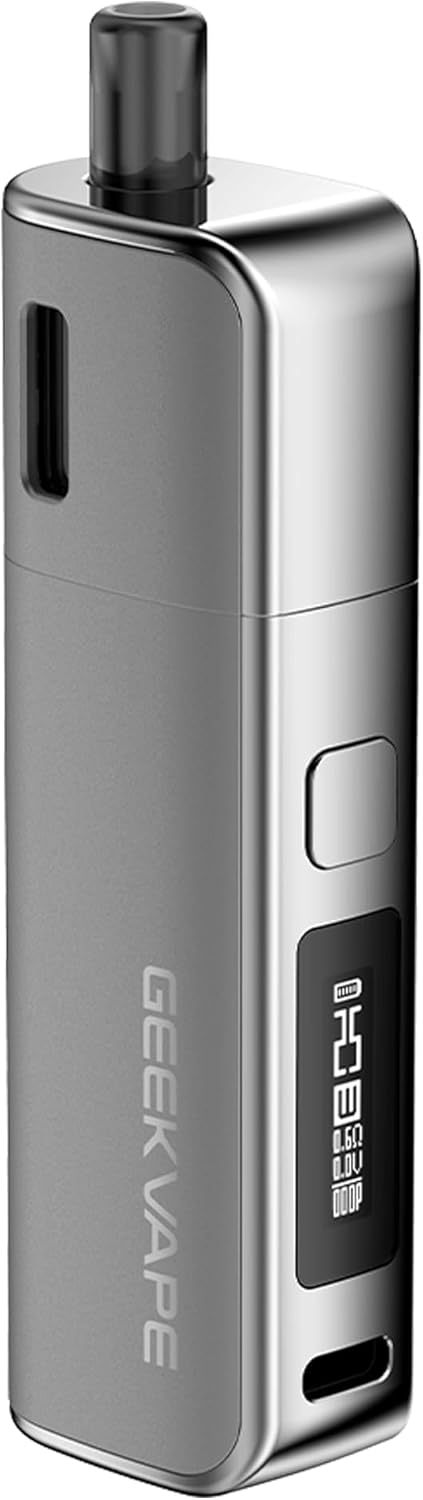
Figure 1: The GeekVape Soul / S30 Pod System in gunmetal, showcasinson design élégant et son écran intégré.

Figure 2: The GeekVape Soul / S30 Pod System available in various color options, highlighting its compact and portable form factor.
2. Contenu du colis
Veuillez vérifier que le colis contient les éléments suivants :
- 1x GeekVape Soul / S30 Pod System
- 1x GeekVape Soul / S30 0.6 Ohm Cartridge (pre-installed)
- 1x GeekVape Soul / S30 1.0 Ohm Cartridge
- 1x câble USB-C
- 1x Manuel d'utilisation
Note: This product does not contain pre-filled cartridges, liquids, nicotine, or tobacco.
3. caractéristiques du produit
- Conception ergonomique : Crafted for comfortable handling with a high-quality finish.
- Batterie intégrée : 1500 mAh capacity for extended use.
- Charge rapide : USB-C port with a maximum charging current of 0.5 A.
- Affichage OLED: 0.69-inch screen for clear display of battery status, wattage, and other information.
- Eau réglabletage: Power output from 5W to 30W, adjustable via the fire button.
- Activation du tirage automatique : Inhale to activate the device.
- VPU Meshed Coils: Ensures smooth draw and intense flavor.
- Side-Fill System: Convenient and mess-free refilling of the 4 ml cartridges.
- Leak-Proof Top-Airflow: Patented design to prevent leaks and allow airflow customization.
- Fonctions de protection complètes : Includes automatic shutdown, short-circuit protection, overheating protection, deep discharge protection, and overcharge protection.

Figure 3 : Un aperçu détaillé view of the 0.69-inch OLED display, showing battery level, wattage, and coil resistance.

Figure 4: An X-ray view illustrating the internal 1500mAh battery, emphasizing the device's power source.

Figure 5 : Une vue en coupe view demonstrating the patented top-airflow system, designed for leak prevention and customizable draw.
4. Installation
4.1 Charge initiale
Before first use, fully charge the device. Connect the supplied USB-C cable to the USB-C port on the device and plug the other end into a suitable power source (e.g., a computer USB port or a 5V/0.5A wall adapter). The display will indicate the charging status. Charging time is approximately 120 minutes.
4.2 Installation de la cartouche
- Ensure the pod cartridge is properly filled with e-liquid (see 4.3).
- Align the contacts on the bottom of the pod cartridge with the contacts inside the device.
- Gently push the pod cartridge into the device until it clicks securely into place.
4.3 Remplissage de la cartouche
The GeekVape Soul / S30 cartridges feature a convenient side-fill system.
- Retirez la cartouche de l'appareil.
- Locate the silicone stopper on the side of the cartridge.
- Carefully lift the silicone stopper to expose the filling port.
- Insert the nozzle of your e-liquid bottle into the filling port and slowly fill the cartridge with up to 4 ml of your preferred e-liquid.
- Once filled, securely close the silicone stopper to prevent leaks.
- Allow the coil to prime for 5-10 minutes after the first fill or after installing a new cartridge to ensure the cotton is fully saturated. This prevents dry hits and extends coil life.
5. Mode d'emploi
5.1 Mise sous/hors tension
Pour allumer ou éteindre l'appareil, appuyez rapidement 5 fois sur le bouton de tir en moins de 2 secondes. L'écran affichera une animation de mise sous/hors tension.
5.2 Réglage de l'eautage
Pour régler l'eautage, rapidly press the fire button 3 times. The wattage value on the display will begin to flash. Press the fire button repeatedly to cycle through the wattage settings (5W to 30W). Once the desired wattage is displayed, stop pressing the button; the device will automatically set the wattage after a few seconds of inactivity.
5.3 Vapotage
The GeekVape Soul / S30 features an auto-draw activation. Simply inhale through the mouthpiece to activate the device and produce vapor.
5.4 Vérification du niveau de la batterie
The 0.69-inch OLED display conveniently shows the current battery level. Monitor this indicator to know when to recharge your device.
5.5 Réglage du débit d'air
The top-airflow system can be adjusted to customize your draw preference. Rotate the airflow control ring located on the top of the pod cartridge to increase or decrease airflow.
6. Entretien
6.1 Nettoyage de l'appareil
Regularly clean the device, especially the pod connection area, to prevent e-liquid residue buildup. Use a dry cloth or cotton swab to wipe down the contacts and the inside of the pod slot. Do not use harsh chemicals or abrasive cleaners.
6.2 Remplacement de la cartouche
The pod cartridges contain integrated coils and should be replaced when you notice a burnt taste, reduced vapor production, or a change in flavor. To replace, simply pull the old cartridge out of the device and insert a new one (see 4.2).
7. Dépannage
- Device Not Firing:
- Ensure the device is powered on (5 clicks of the fire button).
- Vérifiez le niveau de la batterie et rechargez-la si nécessaire.
- Ensure the pod cartridge is correctly installed and making good contact.
- Replace the pod cartridge if the coil is burnt out.
- Aucune production de vapeur :
- Check e-liquid level and refill if low.
- Ensure the coil is properly primed (allow 5-10 minutes after filling a new pod).
- Remplacez la cartouche.
- Fuite :
- Ensure the silicone stopper on the filling port is securely closed.
- Check for cracks or damage on the pod cartridge.
- Ensure the pod is correctly seated in the device.
- Évitez de trop remplir la cartouche.
- Goût de brûlé :
- E-liquid level is too low; refill immediately.
- Coil needs to be replaced.
- Ensure the coil is properly primed before first use or after refilling.
If issues persist, please contact GeekVape customer support.
8. Spécifications
| Fonctionnalité | Spécification |
|---|---|
| Dimensions | 107.85 x 31.45 x 21.50 mm |
| Poids | 52 grammes |
| Écran | Écran OLED 0.69 pouces |
| Gamme de puissance | 5 - 30 W |
| Capacité de la batterie | 1500 mAh |
| Vol de chargetage | 5 V |
| Max. Courant de charge | 0.5 A |
| Port de chargement | USB-C |
| Pod Cartridge Capacity | 4 ml |
| Cartouches disponibles | 0.6 Ohm (15W - 30W), 1.0 Ohm (5W - 15W) |
| Numéro de modèle | hykutx-517610 |
| Couleur | gunmetal (other colors available) |
9. Consignes de sécurité
Please read and understand the following safety precautions before using your GeekVape Soul / S30 Pod System:
- Gardez l’appareil hors de portée des enfants et des animaux domestiques.
- This product is intended for adult users only.
- Do not use the device if it is damaged or has been exposed to water.
- Use only the supplied USB-C cable for charging.
- Do not charge the device overnight or leave it unattended while charging.
- Évitez les températures extrêmes (chaudes ou froides) et la lumière directe du soleil.
- Ne pas démonter ni modifier l'appareil.
- Mettez au rebut l'appareil et la batterie de manière responsable, conformément à la réglementation locale.
- The device includes multiple protection features such as automatic shutdown, short-circuit protection, overheating protection, deep discharge protection, and overcharge protection to ensure safe operation.
10. Garantie et assistance
Specific warranty information for this product was not provided in the available data. Please refer to the official GeekVape website or contact your retailer for detailed warranty terms and conditions. For technical support or inquiries, please visit the GeekVape support page or contact their customer service directly.