Introduction
This manual provides detailed instructions for the safe and effective use of your Cheero Wireless Earphones LITE (Model CHE-636). Please read this manual thoroughly before using the product and retain it for future reference. These earphones offer a blend of design, sound quality, and portability, featuring Bluetooth 5.3 connectivity, IPX5 water resistance, and a multi-functional charging case that doubles as a smartphone stand.
Contenu du colis
Vérifiez que tous les éléments énumérés ci-dessous sont inclus dans votre colis :
- Cheero Wireless Earphones LITE (Left and Right Earbuds)
- Charging Case with Smartphone Stand Function
- Câble de chargement USB A vers C
- Embouts auriculaires (tailles S/M/L)
- Chiffon de nettoyage
- Manuel d'instructions (ce document)
Produit terminéview
Familiarize yourself with the components of your Cheero Wireless Earphones LITE.
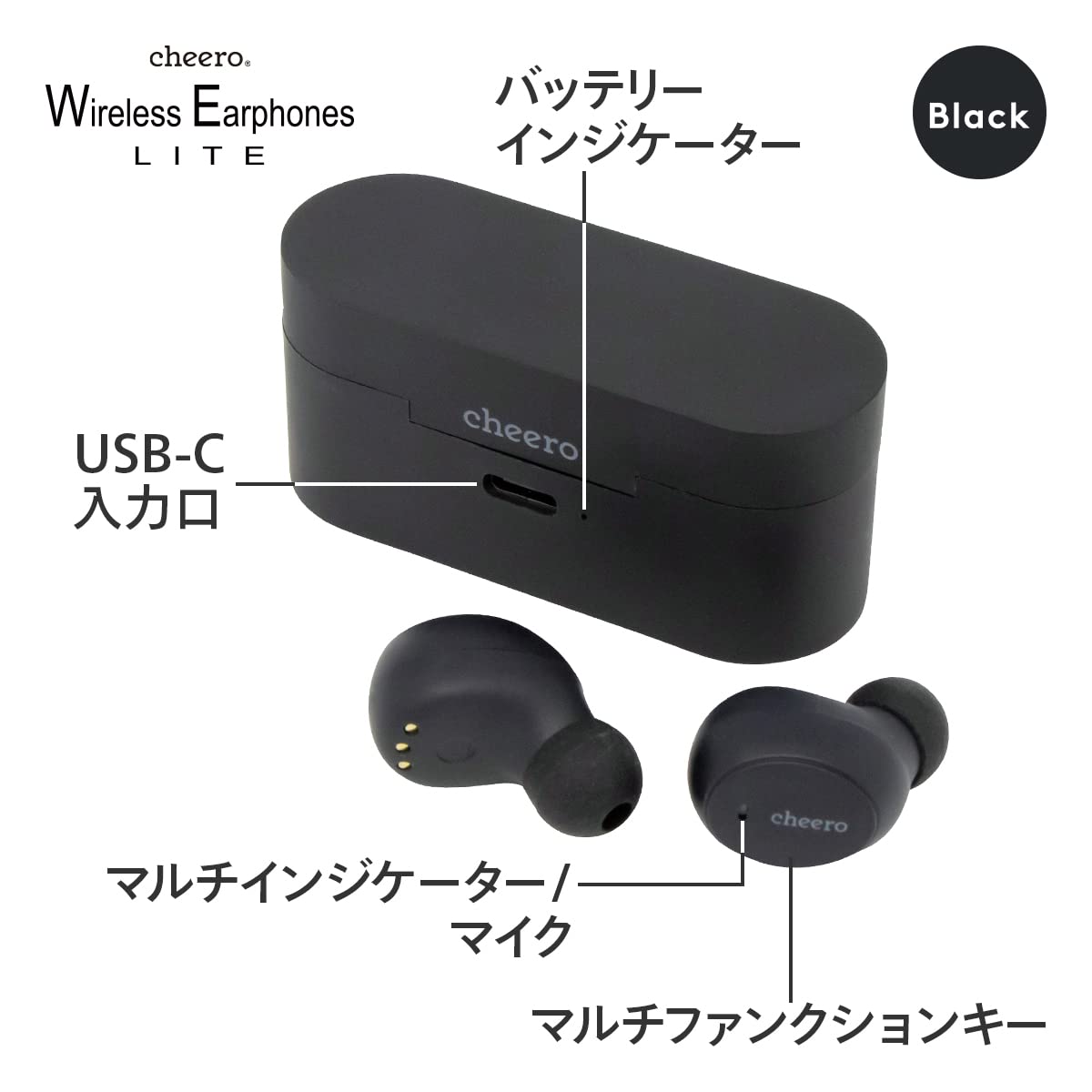
Figure 1 : Earphones and Charging Case Components. This diagram highlights the USB-C input port for charging the case, the battery indicator lights on the case, and the multi-function key and microphone on the earbuds.

Figure 2 : Cheero Wireless Earphones LITE (Black). This image shows the black earbuds inside their charging case, with one earbud placed outside the case for a clear view de sa conception.

Figure 3 : Available Colors. This image displays the Cheero Wireless Earphones LITE in black, white, and blue, along with their matching charging cases, illustrating the color options.
Installation
1. Chargement des écouteurs et de l'étui
Avant la première utilisation, chargez complètement les écouteurs et l'étui de chargement.
- Place the earphones into the charging case. Ensure they are correctly seated; the indicator lights on the earphones will illuminate to show charging status.
- Connect the USB A to C cable to the charging case's USB-C port and the other end to a USB power adapter (not included) or a computer's USB port.
- The battery indicator on the charging case will show the charging progress. A full charge typically takes approximately 1.5 hours.
The earphones provide approximately 5 hours of continuous playback on a single charge. The charging case can provide an additional 3 full charges, extending total playback time to approximately 20 hours.
2. Couplage Bluetooth
Pair your earphones with your device (smartphone, tablet, computer) for the first time.
- Assurez-vous que les écouteurs sont chargés.
- Ouvrez le boîtier de charge. Les écouteurs passeront automatiquement en mode appairage et leurs voyants clignoteront.
- Sur votre appareil, accédez aux paramètres Bluetooth et activez le Bluetooth.
- Rechercher available devices. Select "Cheero Wireless Earphones LITE" from the list.
- Once connected, a voice prompt will confirm successful pairing, and the earphone indicator lights will turn off or change to a steady light.
Les écouteurs se reconnecteront automatiquement au dernier appareil apparié lorsqu'ils seront retirés de l'étui, si le Bluetooth est activé sur l'appareil.
3. Installation des écouteurs
For optimal sound quality and comfort, choose the correct eartip size and ensure a proper fit.
- Experiment with the S, M, and L eartips provided to find the size that creates a comfortable and secure seal in your ear canal.
- Gently insert each earbud into your ear, then twist slightly to secure it in place.
Mode d'emploi
Earphone Controls (Multi-function Key)
The Cheero Wireless Earphones LITE feature touch-sensitive multi-function keys on each earbud for easy control.

Figure 4 : Multi-function Key Operations. This visual guide illustrates how to use the touch controls on the earbuds for various functions such as volume control, playback, call management, and activating the voice assistant.
| Action | Fonction |
|---|---|
| Appui simple (gauche/droite) | Lecture/Pause de la musique, Répondre/Terminer l'appel |
| Appuyez deux fois (à droite) | Piste suivante |
| Appuyez deux fois (à gauche) | Piste précédente |
| Appuyez trois fois (à droite) | Augmenter le volume |
| Appuyez trois fois (gauche) | Baisser le volume |
| Appui long (2 secondes) | Activer l'assistant vocal (Siri, Google Assistant) |
| Appuyez longuement (2 secondes) pendant un appel entrant | Rejeter l'appel |
The earphones can be used individually (mono mode) for calls or listening to audio.
Using the Smartphone Stand Function
The charging case is designed to function as a convenient smartphone stand.

Figure 5 : Smartphone Stand Function. This image demonstrates how the charging case can be used to prop up a smartphone, offering two distinct viewangles d'approche pour la consommation médiatique.
- Ouvrez le couvercle du boîtier de charge.
- Place your smartphone into the groove on the case.
- The case supports two different angles for optimal viewing.
- Note: This function is primarily designed for smartphones and may not be suitable for larger tablets or oversized smartphones.
Entretien
Nettoyage
- Regularly clean the earphones and charging case with the provided cleaning cloth or a soft, dry, lint-free cloth.
- N’utilisez pas de nettoyants abrasifs, d’alcool ou de solvants chimiques.
- Retirez délicatement le cérumen ou les débris des embouts et de la grille du haut-parleur à l'aide d'une petite brosse douce ou d'un coton-tige.
Stockage
- Lorsqu'ils ne sont pas utilisés, rangez les écouteurs dans leur étui de chargement pour les protéger et les maintenir chargés.
- Conserver le produit dans un endroit frais et sec, à l'abri de la lumière directe du soleil et des températures extrêmes.
Dépannage
Si vous rencontrez des problèmes avec vos écouteurs, consultez les solutions courantes suivantes :
| Problème | Cause/solution possible |
|---|---|
| Les écouteurs ne s'allument pas. | Battery is low. Place earphones in the charging case and charge fully. |
| Impossible de jumeler l'appareil. |
|
| Aucun son ou volume faible. |
|
| Connexion intermittente. |
|
| Le boîtier de charge ne charge pas. |
|
Caractéristiques
Detailed technical specifications for the Cheero Wireless Earphones LITE CHE-636.
| Fonctionnalité | Détail |
|---|---|
| Numéro de modèle | CHE-636 |
| Version Bluetooth | 5.3 |
| Norme d'étanchéité | IPX5 (Water droplet-level waterproof, not for immersion) |
| Pro pris en chargefiles | A2DP, AVRCP, HSP, HFP |
| Compatible Codec | SBC, AAC |
| Temps de charge | Approx. 1.5 hours (earphones + case) |
| Continuous Playback Time (Earphone Alone) | Environ 5 heures |
| Continuous Playback Time (with Case) | Environ 20 heures |
| Distance de communication maximale | Approx. 15 meters (no obstacles) |
| Saisir | 5 V/1 A |
| Capacité de la batterie (boîtier) | 400 mAh |
| Dimensions des écouteurs | Environ 27 x 17 x 23 mm (1.1 x 0.7 x 0.9 pouces) |
| Poids des écouteurs | Environ. 5 g (0.2 oz) |
| Poids total de l'article | 120 g |
| Matériel | Plastique |
| Méthode de contrôle | Touche |

Figure 6 : Extended Playback Time. This image shows a user enjoying the earphones while working, highlighting the approximately 20 hours of total playback time with the charging case.

Figure 7 : AAC Codec and IPX5 Rating. This image features a user wearing the earphones, emphasizing their support for AAC codec for high-quality audio and IPX5 water resistance for protection against sweat and splashes.

Figure 8 : Enhanced Sound Quality. This image shows a user enjoying the earphones, illustrating their capability to deliver powerful bass along with clear mid and high frequencies for a balanced audio experience.
Garantie et assistance
Your Cheero Wireless Earphones LITE CHE-636 come with a 1-year manufacturer's warranty from the date of purchase. This warranty covers defects in materials and workmanship under normal use.
La garantie ne couvre pas :
- Dommages causés par un accident, un abus, une mauvaise utilisation, une inondation, un incendie, un tremblement de terre ou d'autres causes externes.
- Damage caused by operating the product outside the permitted or intended uses described by Cheero.
- Damage caused by service performed by anyone who is not a representative of Cheero or an authorized Cheero Service Provider.
- Products or parts that have been modified to alter functionality or capability without the written permission of Cheero.
For warranty claims or technical support, please contact Cheero customer service through their official website or the retailer where the product was purchased. Please have your proof of purchase and product model number (CHE-636) ready when contacting support.


