
1. Produit terminéview
The JADEMALL Keyboard Case provides a protective cover and a detachable wireless Bluetooth keyboard for your iPad Mini. It enhances productivity and offers multiple viewangles d'attaque pour diverses tâches.

Image: The JADEMALL Keyboard Case shown with an iPad Mini, illustrating its use as a laptop-style setup, a stand, a tent mode, and as a protective tablet cover.
2. Compatibilité
This keyboard case is designed to be compatible with the following iPad Mini models. Please verify your iPad model number before use.
- iPad Mini 5 (2019): Modèles A2133, A2124, A2126, A2125
- iPad Mini 4 : Modèles A1538, A1550
- iPad Mini 3 : Modèles A1599, A1600
- iPad Mini 2 : Modèles A1489, A1490, A1491
- iPad Mini 1 : Modèles A1432, A1454, A1455

Image: A visual guide displaying an iPad Mini back and a table listing compatible iPad Mini models and their corresponding model numbers (e.g., A2124).
3. Contenu de la boîte
Lors du déballage, veuillez vous assurer que tous les éléments suivants sont présents :
- JADEMALL Mini Keyboard Case
- Câble de chargement USB
- Manuel de l'utilisateur (ce document)
4. Instructions de configuration
4.1 Chargement du clavier
Before initial use, fully charge the keyboard. Connect the provided USB charging cable to the keyboard's charging port and a USB power source. The charging indicator light will illuminate during charging and turn off when fully charged.
- Temps de charge : environ 3 à 4 heures pour une charge complète.
- Operating Time: Up to 80 hours of uninterrupted work with backlights off.
- Autonomie en veille : jusqu'à 60 jours.

Image: An illustration demonstrating the keyboard charging process via a Type-C USB cable and indicating battery life for charging, typing, and standby modes.
4.2 Appairage du clavier via Bluetooth
- Assurez-vous que le clavier est chargé.
- Turn on the keyboard by sliding the power switch to the 'ON' position. The 'CONNECT' indicator light will flash.
- On your iPad Mini, go to Paramètres > Bluetooth.
- Activez le Bluetooth. Votre iPad recherchera les appareils disponibles.
- Select 'Bluetooth Keyboard' (or similar name) from the list of devices.
- If prompted, enter the pairing code displayed on your iPad onto the keyboard and press Entrer.
- Once paired, the 'CONNECT' indicator light on the keyboard will turn off, and your iPad will show the keyboard as 'Connected'.
5. Mode d'emploi
Contrôle du rétroéclairage 5.1
The keyboard features 7-color adjustable backlights with 3 brightness levels.
- Pour allumer/éteindre le rétroéclairage : Appuyez sur Fn + Light Bulb icon clé.
- Pour changer la couleur du rétroéclairage : Appuyez sur Fn + Light Bulb icon touche à plusieurs reprises.
- Pour régler la luminosité du rétroéclairage : Appuyez sur Fn + Flèche vers le haut or Flèche vers le bas clés.

Image: A close-up of the keyboard highlighting the 'Fn' key and the 'Light Bulb' key for backlight control, showing various backlight colors.
5.2 Fonction de réveil/veille automatique
The case supports automatic wake and sleep functionality. Opening the case will wake your iPad, and closing it will put your iPad to sleep, helping to conserve battery life.
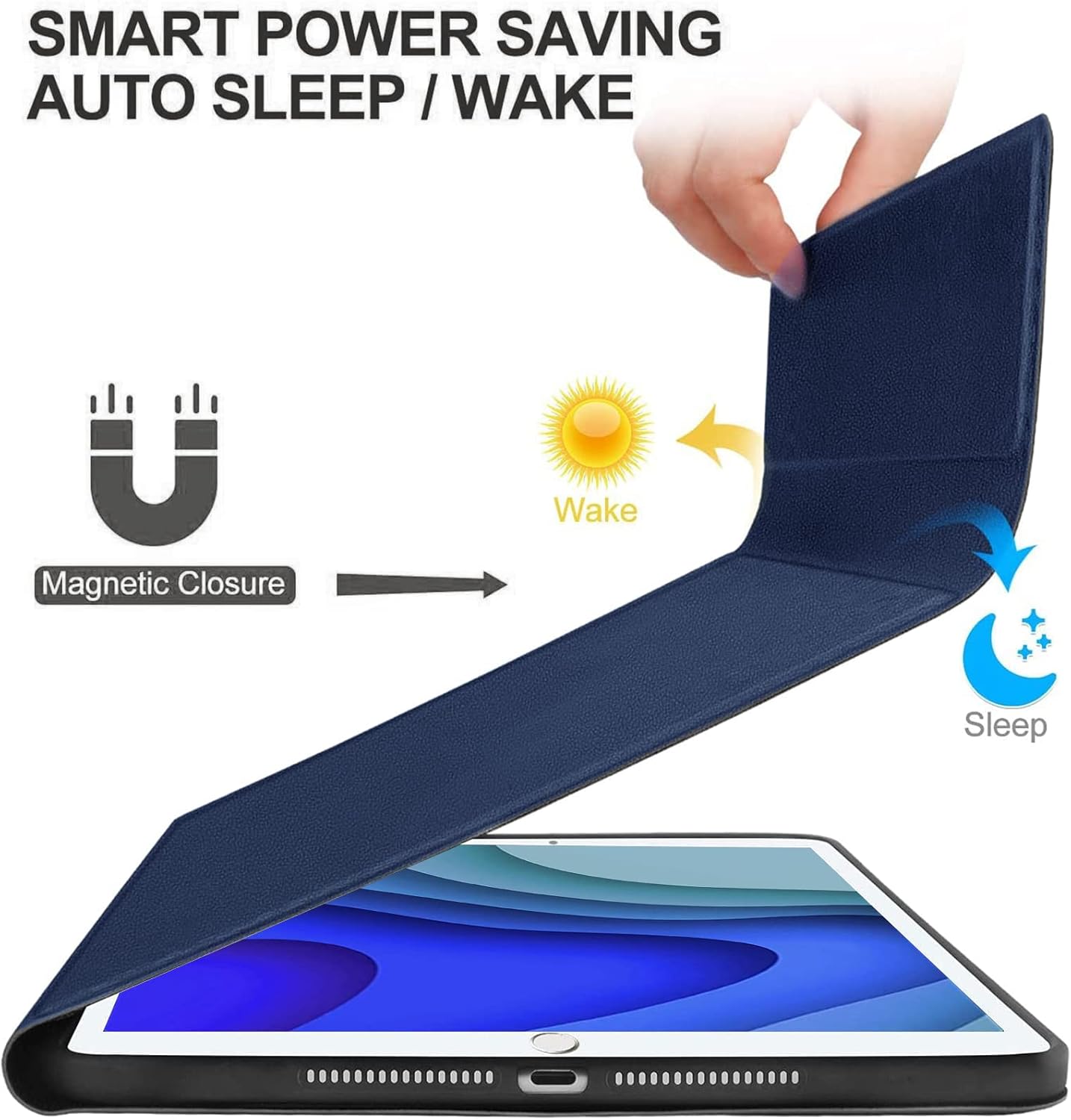
Image: A hand opening the keyboard case, with arrows indicating the 'Wake' function, and the case closing, indicating the 'Sleep' function.
5.3 Réglage ViewAngles
The magnetic design allows for flexible positioning of your iPad Mini, providing multiple viewangles d'attaque pour la frappe, viewing, reading, or video calls.

Image: The keyboard case configured in 'Laptop', 'Stand', and 'Tent' modes, showcasing différent viewing angles for the iPad Mini.
5.4 Changing Operating Systems
The wireless keyboard is compatible with multiple operating systems. To switch between them, press the following key combinations:
- Pour iOS : Appuyez sur Fn + Q
- Pour Android : Appuyez sur Fn + W
- Pour Windows : Appuyez sur Fn + E
6. Entretien
6.1 Nettoyage
Pour nettoyer le clavier et le boîtier, utilisez un chiffon doux et sec.amp cloth. Avoid using harsh chemicals or abrasive materials that could damage the surfaces. Ensure the keyboard is powered off and disconnected from any power source before cleaning.
6.2 Entretien de la batterie
To prolong battery life, avoid fully discharging the keyboard frequently. Charge the keyboard regularly, even if not in constant use. Store the keyboard in a cool, dry place when not in use for extended periods.
7. Dépannage
- Le clavier ne se connecte pas :
- Ensure the keyboard is powered on and fully charged.
- Make sure Bluetooth is enabled on your iPad Mini.
- Try unpairing and re-pairing the keyboard from your iPad's Bluetooth settings.
- Restart both your iPad Mini and the keyboard. - Les touches ne répondent pas :
- Check if the keyboard is charged and connected via Bluetooth.
- Ensure no debris is lodged under the keys.
- Try restarting the keyboard. - Le rétroéclairage ne fonctionne pas :
- Ensure the keyboard is powered on.
- Presse Fn + Light Bulb icon pour faire défiler les modes de rétroéclairage. - Auto Wake/Sleep not functioning:
- Ensure your iPad Mini is properly seated in the case.
- Check your iPad's settings to ensure 'Lock/Unlock' (or similar) is enabled under 'Display & Brightness' or 'General'.
8. Spécifications
| Dimensions du produit | 8.07 x 5.71 x 0.59 pouces |
| Poids de l'article | 1.09 livres |
| Fabricant | Centre commercial Jade |
| Piles | 1 pile A (incluse) |
| Technologie de connectivité | Bluetooth, USB |
| Description du clavier | Multi Functional, Wireless, Bluetooth Connection |
| Dossier spécial | Detachable Keyboard, Adjustable Backlit, Magnetic Attachment |
| Matériel | Acrylonitrile butadiène styrène (ABS) |
| Prise en charge des couleurs de rétroéclairage du clavier | RVB (couleurs 7) |
9. Service client et assistance
If you encounter any issues or have questions regarding your JADEMALL Keyboard Case, please do not hesitate to contact our customer service team. We are committed to providing support and resolving any concerns within 24 hours.
Please refer to the contact information provided with your purchase or visit the official JADEMALL website pour les détails de l'assistance.