
1. Introduction
Thank you for choosing the Tekstap Smart RGBIC Ambiance Light Bar. This device is designed to enhance your entertainment experience with dynamic, customizable lighting. Featuring RGBIC technology, Wi-Fi connectivity, and compatibility with voice assistants like Alexa and Google Assistant, these light bars offer a versatile solution for creating immersive atmospheres for gaming, movies, music, and more.
This manual provides essential information for the safe and efficient use of your new light bars. Please read it thoroughly before installation and operation, and retain it for future reference.
2. Contenu du colis
Veuillez vérifier que le colis contient les éléments suivants :
- Tekstap Smart RGBIC Ambiance Light Bars (2 units)
- Adaptateur secteur
- Base Stands (2 units)
- 3M Adhesive Pads (for alternative mounting)
- Manuel d'utilisation

Image: Contents of the Tekstap Smart RGBIC Ambiance Light Bar package, showing the two light bars, their stands, the power adapter, and the instruction manual.
3. Consignes de sécurité
- Assurer l'alimentation voltage est compatible avec l'appareil.
- N’exposez pas l’appareil à l’eau ou à une forte humidité.
- Avoid direct exposure to sunlight or high temperatures.
- N'essayez pas de démonter ou de réparer l'appareil vous-même. Contactez le service client pour obtenir de l’aide.
- Tenir hors de portée des enfants.
- Utilisez uniquement l’adaptateur secteur fourni.
4. Installation
4.1 Méthodes d'installation
The Tekstap Smart RGBIC Ambiance Light Bars offer two primary installation methods:
- Using Base Stands: Attach the light bars to the provided base stands. These allow for vertical placement on a desk or horizontal placement behind a screen.
- Using 3M Adhesive Pads: For a more permanent setup, attach the light bars directly to the back of your TV or PC using the strong 3M adhesive pads. Ensure the surface is clean and dry before application.

Image: Demonstrates flexible placement options for the light bars, including vertical on a desk and horizontal behind a television screen.
4.2 Connexion à l'alimentation
Connect the light bars to the power adapter and then plug the adapter into a standard electrical outlet.
4.3 Installation et appairage de l'application Smart Life
- Téléchargez l'application : Rechercher Recherchez « Smart Life » dans la boutique d'applications de votre smartphone (iOS ou Android) et téléchargez l'application.
- S'inscrire/Se connecter : Ouvrez l'application Smart Life et créez un nouveau compte ou connectez-vous si vous en avez déjà un.
- Entrez en mode de couplage : Power on the light bars. If they do not automatically enter pairing mode (indicated by a flashing light), press and hold the power button on the control unit for several seconds until the lights begin to flash rapidly.
- Ajouter un appareil : In the Smart Life app, tap the "+" icon to add a new device. Select "Lighting" then "Light Source (Wi-Fi)" or allow the app to auto-discover the device.
- Se connecter au Wi-Fi : Follow the on-screen instructions to connect the light bars to your 2.4GHz Wi-Fi network. Remarque : Cet appareil ne prend pas en charge les réseaux Wi-Fi 5 GHz.
- Appariement terminé : Once connected, the light bars will stop flashing and appear in your Smart Life app. You can then rename the device for easier control.

Image: The Smart Life app interface on a smartphone, demonstrating options for music, brightness, scene, DIY, color, and schedule control for the light bars. Product dimensions are also shown.
5. Mode d'emploi
5.1 Basic Control (Manual)
The light bars feature a control unit with buttons for basic functions:
- Bouton d'alimentation : Press to turn on/off. Long press to enter pairing mode.
- Bouton Mode : Cycle through preset lighting modes.
- Boutons de luminosité : Réglez le niveau de luminosité.
5.2 Contrôle de l'application Smart Life
The Smart Life app provides comprehensive control over your light bars:
- Sélection de couleur : Choisissez parmi 16 millions de couleurs grâce au cercle chromatique.
- Réglage de la luminosité : Precisely control the light intensity.
- Modes scène : Select from over 10 preset scene modes (e.g., Movie, Date, Sunset, Romantic, Christmas Eve, Colorful, Dynamic, Dream, Rainbow, Flowing Water) to instantly change the ambiance. You can also create and save your own DIY scene modes.
- Mode de synchronisation de la musique : Activate the music mode to synchronize the lights with audio from your TV, PC, or surrounding environment via the built-in microphone. Choose from 4 music modes: Vivid, Rhythm, Strike, and Vibrate.
- Programmation: Set timers to automatically turn the lights on or off at specific times.
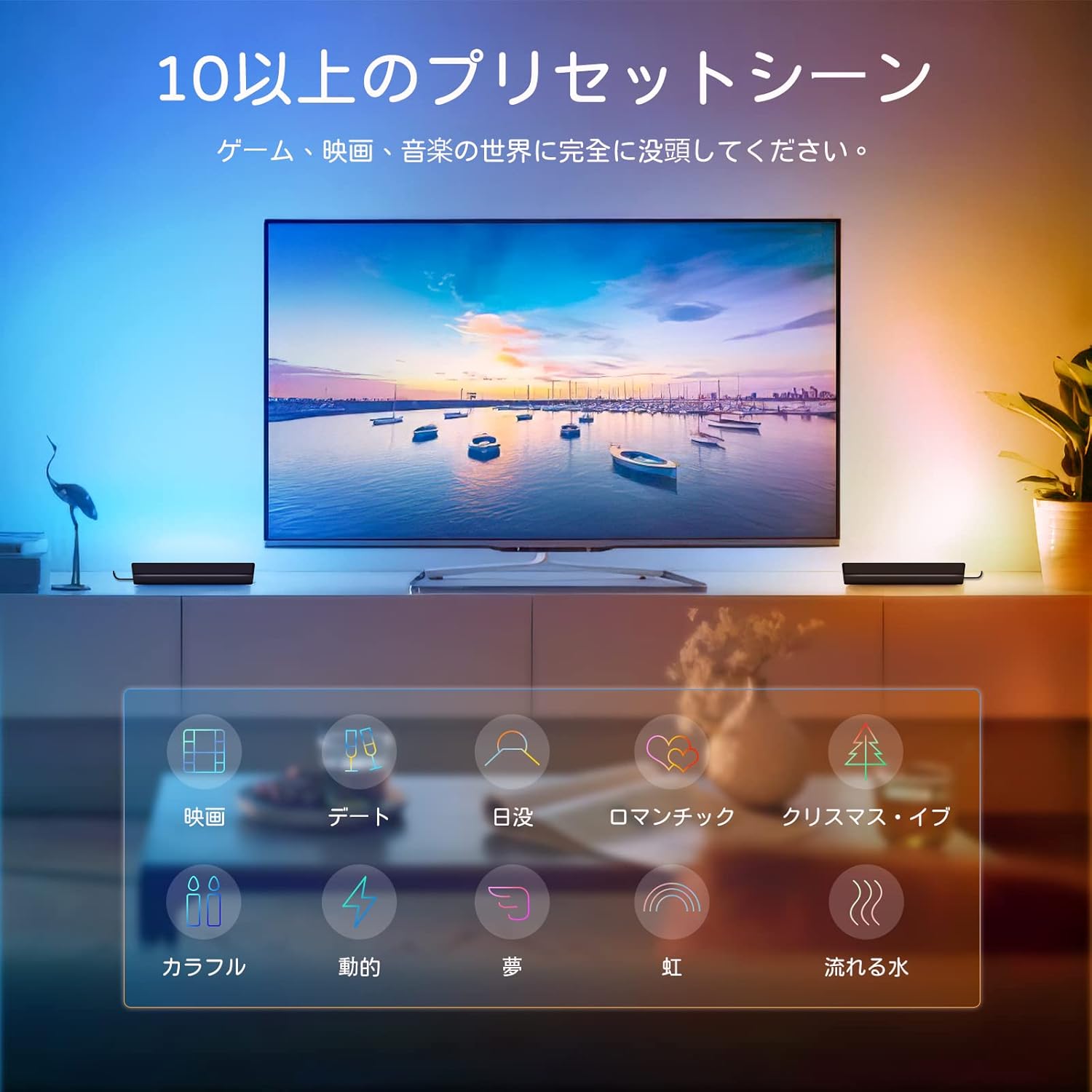
Image: A living room setup showing the light bars behind a television, illustrating various preset scene modes available for different activities like movies, dates, or music.

Image: A smartphone screen showing the scheduling feature within the app, allowing users to set specific times for the light bars to turn on or off automatically.
5.3 Commande vocale (Alexa/Assistant Google)
Integrate your Tekstap Smart RGBIC Ambiance Light Bars with Amazon Alexa or Google Assistant for hands-free control:
- Lier un compte Smart Life : Dans votre application Alexa ou Google Home, accédez à la section « Skills » ou « Fonctionne avec Google ». Rechercher "Smart Life" and enable the skill/service. Log in with your Smart Life account credentials.
- Découvrir les appareils : Once linked, ask your voice assistant to "Discover devices" or manually add them through the app.
- Commandes vocales : You can now control your light bars using voice commands. Examples incluent :
- "Alexa, turn on the Light Bar."
- "Hey Google, set Light Bar to blue."
- "Alexa, dim the Light Bar to 50%."
- "Hey Google, change Light Bar to romantic scene."

Image: A user relaxing on a couch, controlling the light bars behind a TV using voice commands through an Amazon Echo device, demonstrating Alexa and Google Assistant compatibility.
6. Entretien
- Nettoyage: Use a soft, dry cloth to clean the surface of the light bars. Do not use abrasive cleaners or solvents.
- Stockage: Si vous stockez l’appareil pendant une période prolongée, débranchez-le de l’alimentation et rangez-le dans un endroit frais et sec.
- Mises à jour du micrologiciel : Periodically check the Smart Life app for any available firmware updates to ensure optimal performance and access to new features.
7. Dépannage
| Problème | Cause possible | Solution |
|---|---|---|
| Les barres lumineuses ne s'allument pas. | Pas d'alimentation, connexion défectueuse. | Check power adapter connection and wall outlet. Ensure the power button is pressed. |
| Impossible de se connecter au Wi-Fi. | Incorrect Wi-Fi password, 5GHz network, device not in pairing mode. | Ensure correct 2.4GHz Wi-Fi network and password. Put device into pairing mode (flashing lights). Move closer to the router. |
| La commande vocale ne fonctionne pas. | Smart Life skill not enabled, incorrect device name, no internet connection. | Ensure Smart Life skill is enabled and linked in Alexa/Google Home app. Verify device name. Check internet connection. |
| Lights are unresponsive. | Temporary glitch, app issue. | Restart the light bars by unplugging and replugging. Close and reopen the Smart Life app. |
8. Spécifications
| Fonctionnalité | Détail |
|---|---|
| Marque | Tekstap |
| Numéro de modèle | AALB-BC |
| Dimensions du produit | 8 x 4.6 x 26.6 cm (per bar) |
| Poids | 580 g (emballage total) |
| Couleur | Multi-colored (RGBIC) |
| Matériau de l'abat-jour | Polycarbonate |
| Type de commutateur | Tactile, application, voix |
| Connectivité | Wi-Fi (2.4 GHz uniquement) |
| Compatibilité de l'assistant vocal | Amazon Alexa, Google Assistant |
| Caractéristiques spéciales | RGBIC Technology, Music Sync, 10+ Scene Modes, DIY Modes, Scheduling |
9. Garantie et assistance
Tekstap products are designed for reliability and performance. For warranty information and customer support, please refer to the contact details provided on the product packaging or visit the official Tekstap website. Please have your model number (AALB-BC) and purchase information ready when contacting support.
Pour obtenir de l'aide, vous pouvez également vous référer au Tekstap Brand Store.