
1. Introduction
This manual provides comprehensive instructions for the installation, operation, maintenance, and troubleshooting of your LeeKooLuu LK8 RV Backup Camera System. Please read this manual thoroughly before installation and use to ensure proper function and safety.
2. Composants du produit
The LeeKooLuu LK8 RV Backup Camera System includes a wireless camera unit designed for vehicle rear-view monitoring. Key components are detailed below:
- Wireless Camera Unit: Features a wide-angle lens, CMOS optical sensor, and integrated LED lights for enhanced visibility.
- Support de montage réglable : Allows for secure and flexible positioning of the camera.
- Antenne sans fil : Ensures stable signal transmission to a compatible monitor (monitor sold separately).

Figure 2.1 : Devant view of the LeeKooLuu LK8 wireless RV backup camera, showing the central lens and surrounding LED lights for night vision.

Figure 2.2 : Face avant inclinée view of the LeeKooLuu LK8 wireless RV backup camera, highlighting the antenna and adjustable mounting bracket.
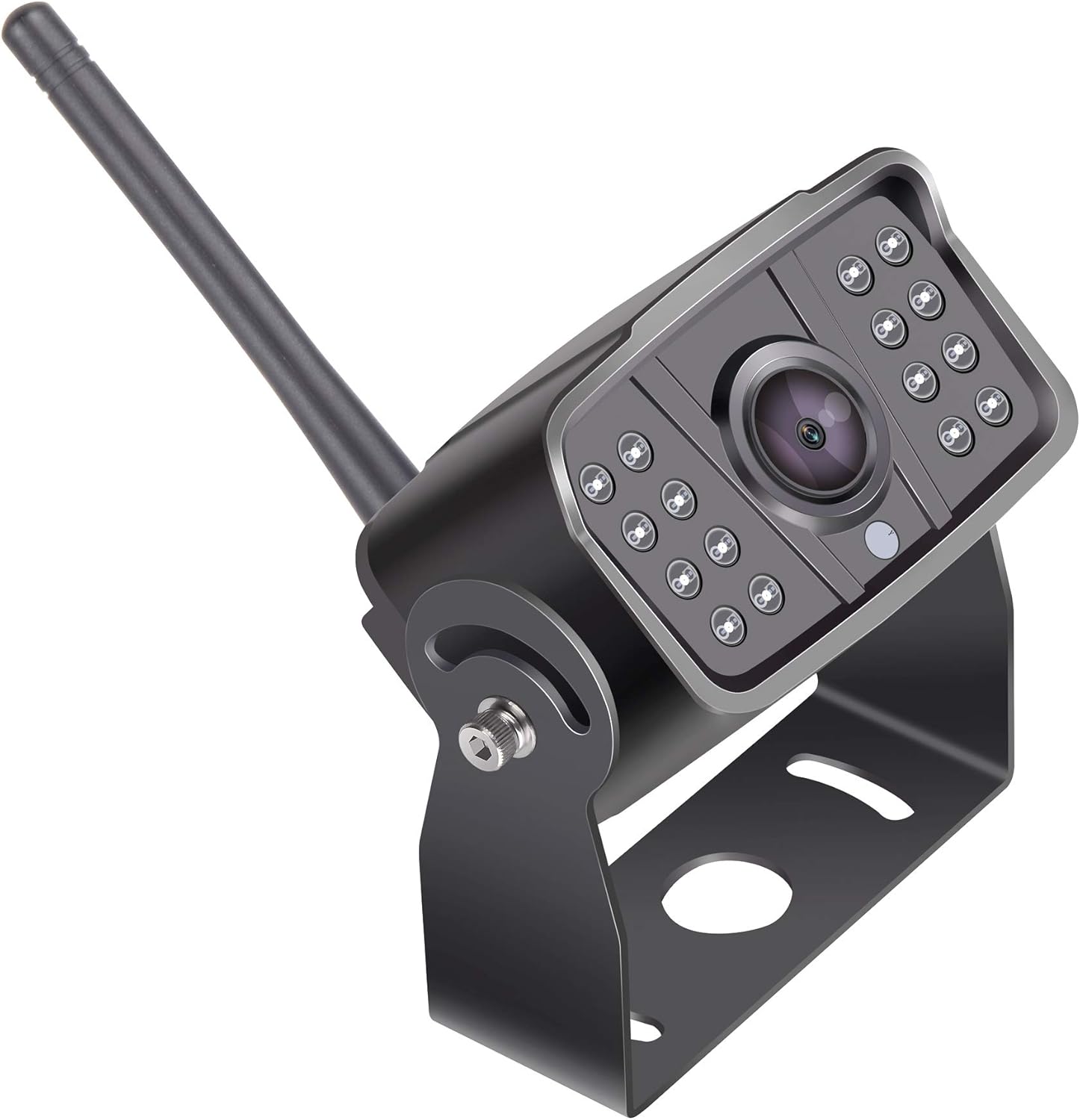
Figure 2.3 : Côté view of the LeeKooLuu LK8 wireless RV backup camera, illustrating the adjustable mounting bracket and the position of the wireless antenna.
3. Guide d'installation
The LK8 camera is designed for monitor-based installation and wireless connectivity. Ensure your compatible monitor (e.g., LeeKooLuu LK8 monitor) is ready for pairing.
3.1 Montage de la caméra
- Sélectionnez l'emplacement: Choose a suitable location at the rear of your RV or vehicle that provides a clear, unobstructed view. The camera's wide-angle lens offers broad coverage.
- Support sécurisé : Use appropriate fasteners (not included) to securely attach the adjustable mounting bracket to the chosen surface. Ensure the bracket is stable and can support the camera's weight.
- Attacher la caméra : Mount the camera unit onto the bracket. Adjust the camera angle for optimal viewing, then tighten the bracket screws to fix its position.
3.2 Connexion d'alimentation
The camera requires a stable power supply. Connect the camera's power cable to a 12V DC power source on your vehicle. Common connection points include:
- Reverse light circuit (for automatic activation when reversing).
- Running lights or auxiliary power (for continuous monitoring).
Assurez-vous que toutes les connexions sont bien fixées et correctement isolées afin d'éviter les courts-circuits et les dégâts d'eau.
3.3 Couplage sans fil
Once the camera is powered, it will automatically attempt to pair with a compatible LeeKooLuu wireless monitor. Refer to your monitor's user manual for specific pairing instructions if automatic connection does not occur.
Vidéo 3.1: Detailed installation guide for the LeeKooLuu RV Backup Camera System. This video provides visual steps for mounting and connecting the camera.
4. Instructions d'utilisation
After successful installation and pairing, your LeeKooLuu LK8 camera system is ready for use.
4.1 Mise sous/hors tension
The camera's operation is typically linked to its power source. If connected to reverse lights, it will activate when the vehicle is in reverse. If connected to continuous power, it will operate whenever the vehicle's ignition is on or the power source is active.
4.2 Viewalimenter le flux
The camera feed will automatically display on your paired monitor. Use the monitor's controls to adjust brightness, contrast, or other display settings as needed. The wide-angle lens provides a comprehensive view of your surroundings, aiding in parking and maneuvering.
4.3 Vision nocturne
The integrated LED lights automatically activate in low-light conditions, providing clear night vision for safe operation in the dark.
Vidéo 4.1: Surview of the LeeKooLuu RV Backup Camera System's operational features, including day and night vision capabilities.
5. Entretien
Un entretien régulier garantit la longévité et les performances optimales de votre système de caméra.
- Nettoyage de la lentille : Nettoyez régulièrement l'objectif de l'appareil photo avec un chiffon doux et sec.amp Chiffon. Évitez les nettoyants abrasifs qui pourraient rayer la lentille.
- Vérification des connexions : Inspect all power and antenna connections regularly to ensure they are secure and free from corrosion or damage.
- Sécurité du support : Verify that the mounting bracket remains securely fastened and the camera's angle has not shifted due to vibrations or impacts.
6. Dépannage
If you encounter issues with your LeeKooLuu LK8 RV Backup Camera System, refer to the following troubleshooting steps:
| Problème | Cause possible | Solution |
|---|---|---|
| Aucune image sur le moniteur | No power to camera or monitor; Loose connection; Pairing issue; Interference. | Check power supply to both camera and monitor. Ensure all cables are securely connected. Re-attempt wireless pairing. Minimize sources of wireless interference. |
| Poor image quality / Flickering | Dirty lens; Weak wireless signal; Electrical interference. | Clean the camera lens. Ensure the camera and monitor are within effective range and antenna is unobstructed. Check for strong electrical sources nearby. |
| Camera not activating | Branchement électrique incorrect ; fusible grillé. | Verify power connection to the correct circuit (e.g., reverse lights). Check vehicle fuses related to the power source. |
Vidéo 6.1: Troubleshooting common issues with wireless backup camera systems, including signal loss and power problems.
7. Spécifications
| Fonctionnalité | Spécification |
|---|---|
| Marque | Lee Koo Luu |
| Modèle | LK8 |
| Dimensions du produit | 12.2 x 6.1 x 3.1 pouces (12.2 po L x 6.1 po l x 3.1 po H) |
| Poids de l'article | 1.01 livres |
| Appareils compatibles | LK8 (compatible monitors) |
| Type d'installation | Monitor-based |
| Technologie de capteur optique | CMOS |
| Type de lentille | Grand angle |
| Type de connecteur | Sans fil |
| Taille du capteur optique | 1/3 pouce |
| Autres fonctionnalités d'affichage | Sans fil |