
1. Introduction
Thank you for choosing the Comfort Zone PowrCurve 18-inch Pedestal Stand Fan. This manual provides important information regarding the assembly, operation, maintenance, and troubleshooting of your new fan. Please read these instructions thoroughly before use and retain them for future reference.
This fan features a 6-blade design for enhanced airflow, a tri-curve grill for reduced noise, 3 speed settings, 180-degree adjustable tilt, and an oscillation function to effectively circulate air in your home or office.

Image: The Comfort Zone PowrCurve 18-inch Pedestal Stand Fan, black, with blue lines indicating powerful airflow.
2. Consignes de sécurité importantes
Lors de l'utilisation d'appareils électriques, des précautions de base doivent toujours être respectées pour réduire les risques d'incendie, de choc électrique et de blessures corporelles, notamment les suivantes :
- Lisez toutes les instructions avant d'utiliser ce ventilateur.
- Utilisez ce ventilateur uniquement comme décrit dans ce manuel. Toute autre utilisation non recommandée peut provoquer un incendie, une électrocution ou des blessures.
- Pour éviter tout risque d'électrocution, ne placez pas le ventilateur près d'une fenêtre, n'immergez pas l'appareil, la prise ou le cordon dans l'eau et ne le vaporisez pas de liquides.
- Une surveillance étroite est nécessaire lorsqu’un appareil est utilisé par ou à proximité d’enfants.
- Unplug fan from outlet when not in use, when moving from one location to another, and before cleaning.
- N’utilisez pas un ventilateur dont le cordon ou la prise est endommagé, ou après que le ventilateur a mal fonctionné, est tombé ou a été endommagé de quelque manière que ce soit.
- Ne faites pas passer le câble sous la moquette. Ne le recouvrez pas de tapis, de descentes de lit ou de revêtements similaires. Installez-le à l'écart des zones de passage afin d'éviter tout risque de trébuchement.
- Évitez tout contact avec les pièces mobiles.
- This fan meets UL, ETL, SAA, CE, CSA, and NOM quality standards.
3. Contenu du colis
Veuillez vérifier le contenu du colis pour vous assurer que toutes les pièces sont présentes et non endommagées :
- Fan Motor Housing with Control Panel
- La grille de devant
- Grille arrière
- Fan Blades (6 blades)
- Poteau sur pied (hauteur réglable)
- Base ronde
- Base Weight (internal)
- Fasteners (nuts, bolts, screws for assembly)
- Power Cord with Fused Plug
- Manuel d'instructions (ce document)
4. Assemblage et configuration
Follow these steps to assemble your Comfort Zone PowrCurve Pedestal Stand Fan. It is recommended to perform assembly on a soft, flat surface to prevent scratching.
- Fixez la base : Secure the pedestal pole to the round base using the provided fasteners. Ensure the base weight is correctly positioned within the base for stability.
- Mount the Motor Housing: Attach the fan motor housing to the top of the pedestal pole. Ensure it is firmly secured.
- Installer la grille arrière : Place the rear grill onto the motor housing, aligning any tabs or notches. Secure it with the provided retaining nut or screws.
- Fixez les pales du ventilateur : Carefully slide the 6 fan blades onto the motor shaft. Ensure they are seated correctly and secure them with the blade cap.
- Installer la calandre avant : Align the front grill with the rear grill and secure them together using the clips or screws provided. Ensure the grills are tightly closed to prevent access to the blades.
- Réglage de la hauteur et de l'inclinaison : The fan's height can be adjusted from 44 inches to 53 inches. Loosen the height adjustment knob on the pedestal pole, set to desired height, and tighten securely. The fan head can also be tilted up to 180 degrees to direct airflow.
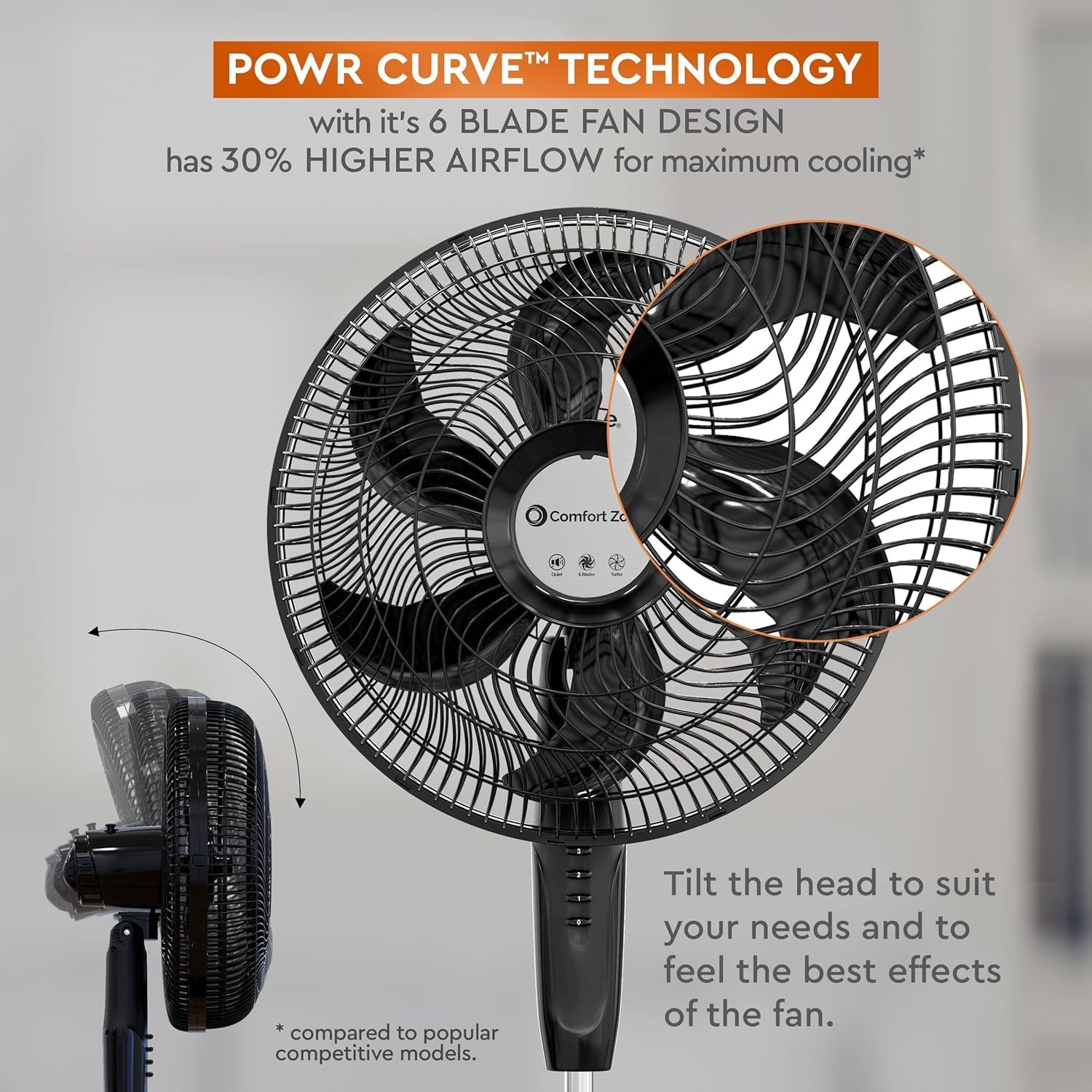
Image: Illustration of the fan's 6-blade design and the adjustable tilt feature.

Image: Depicts the fan's quick and easy assembly, highlighting the 60-inch cord with a safety fused plug.

Image: Shows the fan's adjustable pedestal height, ranging from 44 to 53 inches, and a 19-inch base diameter.
5. Mode d'emploi
Once assembled, your fan is ready for use. Ensure the fan is placed on a stable, level surface and plugged into a standard 120V AC electrical outlet.

Image: The fan's control panel with push buttons for 3 speed settings, indicating widespread oscillation and a tri-curve grille for reduced noise.
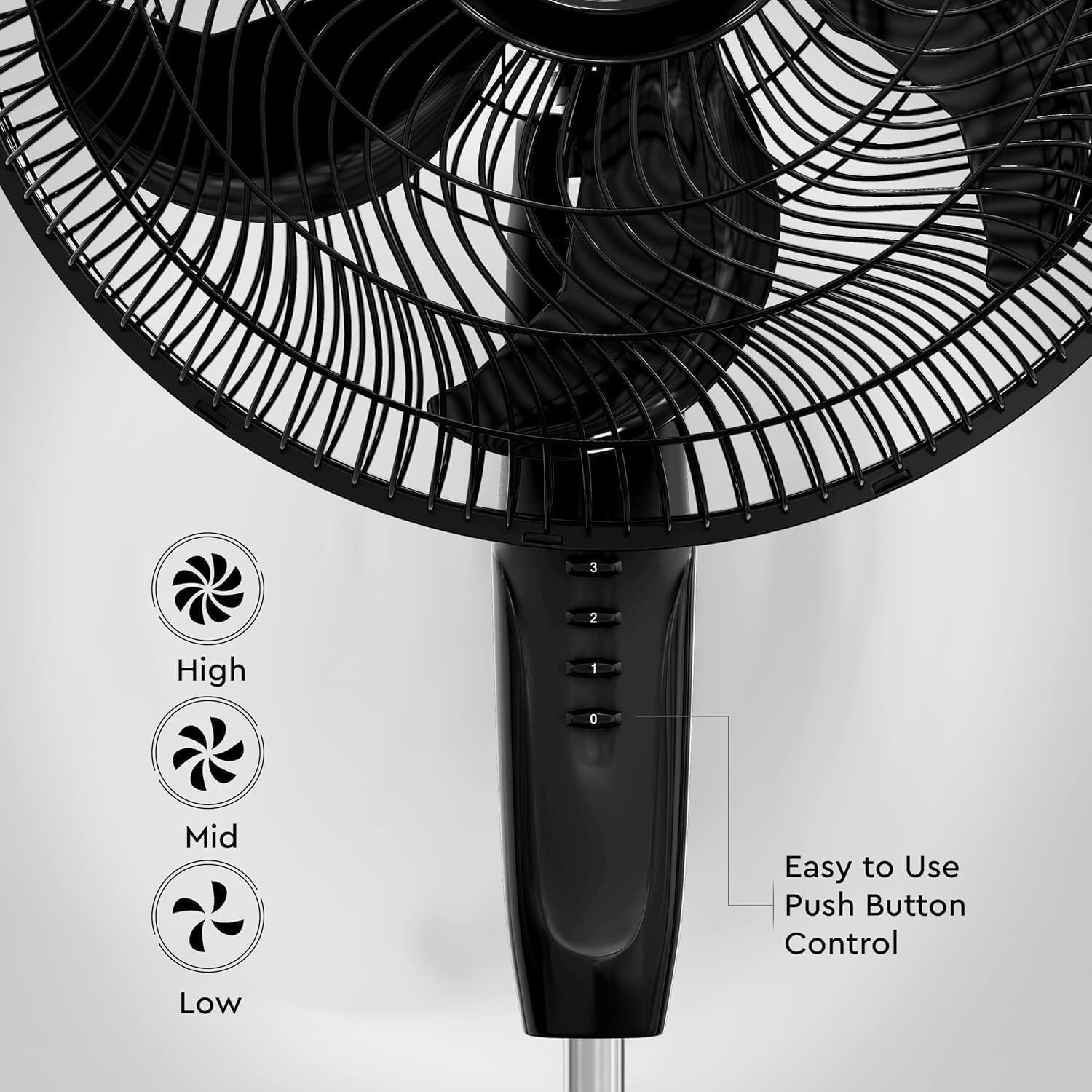
Image : Une image détaillée view of the fan's easy-to-use push-button control panel, showing settings for Low, Mid, and High fan speeds.
- Marche/Arrêt : Press the '0' button to turn the fan off. Press '1', '2', or '3' to turn the fan on and select a speed.
- Sélection de vitesse : Use the push-button control panel to select your desired airflow speed:
- 1 (Faible) : For a gentle breeze.
- 2 (Mid): For moderate cooling.
- 3 (Élevé) : For maximum airflow and cooling.
- Oscillation: To activate the oscillation feature, press the oscillation button located on the top of the motor housing. This will allow the fan head to sweep from side to side, distributing air over a wider area. Press the button again to stop oscillation.
- Inclinaison réglable : The fan head can be manually tilted up or down to direct airflow precisely where needed. Gently adjust the fan head to your preferred angle.
- Veilleuse: This fan includes a built-in night light for gentle illumination. Refer to the control panel for the dedicated night light button, if present, or consult the product packaging for specific activation instructions.
6. Entretien et nettoyage
Un nettoyage et un entretien réguliers garantiront la longévité et les performances optimales de votre ventilateur.
- Débranchez toujours le ventilateur de la prise électrique avant de le nettoyer.
- Utilisez un chiffon doux et sec.amp cloth to clean the exterior surfaces of the fan. Do not use abrasive cleaners or solvents.
- To clean the fan blades and inside the grills, carefully remove the front grill (refer to assembly instructions in Section 4). Wipe the blades and interior surfaces with a soft, damp cloth. Ensure all parts are completely dry before reassembling the grill.
- The fan grills can be hand washed. Ensure they are completely dry before reattaching.
- Do not immerse the fan motor housing or power cord in water or any other liquid.
- For storage, keep the fan in its original packaging or cover it to protect it from dust. Store in a cool, dry place.
7. Dépannage
If your fan is not operating correctly, please consult the following common issues and solutions:
| Problème | Cause possible | Solution |
|---|---|---|
| Le ventilateur ne s'allume pas. | No power to the unit; Power cord not fully plugged in; Blown fuse in plug. | Ensure the fan is securely plugged into a working electrical outlet. Check the fuse in the plug and replace if necessary. Test the outlet with another appliance. |
| Débit d'air réduit ou bruit inhabituel. | Obstruction in front or rear grill; Dust buildup on blades; Loose parts. | Unplug the fan. Check for any obstructions in the grills or on the blades and remove them. Clean the blades and grills as per maintenance instructions. Ensure all assembly parts are securely fastened. |
| Le ventilateur n'oscille pas. | Oscillation button not engaged; Internal mechanism issue. | Press the oscillation button firmly. If the issue persists, unplug the fan and check for any visible obstructions around the oscillation mechanism. |
| Fan head does not stay tilted. | Tilt adjustment mechanism is loose or damaged. | Ensure the tilt adjustment knob or mechanism is tightened securely after adjusting the angle. If damaged, contact customer support. |
If you experience issues not listed here or if the problem persists after attempting these solutions, please contact Comfort Zone customer support.
8. Spécifications
| Marque | Zone de confort |
| Nom du modèle | CZST180BK |
| Couleur | Noir |
| Dimensions du produit | 16.54"P x 16.54"L x 54.33"H |
| Poids de l'article | 12.68 livres |
| Source d'énergie | Électrique avec fil |
| Quoitage | 88 watts |
| Voltage | 120V |
| Nombre de lames | 6 |
| Longueur de la lame | 18 pouces |
| Capacité de débit d'air | 2050 pieds cubes par minute |
| Niveau de bruit | 55 dB |
| Paramètres de vitesse | 3 |
| Caractéristiques spéciales | Hauteur réglable, inclinaison réglable, oscillant, veilleuse intégrée |
| Méthode de contrôle | Bouton poussoir |
| Utilisation intérieure/extérieure | Intérieur |
| Certifications | ETL (Meets UL, ETL, SAA, CE, CSA, and NOM quality standards) |
9. Informations sur la garantie
This Comfort Zone PowrCurve Pedestal Stand Fan (Model CZST180BK) comes with a Garantie d'un an contre les défauts de fabrication à compter de la date d'achat.
This warranty covers defects in materials and workmanship under normal use. It does not cover damage resulting from misuse, abuse, accident, alteration, unauthorized repair, or failure to follow instructions in this manual. Please retain your proof of purchase for warranty claims.
10. Assistance clientèle
For any questions, assistance, or to report a problem with your Comfort Zone fan, please contact our customer support team.
- Support en ligne: Visit the official Comfort Zone webSite regroupant les FAQ, l'enregistrement des produits et les formulaires de contact.
- Boutique de la marque : Vous pouvez également visiter le Boutique Comfort Zone sur Amazon pour plus d'informations sur les produits et les ressources d'assistance.
- When contacting support, please have your model number (CZST180BK) and proof of purchase readily available.