
Bose 863350-1100
Barre de son intelligente Bose 900
Manuel d'utilisation
Introduction
The Bose Smart Soundbar 900 is designed to deliver an immersive audio experience for your home entertainment system. Featuring Dolby Atmos and proprietary Bose TrueSpace spatial processing, this soundbar creates a multi-dimensional soundscape, making audio appear to come from all directions, including overhead.
This manual provides detailed instructions for setting up, operating, maintaining, and troubleshooting your Bose Smart Soundbar 900. Please read it thoroughly to ensure proper use and to maximize your listening experience.

Image: The Bose Smart Soundbar 900, showcasing its elegant black design suitable for any home theater setup.
Installation
Qu'y a-t-il dans la boîte
Avant de commencer, assurez-vous que tous les composants sont présents :
- Barre de son intelligente Bose 900
- Remote control with 2 AAA batteries pre-installed
- Chiffon de nettoyage
- Casque ADAPTiQ
- Câble optique
- Câble HDMI
- Cordon d'alimentation
- Guide de démarrage rapide

Image: All items included in the Bose Smart Soundbar 900 packaging.
Connecting the Soundbar to Your TV
The Bose Smart Soundbar 900 connects to your TV using either an HDMI eARC connection or an optical audio connection. HDMI eARC is recommended for optimal performance, especially for Dolby Atmos content.
- Connexion HDMI eARC : Connect one end of the provided HDMI cable to the HDMI eARC port on your soundbar and the other end to the HDMI eARC port on your TV.
- Connexion audio optique : If your TV does not have an HDMI eARC port, connect the provided optical cable from the OPTICAL OUT port on your TV to the OPTICAL IN port on your soundbar.
- Branchez le cordon d'alimentation à la barre de son, puis à une prise de courant.

Image: Connection ports on the back of the soundbar, highlighting HDMI eARC and optical inputs.
Bose Music App Setup
The Bose Music app is essential for completing the setup, configuring settings, and accessing smart features.
- Download the Bose Music app from your mobile device's app store (available for iOS and Android).
- Ouvrez l'application et suivez les instructions à l'écran pour créer un compte ou vous connecter.
- The app will guide you through connecting the soundbar to your Wi-Fi network and integrating voice assistants like Alexa or Google Assistant.
ADAPTiQ Audio Calibration
For optimal sound performance tailored to your room's acoustics, perform the ADAPTiQ audio calibration using the included headset. The Bose Music app will guide you through this process.
- Plug the ADAPTiQ headset into the port on the back of the soundbar.
- Wear the headset and follow the voice prompts from the soundbar and instructions in the Bose Music app to calibrate the sound for up to five listening positions.
Utilisation de votre barre de son
Commandes de base
The soundbar can be controlled using the included remote control or the Bose Music app.
- Bouton d'alimentation : Allume ou éteint la barre de son.
- Volume haut/bas : Règle le volume audio.
- Bouton de sourdine: Coupe ou rétablit le son.
- Bouton source: Switches between connected audio sources (e.g., TV, Bluetooth).
- Bouton de l'assistant vocal : Activates the built-in voice assistant.

Image: User operating the soundbar with the remote control.
Voice Assistants (Alexa & Google Assistant)
The Bose Smart Soundbar 900 has built-in Amazon Alexa and Google Assistant. Noise-rejecting microphones ensure your commands are heard even during loud playback.
- To activate, simply say "Alexa" or "Hey Google" followed by your command.
- Use voice commands to control playback, adjust volume, get information, control smart home devices, and more.
- For privacy, you can disable the microphones using the dedicated mic-off button on the soundbar.

Image: Controlling the soundbar and its features via the Bose Music app on a smartphone.
Diffusion sans fil
La barre de son prend en charge différentes options de diffusion sans fil :
- Wifi: Connect to your home Wi-Fi network via the Bose Music app for access to integrated music services and multi-room audio with other Bose smart speakers.
- Bluetooth : Pair your mobile device directly to the soundbar for audio streaming.
- Apple AirPlay 2 : Diffuser du contenu audio depuis des appareils Apple.
- Spotify Connect : Play Spotify content directly through the soundbar.
Dolby Atmos and TrueSpace Technology
The Bose Smart Soundbar 900 utilizes advanced audio technologies to create an immersive listening experience:
- Dolby Atmos : Provides a three-dimensional sound experience, including overhead effects, for compatible content.
- Bose TrueSpace Spatial Processing: For non-Dolby Atmos content (like stereo or 5.1), TrueSpace analyzes and upmixes the audio to create a 7-channel experience with a sense of height, enhancing immersion without requiring additional speakers.

Image: Diagram illustrating the spatial audio projection from the soundbar, creating an immersive sound field.
Bose SimpleSync
SimpleSync allows you to pair your Bose Smart Soundbar 900 with compatible Bose headphones or Bluetooth speakers for synchronized audio playback. This is useful for private listening or extending audio to other rooms.
- Initiate SimpleSync pairing through the Bose Music app or by pressing and holding the Bluetooth button on both devices.
Entretien
Cleaning Your Soundbar
To maintain the appearance and performance of your Bose Smart Soundbar 900:
- Débranchez toujours la barre de son de la prise de courant avant de la nettoyer.
- Use the provided cleaning cloth or a soft, dry cloth to wipe the surfaces of the soundbar.
- Do not use any sprays near the soundbar or allow liquids to spill into any openings.
- Évitez d'utiliser des solvants, des produits chimiques ou des solutions de nettoyage contenant de l'alcool, de l'ammoniaque ou des abrasifs.
Dépannage
If you encounter issues with your Bose Smart Soundbar 900, try the following solutions:
Aucun son ou audio intermittent
- Vérifier les connexions : Ensure the HDMI or optical cable is securely connected to both the soundbar and the TV. Verify that the correct input source is selected on your TV and soundbar.
- Cycle d'alimentation : Unplug the soundbar's power cord from the outlet, wait 30 seconds, then plug it back in. Do the same for your TV.
- Paramètres audio du téléviseur : Access your TV's audio settings and ensure the audio output is set to external speakers or the correct HDMI/optical port. Disable internal TV speakers if necessary.
- Câble HDMI: If using HDMI, try a different HDMI cable, especially a high-speed HDMI cable, as some users have reported issues with faulty cables.
- Application Bose Music : Use the Bose Music app to check the soundbar's status and run diagnostics.
L'assistant vocal ne répond pas
- Microphone Status: Ensure the microphone is not muted (check the mic-off button on the soundbar).
- Connexion Internet: Verify that the soundbar is connected to Wi-Fi and has an active internet connection.
- Configuration de l'application : Re-check the voice assistant settings within the Bose Music app to ensure it's properly linked to your Amazon or Google account.
Problèmes de couplage Bluetooth
- Mode d'appariement: Ensure the soundbar is in Bluetooth pairing mode (usually indicated by a blinking light).
- Proximité de l'appareil : Keep your Bluetooth device within 10 meters (33 feet) of the soundbar.
- Oubliez l'appareil: On your mobile device, "forget" or "unpair" the soundbar from your Bluetooth settings, then attempt to pair again.
Réinitialisation d'usine
If issues persist, a factory reset can resolve many software-related problems. Refer to the Bose Music app or Bose support website for specific instructions on performing a factory reset for your model.
Caractéristiques
| Fonctionnalité | Détail |
|---|---|
| Nom du modèle | Barre de son 900 |
| Numéro de modèle | 863350-1100 |
| Dimensions (L x P x H) | 4.21" x 41.14" x 2.29" (10.7 cm x 104.5 cm x 5.82 cm) |
| Poids de l'article | 17 livres (7.7 kg) |
| Type de haut-parleur | Barre de son |
| Configuration des canaux de son surround | 5.1.2 |
| Technologie de connectivité | Bluetooth, Wi-Fi, Optical, HDMI (eARC) |
| Technologie de communication sans fil | Spotify Connect, Bluetooth, Wi-Fi, Apple AirPlay 2 |
| Assistants vocaux | Amazon Alexa, Google Assistant |
| Composants inclus | Soundbar 900, Remote, ADAPTiQ headset, HDMI cable, Optical cable, Power cord, Cleaning cloth |
| Couleur | Noir |
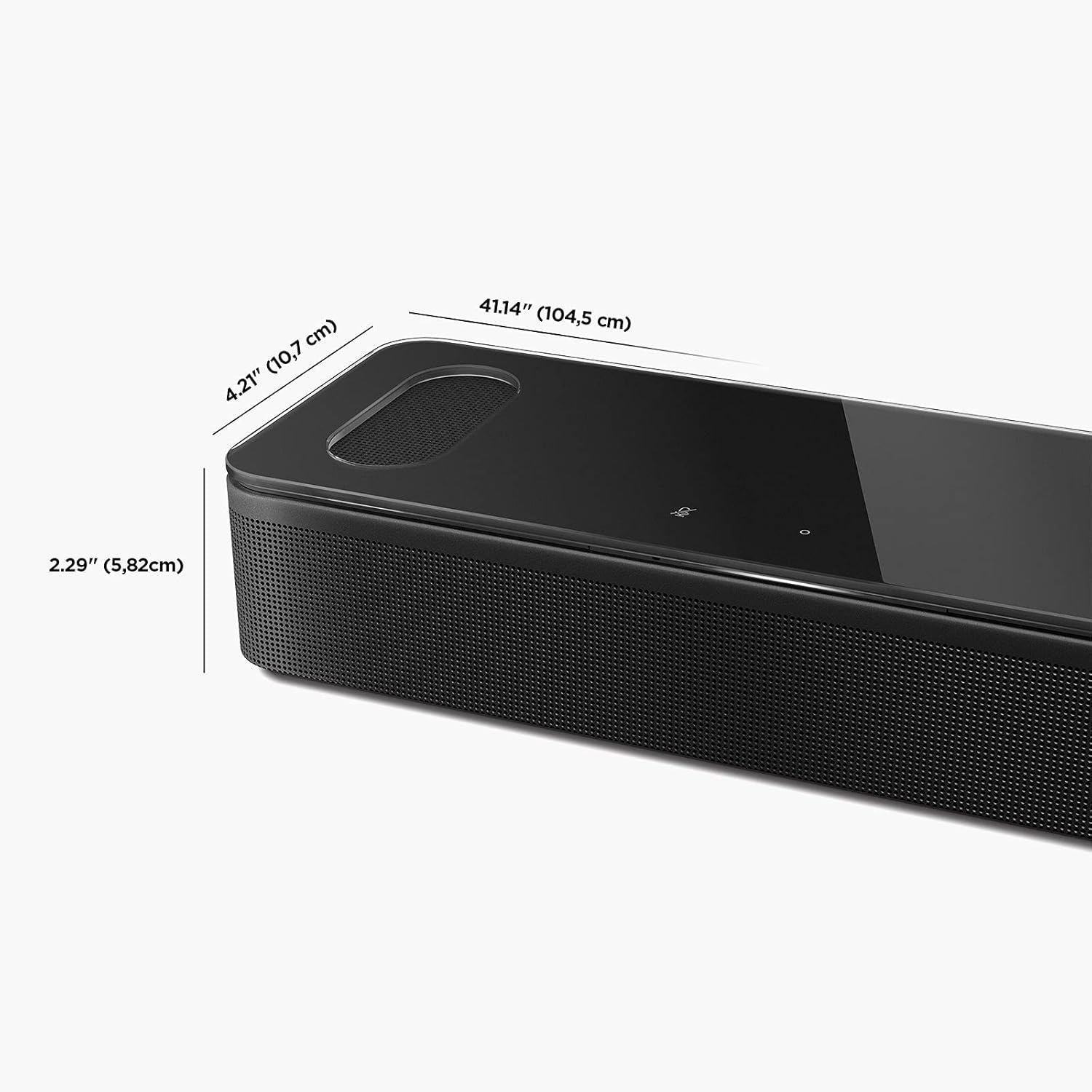
Image: Detailed dimensions of the Bose Smart Soundbar 900.
Garantie et assistance
Informations sur la garantie
The Bose Smart Soundbar 900 comes with a Garantie limitéeVeuillez vous référer à la carte de garantie fournie avec votre produit ou consulter le site officiel de Bose. webConsultez le site pour connaître les conditions générales détaillées concernant la couverture, la durée et les réclamations de garantie.
Assistance clientèle
For further assistance, technical support, or service inquiries, please contact Bose customer support through the following channels:
- Assistance Bose Website: Visite www.bose.com/support for FAQs, troubleshooting guides, and software updates.
- Application Bose Music : The app provides in-app support, tutorials, and direct access to customer service.
- Guide de l'utilisateur (PDF) : A comprehensive user guide is available for download at ce lien.
Ask a question about this manual
Ask about setup, troubleshooting, compatibility, parts, safety, or missing instructions. Manuals+ will review the question and use this page’s manual context to help answer it.