
1. Introduction
This manual provides essential information for the installation, configuration, and operation of your REOLINK RLC-510WA Outdoor WiFi Security Camera. This 5MP HD camera features dual-band Wi-Fi connectivity, smart person/vehicle/animal detection, and an IP67 weatherproof rating, making it suitable for various outdoor surveillance needs. Please read this manual thoroughly before use to ensure proper setup and functionality.

Image 1.1: REOLINK RLC-510WA Outdoor WiFi Security Camera.
2. Contenu de la boîte
Vérifiez que tous les composants sont présents dans votre colis :
- Camera (1 unit)
- Adaptateur secteur (1 unité)
- 4.5m Power Extension Cable (1 unit)
- Câble réseau de 1 m (1 unité)
- Guide de démarrage rapide (1 unité)
3. Produit terminéview
Familiarize yourself with the physical components of your RLC-510WA camera:

Image 3.1: Diagram illustrating the camera's dimensions and key components including antennas, mount, metal aluminum case, IR LEDs, high definition lens, daylight sensor, and microSD card slot.
- Antenne: Pour la réception du signal Wi-Fi.
- Monter: Adjustable bracket for wall or ceiling installation.
- Metal Aluminum Case: Durable housing for outdoor protection.
- 18 LED infrarouges : Fournir un éclairage infrarouge pour la vision nocturne.
- Objectif haute définition (f=4.0 mm) : Captures 5MP video.
- Capteur de luminosité: Détecte la lumière ambiante pour basculer entre les modes jour et nuit.
- Emplacement pour carte microSD : Prend en charge le stockage local jusqu'à 512 Go (carte non incluse).
4. Installation
Follow these steps for initial setup of your REOLINK RLC-510WA camera:
- Alimentation et connexion réseau :
Connect the camera to the power adapter and plug it into an electrical outlet. Connect the camera to your router using the provided network cable for initial setup. Ensure your router is powered on and functioning correctly.

Image 4.1: The camera connected to power and a router via an Ethernet cable for initial configuration.
- Téléchargez l'application Reolink :
Download the official Reolink App from your mobile device's app store (available for iOS and Android). Rechercher "Reolink" and install the application.
- Ajouter une caméra à l'application :
Open the Reolink App. Tap the "+" icon in the top right corner to add your camera. Follow the on-screen instructions to scan the QR code on the camera or manually enter its UID. Complete the network configuration within the app to connect the camera to your Wi-Fi network.
5. Mode d'emploi
5.1. Vivre View et enregistrement
Once connected, you can access the live video feed from your camera via the Reolink App or desktop client. The camera supports continuous recording, motion-triggered recording, and scheduled recording. Configure these options in the app settings.
5.2. Détection intelligente
The RLC-510WA features advanced smart detection capabilities, distinguishing between persons, vehicles, and animals. This reduces false alarms and ensures you receive relevant notifications.

Image 5.1: The camera's smart detection feature identifying a person, vehicle, and animal, with an alert notification displayed on a smartphone.
5.3. Connectivité Wi-Fi double bande
The camera supports both 2.4 GHz and 5 GHz Wi-Fi bands. The 2.4 GHz band offers a wider range, while the 5 GHz band provides faster data speeds and less interference. Choose the band that best suits your installation environment for optimal performance.
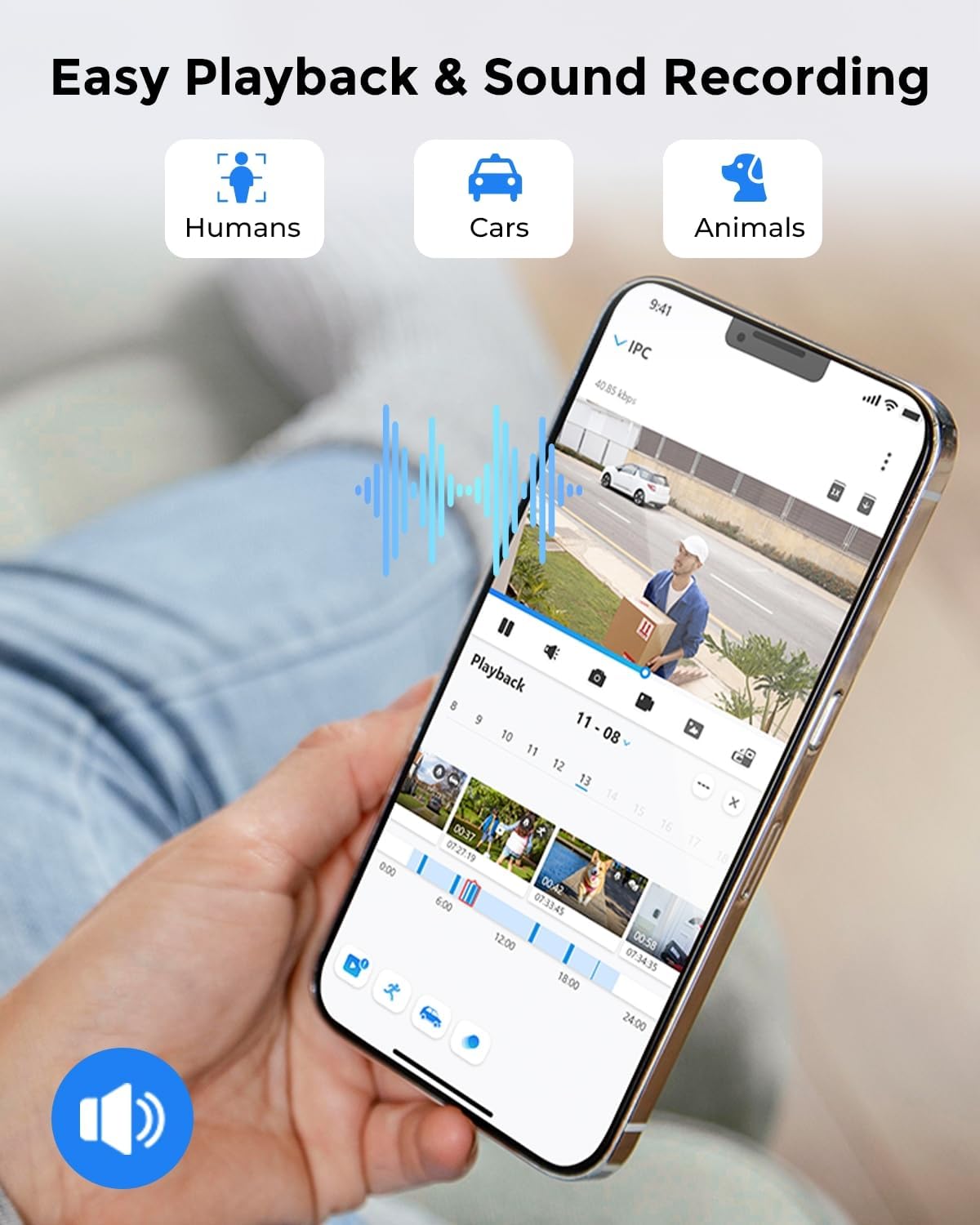
Image 5.2: Illustration of dual-band Wi-Fi coverage, showing 2.4 GHz for long transmission distance and 5 GHz for fast data speed.
5.4. Playback and Sound Recording
Review enregistré footage easily with the playback function. You can filter video clips by detected events (person, vehicle, animal) to quickly find important moments. The camera also captures sound, adding an additional layer of information to your recordings.

Image 5.3: A smartphone screen displaying the Reolink app's playback interface, showing a timeline with event markers for humans, cars, and animals, along with sound recording indicators.
5.5. Plusieurs options de stockage
Your RLC-510WA camera offers flexible storage solutions:
- carte Micro SD: Prend en charge jusqu'à 512 Go (non inclus) pour le stockage local.
- Enregistreur vidéo réseau Reolink : Compatible with Reolink Network Video Recorders for 24/7 continuous recording.
- Serveur ftp: Upload recorded footage to an FTP server for remote backup.

Image 5.4: Visual representation of the camera's storage options, including a microSD card slot, compatibility with a Reolink NVR for 24/7 recording, and FTP server integration.
6. Entretien
6.1. Étanchéité
The RLC-510WA camera has an IP67 weatherproof rating, ensuring protection against dust and water immersion. It is designed to operate in a wide temperature range, from -10°C (14°F) to 55°C (131°F).

Image 6.1: The camera installed outdoors, demonstrating its IP67 weatherproof rating and operating temperature range.
6.2. Nettoyage
Nettoyez régulièrement l'objectif de l'appareil photo avec un chiffon doux et sec.amp Utilisez un chiffon doux pour garantir une image nette. Évitez les produits chimiques agressifs et les matériaux abrasifs qui pourraient rayer l'objectif ou le boîtier.
7. Dépannage
Si vous rencontrez des problèmes avec votre appareil photo, consultez les problèmes courants et leurs solutions ci-dessous :
- Pas d'alimentation :
Ensure the power adapter is securely connected to the camera and a working electrical outlet. Check the power cable for any damage.
- Problèmes de connectivité Wi-Fi:
Verify that your router is functioning and the Wi-Fi signal strength is adequate at the camera's location. Try moving the camera closer to the router or using a Wi-Fi extender. Ensure you are connecting to the correct 2.4 GHz or 5 GHz band as configured in the app.
- Mauvaise qualité d'image :
Nettoyez l'objectif de l'appareil photo. Vérifiez qu'aucun obstacle ne se trouve dans le champ de vision de l'appareil photo. view. Ensure the camera is receiving sufficient power. Adjust video settings (resolution, bitrate) in the Reolink App.
- Détection de mouvement défaillante/trop sensible :
Adjust the sensitivity settings in the Reolink App. Configure detection zones to exclude areas with irrelevant motion (e.g., swaying trees). Ensure the smart detection feature (person/vehicle/animal) is enabled as desired.
- Impossible d'accéder à la caméra à distance :
Ensure your camera is connected to the internet and your mobile device has a stable internet connection. Check firewall settings on your router if you have custom configurations.
For further assistance, please visit the REOLINK support website ou contacter le service client.
8. Spécifications
| Fonctionnalité | Spécification |
|---|---|
| Nom du modèle | RLC-510WA |
| Résolution de capture vidéo | 5 MP |
| Fréquence d'images | 30 images par seconde |
| Technologie de connectivité | Wi-Fi 5 (double bande 2.4/5 GHz) |
| Gamme de vision nocturne | 100 Feet (with 18 IR LEDs) |
| Type d'alerte | Détection de personnes/véhicules/animaux/mouvements |
| Utilisation intérieure/extérieure | De plein air |
| Évaluation de la protection internationale | IP67 (étanche) |
| Source d'énergie | Électrique filaire (12 volts, 12 watts) |
| Appareils compatibles | Ordinateur de bureau, ordinateur portable, smartphone, tablette |
| Type de contrôleur | App Control, Reolink NVR Control |
| Type de montage | Montage mural / au plafond |
| ViewAngle d'attaque | 100 degrés |
| Matériel | Métal |
| Type de mémoire flash | up to 512GB MicroSD (not included) |
| Dimensions de l'article (L x l x H) | 7.32 x 2.64 x 2.64 pouces |
| Poids de l'article | 1.76 livres |
9. Garantie et assistance
Les produits REOLINK sont généralement couverts par une garantie limitée. Veuillez consulter la carte de garantie incluse dans votre emballage ou visiter le site officiel de REOLINK. webConsultez ce site pour connaître les conditions générales de garantie détaillées spécifiques à votre région.
For technical support, troubleshooting, or any inquiries regarding your RLC-510WA camera, please contact REOLINK customer support through their official website: