
1. Introduction
Merci pour votre achatasing the ORIA Motion Sensor Light. This battery-powered LED night light is designed to provide convenient, automatic illumination in various areas of your home. Please read this manual carefully before installation and use to ensure proper operation and longevity of your device.
2. Contenu du colis
- 3 x ORIA Motion Sensor Night Light
- 6 x vis
- 1 x ruban adhésif double face
- 1 x Manuel d'utilisation
3. Spécifications
| Modèle | OUS-HY-UF75Y |
| Source d'énergie | Piles 3 x AAA (non incluses) |
| Voltage | 4.5 volts |
| Quoitage | 0.2 watts |
| Type de source lumineuse | DIRIGÉ |
| Lumen | 20 XNUMX lm |
| Dossier spécial | Détecteur de mouvement |
| Durée de vie | 20,000 heures |
| Matériel | Acrylonitrile butadiène styrène (ABS) |
| Dimensions du produit | 1.04 x 2.75 x 3 pouces |
| Poids de l'article | 5.9 onces (par unité) |
4. Consignes de sécurité
- Ne mélangez pas des piles neuves et usagées.
- Ne mélangez pas des piles alcalines, standard (carbone-zinc) ou rechargeables (nickel-cadmium).
- Assurez-vous que les piles sont insérées en respectant la polarité (+ et -).
- Retirez les piles si la lumière ne doit pas être utilisée pendant une période prolongée.
- Cet appareil est destiné à un usage intérieur uniquement.
- Do not expose to water or excessive moisture.
- Tenir hors de portée des enfants.
5. Installation
5.1 Installation de la batterie
- Tournez délicatement le couvercle arrière de la lampe dans le sens inverse des aiguilles d'une montre pour ouvrir le compartiment à piles.
- Insérez 3 piles AAA (non incluses) dans le compartiment, en veillant à respecter la polarité.
- Remettez le couvercle arrière en place en alignant les repères et en tournant dans le sens des aiguilles d'une montre jusqu'à ce qu'il soit bien fixé.
5.2 options de montage
The ORIA Motion Sensor Light offers two installation methods:

Image: Demonstrates the two installation methods: using screws for a permanent fixture or double-sided adhesive tape for a temporary, non-damaging mount.
Option 1 : montage par vis
- Choose a desired location for the light.
- Mark the positions for the two screw holes on the mounting surface.
- Percez des trous pilotes si nécessaire.
- Fixez la lampe à la surface à l'aide des vis fournies.
Option 2: Adhesive Tape Mounting
- Clean and dry the desired mounting surface thoroughly.
- Peel off one side of the double-sided adhesive tape and apply it firmly to the back of the light.
- Peel off the other side of the tape and press the light firmly onto the mounting surface for at least 30 seconds.
- Allow 24 hours for the adhesive to fully cure before applying significant pressure.
6. Mode d'emploi
The ORIA Motion Sensor Light features three operating modes: ON, OFF, and AUTO.

Image: Illustrates the light's behavior: off during daylight, activating upon motion detection, and automatically turning off after 30 seconds of no motion.
6.1 Sélection du mode
Locate the switch on the side of the light to select your desired mode:
- SUR: The light will remain continuously on, regardless of ambient light or motion.
- OFF: La lumière restera éteinte.
- AUTO (Mode détecteur de mouvement) : The light will automatically turn on when motion is detected in a dark environment. It will turn off approximately 30 seconds after motion ceases.
6.2 Fonctionnalités du capteur de mouvement
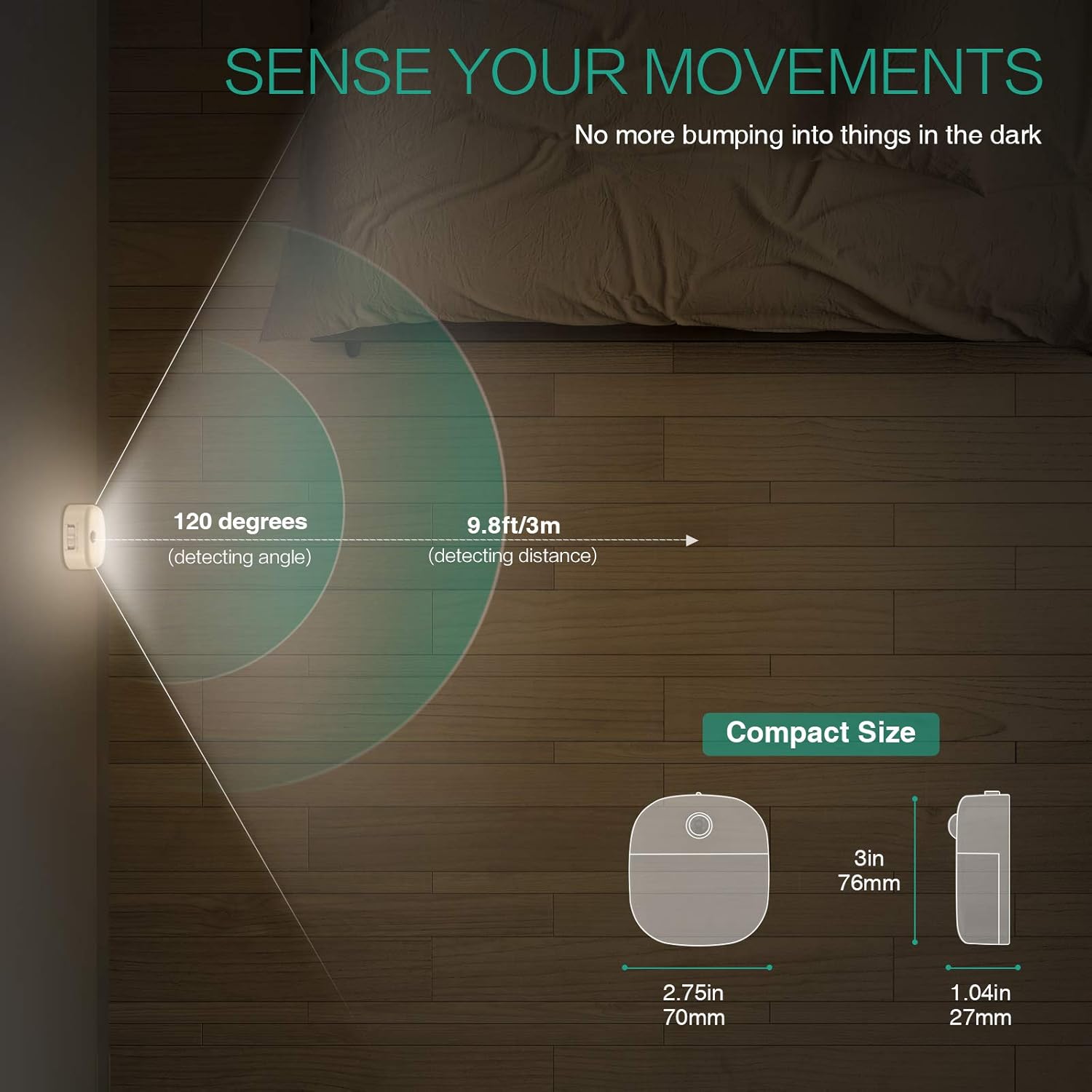
Image: A motion sensor light mounted on a wall, illuminating a staircase as a person ascends, demonstrating its practical application.
- Angle de détection : 120 degrés
- Distance de détection : Jusqu'à 9.8 pieds (3 mètres)
- The sensor is designed to activate only in low-light conditions to conserve battery life.
- Avoid placing the light in direct sunlight or near heat sources, as this may affect sensor performance.
Video: An official product video demonstrating the ORIA Motion Sensor Light's features, including its gentle illumination and motion detection capabilities in various settings like bookshelves and desks.
7. Entretien
- Nettoyage: Wipe the light with a soft, dry cloth. Do not use abrasive cleaners or immerse in water.
- Remplacement de la batterie : When the light dims or fails to activate, replace all 3 AAA batteries with new ones. Ensure correct polarity.
- Entretien du capteur : Keep the motion sensor lens clean and unobstructed for optimal performance.
8. Dépannage
| Problème | Cause possible | Solution |
|---|---|---|
| La lumière ne s'allume pas. |
|
|
| Light stays on continuously (in AUTO mode). |
|
|
| Motion sensor is not sensitive. |
|
|
9. Garantie et assistance
ORIA products are designed for reliability and performance. For warranty information or technical support, please refer to the contact details provided with your purchase or visit the official ORIA website.
Veuillez conserver ce manuel pour référence ultérieure.