
Introduction
Thank you for choosing the WEKOME D6 Desktop Mini Bluetooth Speaker. This compact and portable speaker delivers clear sound quality and offers versatile connectivity options. This manual provides detailed instructions on how to set up, operate, and maintain your speaker to ensure optimal performance.
Produit terminéview

Figure 1 : Devant view of the WEKOME D6 Mini Bluetooth Speaker, highlighting its compact cylindrical design and control panel.
The WEKOME D6 is a palm-sized desktop speaker designed for portability and ease of use. It features Bluetooth connectivity for wireless audio streaming and a TF card slot for direct music playback. Its robust design ensures clear audio output for various compatible devices.
Caractéristiques principales :
- Connectivité Bluetooth : Seamless wireless pairing with smartphones, tablets, and laptops.
- Conception compacte : Palm-sized for easy portability.
- Qualité sonore claire : Delivers crisp and clear audio.
- Longue durée de vie de la batterie : 500 mAh battery provides approximately 4-5 hours of playback.
- Portée étendue : Bluetooth transmission distance of up to 10 meters (33 feet).
- Prise en charge des cartes TF : Maximum support for 32GB TF (MicroSD) cards for direct music playback.
- Puissance de sortie : Speaker maximum output power of 10 Watts.
Contenu du colis
Veuillez vérifier que le colis contient les éléments suivants :
- WEKOME D6 Desktop Mini Bluetooth Speaker
- Câble de chargement USB
- Manuel de l'utilisateur (ce document)
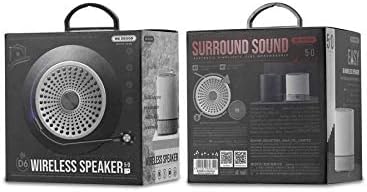
Figure 2 : Retail packaging of the WEKOME D6 Mini Bluetooth Speaker, illustrating the product's branding and key information on the box.
Installation
1. Chargement du haut-parleur :
- Connectez la petite extrémité du câble de chargement USB au port de chargement de l'enceinte.
- Connectez l'autre extrémité du câble USB à un adaptateur secteur USB (non inclus) ou au port USB d'un ordinateur.
- The charging indicator light will illuminate during charging and turn off once fully charged. A full charge typically takes 2-3 hours.
2. Mise sous/hors tension :
- Pour allumer : Appuyez et maintenez enfoncé le Bouton d'alimentation for a few seconds until you hear an audible prompt or see an indicator light.
- Pour éteindre : Appuyez et maintenez enfoncé le Bouton d'alimentation à nouveau pendant quelques secondes.
3. Couplage Bluetooth :
- Ensure the speaker is powered on and in Bluetooth pairing mode (it will usually enter this mode automatically upon first power-on or if no device is connected). The indicator light will typically flash rapidly.
- Sur votre appareil (smartphone, tablette, ordinateur portable), activez le Bluetooth et recherchez les appareils disponibles.
- Select "WEKOME D6" from the list of found devices.
- Une fois l'appairage effectué, l'enceinte émet une confirmation sonore et le voyant cesse de clignoter pour rester allumé en continu.
- L'enceinte se reconnectera automatiquement au dernier appareil apparié lors de sa mise sous tension, si le Bluetooth de l'appareil est activé et à portée.
4. TF Card Insertion:
- Locate the TF card slot on the speaker.
- Gently insert a TF (MicroSD) card (up to 32GB) with pre-loaded music fileinsérer dans la fente jusqu'à ce qu'elle s'enclenche.
- The speaker will automatically switch to TF card playback mode if a card is detected.
Utilisation du haut-parleur
Boutons de contrôle :
Refer to Figure 1 for the location of the control buttons.
- Bouton d'alimentation : Appuyez et maintenez pour allumer/éteindre.
- Bouton Volume + / Piste suivante (+):
- Appui court : Augmenter le volume.
- Appui long : Passer au morceau suivant.
- Bouton Lecture/Pause (||): Appuyez brièvement pour lire ou mettre en pause la musique.
- Bouton de diminution du volume / piste précédente (-):
- Appui court : Diminuer le volume.
- Appui long : Aller à la piste précédente.
- Mode Button (Dot between + and Play/Pause): Short press to switch between Bluetooth mode and TF card mode (if a TF card is inserted).
Entretien
- Nettoyage: Utilisez un chiffon doux et sec pour nettoyer la surface du haut-parleur. N'utilisez pas de nettoyants abrasifs, d'alcool ni d'autres solvants chimiques, car ils pourraient endommager la finition.
- Stockage: Rangez l'enceinte dans un endroit frais et sec, à l'abri de la lumière directe du soleil et des températures extrêmes.
- Entretien de la batterie: Pour prolonger la durée de vie de la batterie, évitez de décharger complètement l'enceinte fréquemment. Rechargez-la régulièrement, même si vous ne l'utilisez pas pendant une période prolongée.
- Résistance à l'eau : This speaker is not water-resistant. Avoid exposure to liquids.
Dépannage
| Problème | Cause possible | Solution |
|---|---|---|
| Le haut-parleur ne s'allume pas. | Batterie faible. | Chargez complètement l'enceinte. |
| Pas de son. | Volume too low; Speaker not paired; Incorrect mode. | Increase volume; Ensure speaker is paired; Switch to correct mode (Bluetooth/TF card). |
| Impossible de coupler avec un appareil Bluetooth. | Enceinte non en mode appairage ; Bluetooth de l’appareil désactivé ; Trop loin de l’enceinte. | Ensure speaker is in pairing mode; Turn on device Bluetooth; Move device closer to speaker (within 10M). |
| Music stops playing from TF card. | TF card not inserted correctly; Corrupted files; Unsupported format. | Reinsert TF card; Check TF card for errors; Ensure music fileLes fichiers sont dans un format pris en charge (par exemple, MP3). |
Caractéristiques
| Marque | BIENVENUE |
| Nom du modèle | D6 |
| Technologie de connectivité | Bluetooth |
| Type de haut-parleur | Desktop Mini Speaker |
| Puissance de sortie maximale du haut-parleur | 10 watts |
| Capacité de la batterie | 500 mAh (approx. 4-5 hours playback) |
| Distance de transmission | 10 mètres (33 pieds) |
| Prise en charge de la carte TF | Jusqu'à 32 Go |
| Appareils compatibles | Ordinateur portable, smartphone, tablette |
| Type de montage | Dessus de table |
| Dimensions du colis | 12.4 x 11.4 x 7.6 cm |
| Poids | 210 g |
Garantie et assistance
For warranty information and technical support, please refer to the warranty card included with your product or contact WEKOME customer service through their official website or authorized retailers. Keep your purchase receipt as proof of purchase for warranty claims.