
MAIDeSITe HBITT
Manuel d'utilisation du cadre de bureau assis-debout électrique MAIDeSITe T2 Pro
Model: HBITT
1. Introduction
Thank you for choosing the MAIDeSITe T2 Pro Electric Standing Desk Frame. This dual-motor height-adjustable desk frame is designed to provide a flexible and ergonomic workspace, allowing you to easily switch between sitting and standing positions throughout your day. This manual provides essential information for assembly, operation, and maintenance to ensure safe and efficient use of your new desk frame.
2. Consignes de sécurité
Please read and understand all safety instructions before assembling or operating the desk frame. Failure to follow these instructions may result in injury or damage to the product.
- Avant l'assemblage, assurez-vous que tous les composants sont présents et non endommagés.
- Tenez les enfants et les animaux domestiques éloignés du bureau pendant son utilisation afin d'éviter tout accident.
- Do not place hands or other body parts near moving parts during height adjustment.
- Ensure there are no obstructions (e.g., chairs, cabinets, cables) in the desk's path during movement. The desk features collision protection, but it is best to avoid obstacles.
- Ne surchargez pas le bureau. Consultez les spécifications pour connaître la capacité de charge maximale.
- Utilisez uniquement l'adaptateur secteur et les composants fournis.
- Do not disassemble or modify the desk frame. Contact customer support for repairs.
- Tenir les liquides éloignés des composants électriques.
3. Contenu du colis
Déballez soigneusement tous les articles et vérifiez que vous avez bien reçu les composants suivants :
- Pieds de bureau (2)
- Crossbar/Frame Support (1 set)
- Control Panel with LED Display (1)
- Adaptateur secteur et câble (1)
- Connection Cables (for motors and control panel)
- Quincaillerie de montage (vis, boulons, rondelles)
- Assembly Tools (L-wrench, screwdriver)
- Cable Management Accessories (e.g., cable ties, adhesive clips)
- Manuel de l'utilisateur (ce document)

Image : Terminéview of the MAIDeSITe T2 Pro Electric Standing Desk Frame components, including the legs, crossbar, and control panel.
4. Configuration et assemblage
Assembly typically requires two people. Please follow the detailed instructions provided in the separate assembly guide included with your package. The general steps are outlined below:
- Préparer l'espace de travail : Clear a spacious area for assembly. Lay down a soft cloth or cardboard to protect components from scratches.
- Assemble Legs and Crossbar: Attach the desk legs to the adjustable crossbar frame using the provided hardware. Ensure all connections are secure.
- Fixer les pieds : Secure the foot supports to the bottom of each leg.
- Panneau de commande du support : Attach the control panel to the underside of your chosen desktop (not included) in an easily accessible location.
- Raccordez les moteurs et le panneau de commande : Connect the motor cables from each leg to the control box, and then connect the control panel cable to the control box.
- Attacher un ordinateur de bureau : Carefully place your desktop onto the assembled frame. Secure the desktop to the frame using appropriate screws (ensure screws are not too long to penetrate the desktop surface).
- Connecter l'alimentation : Branchez l'adaptateur secteur au boîtier de commande, puis à une prise murale.
- Gestion des câbles: Use the included cable management accessories to organize and secure all cables, preventing tangles and ensuring safe operation.

Image: Components of the MAIDeSITe T2 Pro desk frame, illustrating the parts involved in assembly.
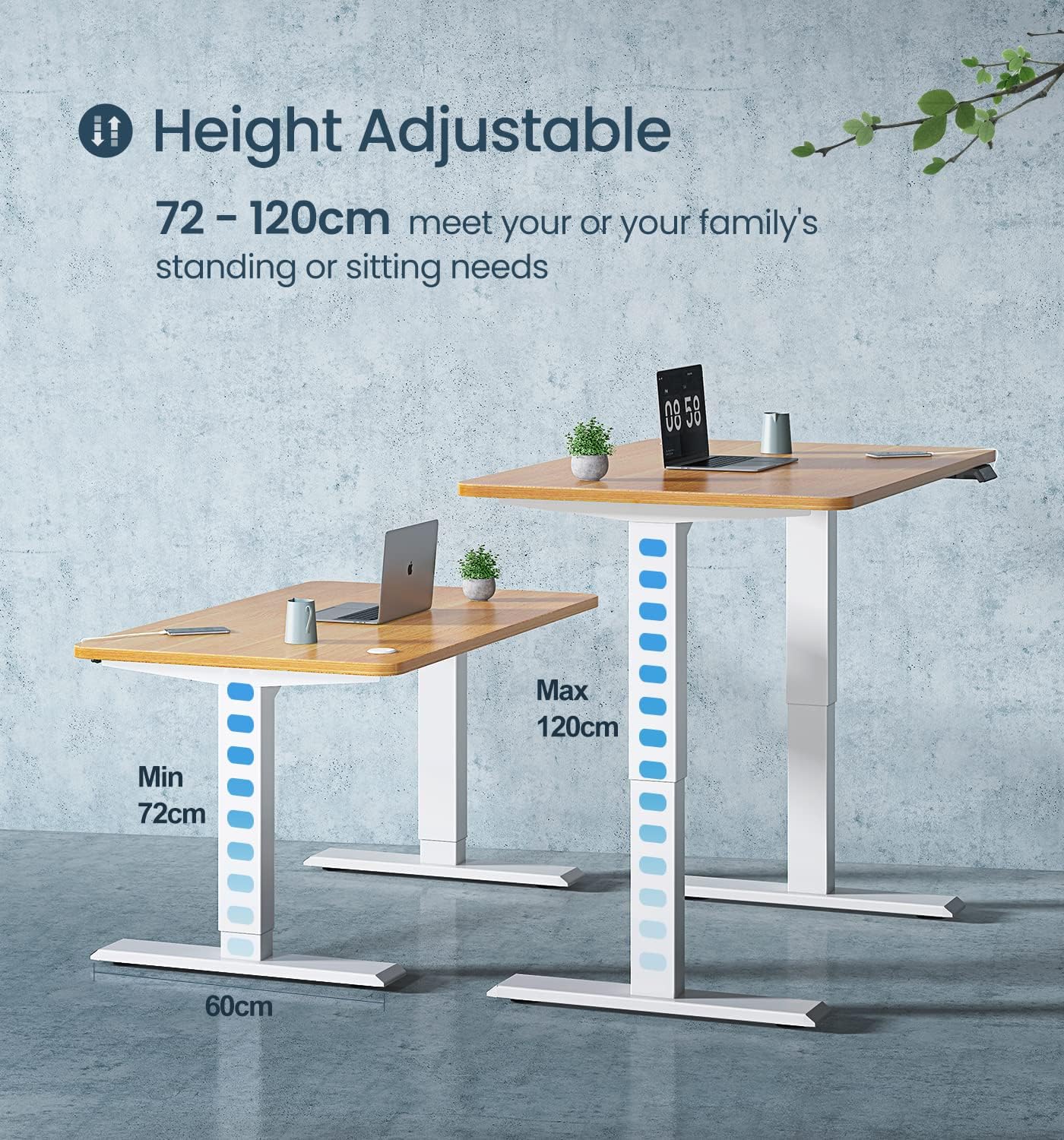
Image: The MAIDeSITe T2 Pro desk frame showing its adjustable width range (100-180cm) suitable for various desktop sizes.
5. Mode d'emploi
The MAIDeSITe T2 Pro desk frame features an intuitive control panel for easy height adjustment and memory functions.

Image: Close-up of the MAIDeSITe T2 Pro control panel, highlighting the LCD display, memory buttons, USB charging port, and child lock feature.
5.1. Réglage de la hauteur de base
- Appuyez sur le HAUT (▲) bouton pour lever le bureau.
- Appuyez sur le BAS (▼) bouton pour abaisser le bureau.
- Release the button at your desired height. The current height will be displayed on the LCD screen.
5.2. Préréglages de mémoire
The control panel allows you to save up to four preferred heights for quick adjustment.
- Réglez le bureau à la hauteur souhaitée à l'aide des boutons HAUT/BAS.
- Appuyez sur le "ENSEMBLE" bouton. L'écran affichera « S- ».
- Dans les 3 secondes, appuyez sur l'un des boutons de mémoire ("1", "2", "3", ou "4"L'écran affichera « S-1 », « S-2 », etc., confirmant ainsi que la hauteur est enregistrée.
- Pour régler le bureau à une hauteur enregistrée, il suffit d'appuyer sur le bouton de mémoire correspondant ("1", "2", "3", ou "4"). The desk will automatically move to that position.
5.3. Fonction de verrouillage enfant
Pour éviter tout réglage accidentel, le panneau de commande est équipé d'une sécurité enfant.
- Pour activer le verrouillage enfant, appuyez longuement sur le bouton. "M" button (or the lock icon if present) for 3 seconds until "LOC" appears on the display. All buttons will be disabled.
- Pour désactiver le verrouillage enfant, appuyez longuement sur le bouton. "M" button (or the lock icon) again for 3 seconds until "LOC" disappears. The buttons will become active.
5.4. Timer/Reminder Function
The desk can remind you to change positions at set intervals.
- Appuyez sur le "0.5h", "1h", ou "2h" button to set a reminder for 30 minutes, 1 hour, or 2 hours, respectively.
- The timer will start, and the desk will beep to remind you when the time is up.
- To cancel the timer, press the active timer button again or any other button.
5.5. Port de chargement USB
The control panel includes a USB port for convenient charging of your devices.
- Simply plug your USB charging cable into the port on the control panel to charge compatible devices.
6. Entretien
Regular maintenance helps ensure the longevity and proper functioning of your desk frame.
- Nettoyage: Essuyez le cadre du bureau et le panneau de commande avec un chiffon doux et sec.amp tissu. Évitez d'utiliser des produits chimiques agressifs ou des nettoyants abrasifs.
- Gestion des câbles: Periodically check that all cables are securely managed and not pinched or tangled.
- Serrage des vis : Occasionally check and tighten any loose screws or bolts on the frame to maintain stability.
- Évitez les déversements : Prevent liquids from spilling onto the control panel or motor components.
7. Dépannage
If you encounter any issues with your MAIDeSITe T2 Pro desk frame, refer to the following common troubleshooting steps:
| Problème | Cause possible | Solution |
|---|---|---|
| Le bureau ne bouge pas. | Power cable disconnected, child lock active, motor error. |
|
| Le bureau bouge de façon irrégulière ou fait un bruit inhabituel. | Surcharge, connexions desserrées, obstruction. |
|
| Display shows an error code (e.g., "E01", "RST"). | Overheat protection, motor fault, need for reset. |
|
If these steps do not resolve the issue, please contact MAIDeSITe customer support for further assistance.
8. Spécifications
| Fonctionnalité | Détail |
|---|---|
| Numéro de modèle | HBITT |
| Plage de réglage de la hauteur | 72 cm - 120 cm (28.3" - 47.2") |
| Plage de réglage de la largeur du cadre | 100 cm - 180 cm (39.4" - 70.9") |
| Type de moteur | Moteur double |
| Vitesse de levage | 32 mm/s |
| Capacité de charge maximale | 160 kg (352 lb) |
| Niveau de bruit | < 45 dB |
| Matériel | Powder-coated Alloy Steel / Carbon Steel |
| Couleur | Blanc |
| Caractéristiques spéciales | 4 Memory Presets, Child Safety Lock, Timer Function, Built-in USB Port, Collision Protection |

Image: Illustration of the MAIDeSITe T2 Pro desk frame's height adjustment range from 72cm (min) to 120cm (max).

Image: Diagram illustrating the dual motor lift system and key performance specifications such as 160kg maximum load, 32mm/sec lifting speed, and less than 45dB noise.
9. Garantie et assistance
MAIDeSITe stands behind the quality of its products.
- Garantie: The MAIDeSITe T2 Pro Electric Standing Desk Frame comes with a 5-year warranty on the table chassis et un Garantie de 3 ans sur le moteur. This warranty covers manufacturing defects and material faults under normal use.
- Assistance clientèle : For technical assistance, troubleshooting, or warranty claims, please contact MAIDeSITe customer support. Refer to the contact information provided on the product packaging or the official MAIDeSITe website.

Image: The MAIDeSITe T2 Pro Electric Standing Desk in a modern office environment, highlighting its aesthetic and the 5-year warranty badge.
Documents connexes - HBITT
 |
Guide d'utilisation du cadre de bureau assis-debout MAIDESITE T1 Pro Ce guide d'utilisation fournit des instructions et des informations de sécurité pour le cadre de bureau assis-debout MAIDESITE T1 Pro, y compris les étapes d'assemblage, les listes de pièces et les spécifications du produit. |
 |
Maidesite M021-01/M021-02 Standing Desk Assembly Instructions Comprehensive assembly instructions and user guide for the Maidesite M021-01/M021-02 electric height-adjustable standing desk. Includes parts list, hardware, step-by-step assembly, controller functions, and troubleshooting. |
 |
Manuel d'utilisation du bureau électrique réglable en hauteur Maidesite Manuel d'utilisation du bureau électrique réglable en hauteur Maidesite, couvrant l'assemblage, le fonctionnement et le dépannage. |
 |
Guide d'utilisation du bureau debout Maidesite T2 Pro/T2 Pro Plus Guide d'utilisation complet pour le bureau debout Maidesite T2 Pro et T2 Pro Plus, couvrant les instructions de sécurité, d'assemblage et de panneau de commande. |
 |
Manuel d'utilisation du bureau électrique réglable en hauteur MAIDESITE Manuel d'utilisation complet du bureau électrique réglable en hauteur MAIDESITE, détaillant l'assemblage, le fonctionnement, les consignes de sécurité et le dépannage pour une utilisation optimale. Liste des pièces et contenu de l'emballage inclus. |
 |
Manuel d'instructions du monte-escalier Maidesite : Guide de sécurité, d'utilisation et d'entretien Manuel d'instructions complet pour le monte-escalier Maidesite, couvrant les consignes de sécurité, le fonctionnement du chargeur et du contrôleur, la structure du produit, les spécifications techniques et la maintenance. Conçu pour la rééducation à domicile. |
Ask a question about this manual
Ask about setup, troubleshooting, compatibility, parts, safety, or missing instructions. Manuals+ will review the question and use this page’s manual context to help answer it.