
1. Introduction
Thank you for choosing the FeinTech LED Desk Lamp LTL00600. This high-quality desk lamp is designed to provide optimal lighting for your workspace while offering convenient features such as a USB charging port, adjustable brightness, and customizable color temperature. Please read this manual thoroughly before use to ensure proper operation and to maximize the lifespan of your product.
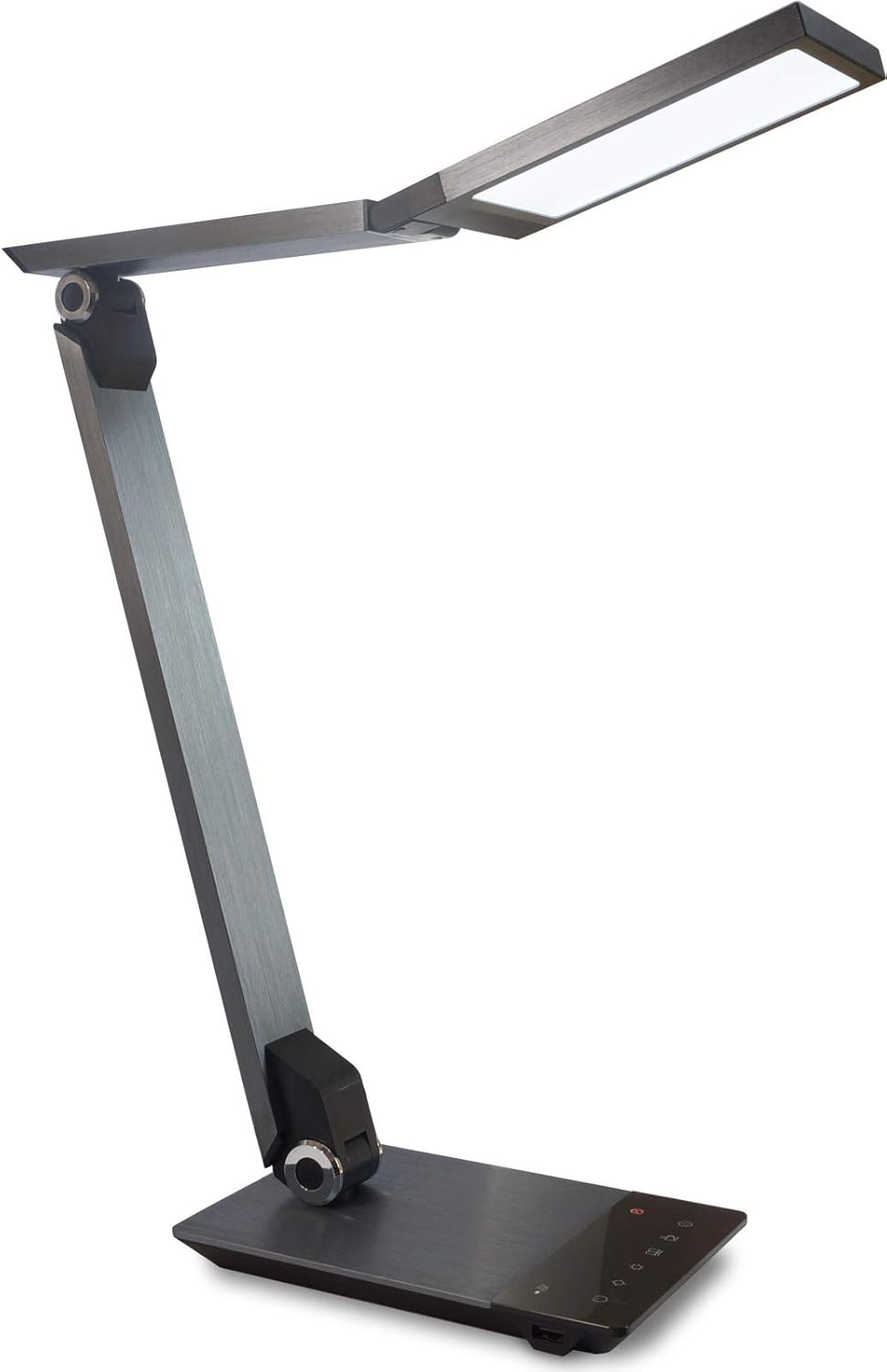
Image 1.1: FeinTech LED Desk Lamp LTL00600. This image displays the lamp dans sa position verticale, montrantasing its brushed aluminum finish and sleek design.
2. Consignes de sécurité
Pour éviter tout dommage ou blessure, veuillez respecter les consignes de sécurité suivantes :
- Assurez-vous que l'adaptateur secteur est branché sur une prise de courant appropriée.
- N'exposez pas le lamp à l'eau ou à une humidité excessive.
- Avoid disassembling or modifying the lampLes réparations ne doivent être effectuées que par du personnel qualifié.
- Gardez le lamp loin des sources de chaleur et de la lumière directe du soleil.
- Nettoyez le lamp Utilisez uniquement un chiffon doux et sec. N’utilisez pas de nettoyants abrasifs ni de solvants.
- Ne regardez pas directement la source lumineuse LED pendant des périodes prolongées.
3. Contenu du colis
Veuillez vérifier que tous les articles sont présents dans le colis :
- Bureau LED FeinTech Lamp (Model: LTL00600)
- Adaptateur secteur (12 V/2 A)
4. Produit terminéview
Familiarize yourself with the components of your FeinTech LED Desk Lamp:
- Lamp Tête: Contains the LED light source.
- Bras réglables : Multiple joints for flexible positioning.
- Base: Provides stability and houses the control panel and USB port.
- Panneau de contrôle: Touch-sensitive buttons for power, brightness, color temperature, and timer.
- Port de charge USB: Located on the side of the base for device charging.

Image 4.1 : Vue de dessus view du lamp's base and control panel. This image highlights the touch-sensitive buttons for various functions.

Image 4.2 : Côté view du lamp's base, showing the integrated USB charging port. This port allows for convenient charging of compatible devices.
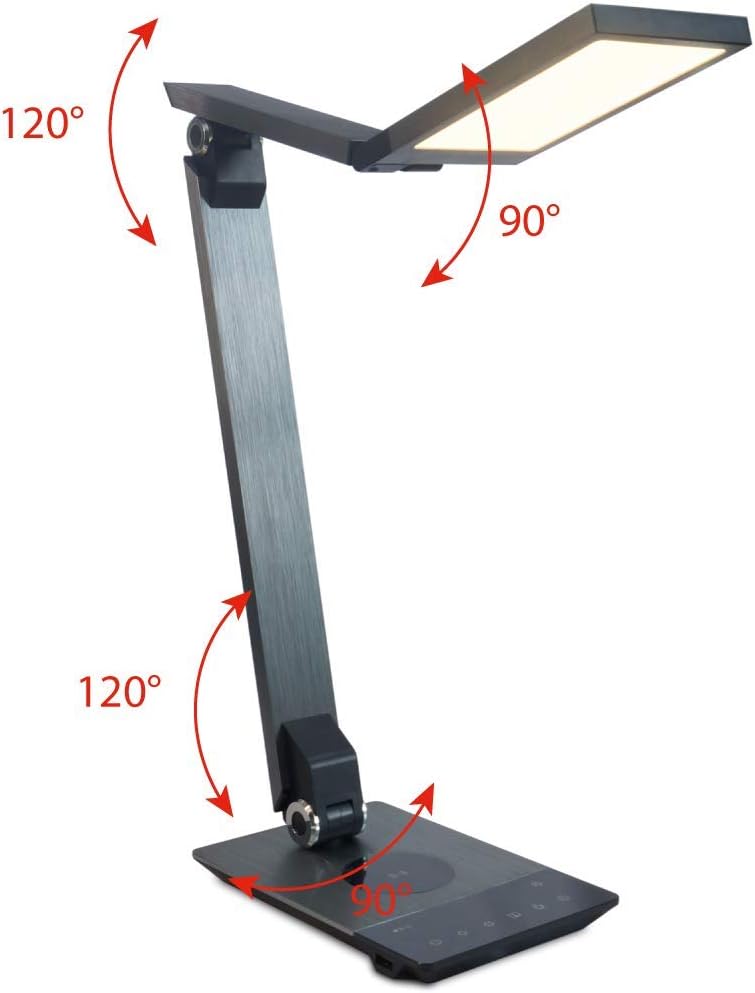
Image 4.3: Diagram illustrating the articulation angles of the lamp's joints. The lamp head can rotate 90 degrees, the upper arm 120 degrees, and the lower arm 120 degrees, allowing for flexible positioning.
5. Installation
Suivez ces étapes pour la configuration initiale :
- Déballer: Retirez soigneusement tous les composants de l'emballage.
- Placement: Placez le lamp base on a stable, flat surface. Ensure there is enough space for the lamp to be adjusted without obstruction.
- Connecter l'alimentation : Insérez le câble de l'adaptateur secteur dans le port d'entrée CC situé à l'arrière de l'appareil.amp Branchez l'adaptateur secteur sur une prise électrique standard.
6. Mode d'emploi
The FeinTech LED Desk Lamp features intuitive touch controls on its base.
6.1 Mise sous/hors tension
- Touchez le Bouton d'alimentation on the control panel (refer to Image 4.1) to turn the lamp allumé ou éteint.
6.2 Réglage de la luminosité (atténuation)
- Avec le lamp on, touch and hold the Luminosité vers le haut or Luminosité vers le bas buttons (refer to Image 4.1) to steplessly adjust the light intensity.
- Le lamp base will vibrate slightly when the minimum or maximum brightness level is reached.
6.3 Réglage de la température de couleur
- Avec le lamp on, touch and hold the Color Temperature Up or Color Temperature Down buttons (refer to Image 4.1) to steplessly adjust the light color from warm white (2700K) to cool white (6500K).
- Le lamp base will vibrate slightly when the minimum or maximum color temperature is reached.
6.4 Favorite Settings
- Le lamp allows you to store and recall 3 favorite light settings (brightness and color temperature).
- To save a setting: Adjust the brightness and color temperature to your desired level. Then, touch and hold one of the Boutons favoris (refer to Image 4.1) until the lamp flashes briefly, indicating the setting is saved.
- To recall a setting: Simply touch the corresponding Bouton favori.
- The last used brightness and color temperature settings are automatically saved even after the lamp est éteint.
6.5 Fonction de chargement USB
- Connect your smartphone or other compatible device to the USB charging port on the side of the lamp base (refer to Image 4.2) using a suitable USB cable.
- The intelligent USB port delivers up to 2.4A for fast charging.
- An LED indicator will signal ongoing and completed charging status.
6.6 Fonction minuterie
- Touchez le Bouton de minuterie (refer to Image 4.1) to activate the timer function.
- The first touch activates a 3-minute timer.
- A second touch activates a 1-hour timer.
- Le lamp will automatically turn off after the selected time period.
7. Entretien
Pour entretenir votre lamp's appearance and functionality:
- Débranchez toujours le lamp de l'alimentation électrique avant de le nettoyer.
- Essuyez le lamp avec un chiffon doux, sec et non pelucheux.
- N’utilisez pas de nettoyants liquides ou en aérosol, car ils pourraient endommager la finition ou les composants internes.
- Avoid scratching the brushed aluminum surface.
8. Dépannage
Si vous rencontrez des problèmes avec votre lamp, se référer aux problèmes et solutions courants suivants :
| Problème | Cause possible | Solution |
|---|---|---|
| Lamp ne s'allume pas. | Pas d'alimentation électrique. | Check if the power adapter is securely connected to the lamp et la prise électrique. Testez la prise avec un autre appareil. |
| Le chargement USB ne fonctionne pas. | Appareil incompatible ou câble défectueux. | Ensure your device is compatible with USB charging. Try a different USB cable. Verify the lamp est sous tension. |
| Les commandes tactiles ne répondent pas. | Problème logiciel temporaire ou problème d'alimentation. | Disconnect the power adapter for 30 seconds, then reconnect it. Ensure your fingers are clean and dry when operating the touch controls. |
9. Spécifications
| Numéro de modèle | LTL00600 |
| Dimensions (L x l x H) | 36 x 13.5 x 44 cm (environ 14.2 x 5.3 x 17.3 pouces) |
| Poids | 1.84 kg (environ 4.06 lb) |
| Matériel | Aluminium brossé |
| Source de lumière | DIRIGÉ |
| Max. Light Output | 500 lumens (1000 lux at 40 cm distance) |
| Température de couleur (CCT) | 2700 K (Warm White) to 6500 K (Cool White) |
| Power Consumption (Lamp seulement) | Max. 10 W |
| Power Consumption (Lamp & Charging) | Max. 22 W |
| Sortie USB | Jusqu'à 2.4 A |
| Vol d'entréetage (Adaptateur) | 12 V / 2 A |
| Type de commutateur | Touche |

Image 9.1: Diagram showing the dimensions of the FeinTech LED Desk Lamp. Le lamp measures approximately 36 cm in length, 13.5 cm in width, and 44 cm in height.
10. Garantie et assistance
FeinTech products are designed for reliability and performance. For warranty information or technical support, please refer to the warranty card included with your purchase or visit the official FeinTech webVeuillez conserver votre preuve d'achat pour toute réclamation au titre de la garantie.