
Introduction
Thank you for choosing the Udreamer Voksun 3-Speed Precision Turntable. This high-fidelity vinyl record player is designed to provide an exceptional audio experience with its magnetic cartridge, belt-drive system, and dual 15-watt speakers. It also features Bluetooth connectivity for versatile audio streaming. This manual will guide you through the setup, operation, and maintenance of your new turntable to ensure optimal performance and longevity.
Produit terminéview
Composants et commandes
Familiarize yourself with the various parts of your turntable:

Figure 1: Turntable Components Overview
- 45 RPM Record Adapter: Utilisé pour lire les disques 7 pouces à grand trou central.
- Plateau tournant: La plateforme rotative où sont placés les disques.
- Tonearm Counterweight: Balances the tonearm for proper tracking force.
- Tonearm Holder: Permet de fixer le bras de lecture lorsqu'il n'est pas utilisé.
- Levier de levage : Raises and lowers the tonearm gently onto the record.
- Bras de lecture: Contient la cartouche et le stylet.
- 33/45/78 RPM Speed Selector: Adjusts the platter speed to match your record.
- Pitch Adjust Switch: Permet d'ajuster la vitesse de lecture.
- Power Switch/Volume Control/Bluetooth Control: Multi-function knob for power, volume, and mode selection.
- Aiguille du stylet : The needle that reads the grooves of the record.
Installation
1. Déballage
Retirez soigneusement tous les composants de l'emballage. Assurez-vous que toutes les pièces mentionnées dans la description du produit sont présentes.view section are present. Retain packaging for future transport or storage.
2. Belt Installation
The belt is pre-stored in the groove on the back of the iron turntable. To install:
- Hold up the turntable platter and rotate it 90 degrees.
- Locate the belt in the groove and carefully place it onto the drive shaft.
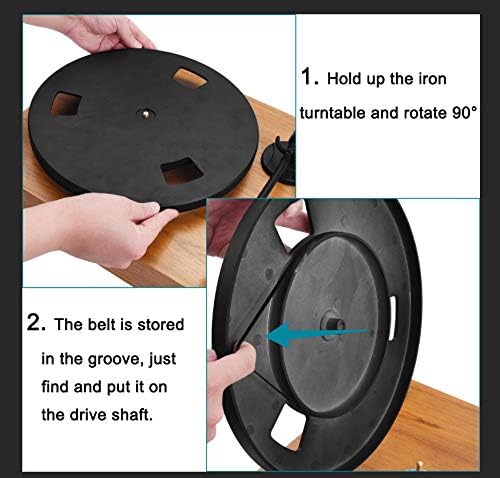
Figure 2: Belt Installation Steps
3. Connexion du haut-parleur
Connect the included dual 15-watt speakers to the turntable using the provided speaker cables. Ensure the left speaker is connected to the 'SP-L' output and the right speaker to the 'SP-R' output on the rear of the turntable.
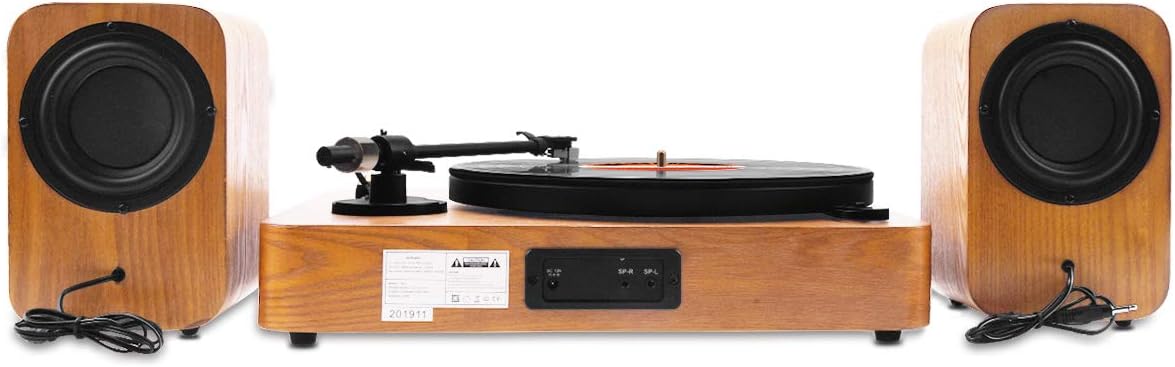
Figure 3: Rear Connections for Speakers
4. Connexion électrique
Connect the power adapter to the DC input on the rear of the turntable, then plug it into a suitable wall outlet.
Mode d'emploi
1. Lecture d'un disque
- Place a record on the turntable platter. If playing a 7-inch record, use the 45 RPM adapter.
- Select the appropriate speed (33, 45, or 78 RPM) using the speed selector knob.
- Gently release the tonearm from its holder.
- Soulevez le bras de lecture à l'aide du levier de levage.
- Positionnez le bras de lecture au-dessus du sillon de départ souhaité du disque.
- Abaissez lentement le bras de lecture à l'aide du levier de levage. Le diamant entrera en contact avec le disque et la lecture commencera.
- Réglez le volume à l'aide du bouton de réglage du volume.
- To stop playback, lift the tonearm using the lift lever, return it to the tonearm holder, and secure it.
2. Speed and Pitch Adjustment
The turntable supports three playback speeds: 33, 45, and 78 RPM. Use the speed selector knob to choose the correct speed for your record. The pitch adjust switch allows for minor adjustments to the playback speed, which can be useful for fine-tuning or correcting slight variations in record pressings.

Figure 4: Speed and Pitch Controls
3. Mode Bluetooth
The turntable features a built-in Bluetooth receiver, allowing you to stream music wirelessly from your smartphone, tablet, or other Bluetooth-enabled devices through the turntable's speakers.
- Allumez le plateau tournant.
- Rotate the Power/Volume/Bluetooth Control knob to select Bluetooth mode. The indicator light will typically change to a blue flashing light, indicating it's in pairing mode.
- On your external device, enable Bluetooth and search for available devices. Select 'Voksun Turntable' (or similar) from the list.
- Once paired, the indicator light will become solid blue, and you can begin streaming audio.

Figure 5 : Connectivité Bluetooth
4. Vidéos opérationnelles
Video 1: Demonstrates the Voksun turntable in operation, showcasing its features and sound quality. This video provides a practical overview de la fonctionnalité du produit.
Video 2: Shows the turntable playing a record, highlighting its ease of use and immediate functionality right out of the box.
Entretien
1. Nettoyage
Regularly dust the turntable and speakers with a soft, dry cloth. Avoid using harsh chemicals or abrasive cleaners, as these can damage the finish. For records, use a dedicated record cleaning brush and solution to remove dust and static before each play.
2. Entretien du stylet
The stylus is a delicate component. Clean it periodically with a soft brush designed for stylus cleaning, brushing gently from back to front. Avoid touching the stylus with your fingers. A worn or damaged stylus can harm your records and degrade sound quality. Replace the stylus when necessary.

Figure 6: Audio-Technica Stylus
Dépannage
| Problème | Cause possible | Solution |
|---|---|---|
| Pas de courant | Adaptateur secteur non connecté ou prise de courant défectueuse. | Ensure power adapter is securely connected to the turntable and a live power outlet. |
| Aucun son des haut-parleurs | Speakers not connected, volume too low, or incorrect mode. | Check speaker cable connections. Increase volume. Ensure turntable is not in Bluetooth pairing mode if playing records. |
| Enregistrements de saut | Disque sale, stylet usé ou surface instable. | Clean the record. Inspect and replace stylus if worn. Place turntable on a stable, level surface. |
| Bluetooth ne se connecte pas | Turntable not in pairing mode, device too far, or interference. | Ensure turntable is in Bluetooth pairing mode. Move device closer to the turntable. Restart both devices. |
Caractéristiques
| Fonctionnalité | Détail |
|---|---|
| Marque | Urêveur |
| Nom du modèle | 3-Speed Precision |
| Matériel | Bois d'ingénierie |
| Couleur | Noyer |
| Vitesses | 33, 45, 78 tours/minute |
| Type de moteur | Moteur à courant alternatif |
| Consommation d'énergie | 15 watts |
| Technologie de connectivité | Sans fil (Bluetooth) |
| Appareils compatibles | Conférencier |
| Fabricant | VOKSU |
| Code UPC | 744678239309 |
| ASIN | B083FPMH78 |
Garantie et assistance
Your Udreamer Voksun 3-Speed Precision Turntable comes with a standard manufacturer's warranty. Please refer to the warranty card included in your product packaging for specific terms and conditions. For technical support, troubleshooting assistance, or to inquire about replacement parts, please contact Udreamer customer service through the retailer where you purchased the product or visit the official Udreamer website.