
1. Introduction
Thank you for choosing the Jansite 10 Inch Full Touch Screen Mirror Dash Cam. This device is designed to enhance your driving safety and provide reliable recording of your journeys. Featuring dual 1080P HD cameras for both front and rear views, super night vision, and a responsive full touch screen, it offers comprehensive surveillance and ease of use. This manual provides detailed instructions for installation, operation, maintenance, and troubleshooting to ensure optimal performance of your dash cam.
2. Contenu de la boîte
Veuillez vérifier le contenu de votre colis pour vous assurer que tous les articles sont présents :
- 1 x 1080P Mirror Dash Cam (Main Unit)
- 1 caméra arrière 1080P
- 1 x 10m Backup Camera Cable (33ft)
- 1 x Chargeur de voiture
- Rubber Straps for mounting
- Manuel d'utilisation
3. Configuration et installation
3.1. Insertion de la carte SD
Before installation, insert a compatible Micro SD card (up to 128GB, not included) into the designated slot on the main dash cam unit. Ensure the card is inserted correctly until it clicks into place.
3.2. Installation de la caméra embarquée intégrée au rétroviseur
- Place the mirror dash cam over your existing rearview miroir.
- Use the provided rubber straps to securely fasten the dash cam to your existing mirror. Ensure it is tightly secured to prevent movement during driving.
- Réglez l'objectif de la caméra frontale pour capturer la scène souhaitée. view of the road ahead. The stretchable front cam allows for flexible positioning.

3.3. Installation de la caméra de recul
- Mount the IP68 waterproof rear camera on the back of your car, typically above the license plate. If you prefer to mount it inside on the rear windshield, an extra bracket may be required (not included).
- Route the 10-meter (33ft) backup camera cable from the rear camera to the main mirror dash cam unit. Carefully tuck the cable along the car's headliner, A-pillar, and door gaps to conceal it and prevent interference.
- Connect the red wire of the rear camera cable to the positive lead of your car's reversing light. This enables the parking assist feature when reversing.
- Plug the rear camera cable into the designated port on the main mirror dash cam unit.

3.4. Connexion électrique
- Connect the car charger to the main mirror dash cam unit.
- Plug the car charger into your vehicle's cigarette lighter port.
- Start your vehicle to power on the dash cam. It should automatically begin recording.
3.5. Guide vidéo d'installation
Pour un guide visuel du processus d'installation, veuillez consulter la vidéo ci-dessous :
4. Mode d'emploi
4.1. Marche/Arrêt
- La caméra embarquée s'allumera automatiquement et commencera à enregistrer au démarrage de votre véhicule.
- To manually turn off the display screen while recording continues, short press the Power button.
4.2. Interface à écran tactile
The 10-inch full touch screen provides intuitive control:
- Commutation Views: Slide left and right on the screen to switch between front camera view, caméra arrière view, or a split-screen display of both.
- Réglage View Angle: Scroll up and down on the touchscreen to adjust the vertical viewangle d'incidence de la caméra active.
- Réglage de la luminosité : Slide left and right on the screen (when not switching views) to adjust the display brightness.

4.3. Recording Modes & Features
- Enregistrement en boucle : Assure un enregistrement continu en écrasant le plus ancien files lorsque la carte mémoire est pleine.
- Capteur G : Automatically detects sudden collisions or impacts and locks the current video footage pour empêcher qu'il ne soit écrasé.
- Surveillance du stationnement 24h/24 : When enabled (requires an extra ACC hardwire kit, not included), the dash cam will automatically start recording a locked video for approximately 20 seconds if it detects a collision while parked.
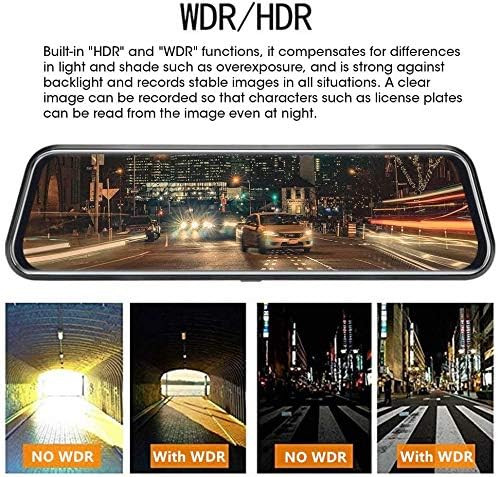
- Super vision nocturne : Both front and rear 1080P cameras provide enhanced night vision in low-light conditions, utilizing WDR/HDR technology and a Starvis sensor with a 6-glass lens for clearer images.
- Aide au stationnement : When shifting into 'R' (reverse) gear, the screen automatically displays the rear camera's perspective with guidelines to assist with safe parking.

4.4. Commande vocale
The dash cam supports voice commands for hands-free operation. Refer to the video below for a demonstration of voice control features:
4.5. Playback & File Gestion
Access recorded videos and images directly on the touch screen. Files are typically organized by date and time. Locked files (from G-sensor activation or parking monitor) are stored separately to prevent accidental deletion.
5. Entretien
- Nettoyage: Use a soft, dry cloth to clean the screen and camera lenses. Avoid abrasive materials or harsh chemicals.
- Formatage de la carte SD : Regularly format your Micro SD card (at least once a month) to ensure optimal performance and prevent data corruption. This can usually be done through the dash cam's settings menu.
- Mises à jour du micrologiciel : Check the Jansite official webConsultez régulièrement ce site pour vérifier les mises à jour du micrologiciel disponibles afin d'améliorer les performances et d'ajouter de nouvelles fonctionnalités.
6. Dépannage
- Caméra embarquée ne s'allume pas : Ensure the car charger is securely connected to both the dash cam and the car's cigarette lighter port. Check if the vehicle's power outlet is functioning.
- Problèmes d'enregistrement : Verify that the Micro SD card is inserted correctly and has sufficient free space. Format the SD card if necessary. Check the loop recording settings.
- Caméra arrière non affichée : Ensure the rear camera cable is securely connected to both the rear camera and the main unit. Check the wiring to the reverse light if the parking assist feature is not working.
- Écran figé/ne répond pas : Try resetting the device (if a reset button is available, use a thin pin). If the issue persists, contact customer service.
- Mauvaise vision nocturne : Ensure camera lenses are clean. Verify that WDR/HDR settings are enabled in the menu.
7. Spécifications
| Fonctionnalité | Spécification |
|---|---|
| Marque | Jansite |
| Nom du modèle | RM |
| Taille de l'écran | 10 pouces |
| Type d'affichage | Écran LCD |
| Méthode de contrôle | Touche |
| Résolution vidéo frontale | HD 1080p |
| Résolution vidéo arrière | HD 1080p |
| Champ avant de View | 170 degrés |
| Champ arrière de View | 140 degrés |
| Caractéristiques spéciales | Loop Recording, Night Vision (WDR/HDR), G-Sensor, Parking Monitor, Parking Assist |
| Technologie de connectivité | USB |
| Stockage pris en charge | Carte Micro SD jusqu'à 128 Go (non incluse) |
| Longueur du câble de la caméra arrière | 10 mètres (33 pieds) |
| Poids de l'article | 64 gramme |
| Piles | 1 batterie lithium-ion requise (incluse) |
| Code UPC | 741376144744 |
8. Garantie et assistance
Jansite is committed to providing high-quality products and excellent customer service. Your Jansite Mirror Dash Cam comes with a standard warranty (please refer to your purchase documentation for specific terms and duration).
For any questions, technical support, or warranty claims, please do not hesitate to contact our customer service team. We offer 24-hour customer service to assist you.
- Service client: Disponible 24h/7 et XNUMXj/XNUMX
- Coordonnées: Please refer to your product packaging or the official Jansite website pour les coordonnées les plus récentes.