
EOTECH XPS2-0
Manuel d'utilisation du viseur holographique EOTECH XPS2 XPS2-0
Brand: EOTECH | Model: XPS2-0
1. Produit terminéview & Traits
The EOTECH XPS2-0 Holographic Weapon Sight is a compact and robust optic designed for rapid target acquisition and reliable performance. Its advanced holographic technology provides a clear and precise aiming solution for various shooting scenarios.
- EOTECH XPS2-0: Holographic Weapon Sight in black with 68MOA ring and (1) 1 MOA dot reticle.
- Polyvalence de montage : Compatible with both 1" weaver and MIL-STD 1913 rails, offering flexible mounting options.
- Luminosité réglable : Features 20 brightness settings to ensure optimal visibility in any lighting condition, from bright daylight to low-light environments.
- Conception compacte : Its small footprint leaves ample rail space for additional accessories such as rear iron sights or magnifiers.

2. Installation
2.1 Montage du viseur
The XPS2-0 is designed for easy mounting on any 1" Weaver or MIL-STD 1913 rail. Ensure the rail is clean and free of debris before mounting. Use the provided thumb-bolt or Allen-type bolt to securely fasten the sight to your firearm's rail. Tighten the bolt firmly to prevent movement under recoil.

2.2 Installation de la batterie
The XPS2-0 uses a single CR123 battery. To install or replace the battery:
- Unscrew the battery cap located on the front right side of the sight.
- Insert the CR123 battery with the positive (+) end facing forward.
- Revissez fermement le bouchon de la batterie.
The sight will flash when the battery is at 20% capacity, indicating it's time for replacement soon.
3. Utilisation du viseur
3.1 Power On/Off & Brightness Adjustment
The control buttons are located on the rear of the sight:
- Pour allumer : Press either the 'Up' (▲) or 'Down' (▼) button.
- Pour régler la luminosité : Press the 'Up' (▲) button to increase brightness or the 'Down' (▼) button to decrease brightness. There are 20 settings available.
- Pour éteindre : Simultaneously press both the 'Up' (▲) and 'Down' (▼) buttons.

3.2 Reticle Description
The XPS2-0 features a 68 MOA (Minute of Angle) ring with a 1 MOA dot in the center. This reticle design allows for quick target acquisition while maintaining precision.
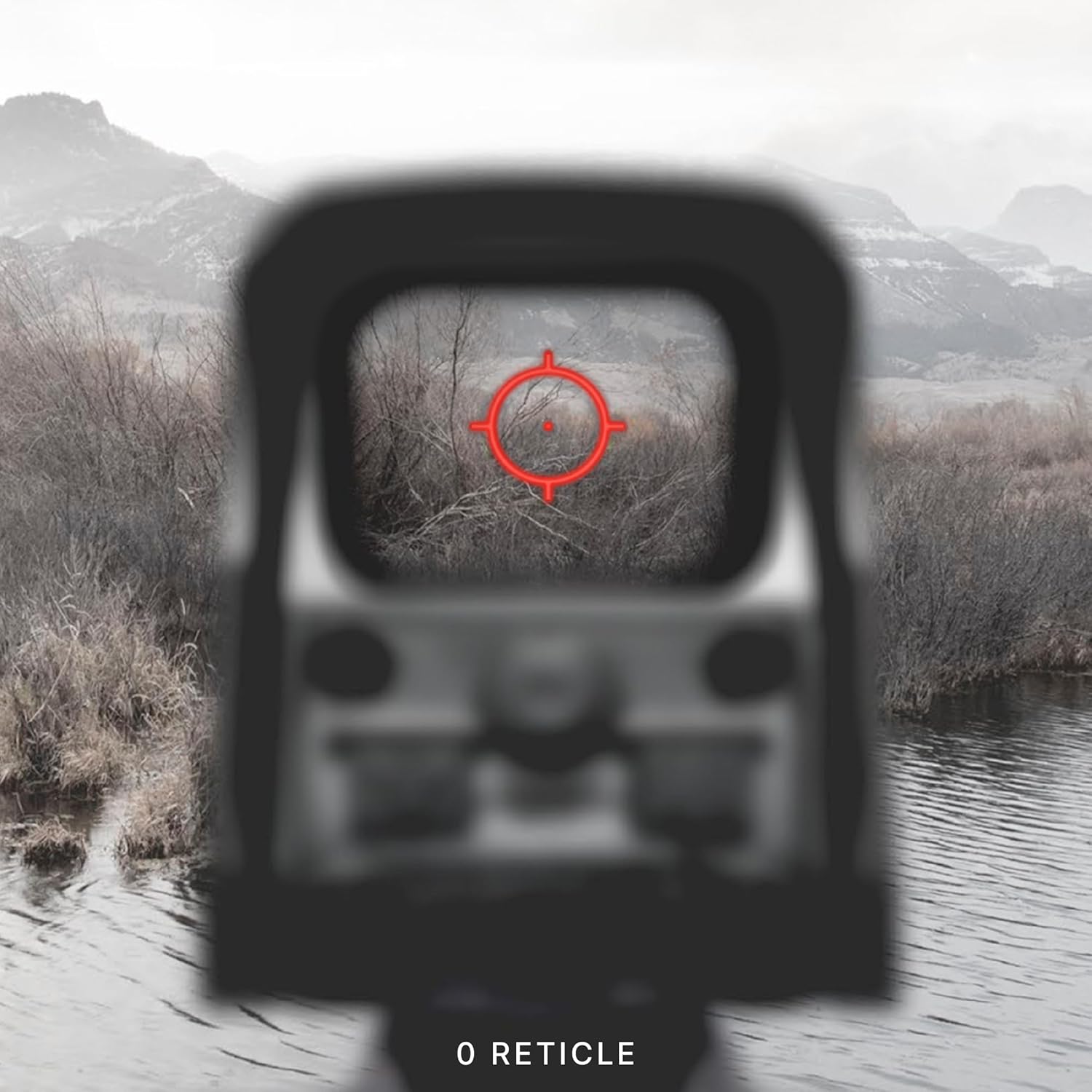

3.3 Réglages de dérive et d'élévation
Adjustments for windage (left/right) and elevation (up/down) are located on the side of the sight. Each click provides a precise adjustment to the point of impact.

4. Entretien
To ensure the longevity and optimal performance of your EOTECH XPS2-0, regular maintenance is recommended:
- Nettoyage des lentilles : Use a soft, lint-free cloth and lens cleaning solution to gently wipe the optical surfaces. Avoid abrasive materials or excessive pressure.
- Nettoyage du corps : Wipe the sight's body with a damp Utiliser un chiffon pour enlever la saleté et les résidus. Éviter les produits chimiques agressifs.
- Stockage: Store the sight in a dry, cool place away from direct sunlight and extreme temperatures. Remove the battery if storing for extended periods.
5. Dépannage
5.1 Indicateur de batterie faible
When the battery life reaches approximately 20%, the reticle will flash upon power-up to indicate a low battery condition. Replace the CR123 battery promptly to ensure continued operation.
5.2 Reticle Blinking Under Recoil
If the reticle blinks or flickers during recoil, this is another indication of a low battery. Replace the battery to resolve this issue.
6. Spécifications
| Fonctionnalité | Détail |
|---|---|
| Marque | EOTECH |
| Nom du modèle | XPS2-0 |
| Couleur | Noir |
| Style | XPS2-0 |
| Poids de l'article | 226.79 gramme |
| Matériel | Plastique |
| Grossissement maximal | 1x |
| Grossissement minimal | 1x |
| Appareils compatibles | Fusil |
| Type de montage | Mont du Tisserand |
| Compatibilité avec la vision nocturne | Non |
| Dimensions (L x l x H) | 3.8" x 2.1" x 2.5" |
| Type de batterie | CR123 |
7. Garantie et assistance
The EOTECH XPS2-0 Holographic Weapon Sight comes with a 10-year limited warranty from the manufacturer, covering defects in materials and workmanship under normal use. For warranty claims or technical support, please refer to the official EOTECH webconsultez le site ou contactez directement leur service client.
It is recommended to register your product online to ensure you are contacted in the event of any product issues and to facilitate warranty service.
8. Informations importantes sur la sécurité
AVERTISSEMENT: Ce produit contient des produits chimiques reconnus par l'État de Californie pour provoquer le cancer et des anomalies congénitales ou d'autres troubles de la reproduction.