
1. Introduction
Thank you for choosing the PUPPY KITTY Automatic Pet Feeder. This device is designed to provide scheduled and portion-controlled meals for your pets, ensuring their health and well-being even when you are away. Please read this manual carefully before use to ensure proper operation and maintenance.

Image 1.1: The PUPPY KITTY Automatic Pet Feeder, highlighting its 6.5L capacity and timer feeding function.
2. Composants du produit
Le forfait comprend les éléments suivants :
- Unité principale du distributeur automatique de nourriture pour animaux
- Food Storage Container (6.5 Liter capacity)
- Plateau de nourriture
- USB Power Cable and Adapter (EU standard)
- Two Dispensing Gears (10g and 5g per portion)
- Manuel d'utilisation
Please ensure all components are present and undamaged upon unpacking.
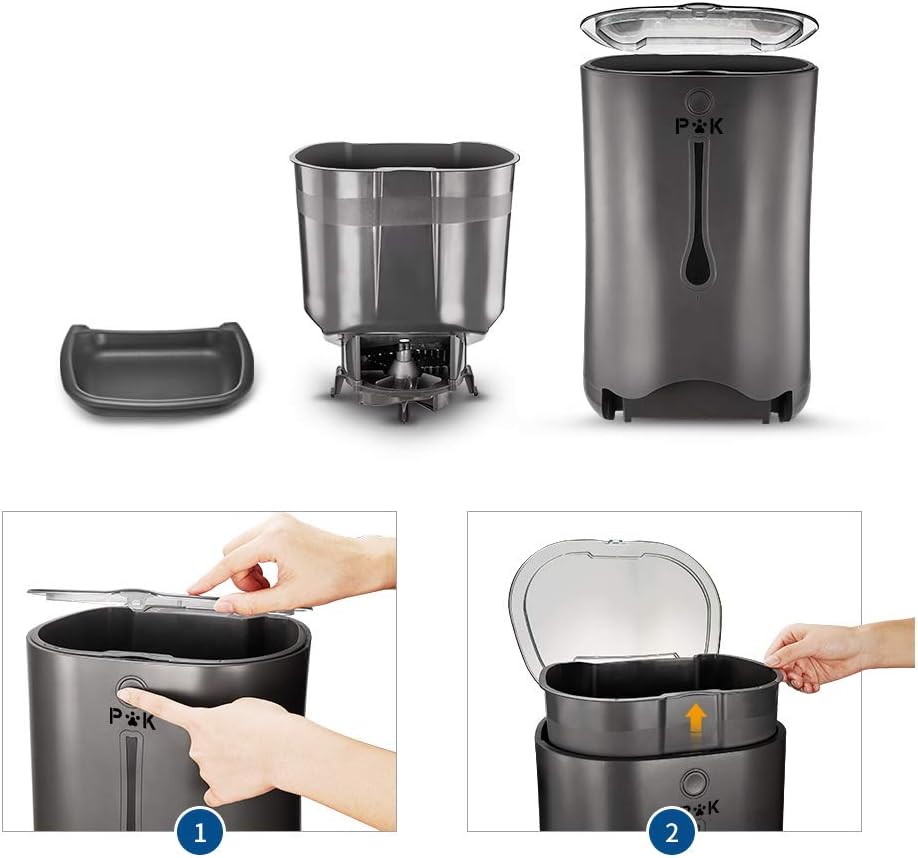
Image 2.1 : Terminéview of the pet feeder's main components, including the food tray, food container, and the main unit.
3. Instructions de configuration
- Déballer et assembler : Carefully remove all components from the packaging. Place the food storage container into the main unit. Ensure it is seated correctly.
- Install Dispensing Gear: Select the appropriate dispensing gear (10g or 5g) based on your pet's food size and desired portion. Install it at the bottom of the food container.
- Fixer le plateau-repas : Slide the food tray into the designated slot at the base of the main unit until it clicks securely into place.
- Alimentation: Le distributeur peut être alimenté de deux manières :
- Puissance USB: Connect the USB cable to the feeder and the power adapter, then plug it into a wall outlet.
- Puissance de la batterie : Open the battery compartment at the bottom of the unit and insert 3 'D' size batteries (not included). This provides backup power in case of an outage.
- Remplir le récipient alimentaire : Open the lid on top of the feeder and pour dry pet food into the container. Close the lid securely.

Image 3.1: Steps for disassembling and assembling the feeder components.

Image 3.2: Power options: USB cable connection and battery compartment for 'D' batteries.
4. Mode d'emploi
The feeder features a blue backlit LCD screen and touch control panel for programming.

Image 4.1: The digital control panel for programming the feeder.
4.1. Réglage de l'heure actuelle
- Press the 'Time' button.
- Use the 'Hour' and 'Minute' buttons to adjust the current time.
- Press 'Time' again to confirm.
4.2. Programming Meals
You can program up to 4 meals per day. Each meal can dispense 1 to 39 portions (10g per portion with the standard gear).
- Press the 'Meal' button (e.g., 'Breakfast', 'Lunch', 'Dinner', 'Meal').
- Use the 'On/Off' button to activate or deactivate the meal.
- Use the 'Hour' and 'Minute' buttons to set the feeding time for that meal.
- Use the 'Meal Size' button to set the number of portions (1-39) for that meal.
- Répétez l'opération pour les autres repas, au besoin.
4.3. Enregistrement vocal
Record an 8-second message to call your pet at meal times. The message will play 3 times.
- Appuyez sur le bouton « MIC » et maintenez-le enfoncé.
- Dites votre message dans le microphone.
- Relâchez le bouton « MIC » pour sauvegarder l'enregistrement.
- Press the 'Play' button to test your recording.

Image 4.2: The voice recording feature helps call your pet for meals.
4.4. Alimentation manuelle
To dispense food manually, press the 'Manual Feed' button on the control panel. Each press will dispense one portion.
4.5. Low Food Alarm
The feeder is equipped with an acoustic alarm that will sound when the food level in the container is low, reminding you to refill.
5. Entretien et nettoyage
Un nettoyage régulier garantit l'hygiène et le bon fonctionnement du distributeur.
- Démontage: Unplug the feeder from power. Remove the food tray and the food storage container.
- Nettoyage: The food tray and food storage container are removable and washable. Wash them with mild soap and water. Rinse thoroughly and dry completely before reassembly. Do not immerse the main unit in water. Wipe the main unit with a damp tissu.
- Remontage: Once all parts are dry, reassemble the feeder by following the setup instructions in reverse order.

Image 5.1: The feeder's design helps prevent food spillage, making cleaning easier.
6. Dépannage
- Distributeur de nourriture ne distribuant pas de nourriture :
- Check if the power adapter is securely plugged in or if batteries are correctly installed and charged.
- Assurez-vous que le récipient alimentaire n'est pas vide.
- Verify that the dispensing gear is not jammed by food particles. Clean if necessary.
- Check programmed meal times and portion settings.
- Food portions are incorrect:
- Ensure the correct dispensing gear (10g or 5g) is installed for your pet's food size.
- Adjust the 'Meal Size' setting for each programmed meal.
- L'enregistrement vocal ne fonctionne pas :
- Ensure the recording process was completed correctly (press and hold 'MIC', then release).
- Test by pressing the 'Play' button.
- L'écran LCD est noir :
- Check power supply (USB or batteries).
- Si vous utilisez des piles, remplacez-les.
7. Spécifications
| Fonctionnalité | Spécification |
|---|---|
| Numéro de modèle | Poupée |
| Capacité | 6.5 litres |
| Dimensions (L x l x H) | 35 cm x 25 cm x 39 cm |
| Poids | 2250 gramme |
| Matériel | Acrylonitrile butadiène styrène, caoutchouc |
| Repas par jour | Jusqu'à 4 |
| Portions par repas | 1-39 (environ 10 g par portion) |
| Enregistrement vocal | 8 seconds, plays 3 times |
| Alimentation électrique | USB cable with adapter or 3 'D' batteries (not included) |
| Caractéristiques spéciales | Programmable, Voice Recording, Digital Timer, Low Food Alarm |
8. Garantie et assistance
Le distributeur automatique de croquettes pour animaux PUPPY KITTY est livré avec un Garantie de 3 ansCette garantie couvre les défauts de fabrication et les dysfonctionnements dans des conditions normales d'utilisation. Veuillez conserver votre preuve d'achat pour toute réclamation au titre de la garantie.
For technical support, troubleshooting assistance, or warranty inquiries, please contact PUPPY KITTY customer service through the retailer where you purchased the product or visit the official PUPPY KITTY website.