1. Introduction
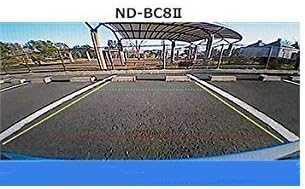
The Pioneer ND-BC8-2 is a universal rear camera designed to enhance vehicle safety by providing a clear view of the area behind your vehicle. It features a natural viewing angle and high image quality, ensuring excellent visibility during both day and night driving conditions. This camera is compatible with various monitors equipped with RCA video input terminals, including Carrozzeria car navigation and car AV systems.
Les principales caractéristiques comprennent :
- Compatibility with RCA video input terminals for broad integration.
- High-performance 1/4-inch CMOS sensor with approximately 310,000 pixels for clear images.
- Primary color filter for natural color reproduction, even in low light.
- Effective reduction of smear noise (overexposure) in bright environments.
- Significant reduction of driver blind spots.
- Integrated power box functionality for simplified installation with a smaller relay coupler.

2. Configuration et installation
Proper installation is crucial for optimal performance of your Pioneer ND-BC8-2 rear camera. This camera is designed for surface mounting and connects via an RCA connector.
2.1. Vérification préalable à l'installation
- Ensure your vehicle's monitor or car AV system has an RCA video input terminal.
- For 2016 Cyber Navigation systems, a camera terminal conversion connector (model "RD-C200") is required for compatibility.
- Gather necessary tools: screwdrivers, wire cutters/strippers, electrical tape, zip ties, and a drill (if mounting requires new holes).
2.2. Montage de la caméra
The camera is designed for surface mount installation. Choose a central location on the rear of your vehicle, typically above the license plate or on the bumper, that provides an unobstructed view. Secure the camera using the provided mounting hardware.
2.3. Connexion du câblage
The ND-BC8-2 features an integrated power box, simplifying the wiring process. Connect the camera's RCA video output to the RCA video input on your monitor or head unit. The camera is designed to receive power and activate automatically when the vehicle is shifted into reverse gear, eliminating the need for complex manual wiring to the tail lights for reverse signal detection.
Route the wiring carefully to avoid interference with moving parts or exposure to excessive heat or moisture. Secure all cables with zip ties to prevent rattling or damage.
3. Mode d'emploi
Once installed, the Pioneer ND-BC8-2 rear camera operates seamlessly with your compatible display unit.
3.1. Activation automatique
When you shift your vehicle into reverse gear, the camera will automatically activate, and its video feed will be displayed on your connected monitor. This automatic activation ensures that you have a clear rear view precisely when needed for parking or maneuvering.
3.2. Parking Assist Lines
The camera system provides dynamic parking assist lines on the display. These lines are designed to help you gauge distance and trajectory, making parking maneuvers easier and safer. The lines may adjust based on your steering wheel input, providing real-time guidance.

3.3. Qualité de l'image
The 1/4-inch high-performance CMOS sensor and primary color filter ensure clear and natural-colored images. Even in challenging lighting conditions, such as direct sunlight or streetlights, the camera minimizes smear noise (overexposure) to maintain a usable and clear view.
4. Entretien
To ensure the longevity and optimal performance of your Pioneer ND-BC8-2 rear camera, follow these simple maintenance guidelines:
- Nettoyage de la lentille : Nettoyez régulièrement l'objectif de l'appareil photo avec un chiffon doux et sec.amp Utilisez un chiffon pour enlever la saleté, la poussière et les traces d'eau. Évitez les nettoyants abrasifs ou les matériaux susceptibles de rayer la lentille.
- Vérification des connexions : Inspectez périodiquement tous les branchements électriques pour vous assurer qu'ils sont bien fixés et exempts de corrosion ou de dommages.
- Facteurs environnementaux : While the camera is designed for outdoor use, extreme weather conditions (e.g., heavy snow, ice, or prolonged direct sunlight) can affect performance. Clear any obstructions from the lens before driving.
5. Dépannage
If you encounter issues with your Pioneer ND-BC8-2 rear camera, refer to the following common troubleshooting steps:
5.1. No Image on Display
- Vérifiez l'alimentation : Ensure the vehicle is in reverse gear and the camera is receiving power.
- Vérifiez les connexions : Confirm that the RCA video cable is securely connected to both the camera and the display unit.
- Entrée du moniteur : Make sure your display unit is set to the correct video input source for the camera.
5.2. Mauvaise qualité d'image
- Nettoyer la lentille : Nettoyez l'objectif de l'appareil photo comme décrit dans la section Maintenance.
- Conditions d'éclairage : While the camera performs well in various lighting, extreme conditions can still impact clarity.
- Intégrité du câble : Check the video cable for any kinks, pinches, or damage that could affect signal transmission.
5.3. Intermittent Functionality
If the camera's functionality is intermittent, check all power and video connections for looseness. Ensure that the vehicle's electrical system is stable. For issues related to software or specific compatibility, contacting Pioneer customer support is recommended for potential firmware updates or specialized assistance.
6. Spécifications
| Fonctionnalité | Détail |
|---|---|
| Marque | PIONEER |
| Modèle | ND-BC8-2 |
| Taille de l'écran | 0.25 Inches (Sensor) |
| Appareils compatibles | Moniteur avec entrée RCA |
| Type d'installation | Montage en surface |
| Voltage | 12 volts |
| Technologie de capteur optique | CMOS |
| Type de lentille | Grand angle, fixe |
| Angle réel de View | 120 degrés |
| Type de connecteur | RCA |
| Résolution fixe efficace | 310,000 pixels |
| Résolution de capture vidéo | 720p |
| Poids de l'article | 304 gramme |
7. Garantie et assistance
Pioneer is committed to providing high-quality products and customer satisfaction. For any questions regarding installation, operation, or troubleshooting that are not covered in this manual, please contact Pioneer customer support. While specific warranty details may vary by region and retailer, Pioneer typically offers support for product defects and operational issues. Keep your purchase receipt as proof of purchase for warranty claims.
Pour obtenir de l'aide supplémentaire, veuillez consulter le site officiel. Boutique PIONEER sur Amazon ou leur représentant website.