1. Introduction
The Nucleus Anywhere Intercom is a family communication device designed to connect you with loved ones, whether they are in another room or across the country. It features voice-activated communication through Amazon Alexa, allowing for audio and video calls, and integrates with smart home devices. The device also offers a mobile application for remote connectivity.

Image 1.1: The Nucleus Anywhere Intercom displaying its user interface, showing options for calling different rooms and contacts.
2. Installation
2.1 Déballage et composants
Avant de commencer, assurez-vous que tous les composants sont présents :
- Nucleus Anywhere Intercom device
- Cordon d'alimentation
- Adaptateur secteur
- Support mural (optionnel)
- Support de table (facultatif)
2.2 Mise sous tension de votre appareil
The Nucleus device can be powered using the included DC adapter or Power over Ethernet (PoE).
- Utilisation de l'adaptateur secteur : Connect the power cord to the AC adapter, then plug the adapter into a standard electrical outlet and the power cord into the Nucleus device.
- Utilisation de l'alimentation par Ethernet (PoE) : If your network supports PoE, connect an Ethernet cable from your PoE-enabled network switch or injector directly to the Nucleus device's Ethernet port. If using standard Ethernet without PoE, you will still need to use the AC adapter for power.

Image 2.1: The Nucleus device positioned on its table stand, ready for use.

Image 2.2: The Nucleus device mounted on a wall, demonstrating an alternative placement option.
Connexion réseau 2.3
The Nucleus device requires an internet connection to function. It supports Wi-Fi, Ethernet, or Power over Ethernet.
- Wifi: Upon first power-on, the device will guide you through connecting to your home Wi-Fi network. Follow the on-screen prompts to select your network and enter the password.
- Ethernet : If using a wired connection, plug an Ethernet cable into the device's Ethernet port. The device should automatically detect and connect to the network.
Once connected, follow the on-screen instructions to complete the initial setup, including creating or logging into your Nucleus account and configuring your device settings.
3. Fonctionnement
3.1 Voice-Activated Communication with Alexa
The Nucleus Intercom integrates with Amazon Alexa for voice-activated communication and smart home control. To initiate a call or use Alexa features:
- Passer des appels: Simply say, "Alexa, ask Nucleus to call [Room Name]" or "Alexa, ask Nucleus to call [Contact Name]".
- Using Alexa Features: Tap the Alexa button on the screen to activate Alexa, then speak your command (e.g., "Alexa, play music," "Alexa, what's the weather?").
Note: The Alexa Voice Service is available in the US only. Nucleus does not currently support Spotify and Pandora with Alexa.

Image 3.1: A family using the Nucleus device for a video call, demonstrating the interactive call screen.

Image 3.2: The Nucleus device facilitating a video call with a grandparent, emphasizing ease of connection.
3.2 Connectivité des applications mobiles
Stay connected to your home from anywhere using the free Nucleus mobile application.
- Télécharger: Rechercher "Nucleus" in your device's app store.
- Compatibilité: The companion mobile app is compatible with iPhone 5s or later and Android 5 or later.
- Caractéristiques: Use the app to check in with your home, make calls to your Nucleus devices, and manage settings remotely.
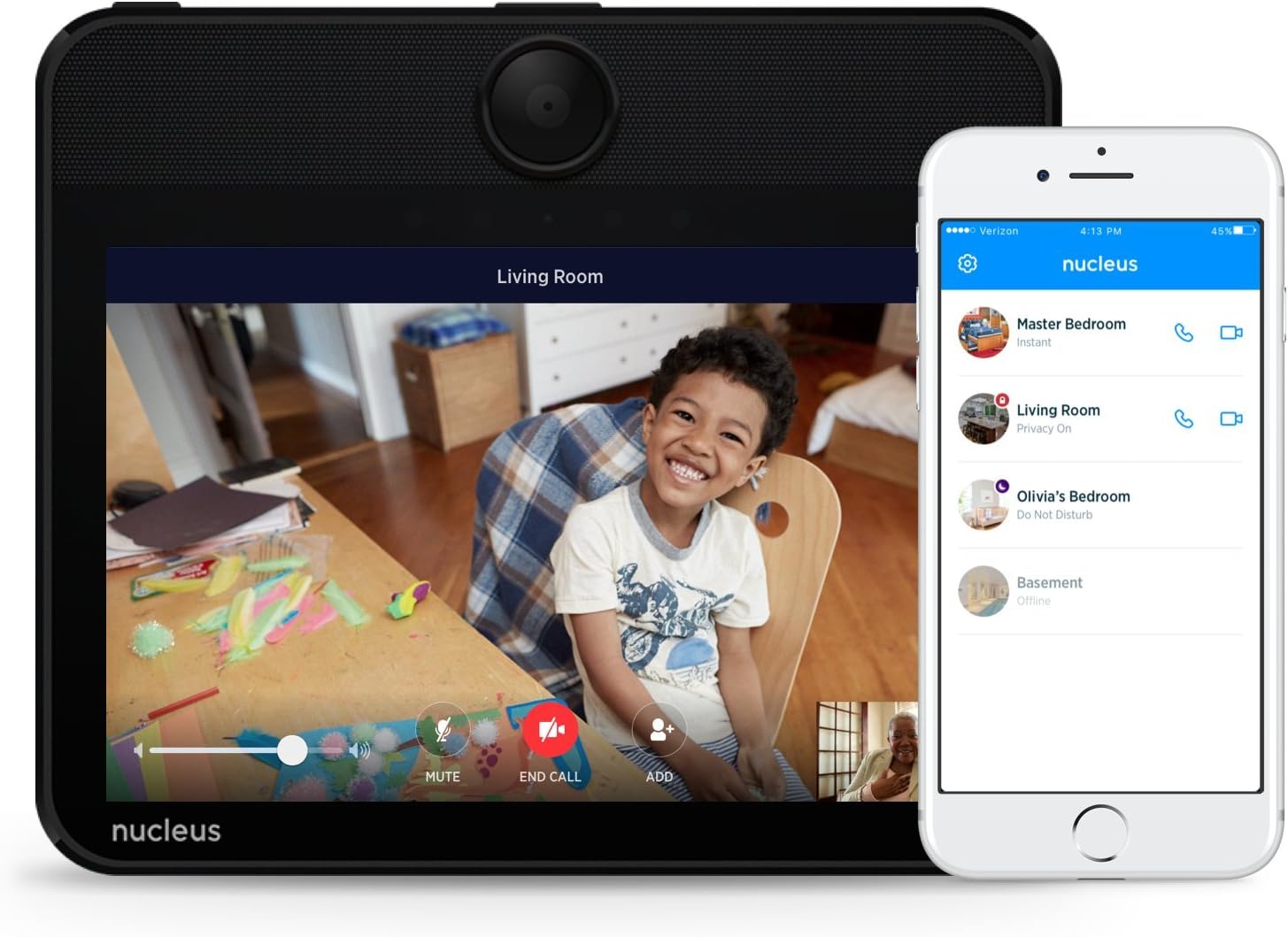
Image 3.3: The Nucleus device and its companion mobile application working in tandem for remote communication.
3.3 Gestion des appels
During a call, the screen will display options such as:
- Muet: Coupez votre micro.
- Fin d'appel : Disconnect the call.
- Ajouter: Add another participant to the call.
The touch screen allows for easy navigation and control of calls and device settings.
4. Entretien
4.1 Nettoyage de l'appareil
Pour maintenir des performances et une apparence optimales :
- Gently wipe the screen and exterior surfaces with a soft, lint-free cloth.
- N’utilisez pas de nettoyants abrasifs, de solvants ou d’aérosols, car ils peuvent endommager l’appareil.
- Assurez-vous que l'appareil est éteint et débranché avant le nettoyage.
4.2 Mises à jour logicielles
The Nucleus device periodically receives software updates to improve functionality, add new features, and enhance security. Ensure your device is connected to the internet to receive these updates automatically. You may be prompted to approve an update or the device may update during periods of inactivity.
5. Dépannage
5.1 Pas d'alimentation
- Check that the power cord is securely connected to both the device and the power outlet/AC adapter.
- Vérifiez le bon fonctionnement de la prise de courant en y branchant un autre appareil.
- If using PoE, ensure your Ethernet connection is active and your network equipment supports PoE.
5.2 Pas de connexion Internet
- Wifi: Go to the device's settings and re-select your Wi-Fi network, re-entering the password if necessary. Ensure your Wi-Fi router is on and functioning.
- Ethernet : Check the Ethernet cable connection at both ends. Try a different Ethernet cable if available.
- Redémarrez votre routeur et votre modem.
5.3 Alexa ne répond pas
- Ensure the device has an active internet connection.
- Tap the Alexa button on the screen to manually activate Alexa.
- Parlez clairement et assurez-vous qu'il n'y ait pas de bruit de fond excessif.
- Restart the Nucleus device by unplugging it for 10 seconds and plugging it back in.
5.4 Problèmes de qualité des appels
- Ensure both devices involved in the call have a stable and strong internet connection.
- Reduce background noise for clearer audio.
- Check the device's camera and microphone for any obstructions.
6. Spécifications
| Fonctionnalité | Détail |
|---|---|
| Numéro de modèle | N1001R31B |
| Fabricant | CloudTalk Inc. (DBA Nucleus) |
| Poids de l'article | 948 g |
| Dimensions du produit | 22.86 x 17.78 x 2.29 cm |
| Couleur | Noir |
| Type de source d'alimentation | DC |
| Connectivité | Wi-Fi, Ethernet, Power over Ethernet (PoE) |
| Composants inclus | Power cord, AC adapter, Wall mount, Table stand |
| Compatibilité des applications mobiles | iPhone 5s or later, Android 5 or later |
7. Garantie et assistance
7.1 Garantie du produit
Nucleus products are covered by a limited warranty against defects in materials and workmanship. For specific warranty terms and conditions, please refer to the warranty card included with your product or visit the official Nucleus support website.
7.2 Assistance clientèle
If you encounter any issues or have questions not covered in this manual, please contact Nucleus customer support. Support contact information can typically be found on the official Nucleus website ou à l'intérieur de l'emballage du produit.
Pour obtenir les informations les plus récentes et les ressources d'assistance, veuillez consulter : www.nucleuslife.com/support