
1. Introduction
This manual provides detailed instructions for the setup, operation, and maintenance of your Rii Mini i8 2.4GHz Wireless Keyboard with Touchpad. This device combines a full QWERTY keyboard with a multi-touch touchpad, designed for convenient control of various devices such as PCs, Smart TVs, Android TV Boxes, and game consoles.

Image : inclinée view of the Rii Mini i8 Wireless Keyboard, showcasing son design compact et la disposition de ses touches.
2. Contenu du colis
Veuillez vérifier le contenu du colis pour vous assurer que tous les éléments sont présents :
- Rii Mini i8 Wireless Keyboard with Touchpad
- Récepteur USB (rangé dans le compartiment des piles)
- Câble de chargement USB
- Manuel de l'utilisateur (ce document)
3. Installation
- Localisez le récepteur USB : Open the battery compartment cover on the back of the keyboard. The USB receiver is stored inside.
- Insérez le récepteur USB : Branchez le récepteur USB sur un port USB disponible de votre appareil (PC, Smart TV, boîtier TV Android, etc.).
- Mise sous tension du clavier : Repérez l'interrupteur MARCHE/ARRÊT sur le côté du clavier et faites-le glisser sur la position « MARCHE ».
- Connexion automatique : Le clavier devrait se connecter automatiquement à votre appareil. Aucun pilote supplémentaire n'est généralement requis.

Image : Arrière view of the Rii Mini i8 keyboard, showing the battery compartment and the USB receiver stored within.

Image : Arrière view of the Rii Mini i8 keyboard with the battery cover open, illustrating the location of the removable USB receiver.
4. Mode d'emploi
Once connected, the Rii Mini i8 functions as a standard keyboard and mouse.
- Dactylographie: Utilisez la disposition de clavier QWERTY pour la saisie de texte.
- Fonction de la souris : The central touchpad allows for cursor control.
- Touches multimédia Dedicated keys for volume control, play/pause, and other media functions are located on the left side.
- Touches de fonction (Fn) : Appuyez et maintenez enfoncé le Fn key (bottom left) and then press a key with a blue icon to access its secondary function (e.g., Fn + F1 for email).

Image: A user holding the Rii Mini i8 keyboard, demonstrating its use for controlling a television display.
5. Keyboard Layout and Functions
The Rii Mini i8 features a compact QWERTY layout with additional function and multimedia keys.

Image : Vue de dessus view of the Rii Mini i8 Wireless Keyboard, clearly showing the full QWERTY layout, touchpad, and dedicated function keys.
- QWERTY Keys: Standard alphanumeric keys for typing.
- Touches de fonction (F1-F12) : Accessible en appuyant sur Fn + corresponding key.
- Touches de contrôle multimédia : Volume up/down, mute, play/pause, next/previous track.
- Pavé directionnel : Located on the right side for navigation.
- Boutons gauche/droite de la souris : Boutons dédiés sous le pavé tactile.
6. Fonctions du pavé tactile
Le pavé tactile intégré prend en charge les gestes multitouch pour une navigation intuitive.
- Appuyez sur un seul doigt : Fonctionne comme un clic gauche de la souris.
- Taper avec deux doigts : Fonctionne comme un clic droit.
- Two Finger Drag (Vertical): Scrolls up or down.
- Glissement à un seul doigt : Déplace le curseur.
7. Chargement de l'appareil
The Rii Mini i8 keyboard is powered by a rechargeable Lithium Metal battery.
- Connectez le câble de chargement : Plug the small end of the included USB charging cable into the mini-USB port on the top edge of the keyboard.
- Connectez-vous à la source d'alimentation : Plug the standard USB end of the cable into a USB port on your computer, a USB wall adapter, or a power bank.
- Indicateur de charge : A charging indicator light (usually red) will illuminate during charging and turn off or change color when fully charged.
- Autonomie de la batterie : The keyboard is designed for extended use on a single charge.

Image: The included USB charging cable, showing the mini-USB connector for the keyboard and the standard USB connector for a power source.
8. Entretien
- Nettoyage: Utilisez un chiffon doux et sec pour nettoyer la surface du clavier. Pour les saletés tenaces, frottez légèrement avec un chiffon doux.amp Un chiffon peut être utilisé, en veillant à ce qu'aucun liquide ne pénètre dans l'appareil.
- Stockage: En cas d'inutilisation prolongée, éteignez le clavier pour préserver la batterie. Rangez-le dans un endroit frais et sec.
- Entretien de la batterie: Évitez de décharger complètement la batterie fréquemment. Rechargez régulièrement l'appareil pour préserver la durée de vie de la batterie.
9. Dépannage
| Problème | Solution possible |
|---|---|
| Le clavier ne répond pas |
|
| Le mouvement du curseur est erratique ou lent. |
|
| Les clés ne fonctionnent pas |
|
10. Spécifications
Key technical specifications for the Rii Mini i8 Wireless Keyboard:
- Modèle: RT-MWK08RF
- Connectivité : Sans fil 2.4 GHz (via une clé USB)
- Interface matérielle: Radio Fréquence
- Vol d'exploitationtage: 3.3 volts
- Source d'alimentation : Battery Powered (Lithium Metal, included)
- Dimensions du produit : 5.79 x 0.75 x 3.86 cm (environ 147 x 18 x 97 mm)
- Poids de l'article : 110 g
- Caractéristiques spéciales : Sans fil, pavé tactile
- Technologie de détection de mouvement : Optical (for touchpad)
- Description du clavier : Intérieur
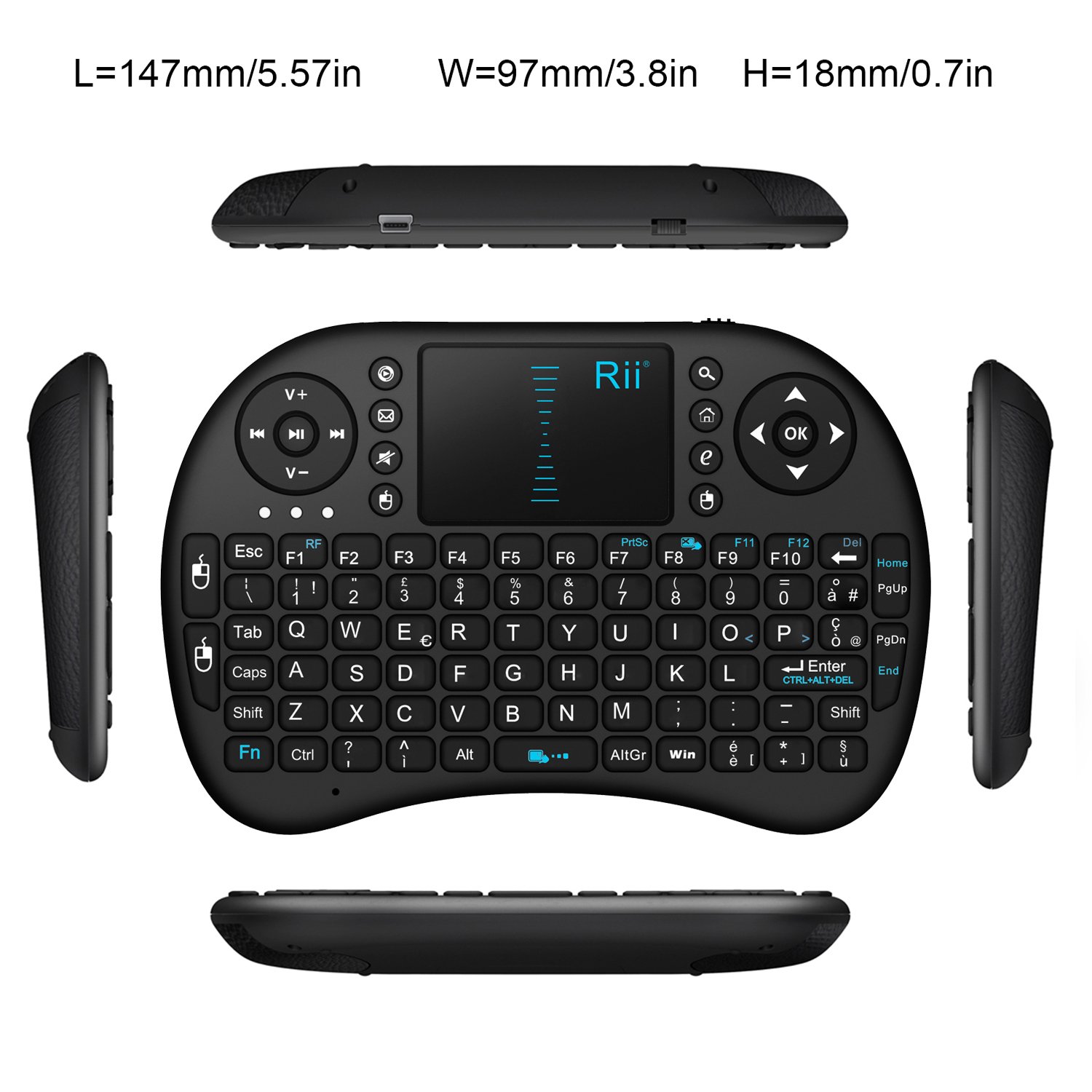
Image : Vue de dessus view of the Rii Mini i8 keyboard with its dimensions (length, width, height) indicated in millimeters and inches.
11. Garantie et assistance
Pour obtenir des informations sur la garantie et une assistance technique, veuillez consulter le site officiel du fabricant. webConsultez le site ou contactez votre revendeur. Conservez votre reçu d'achat pour toute réclamation au titre de la garantie.