
General Tools MMD950
General Tools MMD950 Moisture Meter User Manual
Model: MMD950
1. Introduction
The General Tools MMD950 is a versatile moisture meter designed for detecting moisture content in various building materials such as wood, drywall, and concrete. This device offers both pin-type and pinless measurement modes, providing flexibility for different applications. It features a large LCD display, LED visual alerts, and an audible alarm to indicate moisture levels. This manual provides essential information for the proper setup, operation, and maintenance of your MMD950 Moisture Meter.
2. Consignes de sécurité
Please read and understand all safety instructions before using the device. Failure to follow these instructions may result in injury or damage to the meter.
- Sharp Probes: The pin-type probe contains sharp tips. Handle with care to prevent injury. Keep the protective cap on when not in use.
- Sécurité des batteries : Use only the specified battery type (9V). Do not mix old and new batteries. Dispose of batteries properly according to local regulations.
- Conditions environnementales : Do not expose the meter to extreme temperatures, high humidity, or direct sunlight for extended periods.
- Nettoyage: Nettoyez le compteur avec un chiffon doux et sec. N’utilisez pas de nettoyants abrasifs ni de solvants.
3. Contenu du colis
Vérifiez que tous les éléments sont présents dans votre colis :
- General Tools MMD950 Moisture Meter
- External Pin-Type Probe
- Goupilles de remplacement
- Batterie 9V
- Mallette de transport personnalisée
4. Produit terminéview
Familiarize yourself with the components of your MMD950 Moisture Meter.
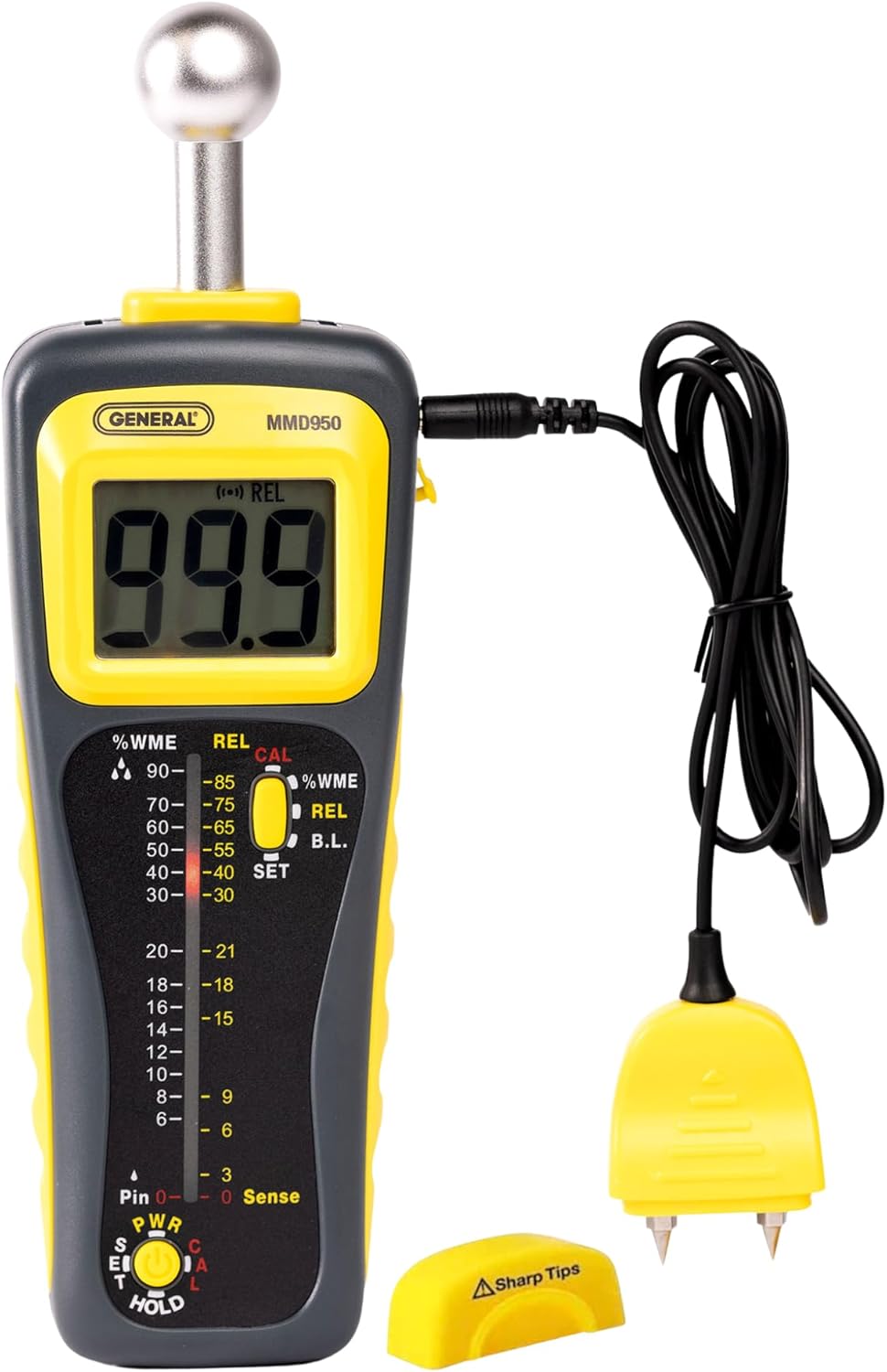
Figure 1 : The General Tools MMD950 Moisture Meter, featuring a large LCD display, spherical pinless sensor, and a connected remote pin-type probe. The device is yellow and gray with clear controls.
- Capteur sphérique sans broches : Located at the top of the meter, used for non-invasive moisture detection.
- Écran LCD : Shows moisture readings, battery status, and mode indicators.
- Graphique à barres LED : Provides visual indication of moisture levels (Green: Low, Yellow: Medium, Red: High).
- Remote Pin-Type Probe Port: Connects the external pin-type probe for invasive measurements.
- Bouton d'alimentation/mode : Turns the device on/off and switches between measurement modes.
- Bouton MAINTENIR : Fige la lecture actuelle affichée.
- Bouchon d'étalonnage : Protective cover for the pin-type probe, also used for calibration.

Figure 2 : The MMD950 meter displaying its dual measurement capabilities: the spherical sensor for pinless readings and the remote probe for pin-type readings, both clearly labeled.
5. Installation
5.1. Installation de la batterie
- Repérez le compartiment à piles à l'arrière de l'appareil.
- Ouvrez le couvercle du compartiment à piles.
- Insérez une pile 9V en respectant la polarité (+/-).
- Fermez soigneusement le couvercle du compartiment à piles.
5.2. Étalonnage initial
The protective cover for the pin-type probe doubles as a calibration checker. To ensure accurate readings, perform a quick calibration:
- Assurez-vous que le compteur est hors tension.
- Place the pin-type probe (either attached or remote) into the designated slots on the protective cap.
- Turn on the meter. The display should show a specific reference value, confirming calibration. Refer to the meter's display for the exact reference value.
6. Modes de fonctionnement
The MMD950 offers two primary measurement modes:
6.1. Pin-Type Measurement (%WME)
This mode uses the external pin-type probe to measure Wood Moisture Equivalent (%WME). It provides precise readings by directly inserting the pins into the material.
- Connect the remote pin-type probe to the meter's port.
- Press the Power/Mode button to select the %WME mode.
- Carefully insert the pins into the material to be tested. Ensure good contact.
- Lisez le pourcentage d'humiditétage on the LCD display and observe the LED bar graph.

Figure 3 : Un gros plan view of the MMD950 meter with the pin-style cable connected, allowing for precise %WME readings from a distance.
6.2. Pinless Measurement (REL)
This non-invasive mode uses the spherical sensor to detect relative moisture levels up to 4 inches deep without damaging the surface. It is ideal for quick scans and detecting moisture behind walls or under flooring.
- Ensure the remote pin-type probe is disconnected or not in use.
- Press the Power/Mode button to select the REL mode.
- Place the spherical sensor flat against the surface of the material.
- Move the meter slowly across the surface. The display will show relative moisture readings.
- Observe the LED bar graph and listen for the audible alarm for high moisture indications.

Figure 4 : A hand holds the MMD950 meter with its spherical sensor against a light gray wall, illustrating its capability to detect moisture up to 4 inches deep without surface penetration.
7. Taking and Interpreting Measurements
7.1. Interprétation des lectures
- Écran LCD : Provides a numerical value of moisture content (in %WME or relative units).
- Graphique à barres LED :
- Vert: Faible teneur en humidité.
- Jaune: Teneur en humidité moyenne.
- Rouge: High moisture content, indicating potential water damage or mold risk.
- Alarme auditive: An audible alert will sound when high moisture levels are detected, particularly useful for quick scanning in pinless mode.

Figure 5 : The MMD950 meter showing a high moisture reading on its display, highlighting its role in identifying moisture for mold prevention.
7.2. Fonction HOLD
Appuyez sur le PRISE button to freeze the current reading on the LCD display. This is useful when taking measurements in hard-to-reach areas where the display cannot be easily viewed. Press the PRISE button again to release the reading.
7.3. Arrêt automatique
The MMD950 features an auto power-off function to conserve battery life. The device will automatically turn off after 3, 5, or 10 minutes of inactivity. This duration can be adjusted in the meter's settings (refer to the full manual for detailed instructions on adjusting auto power-off settings).
8. Entretien
8.1. Nettoyage
Wipe the meter with a soft, dry cloth. Do not use liquid cleaners or immerse the device in water.
8.2. Entretien de la sonde
Always keep the protective cap on the pin-type probe when not in use to prevent damage to the pins and accidental injury. Replacement pins are available if the original pins become dull or damaged.

Figure 6 : The MMD950 meter with its removable pin attachment, which can be regularly calibrated using the protective cap.
8.3. Stockage
Store the meter in its custom hard plastic carrying case in a cool, dry place when not in use. Remove the battery if storing for extended periods to prevent leakage.
9. Dépannage
If you encounter issues with your MMD950, refer to the following common problems and solutions:
| Problème | Cause possible | Solution |
|---|---|---|
| Le compteur ne s'allume pas. | Batterie morte ou mal installée | Remplacez la pile 9V en respectant la polarité. |
| Lectures inexactes | Meter needs calibration; poor probe contact; pins are dull/damaged | Perform calibration using the protective cap. Ensure firm contact with the material. Replace pins if necessary. |
| No reading in Pinless mode | Spherical sensor not flat against surface; material too dense/thick for sensor depth | Ensure the spherical sensor is flush with the surface. Consider using Pin-Type mode for very dense materials or deeper measurements. |
| Audible alarm sounds constantly | High moisture detected; sensor interference | Move the meter to a different area. Ensure no metallic objects are interfering with the sensor. |
10. Spécifications
| Fonctionnalité | Détail |
|---|---|
| Modèle | MMD950 |
| Modes de mesure | Pin Type (%WME), Pinless (Relative) |
| Pinless Sensing Depth | Jusqu'à 4 pouces |
| Afficher | Jumbo LCD, 40-dot Tri-color LED Bar Graph |
| Source d'énergie | 1 x 9V Battery (Alkaline) |
| Mise hors tension automatique | Adjustable (3, 5, or 10 minutes) |
| Composants inclus | Moisture meter, external probe, replacement pins, 9V battery, custom carrying case |
| Dimensions du produit | 4 po L x 12 po H |
| Poids de l'article | 2 livres |
| Température de fonctionnement | Jusqu'à 122°F |
11. Garantie et assistance
11.1. Informations sur la garantie
The General Tools MMD950 Moisture Meter is covered by a Garantie de 1 ans sur les pièces À compter de la date d'achat, cette garantie couvre les défauts de matériaux et de fabrication dans des conditions normales d'utilisation. Elle ne couvre pas les dommages résultant d'une mauvaise utilisation, d'un accident, d'une modification, d'une négligence ou d'une réparation non autorisée.
11.2. Assistance clientèle
For technical assistance, warranty claims, or to order replacement parts, please contact General Tools customer support. Refer to the contact information provided with your product packaging or visit the official General Tools website.