
1. Introduction
This manual provides essential instructions for the proper use and maintenance of your XIAOMI REDMI Buds 8 Pro wireless earbuds. Please read this manual thoroughly before using the product to ensure optimal performance and longevity.
2. What's in the Box
Verify that all items are present in the package:
- XIAOMI REDMI Buds 8 Pro Wireless Earbuds
- Wireless Charging Case
- USB Charging Cable
- Ear Tips (various sizes)
- User Manual (this document)
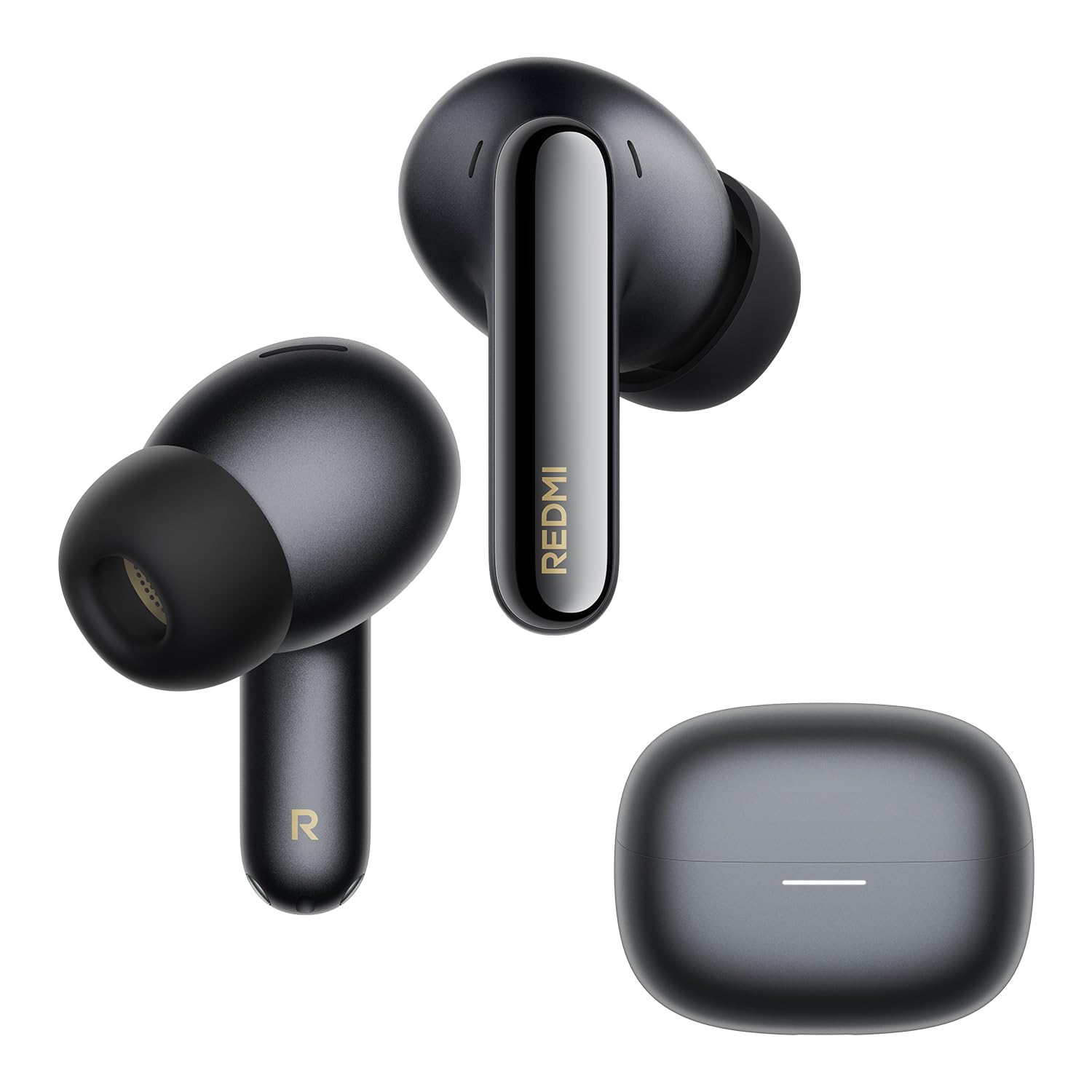
Image: The XIAOMI REDMI Buds 8 Pro earbuds and their charging case, typically included in the product package.
3. Product Features
- Active Noise Cancellation (ANC): Up to 55 dB intelligent ANC with ultra-wide frequency noise cancellation (up to 5 kHz) to reduce ambient noise.
- Adaptive ANC: Real-time noise cancellation that identifies environmental noise and automatically adjusts to your surroundings and earbud fit.
- Clear Calls: AI noise reduction with a triple microphone system ensures clear calls, even in windy conditions (up to 12 m/s wind resistance).
- High-Resolution Audio: Hi-Res Audio certified with powerful triple coaxial drivers for detailed and rich sound.
- Dolby Audio: Enhanced audio experience with clear dialogue and realistic surround sound for various media.
- Dimensional Audio: Immersive audio with dynamic head tracking for music, videos, and games.
- Long Battery Life: Up to 8 hours on a single charge, and up to 33 hours with the charging case.
- Fast Charging: 5 minutes of charging provides approximately 2 hours of playback.
- IP54 Water and Dust Resistance: Protection against splashes and dust.
- Bluetooth 5.4: Improved connection stability and efficiency.
- Multi-Device Connection: Connect to two devices simultaneously for seamless switching.
- Google Fast Pair: Quick and easy pairing with Android devices.
- Xiaomi Earbuds App: Customize gestures, audio settings, and more.

Image: Illustration demonstrating the noise reduction capabilities of the earbuds.
4. Setup
4.1. Charging the Earbuds and Case
- Place the earbuds into the charging case.
- Connect the USB charging cable to the charging port on the case and to a power source.
- The indicator light on the case will show charging status. Ensure the case is fully charged before first use.
A full charge takes approximately 60 minutes for the earbuds and case.
4.2. Pairing with a Device (Google Fast Pair)
- Ensure Bluetooth is enabled on your Android device.
- Open the charging case with the earbuds inside and place it near your device.
- A pop-up notification for Google Fast Pair should appear on your device. Tap to connect.
- If the notification does not appear, manually search for "REDMI Buds 8 Pro" in your device's Bluetooth settings.

Image: Visual representation of the Google Fast Pair process with a smartphone and the earbud case.
4.3. Multi-Device Connection
The earbuds support simultaneous connection to two devices. Once paired with two devices, the earbuds will automatically switch audio sources between them. For example, if you are listening to music on a tablet and receive a call on your phone, the earbuds will switch to the phone call.

Image: Diagram illustrating the multi-device connection feature, showing earbuds connected to both a smartphone and a tablet.
4.4. Fitting the Earbuds
Select the ear tips that provide the best seal and comfort for your ears. A good seal is crucial for optimal sound quality and noise cancellation performance.
5. Operating Instructions
5.1. Touch Controls
The REDMI Buds 8 Pro feature touch controls on each earbud. Specific gestures can be customized via the Xiaomi Earbuds app.
| Action | Function |
|---|---|
| Single Tap | Play/Pause, Answer Call |
| Double Tap | Next Track, End Call |
| Triple Tap | Previous Track, Activate Voice Assistant |
| Press and Hold (Left Earbud) | Toggle ANC/Transparency Mode |
| Press and Hold (Right Earbud) | Toggle ANC/Transparency Mode |
5.2. Active Noise Cancellation (ANC) and Transparency Mode
The earbuds feature multiple ANC modes and a Transparency mode. Use the touch controls or the Xiaomi Earbuds app to switch between modes:
- ANC On: Reduces ambient noise for an immersive listening experience.
- Transparency Mode: Allows you to hear your surroundings while listening to audio, useful for awareness in urban environments.
- ANC Off: Standard listening mode without active noise cancellation.

Image: Illustration showing the "Immersive Commute Mode" with icons for airplane, train, and public transport, indicating optimized noise cancellation for these environments.
5.3. Xiaomi Earbuds App
Download the Xiaomi Earbuds app from your device's app store (Google Play Store for Android, Apple App Store for iOS) to access advanced features:
- Customize touch controls.
- Adjust ANC levels and modes.
- Equalizer settings for personalized audio.
- Firmware updates.
- Battery status display.

Image: Screenshots of the Xiaomi Earbuds app interface, showing various settings and controls for the earbuds.
6. Maintenance
6.1. Cleaning
- Regularly clean the earbuds and charging case with a soft, dry, lint-free cloth.
- Remove ear tips and clean them with water and mild soap if necessary, ensuring they are completely dry before reattaching.
- Gently clean the charging contacts on both the earbuds and inside the case with a dry cotton swab to ensure proper connection.
6.2. Storage
When not in use, store the earbuds in their charging case to protect them from dust and damage, and to keep them charged.
6.3. Water and Dust Resistance (IP54)
The earbuds are rated IP54 for dust and splash resistance. This means they can withstand light rain and sweat but are not suitable for swimming, showering, or submersion in water. Avoid exposing them to high-pressure water or extreme humidity.

Image: Illustration depicting the IP54 rating, showing earbuds with water droplets, indicating splash and dust resistance.
7. Troubleshooting
7.1. Earbuds Not Charging or Turning On
- Verify the charging case battery level. If low, charge the case first.
- Inspect the charging contacts on the earbuds and inside the case for dirt, deformation, or damage. Ensure clean and proper contact.
- Attempt to reset the earbuds: Place them in the case with the lid open. Press and hold the function button on the bottom of the case for 10 seconds until the LED flashes rapidly. The earbuds will reset to factory settings and enter pairing mode. Then, re-pair them with your device.
- If the issue persists, contact customer support.

Image: A section from a manual detailing steps to troubleshoot charging or power-on issues for the earbuds.
7.2. Disconnections or Audio Latency
Disconnections or audio latency can be influenced by environmental factors, network conditions, and the processing speed of the audio codec. As true wireless earbuds, the REDMI Buds 8 Pro may experience slight audio delay during transmission from the phone to the primary and secondary earbuds.
Consider the following:
- Ensure your device is within the Bluetooth range (up to 10 meters).
- Minimize interference from other wireless devices.
- Update the earbud firmware via the Xiaomi Earbuds app.
- If using the LDAC audio codec and a sampling rate of 96 kHz or higher, dimensional audio effects may not be supported, potentially affecting performance.

Image: A section from a manual addressing potential disconnections or audio latency issues.
7.3. Dimensional Audio Compatibility
The REDMI Buds 8 Pro are compatible with dimensional audio. To enable this feature:
- In the Xiaomi Earbuds app, connect the REDMI Buds 8 Pro, go to the home page, select [Audio], then enable [Dimensional Audio] (Immersive Sound).
- On Xiaomi or REDMI phones, go to Bluetooth device list, tap the icon next to REDMI Buds 8 Pro, select [Dimensional Audio], then enable [Immersive Sound].
Note:
- Dimensional audio is not compatible with all Xiaomi phones. Some models may not support this function even after updating to the latest system version. Compatibility will gradually improve with future system updates.
- If the audio codec is set to LDAC and the sampling rate is 96 kHz or higher, dimensional audio effects are not supported.
8. Specifications
| Feature | Detail |
|---|---|
| Model Name | XIAOMI REDMI Buds 8 Pro |
| Model Number | M2535E1 |
| Color | Black |
| Ear Placement | In-Ear |
| Connectivity Technology | Wireless (Bluetooth) |
| Bluetooth Version | 5.4 |
| Bluetooth Range | 10 Meters |
| Noise Control | Active Noise Cancellation (ANC) |
| Frequency Response | 20 Hz - 40000 Hz |
| Impedance | 16 Ohms |
| Sensitivity | 123 dB |
| Audio Driver Type | Dynamic Driver |
| Audio Driver Size | 14.2 Millimeters |
| Audio Latency | 45 Milliseconds |
| Control Type | Touch Control |
| Battery Life (Earbuds) | Up to 8 Hours |
| Battery Life (with Case) | Up to 33 Hours |
| Charging Time | 60 Minutes |
| Water Resistance Level | IP54 (Splash and Dust Resistant) |
| Product Dimensions | 3.06 x 2.13 x 2.45 cm |
| Product Weight | 46.9 Grams |
| Material | Plastic |
| Compatible Devices | All Bluetooth-enabled devices |
9. Warranty Information
The XIAOMI REDMI Buds 8 Pro comes with a 2-year manufacturer's warranty. Please retain your proof of purchase for warranty claims. The warranty covers defects in materials and workmanship under normal use. It does not cover damage caused by misuse, accidents, unauthorized modifications, or normal wear and tear.
For detailed warranty terms and conditions, please refer to the official XIAOMI website or contact their customer service.
10. Support
For further assistance, technical support, or service inquiries regarding your XIAOMI REDMI Buds 8 Pro, please utilize the following resources:
- Xiaomi Earbuds App: The app provides access to FAQs, troubleshooting tips, and direct support options.
- Official Xiaomi Website: Visit the official XIAOMI website for product information, support articles, and contact details for your region.
- Customer Service: Refer to the contact information provided in your product packaging or on the official website for direct customer service.


