
1. بیش ازview
The Philips TAZ2200 is a versatile portable sound machine designed for enjoying various audio formats. It features a top-loading CD player, a front-loading cassette player, FM radio, Bluetooth 6.0 connectivity, USB playback, and a 3.5mm audio input. Equipped with dynamic bass boost and 6W stereo speakers, it delivers rich sound. The unit can be powered by AC mains or batteries and includes a carrying handle for portability.
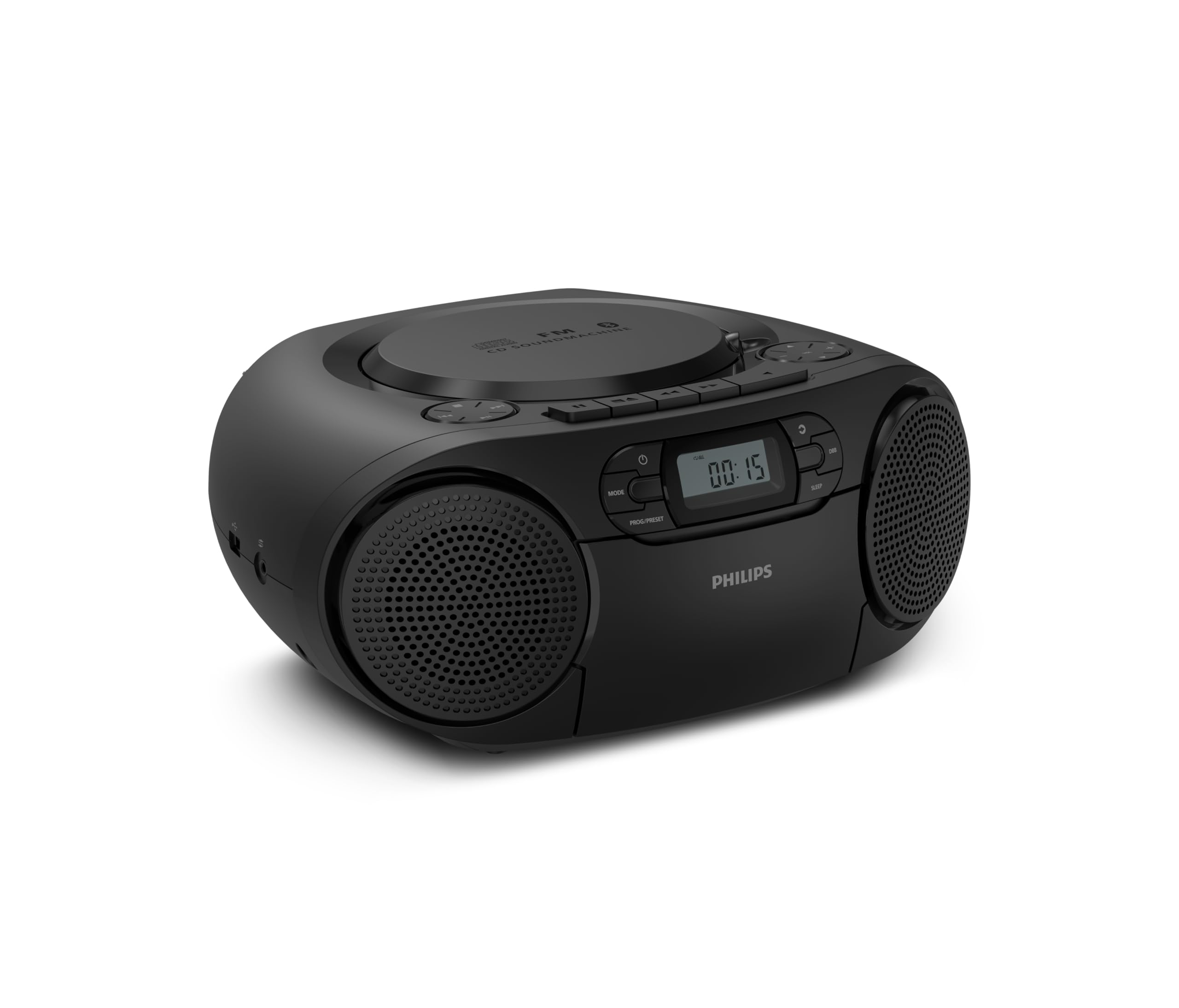
جلو view of the Philips TAZ2200 CD Soundmachine, showing the main display and control buttons.
2. اطلاعات ایمنی
Please read these safety instructions carefully before using your device and keep them for future reference. Incorrect use may result in hazards.
- منبع تغذیه: فقط از آداپتور برق یا باتریهای مشخصشده استفاده کنید. از میزان ولتاژ مطمئن شویدtage با الزامات واحد مطابقت دارد.
- آب و رطوبت: دستگاه را در معرض باران، رطوبت، چکه کردن یا پاشیدن آب قرار ندهید. اشیاء پر از مایعات، مانند گلدان، را روی دستگاه قرار ندهید.
- تهویه: Ensure adequate ventilation. Do not block any ventilation openings. Maintain a minimum distance around the unit for sufficient ventilation.
- گرما: دستگاه را نزدیک منابع گرما مانند رادیاتور، شوفاژ، اجاق گاز یا سایر دستگاهها (از جمله ...) قرار ندهید. ampزنده کننده ها) که گرما تولید می کنند.
- باتری ها: Follow correct polarity when inserting batteries. Do not mix old and new batteries, or different types of batteries. Remove batteries if the unit is not used for a long period.
- تمیز کردن: قبل از تمیز کردن، دستگاه را از پریز برق جدا کنید. از یک پارچه نرم و خشک استفاده کنید. از پاک کننده های مایع یا پاک کننده های آئروسل استفاده نکنید.
- سرویس دهی: سعی نکنید خودتان این محصول را سرویس دهید. کلیه خدمات را به پرسنل خدمات واجد شرایط ارجاع دهید.
۲. چه چیزهایی در جعبه است؟
هنگام باز کردن بستهبندی، لطفاً مطمئن شوید که تمام موارد ذکر شده در زیر موجود است:
- Philips TAZ2200 CD Soundmachine
- کابل برق
- راهنمای شروع سریع
- دفترچه گارانتی
- برگه ایمنی
4. کنترل ها و اتصالات
کنترل پنل جلو
The front panel features the main display, power button, mode selection, program/preset buttons, and dynamic bass boost (DBB) control. Playback controls for CD and USB are also located here.

نمای جلویی با جزئیات view showing the display, power, mode, program/preset, and DBB buttons.
Side and Rear Connections
The side of the unit provides a USB port for digital audio playback and a 3.5mm audio input jack for connecting external devices.

سمت view illustrating the USB port and Audio Input jack.
The top of the unit houses the CD compartment and additional playback controls, while the rear features the AC power input and the FM antenna.

بالا view showing the CD compartment and associated controls.

عقب view displaying the AC power input and the telescopic FM antenna.
5. راه اندازی
5.1 منبع تغذیه
برق متناوب
- مطمئن شوید که دستگاه خاموش است.
- Connect the supplied power cable to the AC IN socket on the rear of the sound machine.
- Plug the other end of the power cable into a wall power outlet.
قدرت باتری
For portable use, the unit can operate on 6 x C-type batteries (not included).
- درب محفظه باتری را که در پایین واحد قرار دارد باز کنید.
- Insert 6 C-type batteries, ensuring correct polarity (+/-) as indicated inside the compartment.
- درپوش محفظه باتری را محکم ببندید.
۶.۳ تنظیم آنتن
For optimal FM radio reception, fully extend the telescopic antenna located at the rear of the unit. Adjust its position and angle to achieve the clearest signal.
6. دستورالعمل های عملیاتی
6.1 عملیات عمومی
- روشن/خاموش برق: را فشار دهید قدرت دکمه روشن یا خاموش کردن دستگاه.
- کنترل صدا: استفاده کنید VOL+ or جلد - دکمه هایی برای تنظیم سطح صدا
- تقویت کننده باس پویا (DBB): را فشار دهید DBB button to activate or deactivate the dynamic bass boost feature for enhanced bass sound.
- انتخاب حالت: را فشار دهید حالت button repeatedly to switch between CD, Cassette, FM Radio, Bluetooth, USB, and Audio Input modes.
6.2 پخش سی دی
- پوشش محفظه سی دی را که در بالای دستگاه قرار دارد، باز کنید.
- Place a CD (CD, CD-R, or CD-RW) with the label side facing up onto the spindle.
- درپوش محفظه CD را ببندید.
- را فشار دهید حالت برای انتخاب حالت CD
- را فشار دهید PLAY/PAUSE دکمه شروع پخش
- استفاده کنید پرش دکمه ها (|< or >> |) برای رد کردن آهنگها.
- را فشار دهید و نگه دارید |< or >> | to search within a track.
- را فشار دهید توقف دکمه توقف پخش
6.3 پخش کاست
- Open the cassette compartment door on the front of the unit.
- یک نوار کاست را طوری قرار دهید که لبه باز آن رو به بالا باشد.
- درب محفظه کاست را ببندید.
- را فشار دهید حالت برای انتخاب حالت کاست، دکمه را فشار دهید.
- را فشار دهید بازی کنید دکمه شروع پخش
- استفاده کنید سریع به جلو or عقب دکمههایی برای جلو یا عقب بردن سریع نوار.
- را فشار دهید توقف دکمه توقف پخش
6.4 رادیو FM
- را فشار دهید حالت برای انتخاب حالت رادیو FM، دکمه را فشار دهید.
- اسکن اتوماتیک: را فشار داده و نگه دارید PROG/PRESET دکمه برای اسکن خودکار و ذخیره ایستگاههای FM موجود.
- تنظیم دستی: را فشار دهید تنظیم دکمه ها (|< or >> |) برای تنظیم دستی فرکانس مورد نظر.
- ذخیره تنظیمات از پیش تعیین شده: After tuning to a station, press PROG/PRESET once, then use |< or >> | برای انتخاب یک شماره از پیش تعیین شده، و را فشار دهید PROG/PRESET دوباره برای تایید
- به یاد آوردن ایستگاه از پیش تنظیم شده: در حالت FM ، را فشار دهید PROG/PRESET repeatedly to cycle through saved preset stations.
پخش بلوتوث 6.5
- را فشار دهید حالت button to select Bluetooth mode. The display will show 'BT' and flash, indicating it's in pairing mode.
- در دستگاه بلوتوثدار خود (گوشی هوشمند، تبلت)، بلوتوث را فعال کنید و دستگاههای موجود را جستجو کنید.
- Select "Philips TAZ2200" from the list of devices.
- Once paired, the unit will emit a confirmation sound, and 'BT' will stop flashing.
- Start playing audio on your connected device. The sound will be streamed to the sound machine.
پخش ۱۴ فایل از طریق USB
- یک فلش مموری USB را به پورت USB کنار دستگاه وارد کنید.
- را فشار دهید حالت را فشار دهید تا حالت USB را انتخاب کنید.
- دستگاه به طور خودکار صدای سازگار را شناسایی و پخش میکند. files (MP3, WAV, WMA).
- از کنترلهای پخش استفاده کنید (PLAY/PAUSE, پرش, توقف) as you would for CD playback.
ورودی صوتی ۶.۵ (AUX)
- Connect one end of a 3.5mm audio cable (not included) to the AUDIO IN jack on the side of the sound machine.
- Connect the other end of the audio cable to the headphone jack or audio output of your external device (e.g., MP3 player, turntable).
- را فشار دهید حالت button to select Audio Input mode.
- Start playing audio on your external device. The sound will be played through the sound machine.
7. تعمیر و نگهداری
- تمیز کردن واحد: قسمت بیرونی دستگاه را با یک پارچه نرم و کمی زبر پاک کنید.amp پارچه از پاک کننده ها یا حلال های ساینده استفاده نکنید.
- مراقبت از پخش کننده سی دی: Keep the CD compartment clean. If the lens is dirty, use a specialized CD lens cleaner. Avoid touching the lens.
- مراقبت از پخش کاست: به طور دورهای سر نوارها و غلتکهای فشاری را با یک پنبه به آرامی تمیز کنید.ampهمراه با ایزوپروپیل الکل
- تعویض باتری: If using batteries, replace all 6 C-type batteries when the unit's performance diminishes or if the unit will not be used for an extended period.
- ذخیره سازی: در صورت عدم استفاده، دستگاه را در جای خشک و تمیز و دور از نور مستقیم خورشید و دمای بالا نگهداری کنید.
8 عیب یابی
If you encounter any issues with your Philips TAZ2200, please refer to the table below for common problems and solutions.
| مشکل | علت احتمالی | راه حل |
|---|---|---|
| بدون قدرت | کابل برق وصل نیست؛ باتریها خالی شدهاند یا به درستی وارد نشدهاند. | اتصال برق متناوب (AC) را بررسی کنید؛ باتریها را تعویض کنید یا از صحیح بودن قطبها اطمینان حاصل کنید. |
| صدا نداره | صدا خیلی کم است؛ حالت نادرست انتخاب شده است؛ هدفون وصل است. | Increase volume; Select the correct source mode (CD, FM, BT, etc.); Disconnect headphones. |
| پخش نشدن سی دی | CD inserted incorrectly; CD is dirty or scratched; CD format not supported. | Insert CD with label side up; Clean or replace CD; Ensure CD is CD-R/RW compatible. |
| کاست پخش نمیشود | Cassette inserted incorrectly; Tape is damaged. | Insert cassette correctly; Try a different cassette. |
| دریافت ضعیف FM | آنتن به درستی کشیده نشده یا در موقعیت صحیح قرار نگرفته است؛ سیگنال ضعیف است. | آنتن تلسکوپی را کاملاً بیرون آورده و تنظیم کنید؛ سعی کنید دستگاه را به مکان دیگری منتقل کنید. |
| بلوتوث وصل نمی شود | Unit not in pairing mode; Bluetooth device too far; Device already paired with another unit. | Ensure unit is in Bluetooth mode and flashing; Move device closer; Disconnect from other devices. |
| مشکلات پخش از طریق USB | درایو USB به درستی وارد نشده است؛ سازگار نیست file فرمت؛ درایو USB خراب است. | Reinsert USB drive; Ensure files are MP3, WAV, or WMA; Try a different USB drive. |
9. مشخصات
| ویژگی | مشخصات |
|---|---|
| نام تجاری | فیلیپس |
| شماره مدل | TAZ2200/10 |
| فناوری اتصال | Bluetooth 6.0, USB, Audio Input (3.5mm) |
| نوع بلندگو | Stereo (2 speakers) |
| توان خروجی | 6 وات (حداکثر) |
| رسانه پشتیبانی شده | CD, CD-R, CD-RW, Cassette, USB (MP3, WAV, WMA) |
| رادیو تیونر | Digital FM with 20 presets |
| منبع تغذیه | AC (wired), 6 x C-type batteries (not included) |
| ابعاد (LxWxH) | 24.5 × 28.5 × 12.5 سانتی متر |
| وزن | 1.35 کیلوگرم |
| رنگ | نقره ای |
10. گارانتی و پشتیبانی
10.1 گارانتی محصول
This Philips TAZ2200 CD Soundmachine comes with a 2 سال گارانتی از تاریخ خرید. لطفاً فاکتور خرید خود را برای موارد گارانتی نگه دارید. گارانتی شامل نقصهای تولید و نقص در شرایط استفاده عادی میشود.
10.2 پشتیبانی مشتری
For technical assistance, troubleshooting beyond this manual, or warranty service, please refer to the contact information provided in the warranty booklet included with your product. You can also visit the official Philips support website for your region for further assistance and FAQs.