
1. محصول تمام شدview
The G-Shock Casio GD010 digital watch is engineered for durability and functionality, designed to withstand demanding conditions while providing essential timekeeping features. This timepiece incorporates bio-based resin components and a CORDURA re/cor band, reflecting a commitment to environmental considerations.
This manual provides detailed instructions for setting up, operating, maintaining, and troubleshooting your GD010 watch.
ویژگی های کلیدی
- ساختار مقاوم در برابر ضربه: Designed to endure impacts and vibrations.
- ساختار محافظ هسته کربنی: Enhances durability and protection for the internal module.
- مقاومت در برابر آب تا عمق ۱۰۰ متر: Suitable for swimming, snorkeling, and diving (non-SCUBA).
- عمر طولانی باتری: تقریباً ۵ سال با باتری CR2025.
- Bio-based Resin Components: Case and bezel made with environmentally conscious materials.
- CORDURA re/cor Band: Durable strap made from recycled PET plastic fiber.
- نمایشگر دیجیتال: Clear and easy-to-read time and function information.
- عملکردهای چندگانه: Includes alarm, chronograph (stopwatch), and timer.

Image 1.1: The G-Shock GD010 watch, showcasing its core features including shock resistance, Carbon Core Guard structure, and a 10-year battery life.
۲. شروع کار: راهاندازی
توابع دکمه
Your GD010 watch features several buttons for navigation and function control. Familiarize yourself with their locations and primary roles.

تصویر ۵.۱: کنار view of the G-Shock GD010, illustrating the location of the control buttons.
- تنظیم (بالا سمت چپ): برای ورود و خروج از حالتهای تنظیم و تأیید تنظیمات استفاده میشود.
- حالت (پایین سمت چپ): Cycles through the watch's various modes (Timekeeping, Stopwatch, Timer, Alarm).
- معکوس (بالا سمت راست): Used to decrease values or move backward through options during setting.
- FORWARD / START (Bottom Right): Used to increase values or move forward through options during setting. Also used to start/stop stopwatch or timer.
- LIGHT (Center Bottom): نور پس زمینه را برای روشنایی فعال میکند.
تنظیم اولیه زمان و تاریخ
- در حالت زمانسنج، دکمه را فشار داده و نگه دارید تنظیم کنید دکمه را فشار دهید تا کد شهر شروع به چشمک زدن کند که نشان دهنده حالت تنظیم است.
- استفاده کنید معکوس و به جلو buttons to select your desired Home City Code. This will automatically set the correct time zone.
- را فشار دهید حالت button to cycle through the settings: DST (Daylight Saving Time) → 12/24-hour format → Seconds → Hour → Minute → Year → Month → Day.
- برای هر تنظیم، از معکوس و به جلو دکمه های تغییر مقدار
- پس از پیکربندی تمام تنظیمات، دکمه را فشار دهید تنظیم کنید را فشار دهید تا از حالت تنظیمات خارج شوید.
۴. کار کردن با ساعت
The GD010 offers various modes for different functions. Press the حالت برای مرور آنها، دکمه را فشار دهید.
حالت زمان سنجی
این حالت پیشفرض است که زمان فعلی، روز هفته و تاریخ را نمایش میدهد.
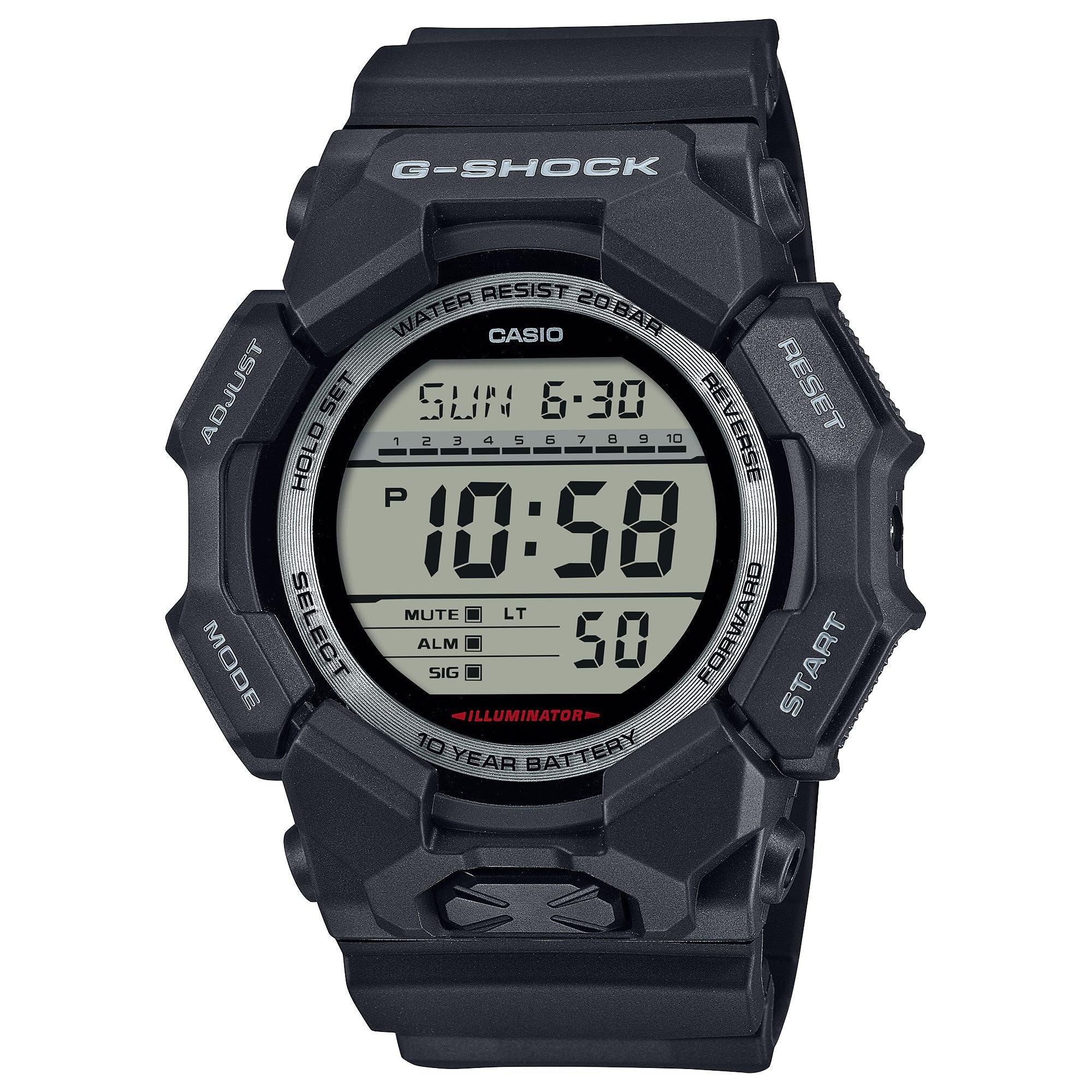
Image 3.1: The G-Shock GD010 watch face in Timekeeping Mode.
استفاده از کرنومتر (زمانسنج)
- از حالت زمانسنج، دکمه را فشار دهید حالت button until "STW" or "STOPWATCH" appears on the display.
- را فشار دهید FORWARD / START دکمه برای شروع کرونومتر.
- را فشار دهید FORWARD / START برای متوقف کردن کرونومتر، دوباره دکمه را فشار دهید.
- برای تنظیم مجدد کرونومتر به صفر، دکمه معکوس دکمه را در حالی که کرونومتر متوقف است فشار دهید.
تنظیم تایمر شمارش معکوس
- از حالت زمانسنج، دکمه را فشار دهید حالت button until "TMR" or "TIMER" appears.
- را فشار داده و نگه دارید تنظیم کنید button until the current timer setting starts to flash.
- استفاده کنید حالت برای انتخاب تنظیم ساعت یا دقیقه، دکمه را فشار دهید.
- استفاده کنید معکوس و به جلو دکمهها برای تنظیم زمان شمارش معکوس دلخواه.
- را فشار دهید تنظیم کنید را فشار دهید تا از حالت تنظیمات خارج شوید.
- را فشار دهید FORWARD / START button to start the countdown. An alarm will sound when the timer reaches zero.
توابع زنگ هشدار
- از حالت زمانسنج، دکمه را فشار دهید حالت را فشار دهید تا عبارت "ALM" یا "ALARM" ظاهر شود.
- را فشار داده و نگه دارید تنظیم کنید را فشار دهید تا زمان هشدار شروع به چشمک زدن کند.
- استفاده کنید حالت برای انتخاب تنظیم ساعت یا دقیقه، دکمه را فشار دهید.
- استفاده کنید معکوس و به جلو دکمهها برای تنظیم زمان دلخواه هشدار.
- را فشار دهید تنظیم کنید را فشار دهید تا از حالت تنظیمات خارج شوید.
- برای روشن/خاموش کردن زنگ هشدار، دکمه FORWARD / START button while in Alarm Mode (without holding ADJUST).
دستورالعمل های مقاومت در برابر آب
Your GD010 watch is rated for 200-meter water resistance. This means it is suitable for recreational diving (excluding saturation diving), swimming, snorkeling, and water sports.
- وقتی ساعت در آب فرو رفته یا خیس است، دکمهها را فشار ندهید.
- Avoid exposing the watch to hot water, steam, or extreme temperature changes, as this can compromise water resistance.
- After exposure to saltwater, rinse the watch thoroughly with fresh water and wipe it dry.
4. مراقبت و نگهداری
مراقبت عمومی
- ساعت را مرتباً با یک پارچه نرم و خشک پاک کنید تا گرد و غبار و رطوبت از بین برود.
- Avoid exposing the watch to strong chemicals, solvents, or detergents, as these can damage the resin materials.
- ساعت را در جای خشک و خنک و دور از نور مستقیم خورشید و دمای بالا (در صورت عدم استفاده) نگهداری کنید.
- The watch's resin components and band are designed for durability, but prolonged exposure to UV light may cause discoloration over time.
تعویض باتری
The GD010 watch is equipped with a CR2025 battery, providing an approximate battery life of 10 years. When the display becomes dim or functions become erratic, it may be time for a battery replacement.
Battery replacement should ideally be performed by a qualified watch technician to ensure proper sealing and maintain water resistance. Attempting to replace the battery yourself may void the warranty and compromise the watch's water resistance.
تمیز کردن
To clean your watch, use a soft cloth dampened with mild soap and water. Gently wipe the case and band. For stubborn dirt, a soft brush can be used. Rinse thoroughly with fresh water and dry completely with a soft cloth.
5. راهنمای عیب یابی
If you encounter issues with your GD010 watch, refer to the following common problems and their solutions.
| مشکل | علت احتمالی | راه حل |
|---|---|---|
| صفحه نمایش خالی یا کم نور است. | باتری کم. | Replace the battery (CR2025). Consult a professional watch technician. |
| زمان نادرست است. | Incorrect time zone or manual setting error. | تنظیمات زمان و تاریخ را همانطور که در بخش ۴.۲ توضیح داده شده است، دوباره تنظیم کنید. |
| دکمه ها پاسخگو نیستند | Watch is wet, or internal module error. | Ensure the watch is dry. If the problem persists, a reset may be required (consult support), or professional service. |
| صدای آژیر نمیآید. | Alarm is turned off or volume is too low (if adjustable). | Verify the alarm is set to ON in Alarm Mode. Check watch settings for alarm volume if applicable. |
If the problem persists after attempting these solutions, please contact G-Shock customer support for further assistance.
6. مشخصات محصول
| نام مدل | GD010 |
| شماره مدل | GD010-1 |
| اندازه جعبه (طول × عرض × ارتفاع) | 54.9 × 51.9 × 16.1 میلی متر |
| وزن | ۴.۳ گرم (تقریباً ۰.۱۵ اونس) |
| جنس بدنه و قاب | کربن زیستی / رزین زیستی |
| نوع مواد باند | Resin (CORDURA re/cor) |
| ساخت و ساز | Shock Resistant, Carbon Core Guard structure |
| مقاومت در برابر آب | ضد آب 200 متر |
| منبع تغذیه | CR2025 (1 Lithium Metal battery, included) |
| عمر تقریبی باتری | 10 سال |
| کریستال | شیشه معدنی |
| نوع نمایشگر | دیجیتال |
| نوع حرکت | کوارتز ژاپنی |
| ویژگی های اضافی | Alarm, Chronograph, Timer |
| نوع قلاب | سگک |
| رنگ باند | مشکی |
| شماره گیری رنگ | مشکی |
۹. گارانتی و پشتیبانی مشتری
اطلاعات گارانتی
Your G-Shock GD010 watch comes with a گارانتی محدود. The terms and conditions of this warranty cover manufacturing defects under normal use. Please refer to the warranty card included with your purchase for specific details regarding coverage duration, exclusions, and how to make a claim. Keep your proof of purchase for warranty validation.
تماس با پشتیبانی مشتری
For technical assistance, warranty service, or any other inquiries regarding your G-Shock GD010 watch, please contact G-Shock customer support.
- Visit the official G-Shock website for support contact information, FAQs, and service center locations.
- Have your watch model number (GD010-1) and proof of purchase ready when contacting support.