
1. مقدمه
This manual provides essential information for the safe and efficient use of your HP 17.3 Inch FHD Business Laptop. Please read this guide thoroughly before operating your device to ensure optimal performance and longevity. This laptop is designed for business and everyday computing tasks, offering a large display, robust performance, and portability.
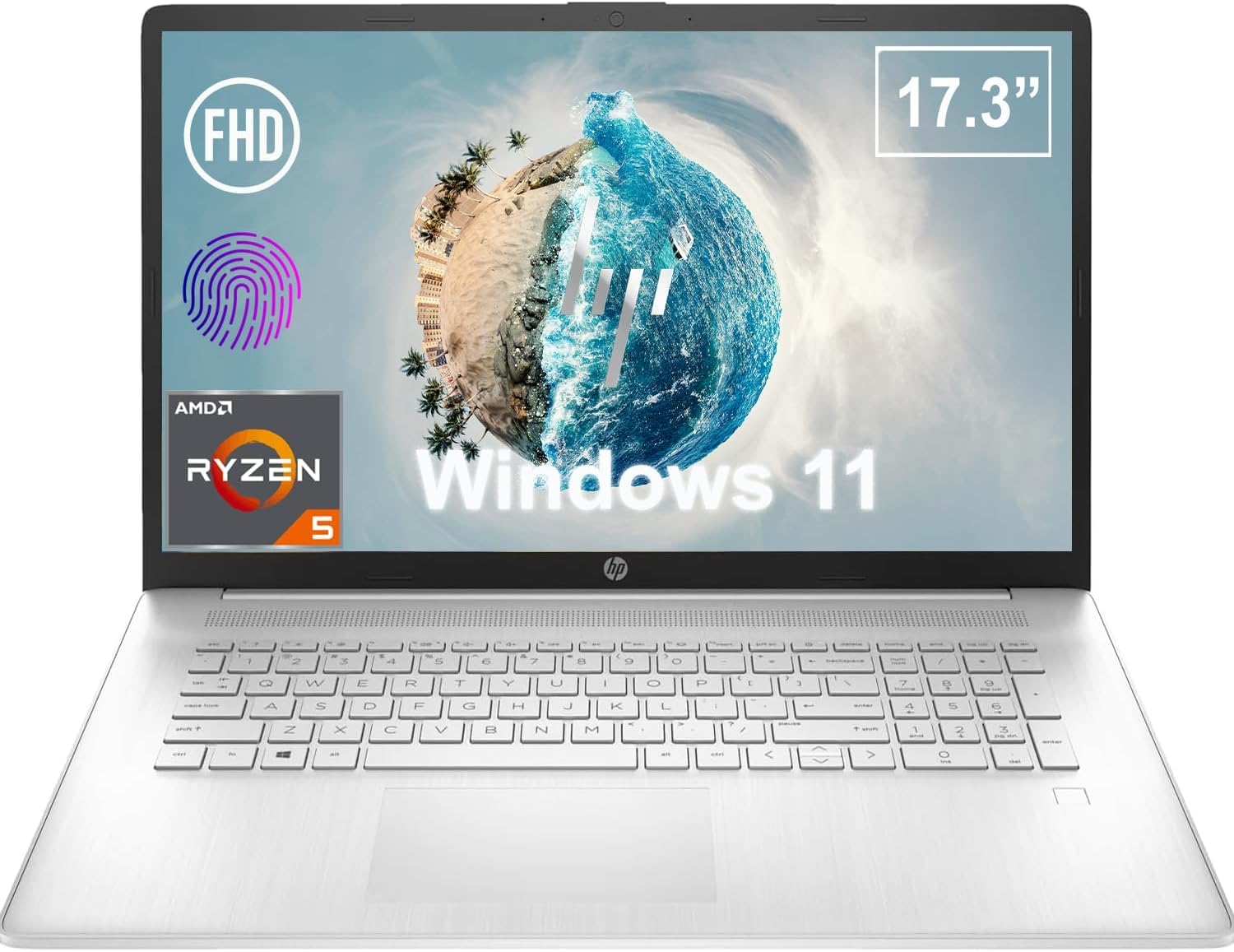
شکل 1.1: جلو view of the HP 17.3 Inch FHD Business Laptop, showcasing the large display and keyboard.
2. راه اندازی
۲.۱ جعبهگشایی و بررسی اولیه
تمام قطعات را با دقت از بستهبندی خارج کنید. از وجود موارد زیر اطمینان حاصل کنید:
- HP 17.3 Inch FHD Business Laptop
- Power Adapter (45 W Smart AC Power Adapter)
- مستندات (این دفترچه راهنما، اطلاعات گارانتی)
Inspect the laptop and accessories for any signs of damage. If any items are missing or damaged, contact your retailer or HP support immediately.
۲.۲ اتصال آداپتور برق
Before first use, ensure the laptop is fully charged. Connect the power adapter to the AC smart pin port on the side of the laptop and then plug the adapter into a power outlet.
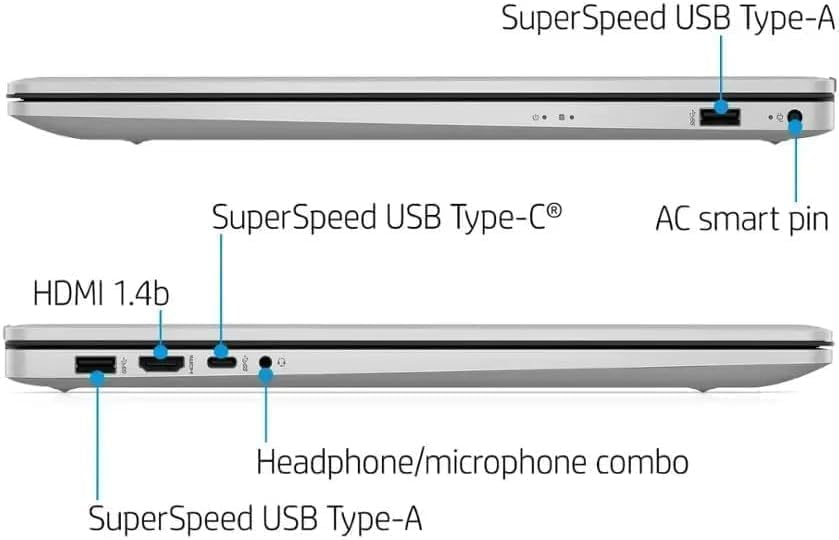
شکل 2.1: سمت view illustrating the location of the AC smart pin and other ports.
۲.۳ روشن کردن اولیه و راهاندازی ویندوز
Press the power button to turn on the laptop. Follow the on-screen instructions to complete the Windows 11 Home setup process. This includes setting up your user account, network connection, and initial preferences.
۵. کار با لپتاپ
۳.۵ صفحه کلید و تاچپد
The laptop features a full-size QWERTY keyboard with a 10-key number pad for efficient data entry. The integrated touchpad provides precise cursor control. Refer to the operating system's settings for customizing touchpad gestures and keyboard shortcuts.
۵۰ دستگاه اثر انگشت خوان
For enhanced security and convenient login, utilize the integrated fingerprint reader. Set up your fingerprints through Windows Hello in the Windows 11 settings.
3.3 Webدوربین و میکروفون
The HP True Vision 720p HD Camera and integrated dual array digital microphones are located at the top of the display. These are suitable for video conferencing and online communication.
3.4 قابلیت اتصال
- وای فای: The laptop supports 802.11a/b/g/n/ac Wi-Fi for wireless internet access. Connect to available networks via the Windows network settings.
- بلوتوث: Bluetooth 5 allows for wireless connection to compatible devices such as headphones, mice, and keyboards. Enable and manage Bluetooth devices through Windows settings.
۴.۲ پورتها و دستگاههای خارجی
این لپتاپ به پورتهای مختلفی برای اتصال دستگاههای خارجی مجهز است:
- 1 x USB Type-C (5Gbps, Data Only): For connecting USB-C compatible devices and data transfer.
- 2 x USB Type-A (5Gbps): For connecting standard USB devices like external drives, mice, or keyboards.
- 1 x HDMI 1.4b: For connecting to external displays or projectors.
- 1 x Headphone/Microphone Combo: For connecting a headset with a single 3.5mm jack.
- 1 x AC Smart Pin: For connecting the power adapter.

شکل ۱: باز کردن view of the laptop, highlighting the keyboard and touchpad area.
3.6 مدیریت باتری
The laptop is powered by a 3-Cell, 41 Wh Li-ion battery, offering up to 8 hours and 30 minutes of video playback. Use the provided 45 W Smart AC Power Adapter for charging. HP Fast Charge technology allows for quicker charging times.
4. تعمیر و نگهداری
۶.۱ تمیز کردن لپتاپ
To maintain the laptop's appearance and functionality:
- از پارچه نرم و بدون پرز استفاده کنیدampبا آب یا یک پاککنندهی مخصوص صفحه نمایش، تمیز کنید.
- برای تمیز کردن صفحه کلید و شاسی، از یک پارچه نرم و خشک استفاده کنید. از مواد شیمیایی قوی یا مواد ساینده خودداری کنید.
- قبل از تمیز کردن، مطمئن شوید که لپتاپ خاموش و از برق کشیده شده است.
4.2 به روز رسانی نرم افزار
برای اطمینان از عملکرد، امنیت و سازگاری بهینه، سیستم عامل ویندوز و درایورهای خود را مرتباً بهروزرسانی کنید. بهروزرسانی ویندوز از طریق منوی تنظیمات قابل دسترسی است.
4.3 Security Software
The laptop comes preloaded with McAfee LiveSafe for security. Ensure this software is active and updated to protect against viruses and other threats.
5 عیب یابی
در این بخش به بررسی مشکلات رایجی که ممکن است با لپتاپ اچپی خود مواجه شوید، میپردازیم.
۷.۱ مشکلات برق
- لپ تاپ روشن نمی شود: Ensure the power adapter is securely connected to both the laptop and a working power outlet. Verify the battery is charged.
- باتری شارژ نمی شود: آداپتور برق و کابل را از نظر آسیب دیدگی بررسی کنید. پریز برق دیگری را امتحان کنید.
5.2 مشکلات نمایش
- عدم نمایش تصویر روی صفحه: برای بررسی اینکه آیا مشکل از نمایشگر لپتاپ است یا خیر، یک مانیتور خارجی وصل کنید. لپتاپ را مجدداً راهاندازی کنید.
- تصویر سوسو میزند یا تحریف شده است: درایورهای گرافیک را بهروزرسانی کنید. وضوح تصویر و نرخ بهروزرسانی صفحه نمایش را در تنظیمات ویندوز تنظیم کنید.
۶.۱ مشکلات اتصال
- وای فای وصل نمیشه: Ensure Wi-Fi is enabled. Restart your router and the laptop. Check network settings for correct password and configuration.
- دستگاه بلوتوث جفت نمیشود: مطمئن شوید که بلوتوث در هر دو دستگاه فعال است. مطمئن شوید که دستگاه در حالت جفت شدن و در محدوده اتصال است.
برای مشکلات پیچیدهتر، به پشتیبانی HP مراجعه کنید webسایت یا با خدمات مشتری تماس بگیرید.
6. مشخصات
| ویژگی | جزئیات |
|---|---|
| نام تجاری | HP |
| نام مدل | HP17 |
| شماره مدل | i5-1135G7 |
| اندازه صفحه نمایش | 17.3 اینچ |
| نوع نمایشگر | IPS, Anti-Glare, LED |
| قطعنامه | 1920 x 1080 (FHD) |
| نرخ تازه سازی | 60 هرتز |
| پردازنده | AMD Ryzen 5 5500U (6 Cores, 12 Threads, up to 4.0 GHz Max Boost Clock) |
| گرافیک | گرافیک مجتمع AMD Radeon |
| حافظه رم | 32 GB DDR4-3200 MHz (Max 64 GB) |
| ذخیره سازی | ۱ ترابایت حافظه SSD از نوع PCIe NVMe M.2 |
| سیستم عامل | ویندوز ۱۱ هوم، ۶۴ بیتی، انگلیسی |
| اتصال بی سیم | وایفای 802.11a/b/g/n/ac، بلوتوث 5 |
| پورت ها | 1x USB Type-C (5Gbps), 2x USB Type-A (5Gbps), 1x HDMI 1.4b, 1x Headphone/Microphone Combo, 1x AC Smart Pin |
| Webبادامک | HP True Vision 720p HD Camera |
| صوتی | Dual Speakers, Integrated Dual Array Digital Microphones |
| باتری | 3-Cell, 41 Wh Li-ion (Up to 8.5 hours video playback) |
| آداپتور برق | آداپتور برق AC هوشمند ۶۵ واتی |
| ابعاد (W x D x H) | 40.07 x 25.78 x 2.06 cm (14.14"L x 9.31"W x 0.78"Th) |
| وزن | شروع از 2.07 کیلوگرم |
| ویژگی های خاص | Fingerprint Reader, Lightweight Design, HP Fast Charge |
7. ضمانت و پشتیبانی
7.1 اطلاعات گارانتی
This HP laptop comes with a 1-year manufacturer's limited warranty. For detailed terms and conditions, please refer to the warranty documentation included with your product or visit the official HP support webسایت
7.2 پشتیبانی مشتری
اگر با مشکلاتی مواجه شدید که با استفاده از مراحل عیبیابی در این دفترچه راهنما قابل حل نیستند، لطفاً با پشتیبانی مشتری HP تماس بگیرید. میتوانید اطلاعات تماس و منابع اضافی را در وبسایت رسمی HP پیدا کنید. webسایت:
- پشتیبانی HP Webسایت: support.hp.com
- فروشگاه اچ پی: فروشگاه اچ پی در آمازون