
Introduction to Your IC-7300 Guide
This guide serves as an independent reference resource designed to assist users of the ICOM IC-7300 HF/50 MHz transceiver. It provides comprehensive, hands-on instructions for operating this groundbreaking software-defined radio (SDR) transceiver. Whether you are new to high-frequency (HF) radio operation or an experienced amateur radio operator, this manual aims to clarify complex features and enhance your operating skills.
The ICOM IC-7300 introduced advanced SDR architecture, making features like real-time spectral displays, precision digital filters, and firmware updates accessible to everyday operators. This guide is structured to make the transition to advanced operation effortless, offering practical, friendly, and clear explanations with real-world examples

Image: Front cover of the ICOM IC-7300 Complete User Guide book. This image displays the book's cover, featuring the ICOM IC-7300 radio on a desk, indicating the subject matter of the guide.
۳.۳. راهاندازی اولیه و اتصالات
Proper setup is crucial for safe and efficient operation of your IC-7300 transceiver. This section details the necessary steps for connecting power, antennas, and ensuring proper grounding.
1.1 اتصالات برق
Connect the transceiver to a stable DC power supply capable of providing the required voltage and current. Ensure correct polarity to prevent damage.
1.2 اتصالات آنتن
Attach your HF/50 MHz antenna to the appropriate connector on the rear panel. Use high-quality coaxial cable and ensure all connections are secure.
1.3 زمین
Establish a robust station ground to minimize RF interference and ensure operator safety. Connect the transceiver's ground terminal to your station's common ground point.
2. Operating Your IC-7300
This section covers the fundamental aspects of operating your IC-7300, including tuning, transmitting, and utilizing its software-defined radio capabilities.
2.1 عملیات اساسی
- روشن کردن: Press the power button to turn on the transceiver.
- تنظیم فرکانس: Use the main dial to select your desired operating frequency.
- انتخاب حالت: Select the appropriate operating mode (e.g., USB, LSB, CW, AM, FM) using the dedicated buttons or touchscreen.
- تنظیم صدا: Adjust the audio output level for comfortable listening.
2.2 SDR Architecture and Digital Modes
The IC-7300's SDR architecture allows for advanced signal processing. Learn to decode digital modes such as FT8 and PSK31, often requiring only a single USB cable for setup and control (CAT/CI-V).
2.3 Display and Filtering
Utilize the 4.3-inch color touchscreen to navigate menus, view the waterfall display for spectral analysis, and adjust DSP filtering for optimal signal reception.
3. تعمیر و نگهداری و عیب یابی
Regular maintenance and knowing how to troubleshoot common issues will ensure the longevity and reliable performance of your IC-7300.
3.1 تعمیر و نگهداری معمولی
- تمیز کردن: Keep the transceiver clean, especially the display and ventilation openings. Use a soft, dry cloth.
- به روز رسانی سیستم عامل: Periodically check for and install the latest firmware updates from ICOM to ensure optimal performance and access to new features.
- SD Card Backup: Regularly back up your settings and memories to an SD card. This is crucial for recovery in case of data loss or when performing major updates.
3.2 عیب یابی مسائل رایج
برای مشکلات رایج و راهحلهای بالقوه آنها، به جدول زیر مراجعه کنید:
| مشکل | علت احتمالی | راه حل |
|---|---|---|
| بدون قدرت | Loose power cable, power supply off, blown fuse. | Check connections, verify power supply, inspect fuse. |
| خروجی صدا وجود ندارد | Volume too low, speaker/headphone issue, squelch too high. | Adjust volume, check speaker/headphones, lower squelch level. |
| پذیرش ضعیف | Antenna issue, incorrect mode, high noise level. | Check antenna connections, select correct mode, adjust DSP filters. |
4. ایمنی و انطباق
Adhering to safety guidelines and regulatory compliance is paramount for legal and efficient amateur radio operation.
4.1 مطابقت FCC
Ensure all operations comply with your local amateur radio regulations, such as those set by the FCC in the United States. This includes proper licensing and adherence to power limits and band plans.
4.2 General Safety Practices
- قرار گرفتن در معرض RF: Maintain safe distances from antennas during transmission to avoid excessive RF exposure.
- ایمنی برق: Always disconnect power before working on internal components or making significant wiring changes.
- نصب آنتن: Install antennas securely and away from power lines.
5. Field Operation and Advanced Techniques
The IC-7300 is well-suited for portable operations and offers advanced features for experienced users.
5.1 Portable Operations (SOTA, Field Day)
Tips for setting up and operating your IC-7300 in portable environments, such as Summits On The Air (SOTA) or Field Day events. Consider battery power solutions and portable antenna systems.
5.2 Exploring Advanced SDR Features
Delve deeper into the capabilities of the IC-7300's SDR, including advanced DSP settings, custom filter configurations, and integration with external software for enhanced control and analysis.
6. Specifications of This Guide Book
This section provides details regarding the physical and publication specifications of the ICOM IC-7300 Complete User Guide book, which this manual is based upon.
- ASIN: B0G2X41QMD
- ناشر: به صورت مستقل منتشر شده است
- تاریخ انتشار: 18 نوامبر 2025
- زبان: انگلیسی
- طول چاپ: 207 صفحه
- شابک-۱۰: 979-8275088212
- وزن مورد: 1.09 پوند
- ابعاد: 8.5 x 0.47 x 11 اینچ
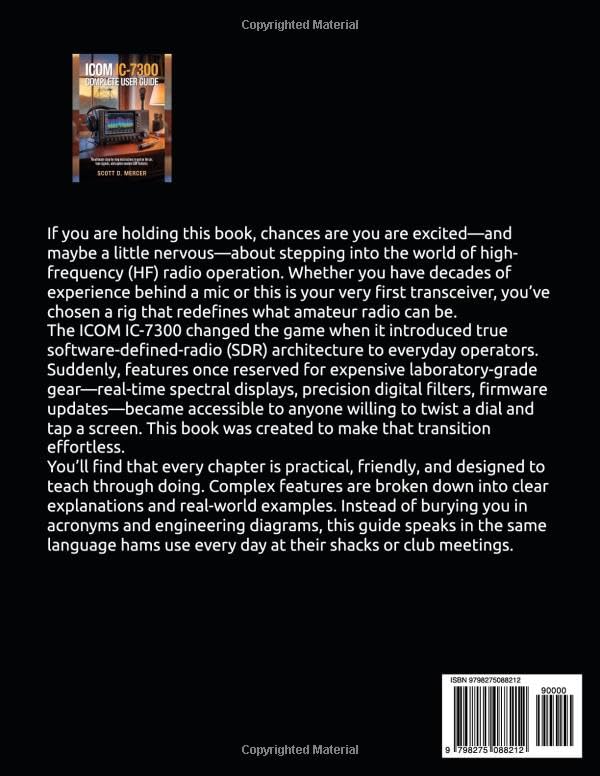
Image: Back cover of the ICOM IC-7300 Complete User Guide book. This image displays the rear of the book, featuring additional descriptive text and the ISBN barcode.
7. گارانتی و پشتیبانی
This user guide is an independent publication and is not affiliated with, authorized by, sponsored by, or endorsed by Icom Incorporated. For warranty information, technical support, or service related to your ICOM IC-7300 transceiver, please refer to the official documentation provided by Icom Incorporated or visit their official website. This guide does not provide warranty services or direct product support for the transceiver itself.