
1. بیش ازview
The Xiaomi Redmi Note 15 Pro 5G is a high-performance smartphone designed for robust daily use. It features a massive 6580 mAh battery, IP66/IP68 dust and water resistance, a 200 MP camera, and a 6.83-inch 1.5K AMOLED display. This manual provides essential information for setting up, operating, and maintaining your device.

تصویر: چندگانه views of the Xiaomi Redmi Note 15 Pro 5G smartphone, showcasinطراحی و ماژول دوربین آن.
۲. چه چیزهایی در جعبه است؟
پس از جعبهگشایی شیائومی ردمی نوت ۱۳ پرو ۵G، باید موارد زیر را پیدا کنید:
- گوشی هوشمند شیائومی ردمی نوت 15 پرو 5G
- کابل USB (USB نوع C)
- ابزار خارج کردن سیم کارت
- کیس محافظ
- Holding Ring (Keyring)
Note: A power adapter is not included with this device.
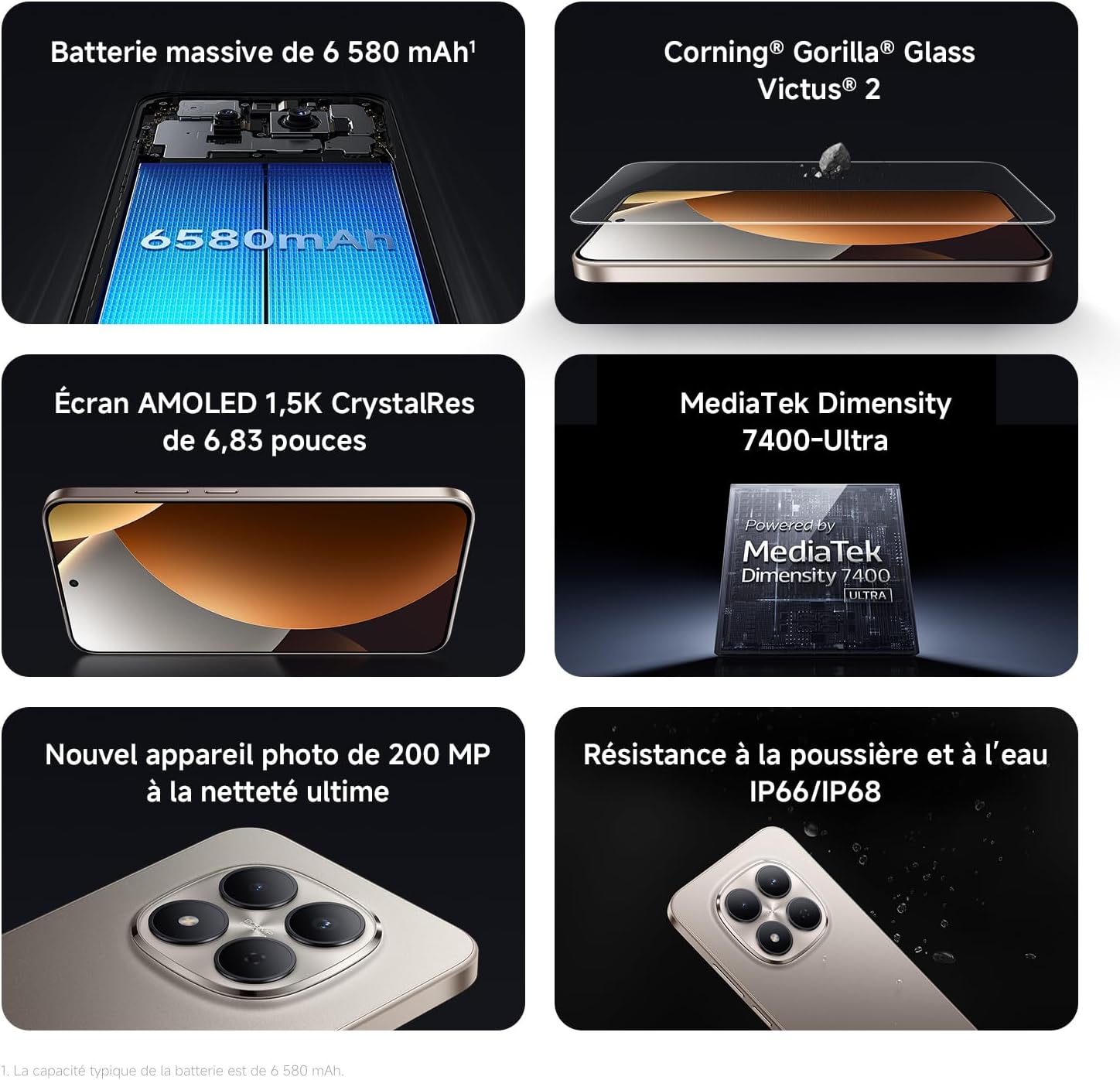
Image: Contents of the Xiaomi Redmi Note 15 Pro 5G box, showing the smartphone, USB-C cable, SIM ejection tool, protective case, and holding ring.
3. ویژگی های کلیدی
- Massive 6580 mAh Battery with 45W Turbo Charging: Equipped with an ultra-large silicon-carbon battery for extended usage while maintaining a slim and light design. Supports 45W turbo charging and up to 22.5W reverse charging.
- IP66 / IP68 Dust and Water Resistance: The device has successfully passed 2-meter water resistance tests for 24 hours. It is designed to withstand daily splashes, accidental immersion, or drops in water without affecting performance.
- New 200 MP Ultra-Clear Camera System: Features a 4th generation 200 MP main sensor combined with a large 1/1.4-inch sensor, offering unprecedented image detail.
- Immersive 6.83-inch 1.5K Eye-Care AMOLED Display: Utilizes flagship-level luminous materials for reduced power consumption and a peak brightness of 3200 nits, ensuring clear visibility even in bright sunlight.
- دستیار هوش مصنوعی: Intelligent optimization with a single gesture, enhancing imaging capabilities and creative efficiency.
- Corning Gorilla Glass Victus 2: Reinforced front glass for enhanced shock and scratch resistance, ensuring long-term durability.
- پردازنده مدیاتک دایمنسیتی ۸۳۰۰-اولترا: Built on a 4nm TSMC process with an octa-core architecture up to 2.6 GHz, providing powerful multitasking, smooth gaming, and stable performance.
- Xiaomi HyperOS 2: Offers a faster, smarter, and smoother user experience with 6 years of security updates.

Image: Diagram illustrating the 6580 mAh battery capacity of the Redmi Note 15 Pro 5G.

Image: The Redmi Note 15 Pro 5G with water droplets, demonstrating its IP66/IP68 dust and water resistance.

تصویر: نمای نزدیک view of the 200 MP camera module on the Redmi Note 15 Pro 5G.

Image: The 6.83-inch 1.5K AMOLED display of the Redmi Note 15 Pro 5G with its specifications.

Image: Before and after images demonstrating AI photo optimization on the Redmi Note 15 Pro 5G.

Image: Illustration of Corning Gorilla Glass Victus 2 durability on the Redmi Note 15 Pro 5G.

Image: Technical image showing RAM chips, indicating up to 24GB RAM with memory extension on the Redmi Note 15 Pro 5G.

Image: Screenshot of the Xiaomi HyperOS 2 interface on the Redmi Note 15 Pro 5G.
4. راه اندازی
۴.۱. قرار دادن سیم کارت
- سینی سیم کارت را در کنار دستگاه خود پیدا کنید.
- ابزار خارج کردن سیمکارت را در سوراخ کوچک کنار سینی قرار دهید و محکم فشار دهید تا سینی بیرون بیاید.
- Place your Nano-SIM card(s) into the tray with the gold contacts facing down. Ensure they are correctly aligned.
- Carefully push the SIM card tray back into the device until it clicks into place.
۲. روشن کردن و راهاندازی اولیه
- دکمه پاور (معمولاً در سمت راست) را فشار داده و نگه دارید تا لوگوی شیائومی ظاهر شود.
- برای انتخاب زبان، منطقه و اتصال به شبکه Wi-Fi، دستورالعملهای روی صفحه را دنبال کنید.
- برای دسترسی به سرویسهای گوگل و فروشگاه پلی، با حساب گوگل خود وارد شوید یا یک حساب جدید ایجاد کنید.
- Set up your screen lock (PIN, pattern, password, fingerprint, or face unlock) for security.
- Review and accept the terms and conditions to complete the setup process.
5. دستورالعمل های عملیاتی
5.1. ناوبری اولیه
- صفحه اصلی: برای حرکت بین صفحات اصلی، انگشت خود را به چپ یا راست بکشید.
- کشوی برنامه: برای دسترسی به تمام برنامههای نصب شده، از پایین صفحه به بالا بکشید.
- اعلانها و تنظیمات سریع: انگشت خود را از بالای صفحه به پایین بکشید تا view اعلانها و دسترسی به تنظیمات سریع.
- برنامه های اخیر: Swipe up from the bottom and hold, or tap the square navigation button (if enabled) to see recently used applications.
5.2. استفاده از دوربین
The 200 MP camera system offers various modes for capturing photos and videos.
- برنامه دوربین را از صفحه اصلی یا کشوی برنامهها باز کنید.
- Swipe left or right on the screen to switch between modes like Photo, Video, Portrait, Pro, and more.
- برای گرفتن عکس، دکمه شاتر و برای شروع/توقف ضبط ویدیو، دکمه ضبط را لمس کنید.
- Use the zoom options (e.g., 0.6x, 1x, 2x) or pinch to zoom for different perspectives.
- Access settings (gear icon) for advanced options like resolution, aspect ratio, and AI enhancements.

Image: A hand holding the Redmi Note 15 Pro 5G, displaying the camera interface with various modes and controls.
5.3. تنظیمات نمایش
نمایشگر خود را برای بهینه سازی سفارشی کنید viewآرامش و راحتی
- رفتن به تنظیمات > نمایشگر.
- Adjust brightness, enable Adaptive brightness, or activate Reading mode for eye comfort.
- Change the Refresh rate (up to 120Hz) for smoother scrolling and animations.
- Select Color scheme and adjust color temperature to your preference.
5.4. مدیریت باتری
Optimize your battery life and utilize charging features.
- دسترسی داشته باشید تنظیمات > باتری به view usage statistics and enable Battery Saver modes.
- Use the provided USB Type-C cable with a compatible 45W charger for turbo charging.
- To use reverse charging, connect a compatible device to your smartphone via a USB-C to USB-C cable.
۵. ادغام رسانهای
6.1. محصول تمام شدview ویدیو
ویدیو: ارائه شده توسط فروشندهview of the Redmi Note 15 Pro, showcasing its design, interface, and camera features. This video highlights the device's smooth operation and aesthetic appeal.
7. تعمیر و نگهداری
۵.۲. تمیز کردن دستگاه
- برای تمیز کردن صفحه نمایش و بدنه گوشی خود از یک پارچه نرم و بدون پرز استفاده کنید.
- از استفاده از مواد شیمیایی خشن یا مواد ساینده خودداری کنید.
- For speaker and port cleaning, the device features a function to expel water and dust. Access this feature through the settings or a dedicated app.

Image: Screenshot of the Redmi Note 15 Pro 5G showing a speaker cleaning function on the screen, which uses high-frequency vibration to expel residual water and dust.
7.2. به روز رسانی نرم افزار
برای اطمینان از عملکرد بهینه، امنیت و دسترسی به ویژگیهای جدید، مرتباً بهروزرسانیهای نرمافزار را بررسی و نصب کنید.
- رفتن به تنظیمات > درباره تلفن > نسخه MIUI (یا نسخه HyperOS) برای بررسی بهروزرسانیها.
8 عیب یابی
۱. دستگاه پاسخ نمیدهد
- برای ریستارت اجباری، دکمه پاور را حدود ۱۰ تا ۱۵ ثانیه فشار داده و نگه دارید.
- If the issue persists, ensure the device is charged. Connect it to a charger and wait a few minutes before attempting to power it on again.
۶.۲ مشکلات اتصال شبکه
- Toggle Airplane mode on and off from Quick Settings.
- دستگاه خود را مجددا راه اندازی کنید.
- بررسی کنید که آیا سیم کارت شما به درستی وارد شده است یا خیر.
- رفتن به تنظیمات > سیمکارتها و شبکههای تلفن همراه to ensure your mobile data is enabled and the correct network type is selected.
۴. کرش کردن یا هنگ کردن برنامهها
- Clear the cache and data of the problematic app (تنظیمات > برنامهها > مدیریت برنامهها > [نام برنامه] > پاک کردن دادهها).
- برنامه را حذف و دوباره نصب کنید.
- مطمئن شوید که نرمافزار دستگاه شما بهروز است.
8.4. تنظیم مجدد کارخانه
If you encounter persistent issues, a factory reset may be necessary. هشدار: این کار تمام اطلاعات دستگاه شما را پاک میکند. قبل از ادامه، از اطلاعات مهم خود نسخه پشتیبان تهیه کنید.
- رفتن به تنظیمات > درباره تلفن > بازنشانی کارخانه.
- برای تأیید تنظیم مجدد، دستورالعملهای روی صفحه را دنبال کنید.
9. مشخصات
| ویژگی | جزئیات |
|---|---|
| نام تجاری | شیائومی |
| نام مدل | Redmi Note 15 Pro 5G |
| سیستم عامل | هایپر او اس |
| RAM | 12 گیگابایت |
| ظرفیت ذخیره سازی | 512 گیگابایت |
| مدل CPU | Mediatek Dimensity 7400 |
| اندازه صفحه نمایش | 6.83 اینچ |
| وضوح نمایش | 1560×720 |
| نرخ تازه سازی | 120 هرتز |
| نوع نمایشگر | AMOLED |
| حامل بی سیم | باز شده است |
| رنگ | مشکی |
| اسلات سیم کارت | دو سیم کارت |
| رابط ورودی | USB نوع C |
| سطح مقاومت در برابر آب | Waterproof (IP66/IP68) |
| وضوح دوربین جلو | 20 مگاپیکسل |
| وضوح دوربین عقب | 200 مگاپیکسل |
| ظرفیت باتری | 6580 میلی آمپر ساعت |
| فناوری سلولی | 5G |
| فناوری اتصال | بلوتوث، NFC، یو اس بی، وای فای |
| سال مدل | 2026 |

Image: Technical specifications and feature legends for the Redmi Note 15 Pro 5G.
10. گارانتی و پشتیبانی
Your Xiaomi Redmi Note 15 Pro 5G comes with a ۱ سال گارانتی سازنده. این ضمانت نقص در مواد و طرز کار در استفاده معمولی را پوشش می دهد.
For warranty claims, technical support, or service inquiries, please contact Xiaomi customer service or visit the official Xiaomi support webسایت. فاکتور خرید خود را برای اعتبارسنجی گارانتی نگه دارید.