
1. مقدمه
ممنون از خریدتونasing the ThermoPro TP210B Wireless Refrigerator/Freezer Thermometer. This device is designed to help you monitor the temperature of your refrigerator and freezer wirelessly, ensuring your food is stored at optimal temperatures. With a strong 500ft/150m wireless range and customizable alarms, you can easily keep track of temperature fluctuations.
2. محتویات بسته
- 1 عدد واحد گیرنده
- 1 x واحد فرستنده
- 2 x AAA Batteries (for Receiver)
- 1 x USB Charging Cable (for Transmitter)
- 1 x دفترچه راهنمای کاربر
3. ویژگی های کلیدی
- برد بی سیم گسترده: Up to 500ft/150m using advanced RF technology for stable connection.
- Pre-Paired for Immediate Use: No complex setup required; units are pre-paired from the factory.
- محدوده اندازه گیری گسترده: Accurate readings within ±0.9°F across -40°F to 158°F (-40°C to 70°C).
- Smart Temperature Alerts: Customizable high/low temperature limits with audio-visual alarms.
- Easy-to-Read Backlit Display: Shows fridge and freezer readings, Max/Min records, and low-battery status.
- Considerate Power Design: Receiver uses AAA batteries, transmitter features a rechargeable lithium battery.
- گزینه های قرارگیری انعطاف پذیر: Receiver has hook, stand, or magnet; transmitter has clip or stand.
4. راه اندازی
۴.۱ نصب باتری گیرنده
- محفظه باتری را در پشت دستگاه گیرنده باز کنید.
- ۴ باتری AAA را وارد کنید و از قطبیت صحیح (+/-) اطمینان حاصل کنید.
- محفظه باتری را محکم ببندید.
Note: The receiver requires 2 AAA batteries, which are included in the package.
4.2. Transmitter Charging
- Locate the charging port on the transmitter unit.
- Connect the provided USB charging cable to the transmitter and a standard USB power source (e.g., wall adapter, computer USB port).
- Allow the transmitter to charge fully before first use. The charging indicator will change when fully charged.
Note: The transmitter uses a rechargeable lithium battery designed for low-temperature environments.
4.3. Initial Pairing (Pre-Paired)
The ThermoPro TP210B units are pre-paired at the factory. Simply power on both the receiver and transmitter, and they should automatically connect. If connection issues occur, refer to the Troubleshooting section.
4.4. تعیین سطح
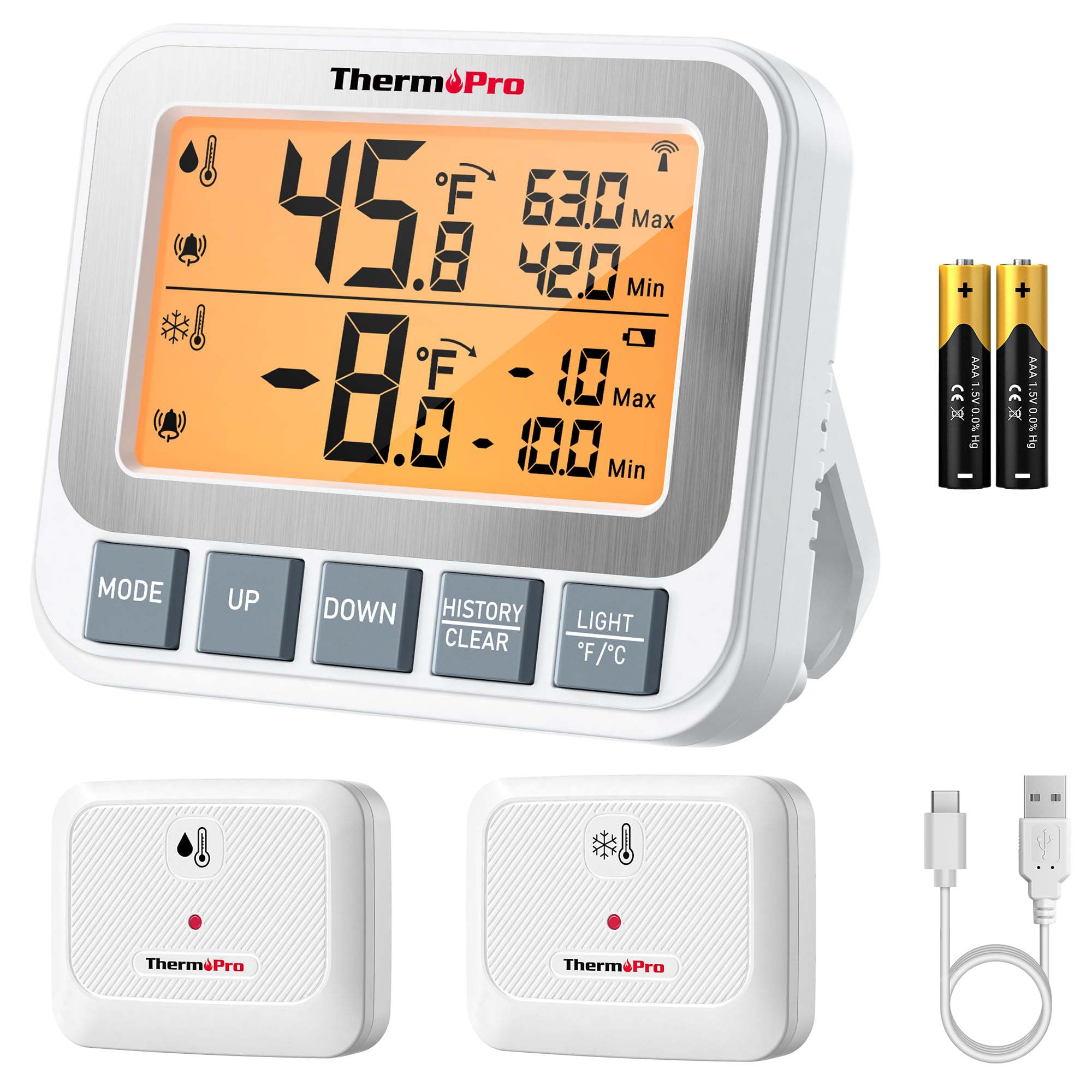
Image: ThermoPro TP210B Receiver and Transmitter. The receiver displays temperatures, while the transmitter sends data from inside the appliance.
محل قرارگیری گیرنده:
- Use the integrated stand to place it on a countertop.
- Utilize the magnetic back to attach it to a metallic surface.
- Hang it using the hook on the back.
- Place the receiver in a location where you can easily view the display and hear alarms, within the 500ft/150m range of the transmitter.
محل قرارگیری فرستنده:
- Place the transmitter inside your refrigerator or freezer.
- Use the integrated clip to attach it to a shelf or rack.
- Ensure the transmitter is not obstructed by large items that could block the wireless signal.
5. دستورالعمل های عملیاتی
5.1. روشن/خاموش
- را فشار دهید قدرت button on both the receiver and transmitter to turn them on or off.
5.2. Reading Temperatures
- The receiver's backlit LCD display will show the current temperature from the transmitter.
- The display typically shows both the current temperature and the all-time Max/Min records.
5.3. Setting Temperature Alarms
The TP210B allows you to set custom high and low temperature limits for alerts.
- را فشار دهید هشدار button on the receiver. The high limit will flash.
- استفاده کنید UP or پایین buttons to adjust the high temperature limit.
- را فشار دهید هشدار again to confirm the high limit and move to the low limit setting.
- استفاده کنید UP or پایین buttons to adjust the low temperature limit.
- را فشار دهید هشدار a third time to confirm the low limit and exit alarm setting mode.
When the temperature exceeds the set range, the receiver will emit an audio-visual alarm.
5.4. Max/Min Temperature Records
- The receiver automatically records the maximum and minimum temperatures detected since the last reset.
- را فشار دهید MAX/MIN button to cycle through current, maximum, and minimum temperature readings.
- To reset the Max/Min records, press and hold the MAX/MIN به مدت 3 ثانیه دکمه را فشار دهید viewing the Max/Min display.
5.5. نور پس زمینه
- The receiver features a bright backlit display for easy reading in low-light conditions.
- The backlight will activate automatically when a button is pressed and will turn off after a short period of inactivity to conserve battery.
6. تعمیر و نگهداری
6.1. تمیز کردن
- Wipe the units with a damp پارچه در آب غوطه ور نشوید.
- از پاک کننده ها یا حلال های ساینده استفاده نکنید.
6.2. Battery Replacement (Receiver)
- When the low battery indicator appears on the receiver display, replace the 2 AAA batteries.
- هنگام قرار دادن باتریهای جدید، از قطبیت صحیح اطمینان حاصل کنید.
6.3. Transmitter Charging
- Recharge the transmitter's lithium battery when the low battery indicator appears.
- از کابل شارژ USB ارائه شده استفاده کنید.
6.4. ذخیره سازی
- If storing the device for an extended period, remove the AAA batteries from the receiver.
- در جای خشک و دور از دمای شدید نگهداری شود.
7 عیب یابی
| مشکل | علت احتمالی | راه حل |
|---|---|---|
| No temperature reading / "--" displayed | Transmitter not powered on, out of range, or low battery. |
|
| خوانش دما نادرست | Sensor obstruction, extreme environmental conditions, or sensor malfunction. |
|
| آژیرهایی که به صدا در نمیآیند | Alarm limits not set correctly or alarm function disabled. |
|
| Transmitter battery drains quickly | Operating in extremely low temperatures or frequent signal transmission. |
|
8. مشخصات
- محدوده دما: -40 درجه فارنهایت تا 158 درجه فارنهایت (40- تا 70 درجه سانتی گراد)
- دقت دما: ± 0.9 درجه فارنهایت (± 0.5 درجه سانتیگراد)
- برد بی سیم: تا ارتفاع 500 فوت (150 متر) در فضای باز
- فرکانس انتقال: 433 مگاهرتز
- قدرت گیرنده: 2 عدد باتری قلمی (شامل)
- قدرت فرستنده: Rechargeable Lithium battery (included, with USB charging cable)
- نمایش: LCD با نور پس زمینه
- ابعاد (گیرنده): Approximately 4.33 inches (length)
- وزن (کالا): تقریبا 11.2 اونس
9. ضمانت و پشتیبانی
ترموپرو برای این محصول در برابر نقص در مواد و ساخت، ضمانت ارائه میدهد. برای اطلاعات دقیق در مورد ضمانت، ثبت محصول یا پشتیبانی فنی، لطفاً به وبسایت رسمی ترموپرو مراجعه کنید. webسایت یا مستقیماً با خدمات مشتریان آنها تماس بگیرید.
رسمی Webسایت: www.thermopro.com
پشتیبانی مشتری: Refer to the contact information provided on the ThermoPro webبستهبندی سایت یا محصول.