
1. مقدمه
The AJAZZ AKP03 Macro Keypad Stream Controller is a versatile device designed to enhance productivity and streamline workflows for gamers, streamers, and professionals. Featuring six programmable keys with LCD displays, three physical knobs, and three toggle switches, it offers extensive customization options for various tasks.
This manual provides detailed instructions for setting up, operating, and maintaining your AKP03 device, ensuring optimal performance and user experience.
2. ویژگی های محصول
- Six Programmable Macro Keys: Customizable LCD displays for single or continuous actions.
- Three Physical Knobs: For precise control over various functions.
- Three Toggle Switches: Additional control options.
- عملیات با یک کلیک: Instant execution of macro commands, text input, application launches, and media control.
- Intuitive Driver Software: Drag-and-drop functionality for easy key assignment and property configuration.
- سازگاری گسترده: Seamless integration with platforms like Streamlabs, Twitch, YouTube, and various software applications on Windows and Mac.
- Removable 40° Stand: ارگونومیک را فراهم می کند viewing angle and stable placement.

شکل 2.1: تمام شده استview of the AJAZZ AKP03 Macro Keypad, highlighting its programmable buttons, toggle switches, and scroll wheels.
3. محتویات بسته
بررسی کنید که همه اقلام در بسته شما موجود باشد:
- AJAZZ AKP03 Macro Keypad Stream Controller
- کابل USB-C به USB-A
- Removable 40° Stand
- راهنمای کاربر (این سند)
4. راه اندازی
4.1 اتصال فیزیکی
- Attach the removable 40° stand to the bottom of the AKP03 for an ergonomic angle, if desired.
- Connect the provided USB-C cable to the USB-C port on the AKP03.
- سر USB-A کابل را به یک پورت USB موجود در رایانه (PC یا Mac) خود وصل کنید.
- دستگاه به طور خودکار روشن می شود.

Figure 4.1: Attaching the removable 40° stand to the AKP03.
4.2 نصب نرم افزار
To unlock the full customization capabilities of your AKP03, you must install the dedicated driver software.
- خودت را باز کن web browser and navigate to the official AJAZZ webسایت: www.a-jazz.com.
- Locate the 'Driver Download' section.
- جستجو برای 'AKP03' or browse for the corresponding driver for your model.
- Download the driver software compatible with your operating system (Windows or macOS).
- نصب کننده را اجرا کنید و دستورالعمل های روی صفحه را دنبال کنید تا نصب کامل شود.
- در صورت درخواست کامپیوتر خود را مجددا راه اندازی کنید.
Video 4.1: Demonstrates the software installation process and initial setup for the AJAZZ Macro Keypad.
5. دستورالعمل های عملیاتی
5.1 Customizing Keys and Knobs
The AKP03's driver software provides a user-friendly interface for customization:
- Launch the 'Stream Dock AJAZZ' software from your desktop or applications folder.
- The software will display a visual representation of your AKP03.
- To assign an action, drag and drop a desired function (e.g., launch application, media control, macro command) from the software's library onto one of the six programmable keys.
- For knobs, select the knob in the software and assign functions such as volume control, scrolling, or zooming.
- You can configure properties for each assigned action, including specific file مسیرها، web URLs, or macro sequences.
- The LCD displays on the keys will update to show the assigned icon or text.
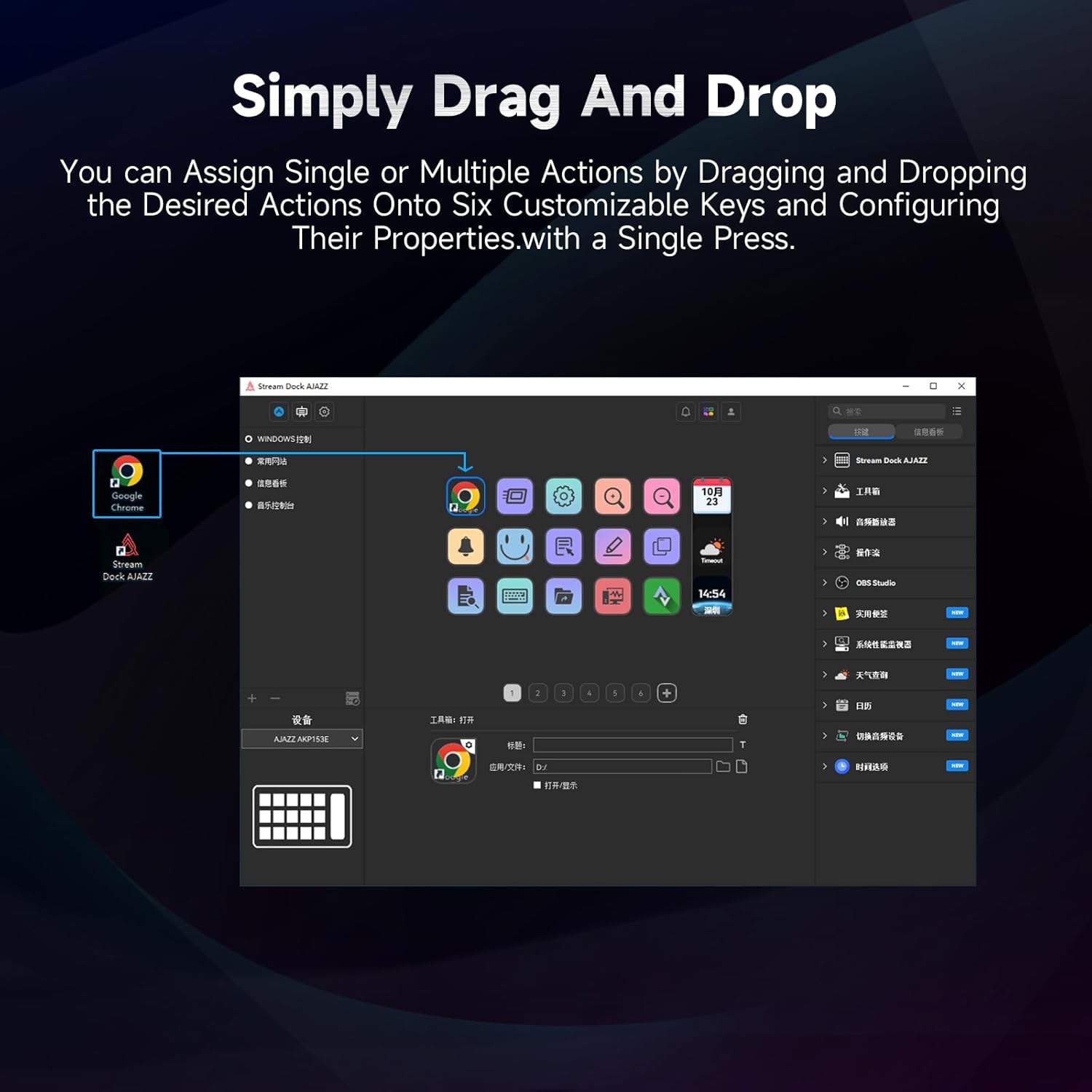
Figure 5.1: Customizing keys using the drag-and-drop interface in the AJAZZ software.
Video 5.1: Demonstration of assigning actions to keys for launching web pages and software with a single click.
5.2 Using Profiles and Pages
The software supports multiple profiles and pages, allowing you to switch between different sets of key assignments for various applications or tasks.
- حرفه ای جدید ایجاد کنیدfiles for specific games, editing software, or streaming setups.
- در هر حرفه ایfile, you can create multiple pages of key assignments, accessible by navigating through the device's buttons or software interface.
- The AKP03 automatically switches to the relevant profile when a linked application is in focus.
Video 5.2: Illustrates the multi-functional capabilities and profile switching of the AKP03 for various tasks.
6. تعمیر و نگهداری
To ensure the longevity and optimal performance of your AJAZZ AKP03, follow these maintenance guidelines:
- تمیز کردن: Use a soft, dry cloth to wipe the surface of the device. Avoid abrasive cleaners or solvents.
- ذخیره سازی: دستگاه را در جای خشک و خنک و دور از نور مستقیم خورشید و دمای شدید نگهداری کنید.
- مراقبت از کابل: برای جلوگیری از آسیب، از خم کردن یا پیچاندن بیش از حد کابل USB خودداری کنید.
- به روز رسانی نرم افزار: مرتباً AJAZZ را بررسی کنید webسایتی برای بهروزرسانیهای نرمافزار و میانافزار جهت اطمینان از سازگاری و دسترسی به ویژگیهای جدید.
7 عیب یابی
If you encounter issues with your AKP03, refer to the following common troubleshooting steps:
- دستگاه شناسایی نشد:
- Ensure the USB cable is securely connected to both the AKP03 and your computer.
- سعی کنید به پورت USB دیگری متصل شوید.
- کامپیوتر خود را مجددا راه اندازی کنید.
- Verify that the driver software is correctly installed and up to date.
- کلیدها پاسخ نمیدهند:
- Check the software to ensure keys are properly assigned and the correct profile فعال است.
- Ensure the driver software is running in the background.
- مشکلات نرم افزاری:
- نرمافزار درایور را دوباره نصب کنید.
- Check for software updates on the AJAZZ webسایت
8. مشخصات
| ویژگی | جزئیات |
|---|---|
| نام تجاری | آژاز |
| نام مدل | AKP03 |
| دستگاه های سازگار | کامپیوتر، لپ تاپ |
| نوع کنترلر | صفحه کلید |
| فناوری اتصال | USB-C |
| تعداد دکمه | 6 Programmable Keys (with LCD displays), 3 Physical Knobs, 3 Toggle Switches |
| وزن مورد | 0.32 کیلوگرم |
| ابعاد مورد (L x W x H) | 5 x 3 x 2 اینچ |
| منبع تغذیه | سیم برقی |
9. گارانتی و پشتیبانی
9.1 اطلاعات گارانتی
The AJAZZ AKP03 Macro Keypad Stream Controller comes with a 1 سال گارانتی محدود از تاریخ خرید. این ضمانتنامه نقصهای ناشی از تولید و نقص در استفاده عادی را پوشش میدهد. خسارت ناشی از سوء استفاده، حوادث، تغییرات غیرمجاز یا نصب نادرست را پوشش نمیدهد.
لطفاً مدرک خرید خود را برای ادعاهای گارانتی نگه دارید.
9.2 پشتیبانی مشتری
For technical assistance, troubleshooting, or warranty inquiries, please contact AJAZZ customer support:
- Webسایت: www.a-jazz.com (Refer to the 'Support' or 'Contact Us' section)
- ایمیل: [Insert Customer Support Email, if available]
- تلفن: [Insert Customer Support Phone Number, if available]
تیم پشتیبانی ما آماده است تا در صورت بروز هرگونه سوال یا ابهام در مورد محصول، به شما کمک کند.