
1. محصول تمام شدview
The HP 17.3 Laptop is designed for general computing tasks, offering a balance of performance and screen size. It features an Intel Core i3-N305 8-core processor, 16GB DDR4 RAM, and a 512GB PCIe SSD for efficient operation. The 17.3-inch Full HD IPS anti-glare display provides clear visuals. This laptop operates on Windows 11 Pro and includes built-in Microsoft Copilot AI for task management. Connectivity options include Wi-Fi 6, Bluetooth 5.4, HDMI, USB-C, and USB-A ports. The device is designed for portability with a battery life of up to 8 hours and HP Fast Charge capability.

Image 1.1: HP 17.3 Laptop in use, showcasing its large display and productivity features.
ویدیوی ۱: تمام شدview of the HP 17.3 Laptop's features and design.
2. محتویات بسته
بررسی کنید که آیا همه اقلام در بسته موجود است یا خیر:
- 1 x HP 17.3" Laptop
- 1 عدد آداپتور برق
- 1 x Accessory kit
- ۱ عدد دفترچه راهنما (این سند)
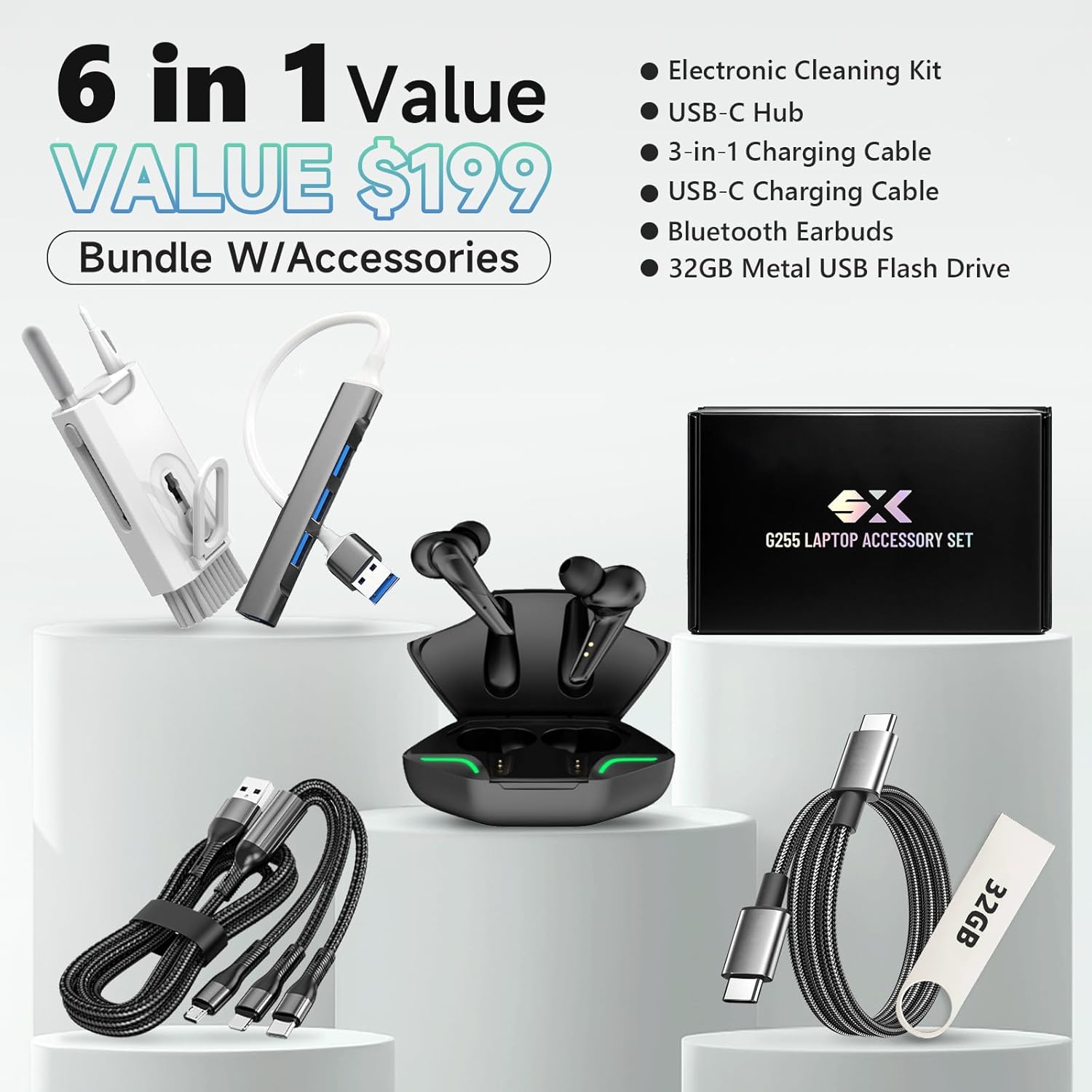
Image 2.1: The HP 17.3 Laptop and its standard accessories.
۱. دستورالعملهای راهاندازی
- اتصال برق: آداپتور برق را به پورت برق لپتاپ و سپس به پریز برق وصل کنید.
- روشن شدن اولیه: درب لپتاپ را باز کنید و دکمه پاور را که معمولاً روی صفحه کلید قرار دارد، فشار دهید.
- راه اندازی ویندوز: Follow the on-screen prompts to complete the Windows 11 Pro setup, including language, region, network connection, and user account creation.
- به روز رسانی نرم افزار: After setup, connect to the internet and check for Windows updates to ensure optimal performance and security. Go to تنظیمات > بهروزرسانی ویندوز.

تصویر 3.1: تمام شدview of the laptop's ports for connecting peripherals and power.
4. دستورالعمل های عملیاتی
4.1 مدیریت انرژی
- روشن کردن: دکمه پاور را فشار دهید.
- حالت خواب: درب را ببندید یا انتخاب کنید شروع > روشن/خاموش > خواب.
- خاموش کردن: انتخاب کنید شروع > روشن/خاموش > خاموش کردن.
- راه اندازی مجدد: انتخاب کنید شروع > روشن/خاموش > راهاندازی مجدد.
۳.۵ صفحه کلید و تاچپد
- این لپتاپ دارای یک صفحهکلید کامل با صفحهکلید عددی است.
- این تاچپد از حرکات چند لمسی برای پیمایش پشتیبانی میکند. برای سفارشیسازی به تنظیمات ویندوز مراجعه کنید.
- To activate or deactivate the keyboard backlight, press the F5 key (if available on your model).
4.3 Windows 11 Pro and Copilot
This laptop comes with Windows 11 Pro, offering advanced security and productivity features. The integrated Microsoft Copilot AI assists with various tasks, including content generation, data analysis, and task automation. Access Copilot through the taskbar icon.

Image 4.1: The laptop screen showing the Windows 11 Pro interface and Microsoft Copilot.
5. قابلیت اتصال
5.1 اتصال بی سیم
- وایفای ۶ (۸۰۲.۱۱ax): Connect to wireless networks for internet access. Manage Wi-Fi connections via the network icon in the taskbar.
- بلوتوث 5.4: Pair with Bluetooth-enabled devices such as headphones, mice, and keyboards. Access Bluetooth settings via تنظیمات > بلوتوث و دستگاهها.
5.2 پورت ها و کانکتورها
The laptop is equipped with various ports for external devices:
- 1 x HDMI 1.4b: For connecting to external displays or projectors.
- 1 x USB-C 3.0 (5Gbps signaling rate): For data transfer and connecting compatible USB-C devices.
- 2 x USB-A 3.0 (5Gbps signaling rate): For connecting USB-A peripherals.
- 1 x Headphone/Microphone Combo Jack: For audio input and output.
- 1 x AC Smart pin: For connecting the power adapter.
Image 5.1: Labeled diagram of the laptop's input/output ports.
6. مشخصات فنی
| ویژگی | مشخصات |
|---|---|
| مدل | HP 17-cn3083st |
| پردازنده | Intel Core i3-N305 (8 cores, up to 4.5GHz) |
| حافظه (RAM) | 16GB DDR4-3200 MT/s |
| ذخیره سازی | حافظه SSD با ظرفیت ۵۱۲ گیگابایت از نوع PCIe NVMe |
| گرافیک | گرافیک یکپارچه UHD اینتل |
| نمایش | 17.3" FHD (1920x1080) IPS, Anti-Glare, LED |
| سیستم عامل | ویندوز 11 پرو |
| بی سیم | Wi-Fi 6 (2x2) & Bluetooth 5.4 |
| پورت ها | 1x HDMI 1.4b, 1x USB-C 3.0, 2x USB-A 3.0, 1x Headphone/Mic Combo, 1x AC Smart pin |
| صوتی | بلندگوهای استریو HD |
| دوربین | 720p HD Webبادامک |
| عمر باتری | Up to 7–8 hours (HP Fast Charge) |
| ابعاد (LxWxH) | 20.47 x 13.58 x 2.72 اینچ |
| وزن | 4.9 پوند |
| رنگ | نقره ای |
7. تعمیر و نگهداری
- تمیز کردن: برای تمیز کردن صفحه نمایش و قسمت بیرونی آن از یک پارچه نرم و بدون پرز استفاده کنید. از مواد شیمیایی قوی خودداری کنید.
- به روز رسانی نرم افزار: Regularly check for and install Windows updates and driver updates to maintain system stability and security.
- مراقبت از باتری: برای افزایش عمر باتری، از دمای بسیار بالا و تخلیه کامل باتری به طور مکرر خودداری کنید.
- مدیریت ذخیره سازی: پاک کردن دورهای موارد غیرضروری files and applications to optimize storage space and performance.
- تهویه: برای جلوگیری از گرم شدن بیش از حد لپتاپ، مطمئن شوید که منافذ تهویه آن مسدود نشده باشند.
8 عیب یابی
| موضوع | راه حل |
|---|---|
| لپتاپ روشن نمیشود. | Ensure the power adapter is securely connected to both the laptop and a working power outlet. Check if the power adapter's indicator light is on. Try a different outlet. |
| صفحه خالی یا سیاه است. | Connect an external monitor to check if the display output is working. Adjust screen brightness. Restart the laptop. |
| مشکلات اتصال وای فای. | Ensure Wi-Fi is enabled in Windows settings. Restart your router and modem. Update Wi-Fi drivers. |
| عملکرد کند. | Close unnecessary applications. Check for background processes consuming resources. Ensure sufficient free storage space. Run a disk cleanup. |
| باتری شارژ نمی شود. | Verify the power adapter is correctly connected. Check the power adapter for damage. Update battery drivers. |
9. گارانتی و پشتیبانی
This HP laptop includes a 1-year manufacturer's warranty. Lifetime technical customer support is also provided. For technical assistance, warranty claims, or further information, please visit the official HP support webسایت یا با خدمات مشتریان آنها تماس بگیرید.
Official HP Store: فروشگاه اچ پی در آمازون

Image 9.1: Information regarding HP's customer support and warranty.