
boAt Rockerz Trinity Gen 2
boAt Rockerz Trinity Gen 2 Bluetooth Neckband Earphones User Manual
Model: Rockerz Trinity Gen 2
مقدمه
Thank you for choosing the boAt Rockerz Trinity Gen 2 Bluetooth Neckband Earphones. This manual provides essential information for setting up, operating, and maintaining your earphones. Please read it carefully to ensure proper use and to maximize your listening experience. These earphones are designed for extended audio playback, high-resolution sound, and clear communication.
آنچه در جعبه است
- boAt Rockerz Trinity Gen 2 Earphones
- کابل شارژ
- راهنمای کاربر
The package includes the boAt Rockerz Trinity Gen 2 Earphones, a charging cable, and this user manual.
محصول تمام شده استview
The boAt Rockerz Trinity Gen 2 features a flexible neckband design with in-ear earbuds. It includes integrated controls for media playback, call management, and voice assistant activation. The neckband houses the battery and main electronics.
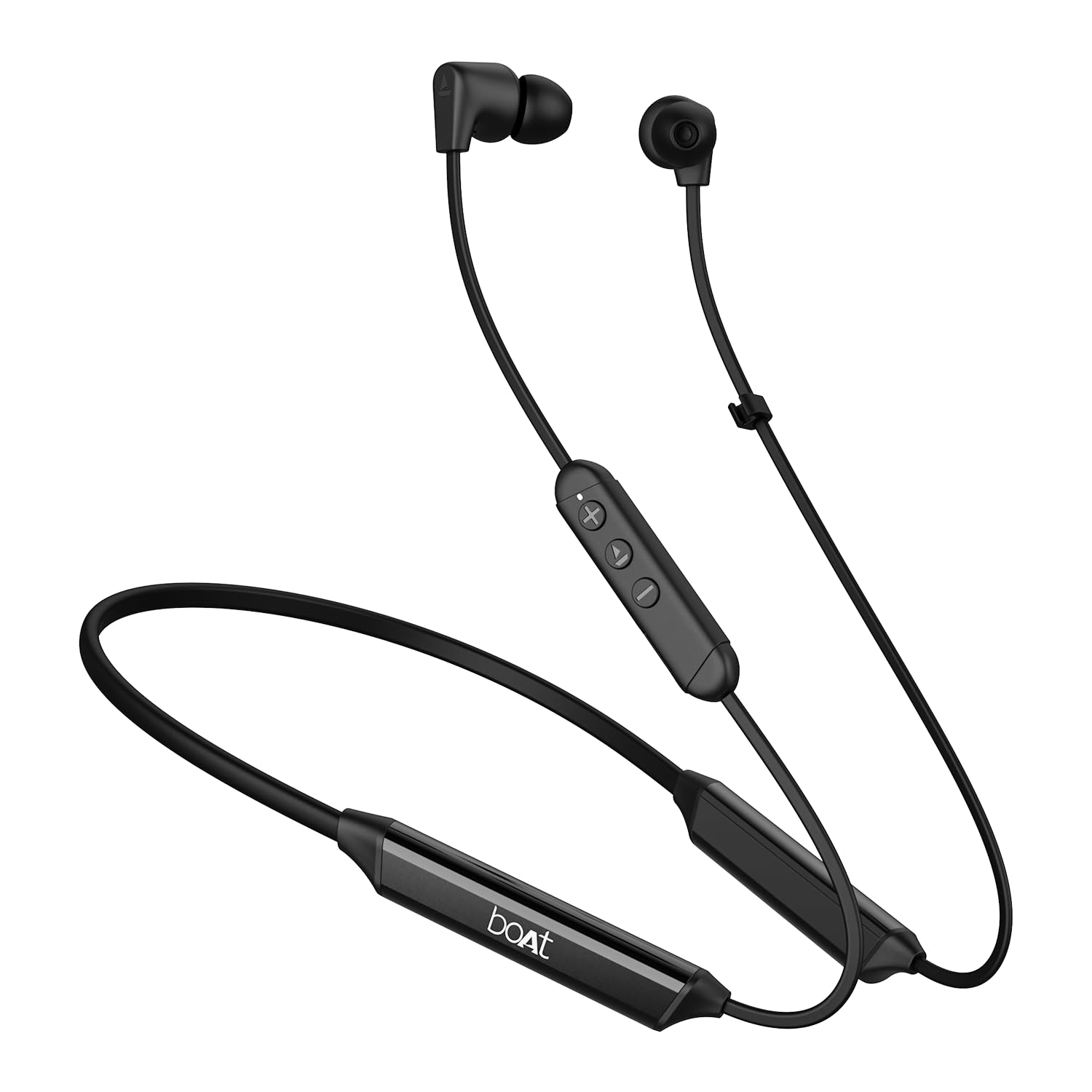
Image: The boAt Rockerz Trinity Gen 2 neckband earphones, highlighting the flexible neckband and in-ear design.

تصویر: جزئیات view of the boAt Rockerz Trinity Gen 2 earbuds and the inline control panel, showing buttons for volume and playback.
راه اندازی
۱. شارژ کردن هدفون
Before first use, fully charge your earphones. Connect the provided charging cable to the charging port on the neckband and to a USB power source. The LED indicator will show charging status. A full charge provides up to 150 hours of playback. With ASAP Charge, 10 minutes of charging provides up to 24 hours of playback.
Image: The boAt Rockerz Trinity Gen 2 neckband, illustrating its long battery life with "150 HOURS PLAYBACK" text.
2. روشن/خاموش کردن
- روشن کردن: Press and hold the Multi-function button (usually the center button on the inline control) for approximately 3 seconds until the LED indicator flashes blue and you hear a power-on prompt.
- برای خاموش کردن: Press and hold the Multi-function button for approximately 5 seconds until the LED indicator flashes red and you hear a power-off prompt.
3. جفت شدن بلوتوث
- مطمئن شوید که هدفونها خاموش هستند.
- Press and hold the Multi-function button for about 5-7 seconds until the LED indicator flashes red and blue alternately, indicating pairing mode.
- در دستگاه خود (گوشی هوشمند، لپتاپ)، بلوتوث را فعال کنید و دستگاههای موجود را جستجو کنید.
- Select "boAt Rockerz Trinity Gen 2" from the list of found devices.
- Once connected, the LED indicator will flash blue slowly, and you will hear a confirmation tone.

Image: The boAt Rockerz Trinity Gen 2 earphones connected to both a smartphone and a tablet, illustrating the dual pairing feature.
4. Dual Pairing (Multipoint)
The Rockerz Trinity Gen 2 supports dual pairing, allowing connection to two devices simultaneously. After pairing with the first device, disable Bluetooth on that device. Put the earphones back into pairing mode and connect to the second device. Once connected to the second device, re-enable Bluetooth on the first device. The earphones will automatically connect to both devices, allowing seamless switching between them for calls and media.
دستورالعمل های عملیاتی
کنترل های اساسی
- پخش/مکث: دکمه چند منظوره را یک بار فشار دهید.
- افزایش صدا: دکمهی «+» را فشار دهید.
- کاهش حجم: دکمه '-' را فشار دهید.
- آهنگ بعدی: دکمه «+» را فشار داده و نگه دارید.
- آهنگ قبلی: دکمه '-' را فشار داده و نگه دارید.
- پاسخ/پایان تماس: دکمه چند منظوره را یک بار فشار دهید.
- رد تماس: دکمه Multi-function را به مدت 2 ثانیه فشار داده و نگه دارید.
- دستیار صوتی را فعال کنید: دکمه چند منظوره را دوبار فشار دهید.
صدای با وضوح بالا با LDAC
The Rockerz Trinity Gen 2 supports Hi-Res Audio with LDAC codec, providing superior sound quality. Ensure your connected device also supports LDAC for the best audio experience. This feature allows for high-resolution audio transmission over Bluetooth, preserving more detail from your music.

Image: The boAt Rockerz Trinity Gen 2 earphones displaying the "Hi-Res Audio Wireless" and "LDAC" logos, indicating high-resolution audio support.
دو حالت EQ
Switch between different equalizer modes to customize your audio experience. Refer to the product's quick start guide or experiment with button combinations (often a triple-press of the Multi-function button or a combination with volume buttons) to cycle through available EQ presets. This allows you to adjust the sound profile به ترجیح شما

Image: A close-up of the boAt Rockerz Trinity Gen 2 earbuds, highlighting the availability of dual EQ modes for sound customization.
AI-ENx™ Technology for Clear Calls
The earphones feature AI-ENx™ technology, which enhances call clarity by eliminating background noise. This ensures your voice is heard clearly during calls, even in noisy environments.

Image: A close-up of a boAt Rockerz Trinity Gen 2 earbud, emphasizing the AI-ENx™ technology for clear voice calls.
حالت BEAST™ (تاخیر کم)
Activate BEAST™ Mode for a low-latency gaming experience (65ms). This mode synchronizes audio with visuals, providing a more immersive gaming session. To activate/deactivate BEAST™ Mode, refer to the specific instructions in your quick start guide, usually involving a dedicated button press or a combination.

Image: The boAt Rockerz Trinity Gen 2 earphones with "BEAST™ MODE 65ms Low Latency" text, depicted alongside gaming characters to illustrate its use for gaming.
تعمیر و نگهداری
تمیز کردن
- هدفونها را با یک پارچه نرم، خشک و بدون پرز پاک کنید.
- از مواد شیمیایی خشن، حلال های پاک کننده یا شوینده های قوی استفاده نکنید.
- Regularly clean the ear tips to prevent wax buildup, which can affect sound quality.
مقاومت در برابر آب (IPX5)
The earphones are IPX5 rated, meaning they are resistant to sweat and light splashes of water. They are not designed for submersion in water. Avoid exposing them to heavy rain or direct water jets. Ensure the charging port cover is securely closed when not charging to maintain water resistance.

Image: The boAt Rockerz Trinity Gen 2 earbuds with water droplets on them, illustrating their IPX5 water resistance rating.
ذخیره سازی
Store the earphones in a cool, dry place away from direct sunlight and extreme temperatures. Avoid storing them with sharp objects that could damage the cables or earbuds.
عیب یابی
بدون قدرت
- مطمئن شوید که هدفونها کاملاً شارژ شدهاند.
- Press and hold the Multi-function button for 3-5 seconds to power on.
نمی توان با دستگاه جفت کرد
- Ensure the earphones are in pairing mode (LED flashing red and blue alternately).
- مطمئن شوید که بلوتوث روی دستگاه شما فعال است و در محدوده برد (معمولاً 10 متر) قرار دارد.
- Forget "boAt Rockerz Trinity Gen 2" from your device's Bluetooth list and try pairing again.
- هم دستگاه و هم هدفون خود را مجدداً راه اندازی کنید.
Low or Distorted Sound
- Adjust the volume on both the earphones and your connected device.
- Ensure the ear tips are clean and properly seated in your ears.
- برای آببندی بهتر، سرگوشیهایی با اندازههای مختلف را امتحان کنید.
- برای جلوگیری از تداخل، به دستگاه متصل خود نزدیکتر شوید.
میکروفون کار نمی کند
- مطمئن شوید که هدفونها به درستی به دستگاه شما متصل شدهاند.
- Check your device's audio settings to ensure the earphones are selected as the input device.
- Clean the microphone opening if it appears obstructed.
مشخصات
| نام تجاری | قایق |
| نام مدل | Rockerz Trinity Gen 2 |
| قرار دادن گوش | در گوش |
| فاکتور فرم | در گوش |
| کنترل نویز | AI-ENx™ Technology (for calls) |
| فناوری اتصال | بلوتوث |
| عمر متوسط باتری | 150 ساعت |
| زمان شارژ باتری | 10 Minutes (for 24 hours playback via ASAP Charge) |
| نوع درایور صوتی | Dynamic Driver (10mm, inferred from description) |
| محدوده فرکانس | ۲۰ هرتز - ۲۰۰۰۰ هرتز |
| مقاومت در برابر آب | IPX5 |
| ویژگی های خاص | Hi-Res Audio with LDAC, Dual EQ Modes, AI-ENx™ Technology, Dual Pairing, BEAST™ Mode (65ms Low Latency), ASAP Charge |
| روش کنترل | Voice, Button |
| وزن مورد | 60 گرم |
گارانتی و پشتیبانی
اطلاعات گارانتی
The boAt Rockerz Trinity Gen 2 earphones come with a 1 سال گارانتی from the date of purchase. This warranty covers manufacturing defects. Please retain your purchase receipt for warranty claims. The warranty does not cover damage caused by misuse, accidents, unauthorized modifications, or normal wear and tear.
پشتیبانی مشتری
For technical assistance, warranty claims, or any other inquiries, please contact boAt customer support:
- ایمیل: info@imaginemarketingindia.com
- سازنده: تصور کنید بازاریابی با مسئولیت محدود
لطفا از قایق رسمی دیدن کنید webسایتی برای بهروزترین اطلاعات پشتیبانی و اطلاعات تماس.
Ask a question about this manual
Ask about setup, troubleshooting, compatibility, parts, safety, or missing instructions. Manuals+ will review the question and use this page’s manual context to help answer it.