
1. مقدمه
The ATTACK SHARK X820 Ultra is a high-performance 75% wireless mechanical gaming keyboard designed for versatility and customization. It features tri-mode connectivity (Bluetooth, 2.4GHz wireless, and wired USB-C), hot-swappable switches, dynamic RGB backlighting, and a smart TFT display with a multi-function knob. This manual provides detailed instructions for setting up, operating, maintaining, and troubleshooting your keyboard.
2. محتویات بسته
لطفاً بررسی کنید که همه اقلام در بسته شما موجود باشد:
- ATTACK SHARK X820 Ultra Keyboard
- کابل USB-C
- جمع کننده کلید/سوئیچ ۲ در ۱
- Spare Switches (2)
- راهنمای کاربر
- گیرنده بی سیم 2.4 گیگاهرتز
- ATTACK SHARK Mascot Stickers (2)

Image: Contents of the ATTACK SHARK X820 Ultra keyboard package.
3. راه اندازی
3.1 شارژ اولیه
Before first use, connect the keyboard to a USB power source using the provided USB-C cable to ensure it is fully charged. The 4000mAh battery provides extended usage time.
۵.۱ حالتهای اتصال
The X820 Ultra supports three connection modes: 2.4GHz wireless, Bluetooth 5.1, and wired USB-C. A switch on the back of the keyboard allows you to select the desired mode.
- بیسیم ۲.۴ گیگاهرتز: Insert the 2.4GHz wireless receiver into an available USB port on your computer. Switch the keyboard to 2.4G mode. The keyboard should connect automatically.
- بلوتوث: Switch the keyboard to BT mode. On your device (computer, tablet, or smartphone), search for Bluetooth devices and select 'X820Ultra' to pair. The keyboard supports connecting to multiple Bluetooth devices.
- سیمی USB-C: کیبورد را مستقیماً با استفاده از کابل USB-C به رایانه خود وصل کنید. این حالت کیبورد را نیز شارژ میکند.
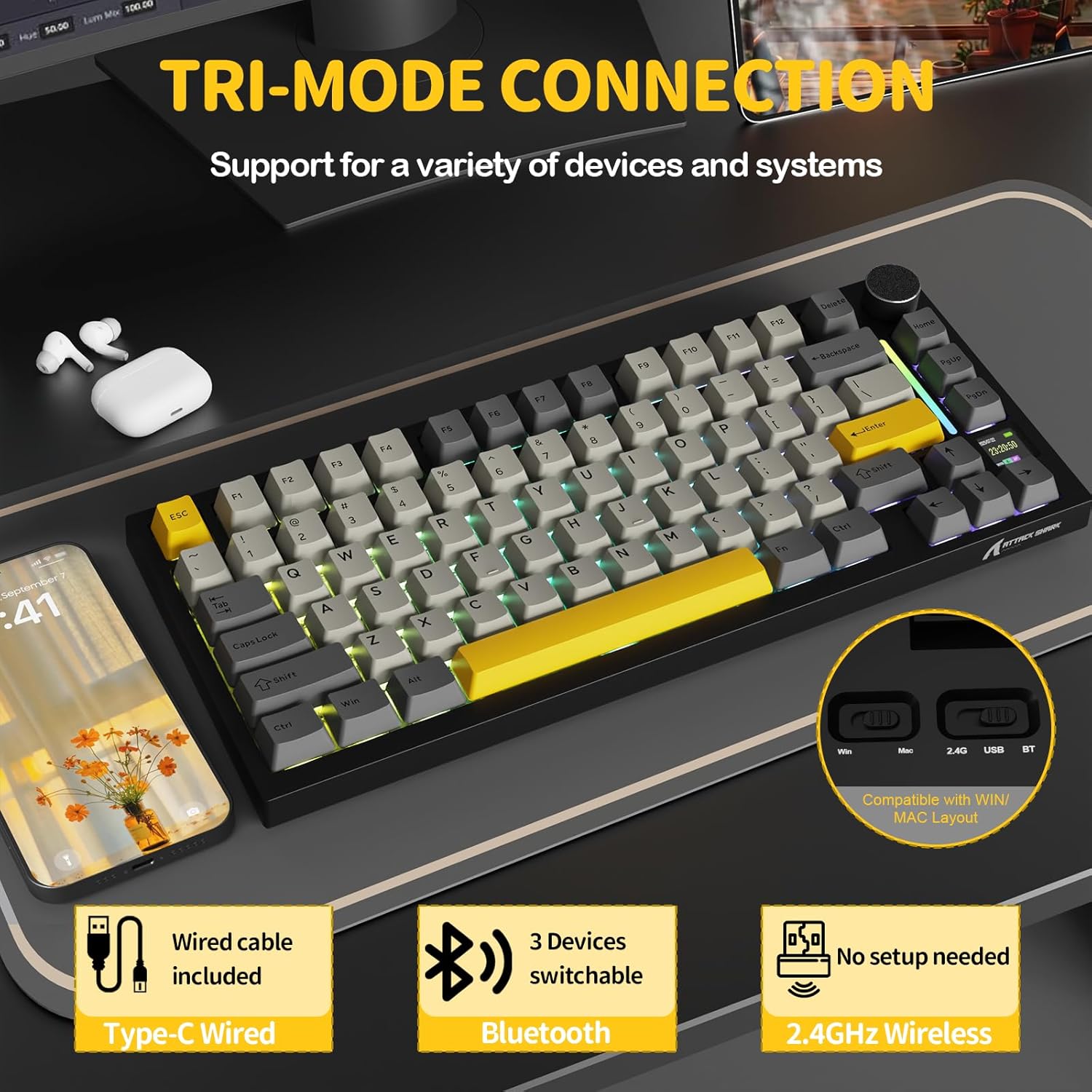
Image: Tri-mode connectivity options for the X820 Ultra keyboard.
3.3 سازگاری با سیستم عامل
The keyboard supports both Windows and macOS. Use the dedicated switch on the back of the keyboard to toggle between Win and Mac layouts for optimal functionality.
4. عملیات
4.1 Smart TFT Display & Multi-Function Knob
The X820 Ultra features a smart TFT display and a metal control knob for intuitive control and real-time information. The display can show RGB settings, OS modes, battery status, date, and connection status.
- کنترل صدا: Press the Fn key + rotate the knob to adjust volume up or down.
- پیمایش منو: Rotate the knob to select menu items on the TFT screen. Short press the knob to confirm selections.
- بررسی باتری: Long press the Fn key + Backspace to check the battery level on the TFT display.
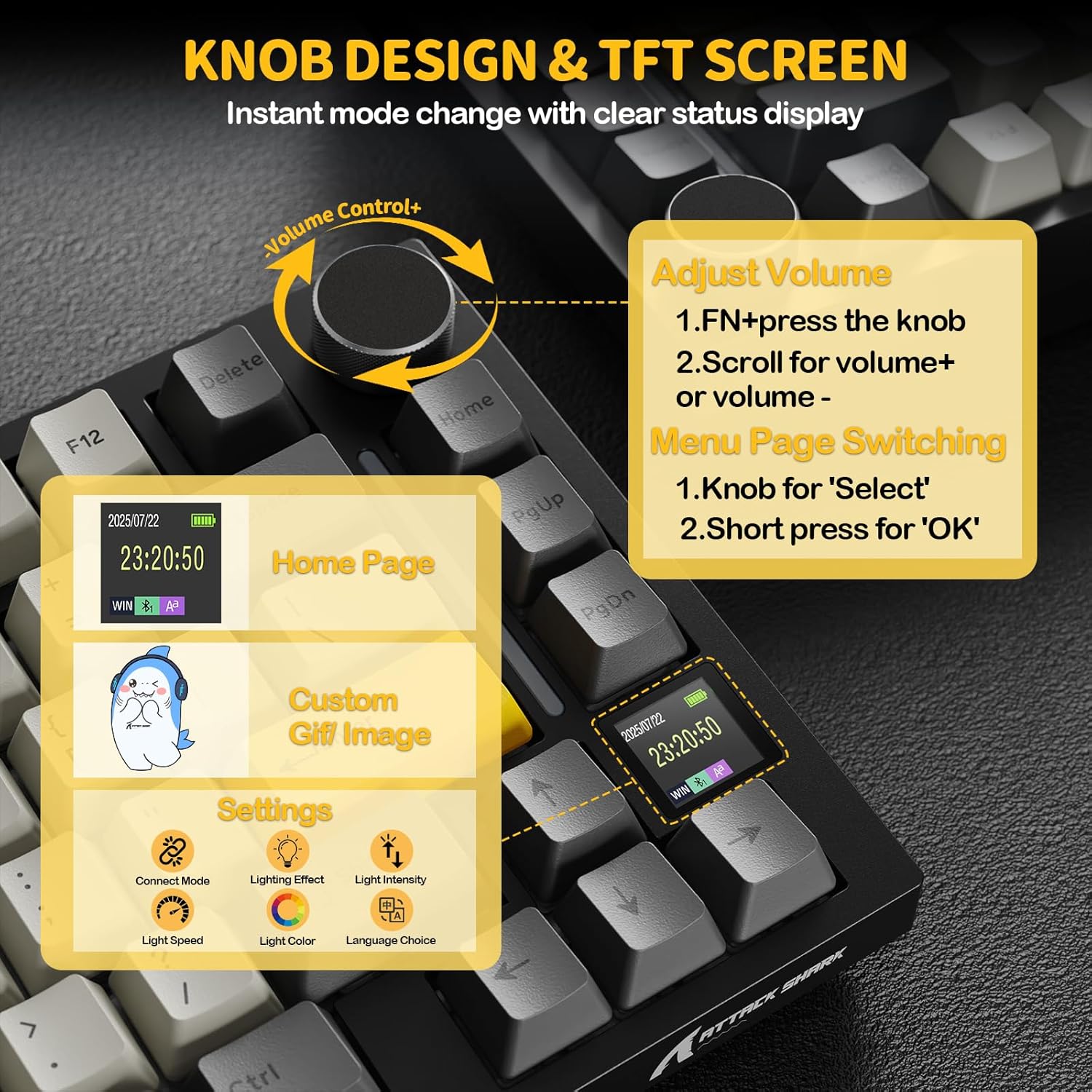
Image: Smart TFT display and multi-function knob controls.
4.2 Dynamic RGB Lighting
Personalize your typing experience with 16.8 million colors and over 19 lighting presets. The south-facing LEDs ensure vibrant and even backlighting.
- روشن/خاموش کردن RGB: Press Fn + \| key.
- تغییر رنگ: Press Fn + Enter key.
- Custom Light Effect: Press Fn + ]} key.
- Adjust effects and brightness via the knob or the web راننده
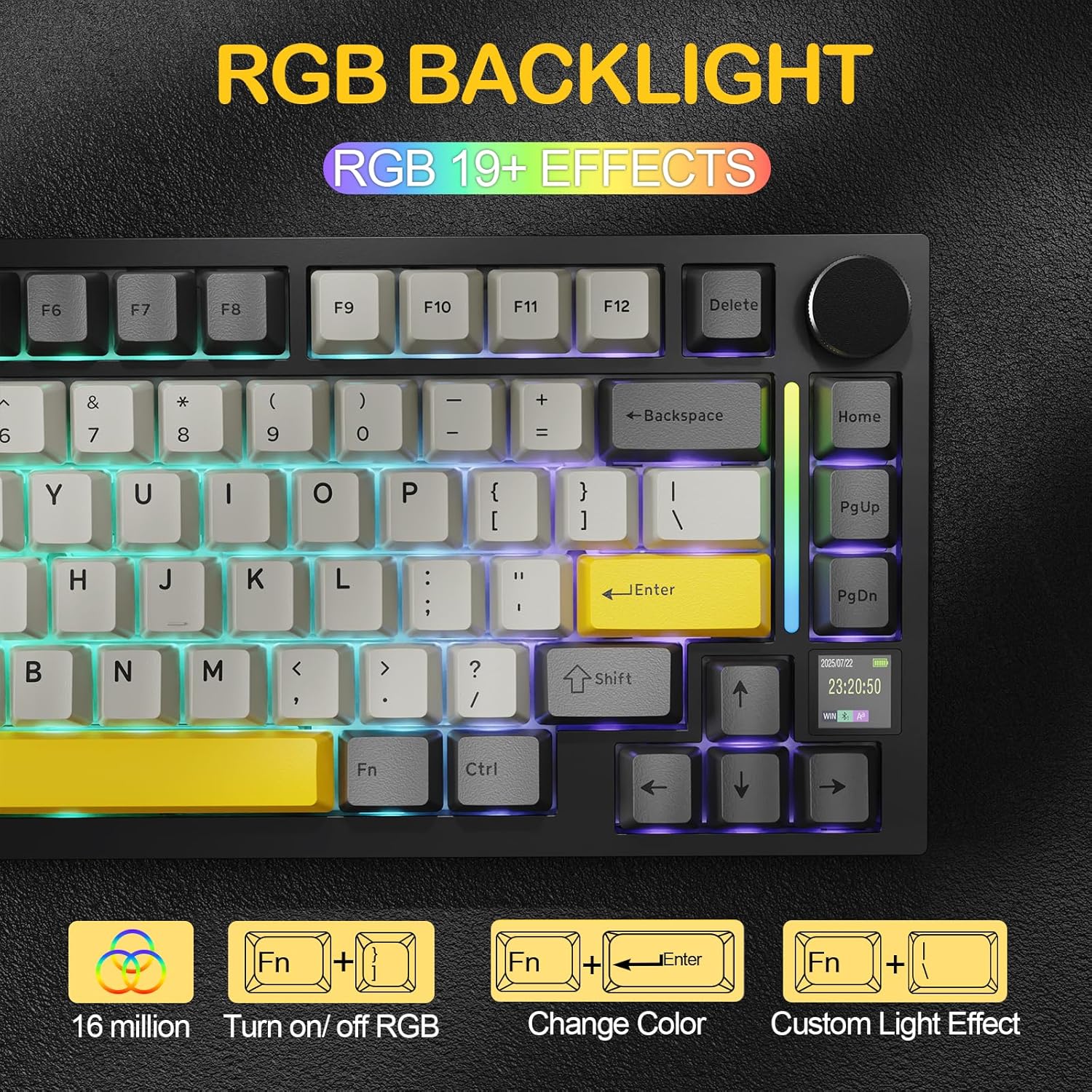
Image: RGB backlight features and controls.
۴.۴ سوئیچهای قابل تعویض در حین کار
The keyboard is equipped with hot-swappable sockets, allowing you to easily change switches without soldering. It supports both 3-pin and 5-pin mechanical switches.
- Shark Switch: Linear, 42g actuation, 48g bottom-out, 2.0mm pre-travel. Offers a lighter, more responsive typing experience.
- Gift Switch: Linear, 45g actuation, 60g bottom-out, 2.0mm pre-travel. Provides balanced tactile feedback with a deeper sound.

Image: Hot-swappable PCB and switch types.
4.4 Web Driver (QMK Support)
Customize your keyboard settings, macros, lighting, and key remapping directly through your browser using the cloud driver. Full QMK web driver support is available at qmk.top for advanced customization.
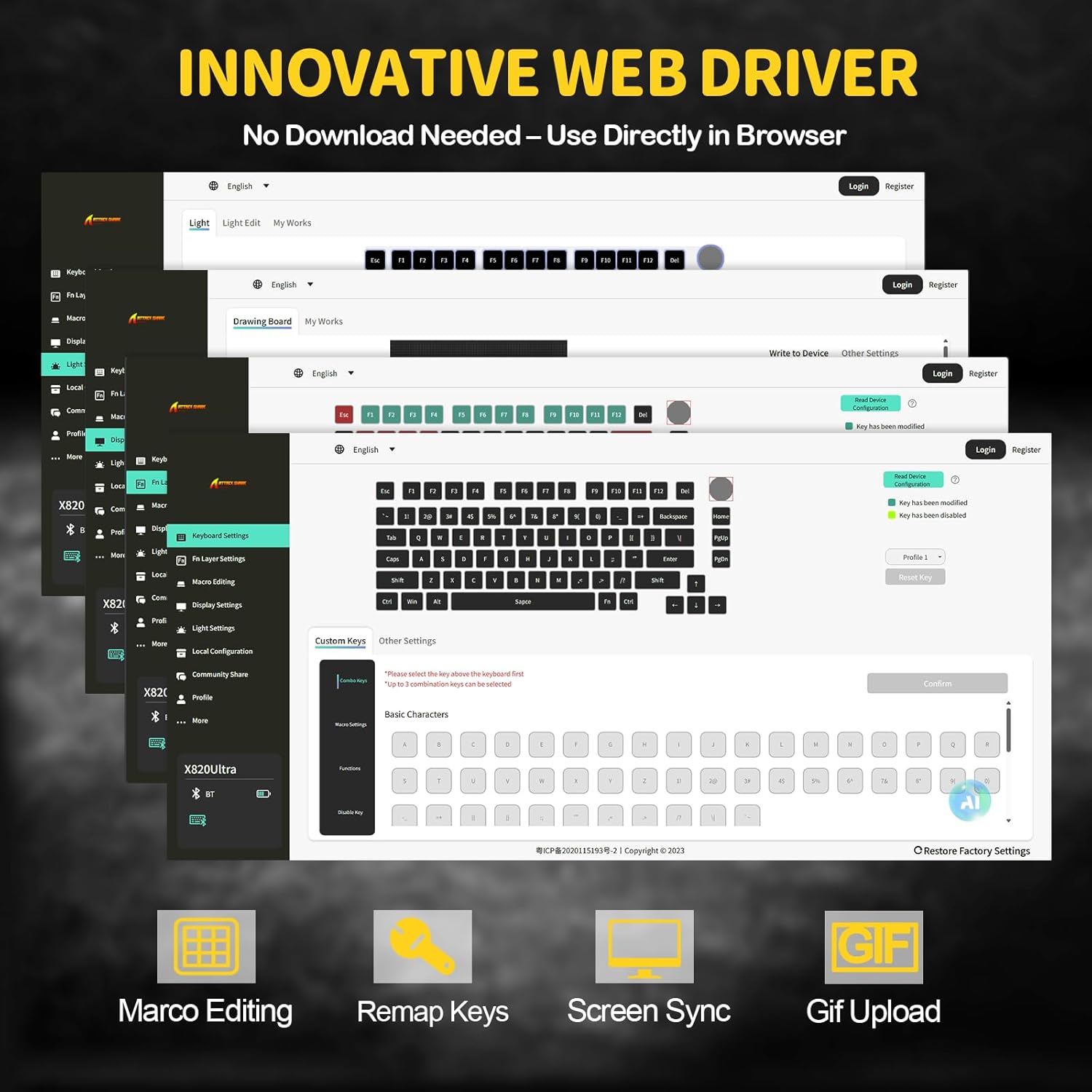
Image: Innovative web driver interface for customization.
5. تعمیر و نگهداری
۷.۱ تمیز کردن صفحه کلید
To maintain optimal performance and appearance, regularly clean your keyboard. Use a soft, dry cloth to wipe down the keycaps and chassis. For deeper cleaning, use the provided keycap puller to remove keycaps and clean underneath with compressed air or a small brush. Avoid using harsh chemicals or abrasive materials.
۵.۲.۱ تعویض سوئیچها
Thanks to the hot-swappable design, you can easily replace individual switches. Use the provided switch puller to gently remove a switch. Align the pins of the new switch with the holes on the PCB and press down firmly until it clicks into place. Ensure the pins are not bent during insertion.
5.3 مراقبت از باتری
To prolong the life of the 4000mAh battery, avoid fully discharging it frequently. Charge the keyboard when the battery indicator on the TFT display shows low power. If storing the keyboard for an extended period, charge it to approximately 50% and store it in a cool, dry place.
6 عیب یابی
۶.۱ مشکلات اتصال
- 2.4GHz/Bluetooth Not Connecting: Ensure the mode switch on the back of the keyboard is set correctly (2.4G or BT). For Bluetooth, ensure your device's Bluetooth is enabled and the keyboard is in pairing mode. Try restarting both the keyboard and your device.
- اتصال متناوب: Ensure the keyboard is within range of the receiver/device. Avoid obstructions that may interfere with the wireless signal. Check for other wireless devices causing interference.
- اتصال سیمی شناسایی نمیشود: Try a different USB-C cable or USB port on your computer. Ensure the cable is securely connected at both ends.
6.2 RGB Lighting Problems
- چراغ ها کار نمی کنند: Ensure RGB is turned on (Fn + \|). Check brightness settings via the knob or web راننده
- رنگها/افکتهای نادرست: Reset lighting effects through the web driver or cycle through presets using keyboard shortcuts.
۶.۲ کلید پاسخ نمیدهد
- Single Key Failure: Due to the hot-swappable design, a switch might be improperly seated or faulty. Use the switch puller to remove and re-insert the switch. If the issue persists, try replacing it with one of the spare switches.
- Multiple Keys Not Responding: Ensure the keyboard is charged and properly connected. Try resetting the keyboard (refer to the web driver or manufacturer's support for specific reset instructions).
6.4 TFT Display Issues
- Display Blank/Frozen: Try restarting the keyboard. If the issue persists, check for firmware updates via the web راننده
- Incorrect Information: Ensure the keyboard's internal clock is synchronized if applicable, or check connection status.
7. مشخصات
| ویژگی | جزئیات |
|---|---|
| نام تجاری | کوسه حمله |
| نام مدل | ATTACK SHARK X820Ultra |
| توضیحات صفحه کلید | مکانیکی |
| طرح بندی | 75% (81 کلید) |
| قابلیت اتصال | بلوتوث ۵.۰، بیسیم ۲.۴ گیگاهرتز، سیمی USB-C |
| سوئیچ ها | Hot-Swappable (3/5-pin compatible), Linear (Shark Switch, Gift Switch options) |
| نور پس زمینه | RGB (16.8M colors, 19+ presets), South-Facing LEDs |
| نمایش | نمایشگر TFT هوشمند |
| دکمه کنترل | Multi-function CNC Metal Knob |
| ظرفیت باتری | 4000 میلی آمپر ساعت |
| کلمات کلیدی | PBT دو بار مصرف |
| ساختار | Gasket Mount with Advanced Acoustic Tuning |
| سازگاری | Windows, macOS (QMK web driver support) |
۹. ویدیوی رسمی محصول
ویدئو: یک مقام رسمی در حال عبورview of the ATTACK SHARK X820 Ultra Wireless Gaming Mechanical Keyboard, demonstrating its features and functionality.
9. گارانتی و پشتیبانی
For warranty information, technical support, and additional resources, please visit the official ATTACK SHARK website or contact their customer service. Details can typically be found on the product packaging or the brand's online presence.