
1. محصول تمام شدview
The NEEWER BASICS NS14S Rectangular Softbox Kit is a 12"x47" (30x120 cm) quick-release strip softbox designed for studio photography and video recording. It features a glossy silver lining for even light diffusion, reducing blemishes and shadows while maintaining accurate color rendering. This softbox is part of the NEEWER BASICS line, focusing on essential functions and practical design without unnecessary complexities.
Its lightweight nylon alloy construction and quick-folding design make it durable and portable, suitable for various shooting scenarios including portraiture, product photography, and live streaming.

Image 1.1: The NS14S softbox is versatile for various applications such as portraiture, product photography, and live streaming.
2. محتویات بسته
لطفاً بررسی کنید که تمام موارد ذکر شده در زیر در بسته شما موجود باشد:
- 1 x NS14S Strip Softbox
- 1 x Internal Diffuser
- 1 x External Diffuser
- ۱ عدد شبکه لانه زنبوری
- 1 عدد کیف حمل
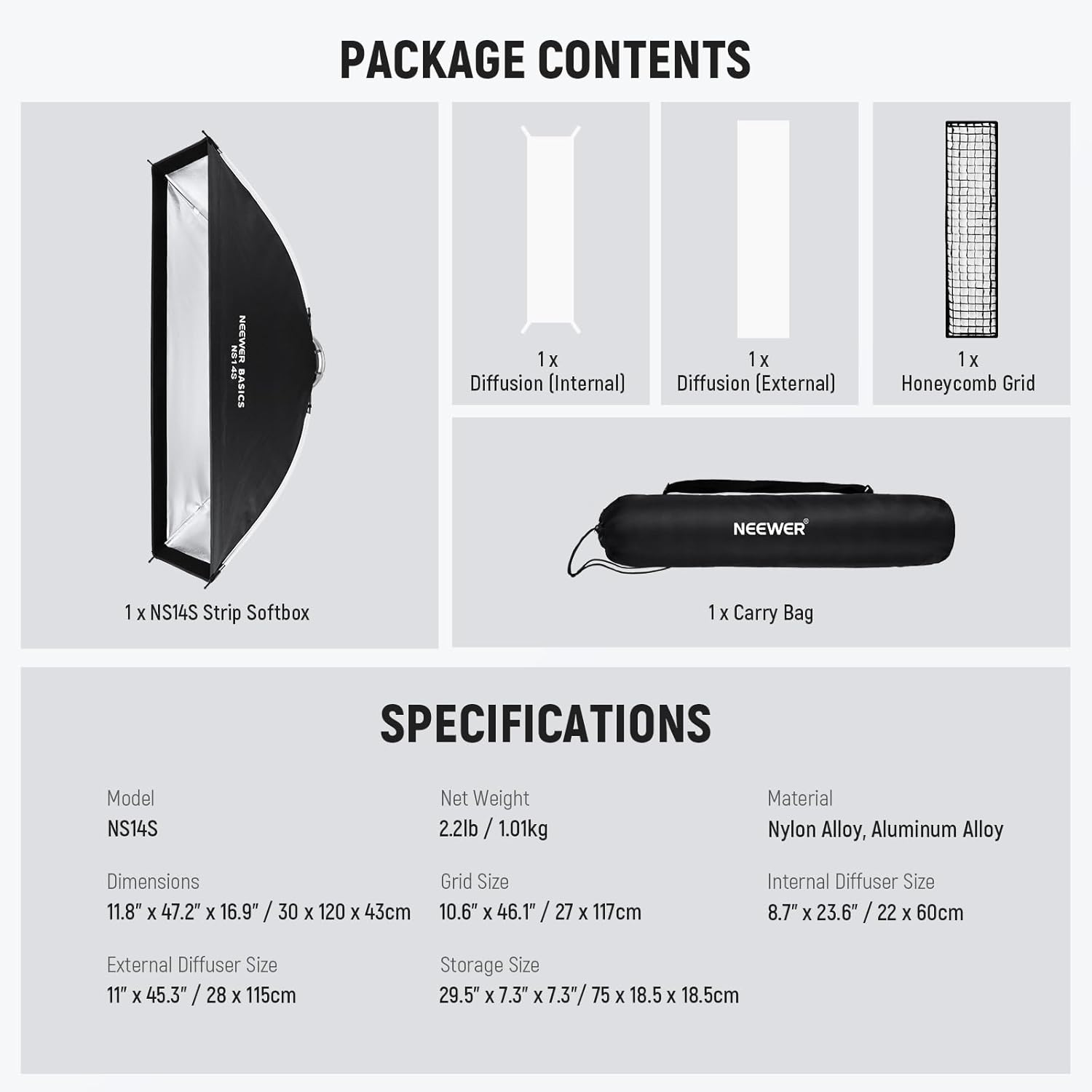
Image 2.1: Visual representation of the NS14S softbox and its included accessories.
۱. دستورالعملهای راهاندازی
3.1 Unfolding the Softbox
- Hold the Bowens mount adapter firmly.
- Gently pull up each of the four ribs until they lock into place. You will hear a click when each rib is securely extended.
- Ensure all four ribs are fully extended and locked to form the rectangular shape of the softbox.

Image 3.1: The quick-release design allows for rapid unfolding and folding of the softbox.
3.2 Attaching Diffusers and Honeycomb Grid
- پخش کننده داخلی: Attach the internal diffuser to the softbox using the touch fasteners (Velcro) located inside the softbox. This diffuser helps to further soften the light.
- پخش کننده خارجی: Attach the external diffuser to the front edge of the softbox using the outer touch fasteners. This provides the primary softening layer.
- شبکه لانه زنبوری: For more controlled and directional light, attach the honeycomb grid to the outermost edge of the softbox using its dedicated touch fasteners. The grid helps to prevent light spill and create a more focused beam.
3.3 Mounting to a Light Fixture
The NS14S softbox features a standard Bowens mount, making it compatible with a wide range of studio strobe lights and continuous LED video lights from brands like Godox, Aputure, and NEEWER.
- Align the Bowens mount on the softbox with the Bowens mount receiver on your light fixture.
- Insert the softbox mount into the light fixture's receiver.
- Rotate the softbox clockwise until it locks securely into place. Ensure it is firmly attached before use.

Image 3.2: The Bowens mount ensures broad compatibility with professional lighting equipment.
4. دستورالعمل های عملیاتی
4.1 Light Diffusion
The primary function of the softbox is to diffuse and soften light, creating a more even and flattering illumination. Use both the internal and external diffusers for maximum light softening and shadow reduction. The glossy silver lining inside the softbox helps to evenly spread the light before it passes through the diffusers.

Image 4.1: Demonstrates the progressive softening of light with one and two diffusers.
4.2 Using the Honeycomb Grid
The included honeycomb grid provides precise control over the direction of light. When attached, it narrows the light beam, reduces light spill, and enhances contrast, creating a more dramatic and three-dimensional lighting effect. This is particularly useful for accentuating specific areas or for hair lights in portrait photography.
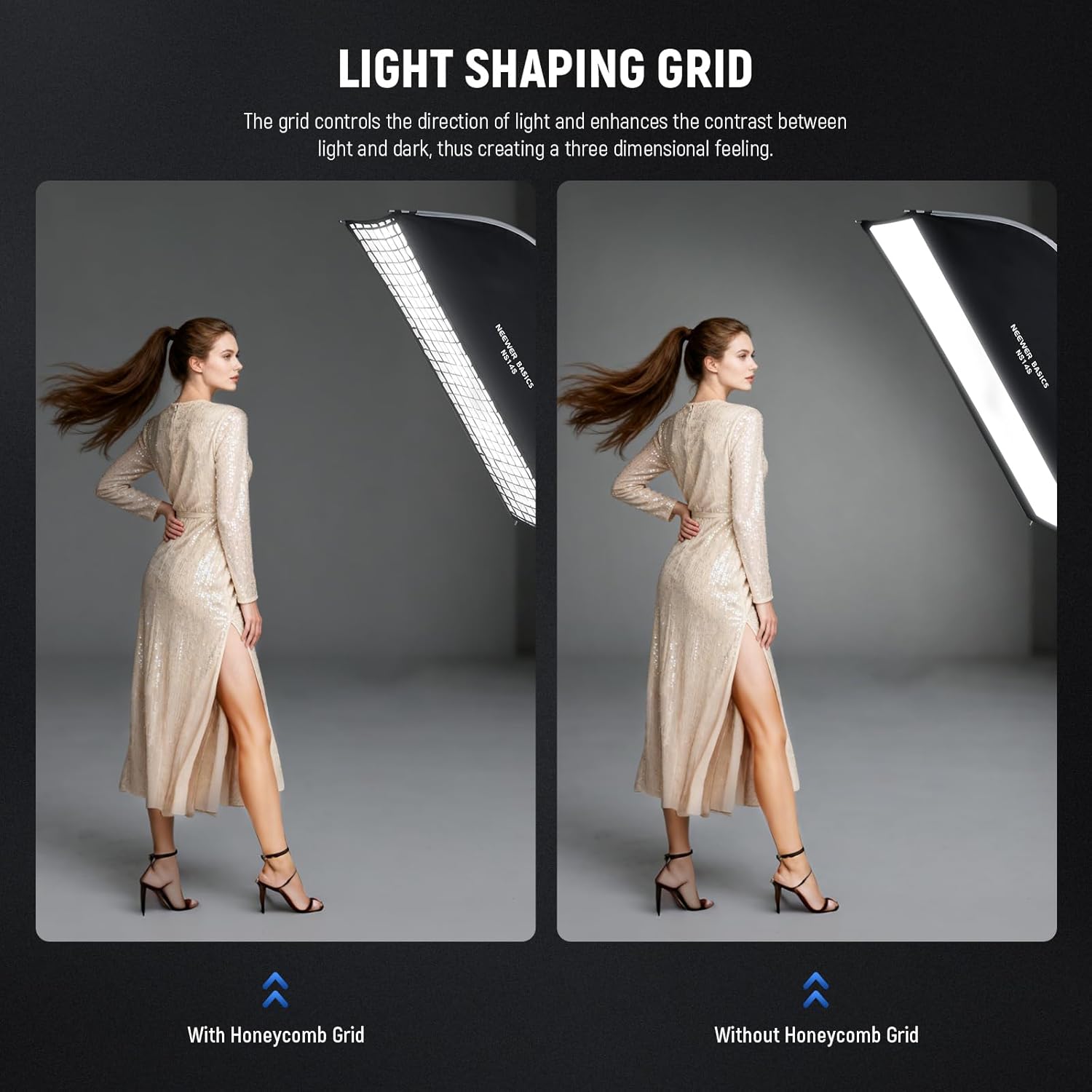
Image 4.2: The honeycomb grid helps shape light for more defined results.
5. تعمیر و نگهداری
5.1 تمیز کردن
- Exterior (Oxford Cloth): نمای بیرونی را با تبلیغات پاک کنیدamp cloth and mild soap if necessary. Allow it to air dry completely before folding or storing.
- Interior (Reflective Lining): Use a soft, dry, lint-free cloth to gently wipe the silver reflective interior. Avoid abrasive cleaners or excessive rubbing, which could damage the reflective surface.
- Diffusers and Grid: These can be gently hand-washed with mild soap and water if they become dirty. Rinse thoroughly and allow to air dry completely.
5.2 ذخیره سازی
To store the softbox, simply push and hold the latches on the Bowens mounting plate to release the ribs, allowing the softbox to fold flat. Place the folded softbox, diffusers, and honeycomb grid into the provided carrying bag for protection and easy transport. Store in a cool, dry place away from direct sunlight.

Image 5.1: The durable materials ensure longevity and consistent performance.
6 عیب یابی
| مشکل | علت احتمالی | راه حل |
|---|---|---|
| Softbox does not open fully or maintain shape. | Ribs not fully extended and locked. | Ensure each rib is pulled up until it clicks into its locked position. |
| اتصال به لامپ مشکل است. | Incorrect alignment or incompatible mount. | Verify the light fixture has a Bowens mount. Align the softbox mount correctly and rotate until it locks. |
| خروجی نور ناهموار | Diffusers not properly installed or light source not centered. | Check that both internal and external diffusers are smoothly attached. Ensure your light source is correctly positioned within the softbox. |
| Difficulty folding the softbox. | Latches on the mounting plate not fully pressed. | Press and hold the latches on the Bowens mounting plate firmly to release the ribs for folding. |
7. مشخصات
| ویژگی | جزئیات |
|---|---|
| مدل | NS14S |
| ابعاد محصول | ۶.۳ در ۲.۷ در ۰.۵ اینچ (تاشده) |
| Softbox Size (Open) | ۱۱.۸ اینچ در ۱۲.۲ اینچ (۳۰ در ۳۱ سانتیمتر) |
| وزن مورد | 3.31 پوند (1.5 کیلوگرم) |
| مواد | Nylon, Nylon Alloy |
| نوع کوه | کوه بوونز |
| سازگاری نوع منبع نور | Strobe, LED |
| Internal Diffuser Size | 8.7" x 23.6" / 22 x 60cm |
| External Diffuser Size | 11" x 45.3" / 28 x 115cm |
| اندازه شبکه | 10.6" x 46.1" / 27 x 117cm |
| اندازه ذخیره سازی | 29.5" x 7.3" x 7.3" / 75 x 18.5 x 18.5cm |
8. گارانتی و پشتیبانی
NEEWER products are designed for reliability and performance. For warranty information, please refer to the documentation included with your purchase or visit the official NEEWER website. If you encounter any issues or require technical assistance, please contact NEEWER customer support through their official channels. Keep your purchase receipt as proof of purchase for warranty claims.
برای منابع بیشتر و اطلاعات محصول، به [لینک] مراجعه کنید. فروشگاه NEEWER در آمازون.