
Zunate AI Smart Glasses
Zunate AI Smart Glasses User Manual
Model: AI Smart Glasses (ASIN: B0FC6YM48Q)
1. مقدمه
Thank you for choosing the Zunate AI Smart Glasses. These innovative glasses combine advanced technology with everyday convenience, offering features such as AI translation, HD camera capabilities, music playback, call functions, and fitness tracking. This manual provides detailed instructions to help you set up, operate, and maintain your new smart glasses, ensuring optimal performance and a seamless user experience.

تصویر: جلو view of the Zunate AI Smart Glasses, showcasing their sleek, black frame design.
2. اطلاعات ایمنی
لطفاً قبل از استفاده از این محصول، تمام هشدارها و دستورالعملهای ایمنی را مطالعه کنید تا از آسیب یا جراحت جلوگیری شود.
- عینک را در معرض دمای شدید، نور مستقیم خورشید یا رطوبت زیاد قرار ندهید.
- از انداختن یا قرار دادن عینک در معرض ضربات شدید خودداری کنید.
- Keep the glasses away from water and liquids. This product is not waterproof.
- Do not attempt to disassemble or repair the glasses yourself. Contact customer support for assistance.
- فقط از کابل شارژ ارائه شده و آداپتور برق سازگار استفاده کنید.
- Be aware of your surroundings when using the glasses, especially when walking or driving.
3. محتویات بسته
بررسی کنید که همه اقلام در بسته شما موجود باشد:
- Zunate AI Smart Glasses
- کابل شارژ
- راهنمای کاربر (این سند)
4. محصول تمام شدview
Familiarize yourself with the key components of your Zunate AI Smart Glasses.
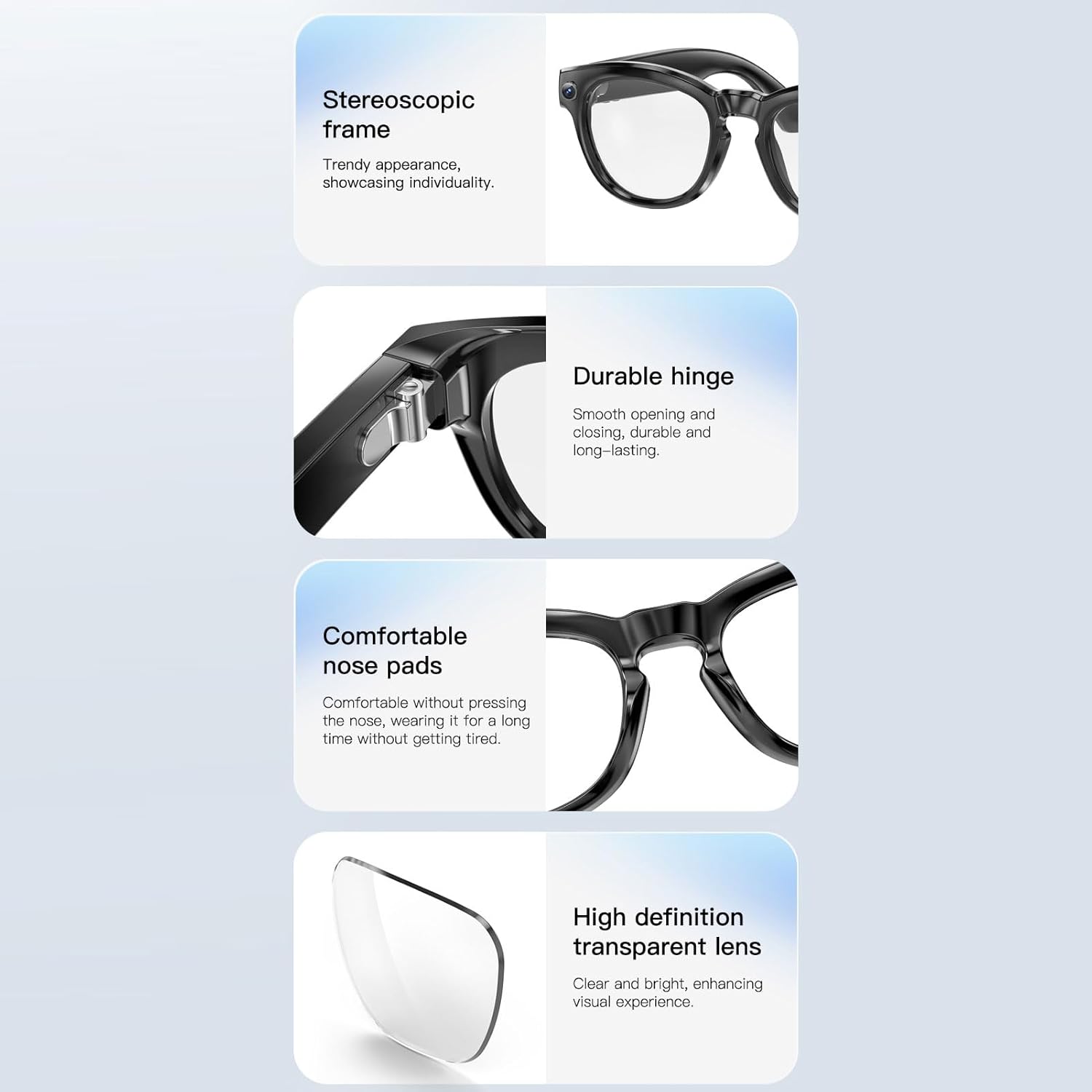
تصویر: دقیق view of the smart glasses highlighting the stereoscopic frame, durable hinge, comfortable nose pads, and high-definition transparent lenses.
- Stereoscopic Frame: Provides a trendy appearance and showcases individuality.
- Durable Hinge: Ensures smooth opening and closing, designed for long-lasting use.
- Comfortable Nose Pads: طراحی شده برای استفاده طولانی مدت بدون ایجاد ناراحتی
- High Definition Transparent Lens: Offers clear and bright vision, enhancing the visual experience.
- دوربین یکپارچه: Located on the frame for photo and video capture.
- فلاش الایدی: For illuminating subjects during photo taking.
- سخنرانان: Dual-channel stereo speakers integrated into each temple for immersive sound.
- میکروفون: With voice noise reduction for clear calls and voice commands.
- Control Buttons/Sliding Pad: Located on the right temple for various functions.
5. راه اندازی
۳.۱ شارژ کردن عینک
Before first use, fully charge your Zunate AI Smart Glasses.
- Connect the charging cable to the charging port on the glasses.
- سر دیگر کابل را به آداپتور برق USB (که همراه دستگاه نیست) یا پورت USB کامپیوتر وصل کنید.
- The indicator light will show charging status (refer to APP for detailed status).
- A full charge takes approximately 60 minutes. The battery life is 10 hours or more of continuous use, with a standby time of 15 days.
۳.۳ جفت شدن با تلفن هوشمند شما
The glasses connect wirelessly via Bluetooth 5.4.
- Ensure your glasses are charged and powered on.
- بلوتوث را در گوشی هوشمند خود فعال کنید.
- Open the dedicated Zunate Smart Glasses APP (see section 5.3).
- Follow the in-app instructions to search for and pair with your glasses.
۴.۴ نصب برنامه و راهاندازی اولیه
The companion app is essential for full functionality.

Image: Screenshot of the Zunate Smart Glasses companion app interface, showing exercise data and activity tracking.
- Scan the QR code in the product packaging or search for the "Zunate Smart Glasses" app on your smartphone's app store (compatible with Android 9.0 and above, iOS 10.0 and above).
- برنامه را نصب و باز کنید.
- Create an account or log in if prompted.
- Allow necessary permissions (Bluetooth, camera, location, etc.) for the app to function correctly.
- Connect the glasses to the app as described in section 5.2.
6. دستورالعمل های عملیاتی
6.1 کنترل های اساسی
The glasses feature dual keys and a sliding pad on the right temple for intuitive control.

Image: Diagram illustrating the location of the sliding plate, rear button, and front button on the right temple of the smart glasses.
- روشن/خاموش برق: Press and hold the designated button. A sound reminder will confirm.
- کنترل صدا: Use the sliding pad or specific buttons to adjust volume.
- پخش موسیقی/مکث: دکمه تعیین شده را فشار دهید.
- سوئیچ موسیقی: Use the sliding pad or specific buttons to skip tracks.
- پاسخ/قطع تماس: Press the designated button during an incoming call.
- Gesture Swiping: Supported for various functions (details in app).
6.2 Camera Functions (Photo & Video)
Capture moments with the integrated HD camera.

تصویر: نمای نزدیک view of the high-definition camera lens integrated into the smart glasses frame.

Image: Close-up of the LED flash on the smart glasses, designed to illuminate subjects.
- گرفتن عکس: Supports 2MP photo taking. Press the camera button to capture images.
- ضبط ویدئو: Supports 2MP video recording (1080 x 720, 30 frames). Press and hold the camera button to start/stop recording.
- چراغ LED: Supported for photo taking in low light conditions.
- Viewرسانه ها: به view pictures and videos taken by the glasses, ensure the glasses are connected to the cell phone APP. Turn on your cell phone hotspot, then connect to the hotspot within the APP. You can then view the media in the app's gallery. The glasses have 4GB of internal memory.
۵.۳ ترجمه هوش مصنوعی
The glasses support AI translation in 11 languages.
- زبان های پشتیبانی شده: Chinese, English, German, Spanish, French, Italian, Japanese, Korean, Portuguese, Russian, Swedish.
- استفاده: Activate the translation feature via the companion app. Speak into the microphone, and the translated audio will be played through the glasses' speakers.
6.4 Music and Call Functions
Enjoy immersive audio and clear conversations.

Image: A man wearing the smart glasses, with visual representations of sound waves emanating from the temples, indicating music playback.
- پخش موسیقی: Stereo music playback is supported through the HiFi speakers.
- تماس بیسیم: Make and receive calls with clear and smooth conversation thanks to the voice noise reduction microphone.
- صدای فراگیر: Dual-channel stereo design with independent speakers in each temple provides a 360-degree surround sound effect.
6.5 Fitness Tracking and Smart Features
Monitor your activity and access smart assistance.
- گام شماری: گامهای روزانهتان را پیگیری کنید.
- Calories Tracking: کالریهای سوزانده شده را زیر نظر داشته باشید.
- ردیابی فاصله: Keep track of the distance covered.
- تشخیص سایش: The glasses can detect when they are being worn.
- Voice Helper: Integrated with for ChatGPT for intelligent assistance.
- عملکرد روشنایی: Refers to the LED flash for illumination.
- Automatic Lens Tint Adjustment: Lenses can automatically adjust tint.
7. تعمیر و نگهداری
Proper care will extend the life of your smart glasses.
- تمیز کردن: Use a soft, lint-free cloth to clean the lenses and frame. Do not use abrasive cleaners or solvents.
- ذخیره سازی: Store the glasses in a cool, dry place, away from direct sunlight and extreme temperatures. Use the provided case for protection when not in use.
- مراقبت از باتری: از خالی شدن کامل باتری به طور مکرر خودداری کنید. برای حفظ سلامت باتری، آن را به طور منظم شارژ کنید.
8 عیب یابی
اگر با مشکلی مواجه شدید، قبل از تماس با پشتیبانی، این راهحلها را امتحان کنید.
- عینک روشن نمیشود: مطمئن شوید که باتری شارژ شده است. دستگاه را به شارژر وصل کنید و قبل از تلاش مجدد برای روشن کردن، چند دقیقه صبر کنید.
- جفت شدن با تلفن هوشمند امکانپذیر نیست:
- Ensure Bluetooth is enabled on your phone and the glasses are in pairing mode.
- Make sure the glasses are within the Bluetooth range (approx. 10 meters).
- هم عینک و هم گوشی هوشمند خود را ریستارت کنید.
- Try resetting the glasses to factory settings via the APP if necessary.
- بدون صدا از بلندگوها: Check the volume level on both the glasses and your phone. Ensure the glasses are properly connected.
- دوربین کار نمیکند: Ensure the glasses are connected to the app. Check for any error messages in the app.
- ترجمه کار نمیکند: Verify internet connection on your phone (required for translation). Ensure the correct languages are selected in the app.
9. مشخصات
Detailed technical specifications for the Zunate AI Smart Glasses.
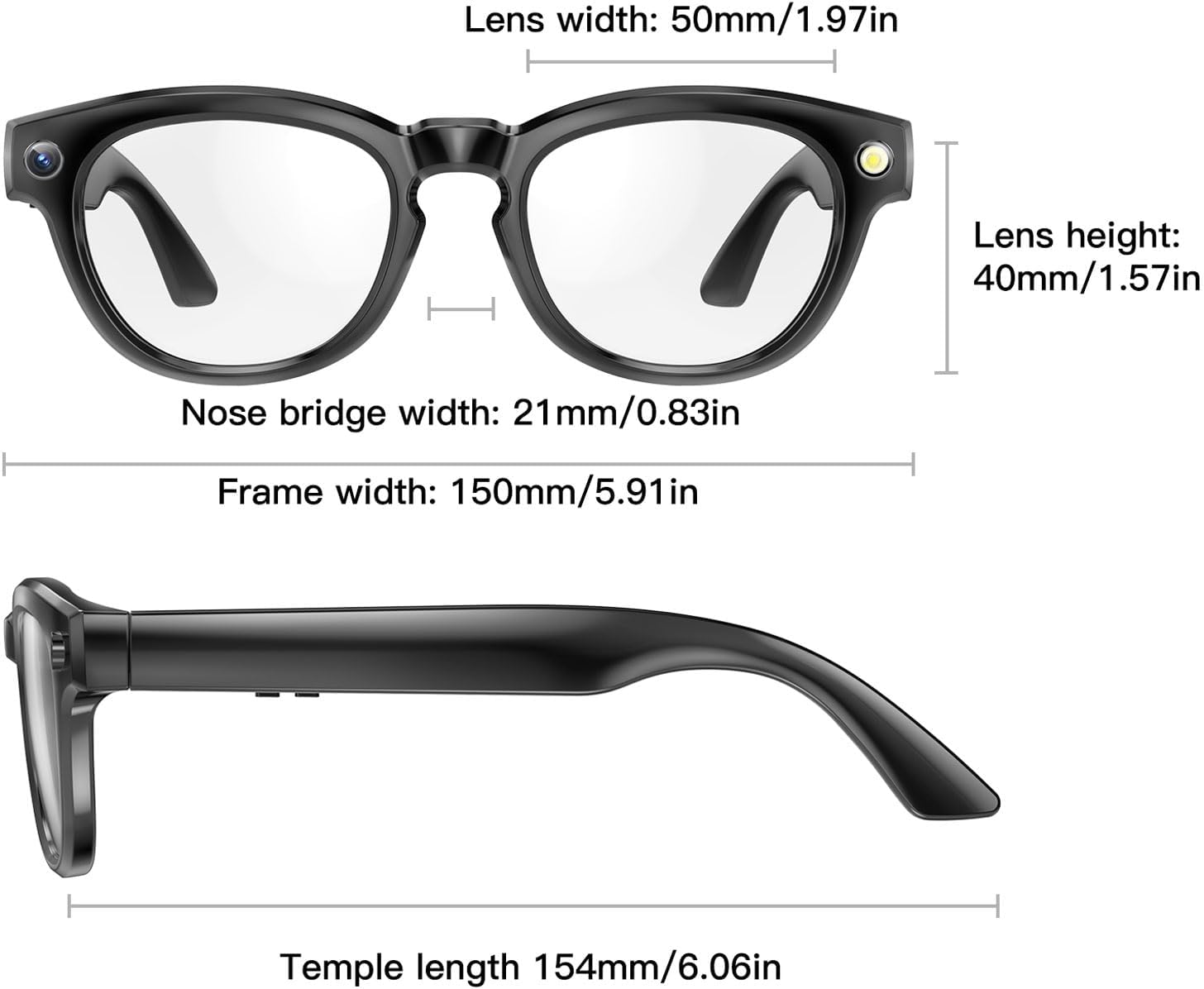
Image: Diagram showing the dimensions of the smart glasses, including lens width, lens height, bridge width, frame width, and temple length.
| ویژگی | مشخصات |
|---|---|
| مواد | کامپیوتر، ABS |
| اندازه محصول | Approx. 154x150mm / 6.06x5.91in |
| عرض لنز | تقریباً ۴۸ میلیمتر / ۱.۸۹ اینچ |
| ارتفاع لنز | تقریباً ۴۸ میلیمتر / ۱.۸۹ اینچ |
| Bridge Width | تقریباً ۴۸ میلیمتر / ۱.۸۹ اینچ |
| Picture Quality (Video) | 1080 x 720, 30 frames |
| وضوح عکس | 2 مگاپیکسل |
| باتری | 481048 Li Ion Battery 260mAh (Built-in) |
| عمر باتری | 10 Hours or More (Continuous Use), 15 Days (Standby) |
| اتصال بی سیم | بلوتوث 5.4 |
| میکروفون | کاهش نویز صدا |
| زمان شارژ | 60 دقیقه |
| Voice Helper | Integrated with for ChatGPT |
| حافظه | 4 گیگابایت |
| سازگاری سیستم | for Android 9.0 and Above, for iOS 10.0 and Above |
| AI Translation Languages | Chinese, English, German, Spanish, French, Italian, Japanese, Korean, Portuguese, Russian, Swedish |
| وزن مورد | تقریبا 171.00 گرم / 6.03 اونس |
10. گارانتی و پشتیبانی
Zunate products are designed for reliability and performance. For warranty information and customer support, please refer to the warranty card included with your product or visit the official Zunate website. If you experience any issues not covered in this manual, please contact Zunate customer service for assistance.
سازنده: زونیت
Ask a question about this manual
Ask about setup, troubleshooting, compatibility, parts, safety, or missing instructions. Manuals+ will review the question and use this page’s manual context to help answer it.