
1. بیش ازview
The Roku Select Series HD TV provides a streamlined entertainment experience. This 32-inch 720p HD television integrates the Roku operating system for easy access to streaming content, live TV, and various applications. It features a voice remote for convenient control and includes technologies like Bluetooth Headphone Mode and Dolby Audio for enhanced sound.
ویژگی های کلیدی
- پخش جریانی بیوقفه: Fast Wi-Fi and quick app launches for immediate entertainment access.
- Extensive Content: Access to thousands of streaming apps, free movies, shows, and live TV channels.
- صفحه اصلی قابل تنظیم: Organize apps and content for personalized viewing.
- بهروزرسانیهای خودکار نرمافزار: Ensures access to the latest features and applications.
- ادغام خانه هوشمند: Compatible with Roku Voice, Siri, Alexa, and Google Assistant for voice control. Supports Apple AirPlay for content sharing.
- Clear HD Picture: 720p HD resolution with Roku Smart Picture technology for optimized visuals.
- کنترل صوتی: Search, play, and control streaming with voice commands.
- صدای پیشرفته: Designed for clear speech and louder sound with Dolby Audio technology.
- Bluetooth Headphone Mode: Private listening with wireless headphones.

Image: Roku 32-inch Select Series HD Smart TV with included remote control.
۲. چه چیزهایی در جعبه است؟
قبل از ادامه تنظیمات، از وجود همه اجزا اطمینان حاصل کنید.
- Roku Select Series 32" HD TV
- Stands and screws
- Roku Voice Remote with batteries (2 AAA)
- کابل برق
- راهنمای کاربر (این سند)

Image: Contents of the Roku Select Series TV packaging.
3. راه اندازی
3.1 باز کردن بسته بندی
تلویزیون و تمام لوازم جانبی را با دقت از بستهبندی خارج کنید. بستهبندی را برای حمل و نقل یا نیازهای سرویس بعدی نگه دارید.
3.2 چسباندن پایه
- برای جلوگیری از خش افتادن، صفحه تلویزیون را رو به پایین روی یک سطح نرم و تمیز قرار دهید.
- پایه های تلویزیون را با سوراخ های پیچ در پایین تلویزیون تراز کنید.
- پایهها را با استفاده از پیچهای ارائه شده محکم کنید. مطمئن شوید که محکم بسته شدهاند.
3.3 اتصال لوازم جانبی
دستگاههای خود را به پورتهای مناسب در پشت تلویزیون وصل کنید.
- HDMI: Connect up to three HDMI devices (e.g., cable box, gaming console, Blu-ray player) to the HDMI ports.
- USB: Use the USB port for media playback or connecting compatible accessories.
- نوری (S/PDIF): برای اتصال به سیستم صوتی خارجی.
- کابل برق: کابل برق را به تلویزیون و سپس به پریز برق وصل کنید.
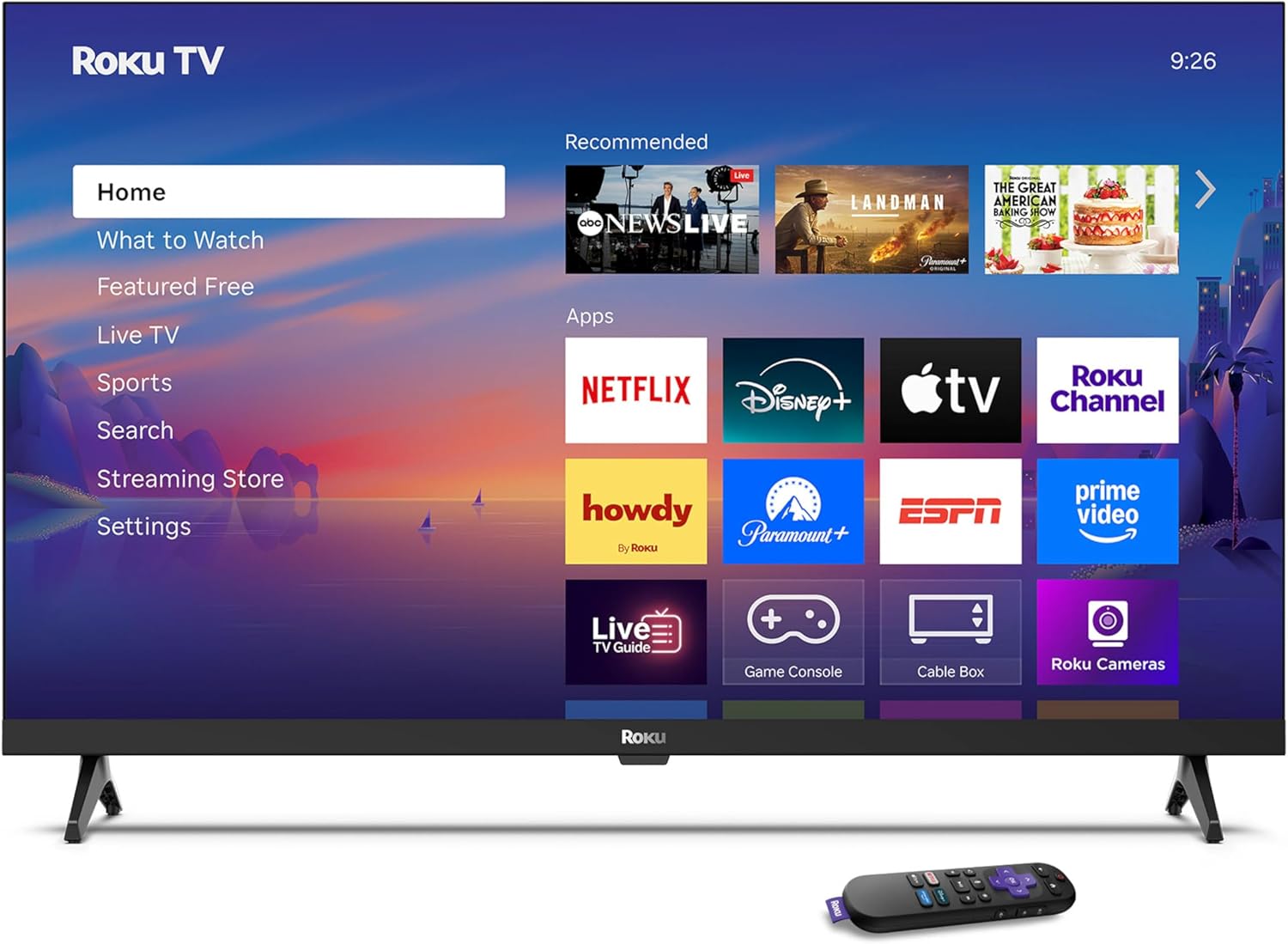
Image: Rear panel connections including HDMI, USB, and optical ports.
۲.۳ روشن کردن اولیه و اتصال به شبکه
- Plug in the TV and press the power button on the remote or TV.
- Follow the on-screen instructions to select your language and connect to your Wi-Fi network.
- Activate your Roku account or create a new one.
ویدئو: تمام شدview of the Roku TV operating system, demonstrating its user interface and features. This video is provided by Roku, Inc.
4. دستورالعمل های عملیاتی
۴.۱ استفاده از کنترل از راه دور صوتی
The Roku Voice Remote allows for intuitive control of your TV and streaming content.
- جستجوی صوتی: Press and hold the voice button and speak your command to search for content, launch apps, or control playback.
- ناوبری: از پد جهتدار برای حرکت در منوها و انتخاب موارد استفاده کنید.
- میانبرهای برنامه: دکمههای اختصاصی، دسترسی سریع به سرویسهای پخش محبوب را فراهم میکنند.

Image: Features of the Roku Voice Remote, highlighting voice control and shortcut buttons.
4.2 Navigating the Home Screen
The Roku Home Screen provides access to all your installed apps, inputs, and settings.
- صفحه اصلی: Returns you to the main home screen.
- آنچه باید تماشا کرد: Discover recommended content.
- تلویزیون زنده: Access free live television channels.
- فروشگاه پخش جریانی: کانالهای پخش جدید را مرور و اضافه کنید.
- تنظیمات: Adjust TV and system preferences.

Image: The Roku TV home screen interface.
4.3 Adjusting Picture and Sound Settings
خود را سفارشی کنید viewing and listening experience through the settings menu.
- حالت تصویر: Select from predefined modes like Standard, Vivid, Sports, or Movie. Roku Smart Picture automatically optimizes settings.
- حالت صدا: صدا حرفه ای را انتخاب کنیدfiles or enable features like Night Mode for reduced volume fluctuations.
- Bluetooth Headphone Mode: Pair your wireless headphones for private audio.

Image: Picture mode settings on the Roku TV.

Image: Bluetooth Headphone Mode in use.

Image: Dolby Audio technology for clear sound.
5. تعمیر و نگهداری
۶.۱ تمیز کردن صفحه نمایش
برای تمیز کردن صفحه تلویزیون، آن را به آرامی با یک پارچه نرم، خشک و بدون پرز پاک کنید. برای لکههای سرسخت، به آرامی ...ampپارچه را با آب یا محلول تمیزکننده مخصوص صفحه نمایش بپوشانید. از استفاده از مواد شیمیایی قوی یا مواد ساینده خودداری کنید.
5.2 به روز رسانی نرم افزار
تلویزیون Roku شما هنگام اتصال به اینترنت، بهطور خودکار بهروزرسانیهای نرمافزاری را دریافت میکند. این بهروزرسانیها ویژگیهای جدید، بهبود عملکرد و رفع اشکالات را ارائه میدهند. برای عملکرد بهینه، مطمئن شوید که تلویزیون شما به اینترنت متصل میماند.
6 عیب یابی
If you encounter issues with your Roku TV, refer to the following common solutions:
- بدون برق: مطمئن شوید که کابل برق به طور محکم به تلویزیون و یک پریز برق سالم وصل شده است. پریز برق دیگری را امتحان کنید.
- تصویر/صدا ندارد: Verify that the correct input source is selected. Check all cable connections (HDMI, audio). Restart the TV by unplugging it for 30 seconds and plugging it back in.
- ریموت کار نمی کند: Replace the AAA batteries in the remote. Ensure there are no obstructions between the remote and the TV. For voice remote issues, re-pair the remote if necessary (refer to Roku support for specific steps).
- مشکلات اتصال شبکه: Restart your Wi-Fi router and modem. Go to the TV's settings menu, then Network, and try reconnecting to your Wi-Fi network.
- App Not Loading/Crashing: Try restarting the app. If the issue persists, remove the app from the home screen, restart the TV, and then re-add the app from the Streaming Store.
7. مشخصات
| ویژگی | جزئیات |
|---|---|
| اندازه صفحه نمایش | 32 اینچ |
| فناوری نمایش | LED |
| قطعنامه | 720p |
| نرخ تازه سازی | 60 هرتز |
| ویژگی های خاص | Bluetooth Headphone Mode, Dolby Audio, Voice Remote |
| فناوری اتصال | بلوتوث ، Wi-Fi |
| مجموع پورت های HDMI | 3 |
| مجموع پورت های USB | 1 |
| ورودی صوتی | HDMI |
| سیستم عامل | سیستم عامل Roku |
| نوع نصب | پایه رومیزی، پایه دیواری |
| استاندارد نصب VESA | 200 × 200 میلی متر |
| ابعاد محصول (D x W x H) | 7 اینچ × 28.3 اینچ × 18.3 اینچ |
| وزن مورد | 7.5 پوند |
| شماره مدل | 32R2D5 |
| UPC | 829610008974 |
8. اطلاعات گارانتی
8.1 گارانتی محدود
Roku warrants the hardware against defects in materials and workmanship under normal use for a period of one (1) year from the date of purchase ("Warranty Period"). If Roku determines that the device’s hardware is defective during the Warranty Period, Roku’s sole obligation, and your exclusive remedy, will be to either repair or replace the unit with either a new or rebuilt device, at its option. This warranty applies if the product is used in accordance with the provided documentation.
۸.۱ سیاست بازگشت کالا
You may return a device for any reason:
- Within thirty (30) days from the date of purchase from Roku.
- Within the applicable return period if purchased from an authorized reseller or distributor.
Additional details regarding product returns can be found on the Roku support site.
9. پشتیبانی
For further assistance, troubleshooting guides, and frequently asked questions, please visit the official Roku support webسایت: