
1. مقدمه
The Veise VE012W Smart Lock is an advanced keyless entry system designed for enhanced home security and convenience. Featuring built-in Wi-Fi, it allows for remote management and control via a dedicated mobile application. This smart deadbolt offers multiple access methods including fingerprint recognition, PIN codes, voice assistant integration, auto-lock functionality, and traditional physical keys. Its robust construction meets BHMA/ANSI standards and boasts an IP55 waterproof rating, ensuring durability and reliable performance in various conditions. This manual provides detailed instructions for installation, setup, operation, and maintenance of your Veise VE012W Smart Lock.
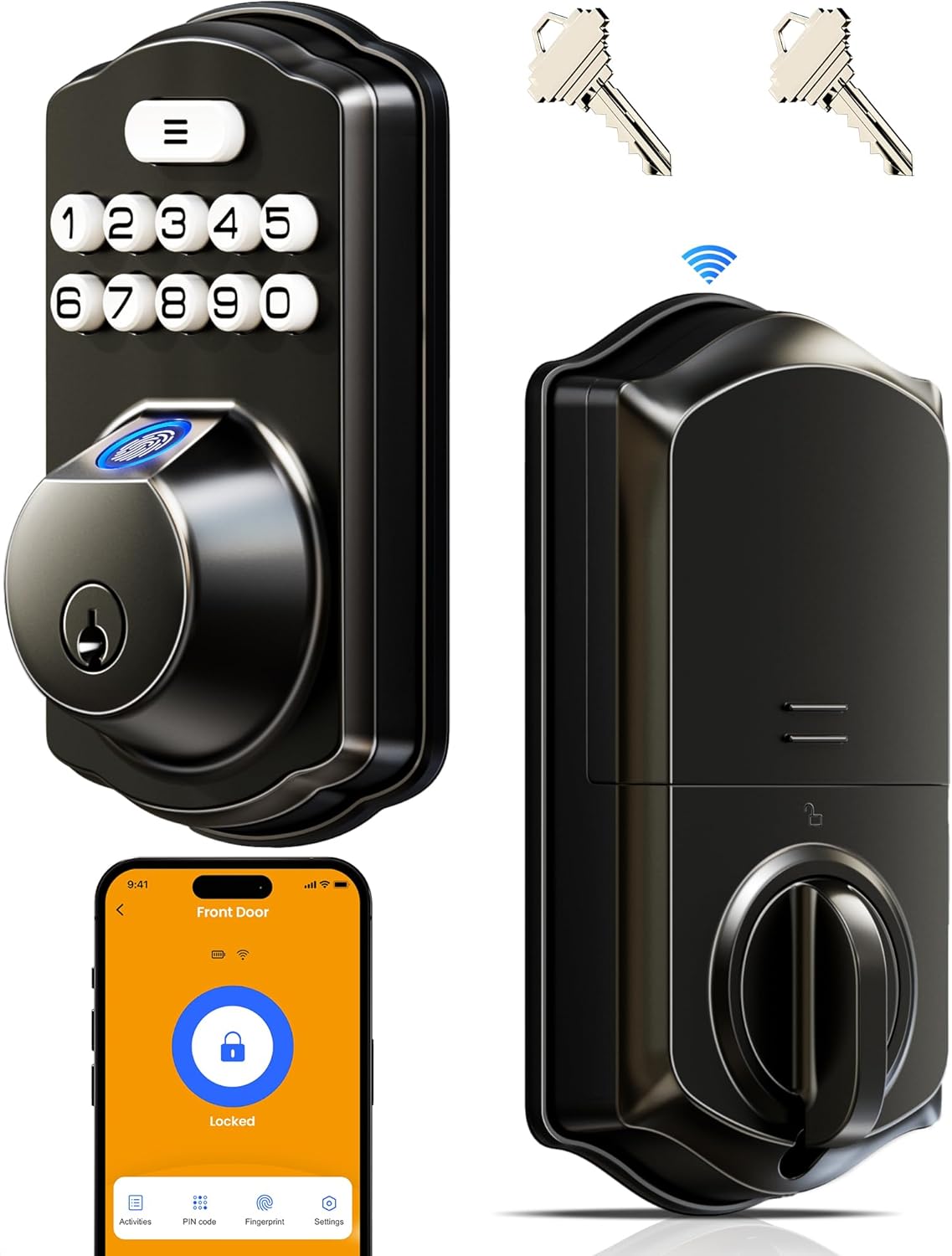
تصویر: جلو و عقب view of the Veise VE012W Smart Lock, showcasing the keypad, fingerprint sensor, and the internal deadbolt mechanism, alongside a smartphone displaying the lock's app interface.
2. اجزای محصول
Before beginning installation, please ensure all components are present and undamaged. The package includes:
- Wi-Fi Fingerprint Lock (Exterior and Interior Assemblies)
- 2 کلید پشتیبان
- صفحه نصب
- پیچ (اندازههای مختلف برای نصب)
- چفت
- صفحه اعتصاب
- راهنمای کاربر (این سند)
- Installation Manual (separate guide for physical installation)
3. نصب و راه اندازی
The Veise VE012W Smart Lock is designed for easy DIY installation, typically requiring only a screwdriver. No complex wiring is needed. For detailed step-by-step instructions, please refer to the dedicated Installation Manual provided with your product. Ensure your door meets the following specifications for proper fit and function:
- قطر سوراخ: ۱-۱/۲ اینچ یا ۲-۱/۸ اینچ (۳۸ میلیمتر یا ۵۴ میلیمتر)
- پشت: ۱-۱/۲ اینچ یا ۲-۱/۸ اینچ (۳۸ میلیمتر یا ۵۴ میلیمتر)
- قطر سوراخ: ۱.۲۶ اینچ (۳۲ میلیمتر)
- ضخامت درب: 1-3/8" – 2" (35mm – 50mm)
- حداقل فاصله: 1-3/4" (45mm) between handle and hole.
The lock is compatible with single cylinder deadbolts and can be installed on both left-hand and right-hand doors, automatically identifying the direction during setup. It is not compatible with mortise or integrated lock systems.

Image: Diagram illustrating key door measurements (hole diameter, backset, bore diameter, door thickness, minimum distance) required for compatible installation of the smart lock.

Image: Visual guide showing compatible door types (chiseled/not chiseled, single cylinder) and incompatible types (mortise/integrated) for the smart lock.
4. راه اندازی
After physical installation, proceed with the electronic setup and app pairing.
4.1. Powering the Lock
The Veise VE012W requires 8 AA batteries (not included) for operation. Insert them into the battery compartment located on the interior assembly of the lock. Ensure correct polarity.
۲. دانلود و جفتسازی برنامه
Download the "KK Home" app from your smartphone's app store (available on Google Play and Apple App Store). Follow the in-app instructions to create an account and pair your smart lock. The built-in Wi-Fi allows direct connection to your home network (2.4GHz Wi-Fi required) without the need for an additional hub.
4.3. مدیریت کاربر
Manage users, fingerprints, and PIN codes through the KK Home app. You can create permanent, scheduled, recurring, or one-time passcodes for family members, guests, or service providers. The app also allows you to assign specific permissions to different users.

Image: Screenshot of the KK Home app interface showing options for creating and sharing codes, remote access, real-time alerts, access logs, and assigning permissions for the smart lock.

Image: Illustration showing different types of passcodes that can be generated: Permanent, Recurring, One-Time, and Duration-based codes.
5. دستورالعمل های عملیاتی
The Veise VE012W Smart Lock offers multiple convenient ways to lock and unlock your door:
- اثر انگشت: Place your registered finger on the fingerprint sensor for quick access. The lock features a 0.3-second semiconductor chip for rapid recognition.
- پین کد: Enter your programmed PIN code on the digital keypad. The anti-peeping passcode feature allows you to enter random digits before or after your actual code to prevent others from guessing it.
- کنترل برنامه: Use the KK Home app to remotely lock or unlock your door from anywhere with an internet connection.
- دستیار صوتی: Integrate with Amazon Alexa or Google Assistant for voice-controlled locking and unlocking.
- قفل خودکار: Configure the auto-lock feature via the app to automatically lock the door after a set period (10-180 seconds) for added security.
- کلید فیزیکی: In case of battery depletion or electronic malfunction, use the provided physical backup keys for manual access.
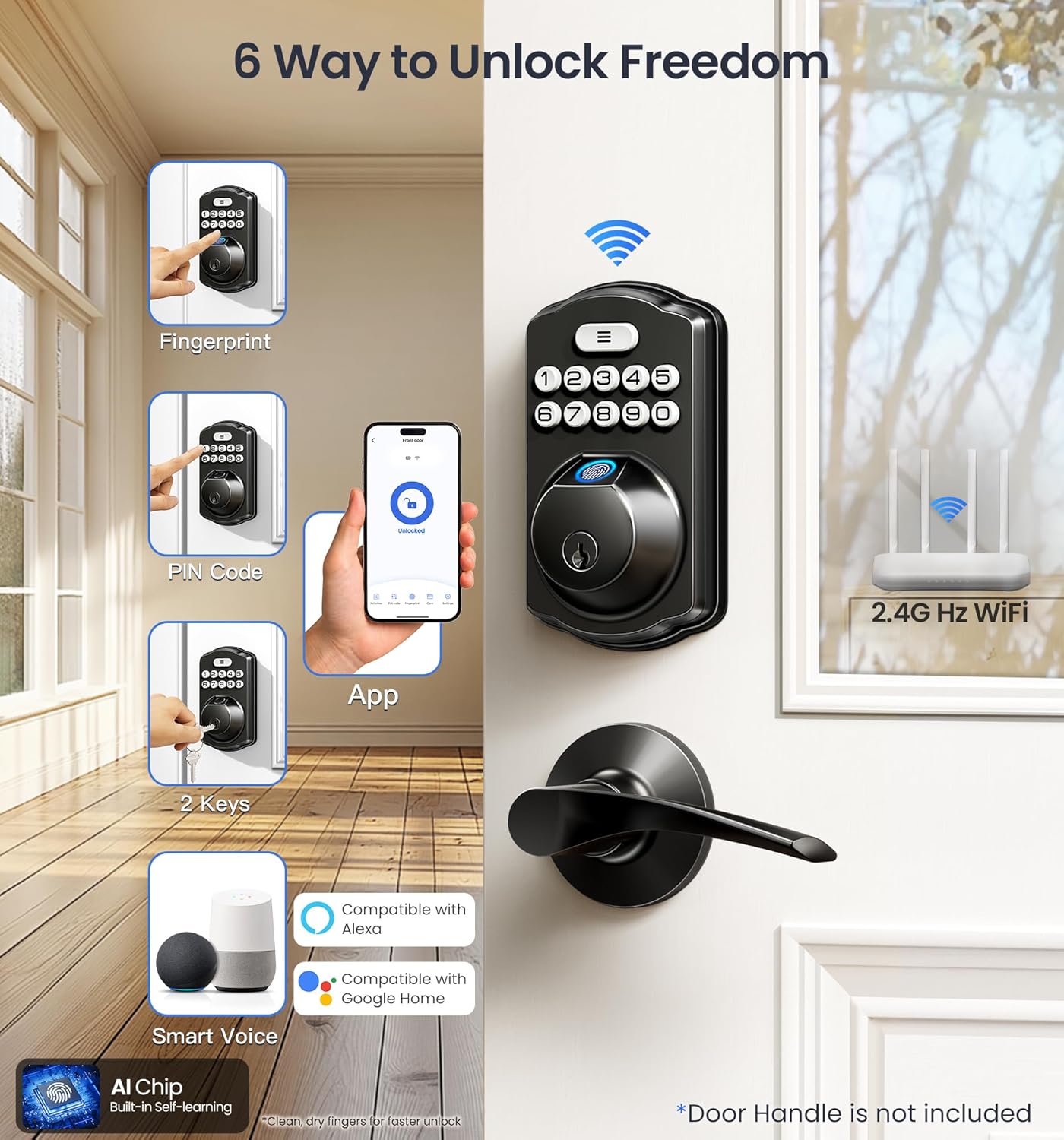
Image: Visual representation of the six different methods to unlock the Veise smart lock: Fingerprint, PIN Code, App, 2 Keys, Smart Voice (Alexa/Google Home), and Auto-Lock.

Image: Diagram explaining the anti-peeping passcode feature, where random digits can be added before or after the correct password to obscure it from onlookers.

Image: Illustration showing the smart lock integrated into a home environment, compatible with Alexa and Google Home for voice commands like "Alexa, lock all the doors."
6. تعمیر و نگهداری
6.1. تعویض باتری
The smart lock is powered by 8 AA alkaline batteries. When the battery level is low (typically around 10%), you will receive a low battery alarm notification via the KK Home app. Replace all 8 batteries promptly to ensure continuous operation. The lock is designed for extended battery life, supporting over 2000 lock and unlock cycles.
Image: Visual showing the battery compartment of the smart lock and a smartphone displaying a low battery alert from the KK Home app.
6.2. تمیز کردن
قسمت بیرونی قفل را با یک اسفنج نرم و زبر تمیز کنید.amp cloth. Avoid using abrasive cleaners or solvents, as these can damage the finish and electronic components. Ensure the fingerprint sensor and keypad are free of dirt and debris for optimal performance.
7 عیب یابی
If you encounter issues with your Veise VE012W Smart Lock, refer to the following common problems and solutions:
| مشکل | علت احتمالی | راه حل |
|---|---|---|
| قفل به اثر انگشت پاسخ نمیدهد. | Finger is dirty or wet; unregistered fingerprint; sensor malfunction. | Ensure finger is clean and dry. Re-register fingerprint if necessary. Contact support if issue persists. |
| کد پین کار نمیکند. | Incorrect code entered; keypad dirty; temporary lockout due to multiple wrong attempts. | Verify PIN code. Clean keypad. Wait 1 minute if locked out (after 5 wrong attempts). |
| نمیتوان به Wi-Fi/برنامه متصل شد. | Incorrect Wi-Fi password; 5GHz network; weak signal; app issue. | Ensure 2.4GHz Wi-Fi. Check password. Move router closer or use Wi-Fi extender. Restart app/phone. |
| قفل خودکار فعال نمیشود. | Feature disabled in app; door not fully closed. | Check auto-lock settings in KK Home app. Ensure door is completely closed and latched. |
| هشدار باتری کم | باتری ها خالی شده اند. | فوراً هر 8 باتری قلمی (AA) را تعویض کنید. |
For more detailed troubleshooting or issues not listed here, please refer to the Troubleshooting Guide (PDF) available online or contact Veise customer support.
8. مشخصات
| ویژگی | جزئیات |
|---|---|
| نام مدل | VE012W |
| نام تجاری | ویزه |
| نوع قفل | بیومتریک، قفل کلیدی، صفحه کلید |
| پروتکل اتصال | Wi-Fi (Built-in, no hub required) |
| روش کنترل | App, Fingerprint, Passcode, Keys, Voice (Alexa/Google) |
| مواد | فلز |
| رنگ | مشکی مات |
| ابعاد مورد (L x W x H) | 3 x 1.3 x 5.1 اینچ |
| وزن مورد | 1.68 پوند |
| منبع تغذیه | 8 باتری AA (شامل نمی شود) |
| رتبه بندی ضد آب | IP55 |
| درجه امنیت | دارای گواهینامه درجه ۳ BHMA |
| دمای عملیاتی | Works perfectly from -4°F to 129°F |
| ویژگی های خاص | Auto-Lock, Remote Access Sharing, Locally record activities, Back-Lit Keypad, Fingerprint, Smart App Control, AES 128 Encrypted, Salt Spray Tested |

تصویر: تمام شدview of the smart lock's durability features, including IP55 Waterproof, Auto Lock, Wi-Fi Remote Control, 2X Battery Life Design, Bluetooth Local Control, and BHMA/ANSI Grade 3 certification.

Image: Details on the lock's IP55 waterproof rating, operating temperature range (-4°F to 129°F), and salt spray testing for corrosion resistance.
9. گارانتی و پشتیبانی
The Veise VE012W Smart Lock comes with a 1 سال گارانتی. Veise offers lifetime weekday phone support (9 AM–5 PM PST) and 24/7 email assistance for any product-related inquiries or issues. For support, please refer to the contact information provided in your product packaging or on the official Veise webسایت

Image: Depiction of Veise's US-based customer support team, highlighting lifetime phone support and 24/7 email assistance.