مقدمه
This manual provides essential instructions for setting up, operating, and maintaining your SVITOO Kids Tablet 10 Inch. Designed for young users, this Android 15 tablet features parental controls, a durable shockproof case, and a vibrant 10-inch HD IPS display. Please read this guide thoroughly to ensure proper use and to maximize your tablet's functionality.
آنچه در جعبه است
- SVITOO Kids Tablet 10 Inch
- Protective Cover (Pre-installed)
- کابل شارژ USB-C
- راهنمای کاربر
- جعبه هدیه
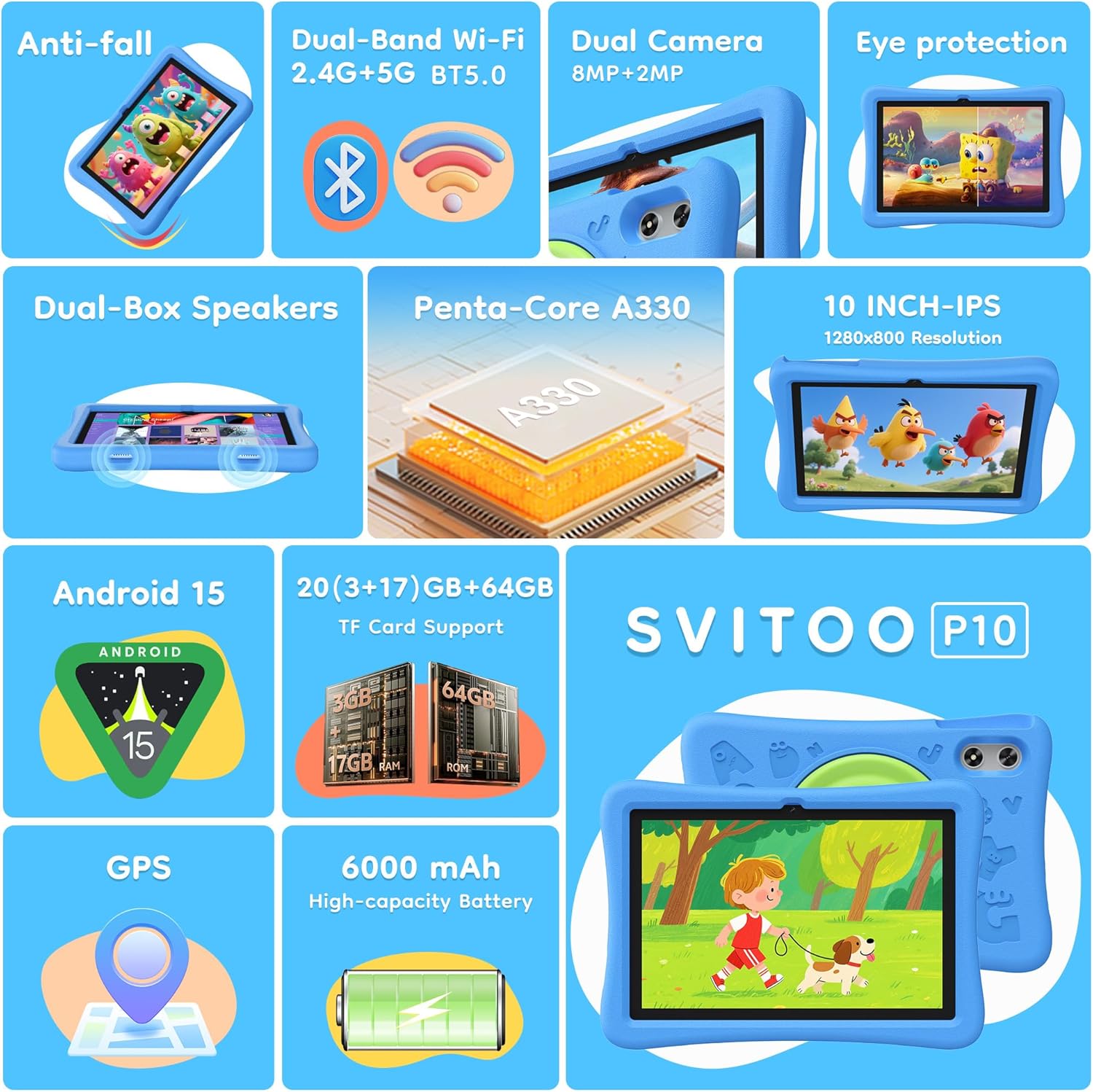
Image: The SVITOO Kids Tablet 10 Inch, shown in its blue protective case, highlighting its robust design suitable for children.
محصول تمام شده استview
ویژگی های کلیدی
- سیستم عامل: Android 15 with GMS Certification for full Google Play access.
- نمایش: 10-inch HD IPS (1280 x 800 pixels) touchscreen with eye protection mode.
- پردازنده: Unisoc T7200 8-core CPU for smooth performance.
- حافظه و ذخیره سازی: 20GB RAM (3GB physical + 17GB virtual) and 64GB internal storage, expandable up to 1TB via microSD card (sold separately).
- دوربین ها: 8MP Rear Camera and 2MP Front Camera.
- قابلیت اتصال: Dual-Band Wi-Fi (2.4/5 GHz) and Bluetooth 5.0.
- باتری: 6000mAh high-capacity battery for extended usage.
- صوتی: Dual-box speakers and a 3.5mm headphone jack.
- ماندگاری: Kid-friendly EVA shockproof case with a 360° rotating handle and 180° rotating stand.
- کنترل والدین: Advanced settings for screen time limits, content filtering, and app management.
اجزای تبلت
با اجزای فیزیکی تبلت خود آشنا شوید:

تصویر: جزئیات view of the tablet's side and rear, indicating the USB Type-C port, headphone jack, power ON/OFF button, volume controls, speakers, rear camera, and front camera.
- پورت USB Type-C: برای شارژ و انتقال اطلاعات
- جک هدفون (3.5 میلی متر): برای اتصال هدفونهای سیمی.
- دکمه روشن/خاموش: To turn the tablet on/off or put it to sleep.
- دکمه های صدا: برای تنظیم میزان صدای ضبط.
- سخنرانان: Dual-box speakers for audio output.
- دوربین جلو: برای تماسهای ویدیویی و گرفتن سلفی.
- دوربین عقب: برای گرفتن عکس و فیلم.
- اسلات کارت MicroSD: Located under a protective flap, for storage expansion.

Image: The tablet's protective case featuring a versatile 360-degree rotating handle that also functions as a 180-degree rotating stand, allowing for various viewزوایای ing
راهنمای راه اندازی
- تبلت را شارژ کنید: Before first use, fully charge the tablet using the provided USB-C cable and a compatible power adapter.
- روشن کردن: Press and hold the Power ON/OFF button until the screen lights up.
- راه اندازی اولیه: برای انتخاب زبان، اتصال به شبکه Wi-Fi و تنظیم حساب Google خود، دستورالعملهای روی صفحه را دنبال کنید.
- Google Kids Space / Parental Controls: During setup, you will have the option to configure Google Kids Space or other parental control settings. It is highly recommended to set these up immediately to ensure a safe environment for your child.
- نصب برنامه ها: Once setup is complete, you can download age-appropriate apps and games from the Google Play Store.
دستورالعمل های عملیاتی
ناوبری اولیه
- صفحه اصلی: Swipe left or right to access different app pages.
- کشوی برنامه: صفحه را از پایین صفحه به سمت بالا بکشید و به بالا بکشید view همه برنامه های نصب شده
- اعلانها و تنظیمات سریع: Swipe down from the top of the screen to access notifications and quick settings like Wi-Fi, Bluetooth, and screen brightness.
- برگشت، خانه، برنامههای اخیر: Use the navigation buttons at the bottom of the screen to go back, return to the home screen, or view برنامههای اخیراً باز شده.
شارژ تبلت
Connect the USB-C charging cable to the tablet's USB-C port and the other end to a power adapter. The battery icon on the screen will indicate charging status. A full charge provides approximately 12 hours of mixed use.

Image: The tablet connected to a charger, displaying a battery icon with 99% charge, illustrating the charging process and battery life features like Night Mode and Energy Saving.
حالت محافظت از چشم
To reduce eye strain, especially during prolonged use, activate the Eye Protection Mode (often called Night Mode or Reading Mode) from the quick settings panel or display settings. This mode adjusts screen colors to warmer tones.
کنترل های والدین
The SVITOO Kids Tablet features robust parental controls to help manage your child's digital experience. These controls are integrated with Android 15 and Google Family Link.

Image: A family using the tablet, with an overlay showing various parental control options such as setting screen time limits, blocking harmful apps/websites, approving app downloads, and tracking child's location.
پیکربندی کنترلهای والدین:
- تنظیمات دسترسی: رفتن به تنظیمات > سلامت دیجیتال و کنترل والدین or search for "Family Link" in your app drawer.
- Set Screen Time Limits: Define daily limits for tablet usage to encourage balanced screen time.
- فیلتر محتوا: مسدود کردن دسترسی به موارد نامناسب webسایت ها و اپلیکیشن ها
- App Approvals: Require parental approval for new app downloads or in-app purchases.
- ردیابی موقعیت مکانی: Monitor your child's device location (if enabled and configured).
For detailed instructions on Google Family Link, please refer to Google's official support documentation.
تعمیر و نگهداری
- تمیز کردن: Use a soft, lint-free cloth to clean the screen and tablet body. Avoid abrasive cleaners or solvents.
- مراقبت از باتری: To prolong battery life, avoid fully discharging the tablet frequently. Charge it regularly and avoid exposing it to extreme temperatures.
- به روز رسانی نرم افزار: Keep the tablet's operating system and apps updated to ensure optimal performance and security.
- ذخیره سازی: Store the tablet in a cool, dry place away from direct sunlight when not in use.
- قاب محافظ: The included EVA shockproof case provides protection against drops and bumps. Ensure it is properly fitted at all times.
عیب یابی
| مشکل | راه حل |
|---|---|
| تبلت روشن نمیشود. | Ensure the tablet is fully charged. Connect it to a charger for at least 30 minutes, then try powering it on again. |
| صفحه نمایش پاسخ نمی دهد. | Perform a force restart by holding the Power ON/OFF button for 10-15 seconds. If the issue persists, contact support. |
| مشکلات اتصال وای فای. | Check if other devices can connect to the Wi-Fi network. Restart your router and the tablet. Forget the network and reconnect. |
| برنامهها از کار میافتند یا کند میشوند. | Close background apps. Clear app cache (Settings > Apps > [App Name] > Storage > Clear Cache). Ensure sufficient storage space is available. Restart the tablet. |
| باتری به سرعت تخلیه می شود. | روشنایی صفحه را کم کنید. برنامههای بلااستفاده را ببندید. وقتی از Wi-Fi/Bluetooth استفاده نمیشود، آنها را غیرفعال کنید. میزان مصرف باتری را در تنظیمات بررسی کنید تا برنامههای پرمصرف را شناسایی کنید. |
مشخصات
| ویژگی | جزئیات |
|---|---|
| نام مدل | SVITOO Tab 10 GMS Certified 1027C |
| سیستم عامل | اندروید 15 |
| اندازه صفحه نمایش | 10 اینچ |
| وضوح صفحه نمایش | ۱۲۸۰ در ۸۰۰ پیکسل (اچدی آیپیاس) |
| پردازنده | 1.8 GHz (Unisoc T7200 8-core CPU) |
| RAM | ۱۱ گیگابایت (۶ گیگابایت فیزیکی + ۵ گیگابایت مجازی) |
| ذخیره سازی داخلی | 64 گیگابایت |
| فضای ذخیره سازی قابل ارتقا | Up to 1TB via MicroSD (sold separately) |
| پردازنده کمکی گرافیکی | Mali-G57 processor Imagination Tech |
| نوع بی سیم | 802.11a/b/g/n/ac (Dual-Band 2.4/5 GHz) |
| بلوتوث | بلوتوث 5.0 |
| ظرفیت باتری | 6000 میلی آمپر ساعت |
| میانگین عمر باتری | 12 ساعت |
| دوربین جلو | 2 مگاپیکسل |
| دوربین عقب | 8 مگاپیکسل |
| وزن مورد | 2.44 پوند |
| ابعاد محصول | 9.7 x 6.4 x 0.4 اینچ |
گارانتی و پشتیبانی
Your SVITOO Kids Tablet comes with a ۳ سال حمایت سازنده. This warranty covers manufacturing defects under normal use. It does not cover damage caused by misuse, accidents, natural disasters, or unauthorized modifications.
For technical support, warranty claims, or any questions regarding your product, please contact SVITOO customer service through your Amazon order page. Look for the "Contact Us" option next to your order details.
لطفا رسید خرید خود را برای گارانتی نگه دارید.