
1. مقدمه
Thank you for choosing the Generic YD03 TWS Wireless Earbuds. This manual provides detailed instructions on how to set up, operate, and maintain your earbuds to ensure optimal performance and longevity. Please read this manual carefully before using the product.
2. محتویات بسته
- YD03 TWS Wireless Earbuds (Left and Right)
- Charging Case with Smart Digital Display
- کابل شارژ USB
- Wired Earphones (Bonus Item)
- راهنمای کاربر

Image 2.1: The YD03 wireless earbuds are shown alongside their charging case, which features a smart digital display. A pair of wired earphones is also included.

Image 2.2: A pair of wired earphones with an inline microphone and control button, featuring a braided cable.
3. محصول تمام شدview
۳.۱ هدفونهای توگوشی و قاب شارژ
The YD03 earbuds are designed for comfortable in-ear fit and feature touch controls. The charging case not only protects the earbuds but also recharges them and provides a smart LED digital display for battery status.

تصویر ۲: نمای نزدیک view of the YD03 wireless earbuds and their charging case, highlighting the sleek design.
3.2 Smart Digital Display
کیس شارژ دارای یک صفحه نمایش LED است که درصد باتری را نشان میدهد.tage of the charging case itself, as well as the individual battery levels for the left (L) and right (R) earbuds. This allows you to monitor battery status without opening the case.

Image 3.2: A diagram explaining the LED digital display on the YD03 charging case, indicating battery levels for the left earbud, charging case, and right earbud.
4. راه اندازی
۴.۱ شارژ کردن ایربادها و قاب آنها
- شارژ اولیه: قبل از اولین استفاده، محفظه شارژ و ایربادها را کاملاً شارژ کنید.
- شارژ پرونده: Connect the provided USB charging cable to the micro-USB port on the charging case and a compatible USB power source (e.g., computer, wall adapter). The LED display will show the charging progress. A full charge takes approximately 1 hour.
- شارژ هدفون: Place the earbuds into their respective slots in the charging case. Ensure they are properly seated. The earbuds will automatically begin charging. The LED display will indicate the charging status of each earbud.

تصویر ۲.۲: الف view of the YD03 charging case, highlighting the micro-USB charging port at the bottom and the LED display showing charging progress.
۴.۲ جفت شدن با دستگاه بلوتوث
- روشن کردن: محفظه شارژ را باز کنید. ایربادها به طور خودکار روشن شده و وارد حالت جفتسازی میشوند. ممکن است یک پیام صوتی بشنوید که نشان میدهد آنها آماده جفتسازی هستند.
- بلوتوث را فعال کنید: در تلفن هوشمند یا سایر دستگاههای دارای بلوتوث، به تنظیمات بلوتوث بروید و بلوتوث را روشن کنید.
- وسیله را انتخاب کن: Look for "YD03" in the list of available devices and select it to connect.
- تایید: Once successfully paired, you will hear a confirmation sound or voice prompt from the earbuds.
- اتصال مجدد: After initial pairing, the earbuds will automatically connect to the last paired device when taken out of the charging case, provided Bluetooth is enabled on the device.
5. دستورالعمل های عملیاتی
The YD03 earbuds feature touch controls on each earbud. The following gestures control various functions:
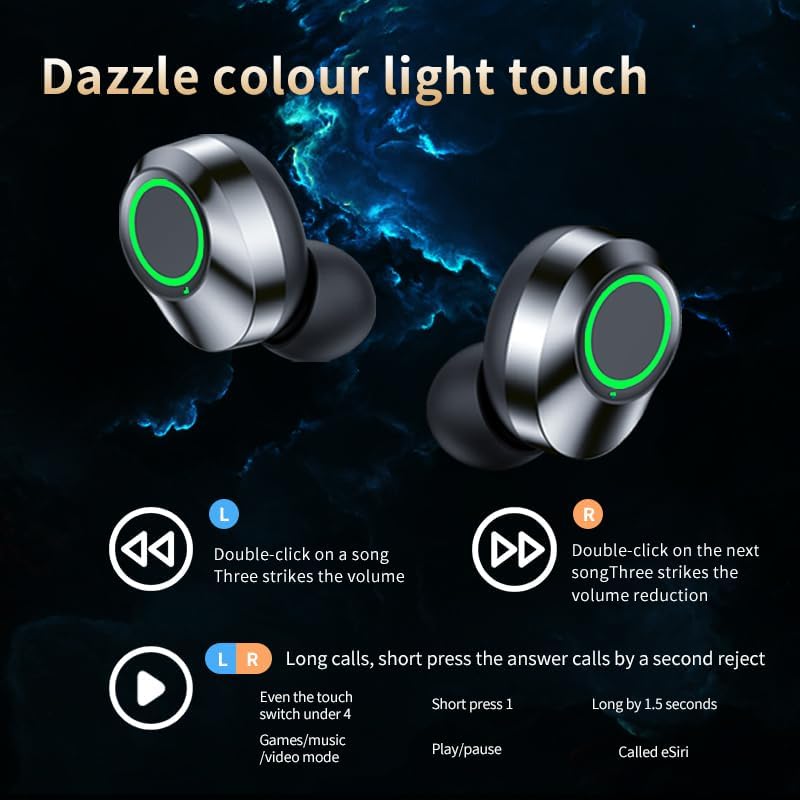
Image 5.1: An illustration detailing the touch control functions for the YD03 earbuds, including commands for music playback, volume adjustment, call management, and voice assistant activation.
5.1 روشن/خاموش
- روشن کردن: قاب شارژ را باز کنید، یا قسمت لمسی روی هر دو ایرباد را به مدت ۳ ثانیه فشار دهید.
- خاموش: ایربادها را دوباره داخل محفظه شارژ قرار دهید و درب آن را ببندید، یا قسمت لمسی روی هر دو ایرباد را به مدت ۵ ثانیه فشار دهید.
5.2 کنترل موسیقی
- پخش/مکث: Short press the touch area on either earbud once.
- آهنگ بعدی: Double-click the touch area on the Right (R) earbud.
- آهنگ قبلی: Double-click the touch area on the Left (L) earbud.
- افزایش صدا: Triple-click the touch area on the Right (R) earbud.
- کاهش حجم: Triple-click the touch area on the Left (L) earbud.
5.3 کنترل تماس
- پاسخ/پایان تماس: Short press the touch area on either earbud once.
- رد تماس: Long press the touch area on either earbud for 2 seconds.
5.4 دستیار صوتی
- فعال کردن دستیار صوتی (مثلاً سیری): Long press the touch area on either earbud for 1.5 seconds.
5.5 Gaming/Video Mode
- تغییر حالت: Short press the touch area on either earbud four times to switch between standard and gaming/video mode (if supported by your device and application). This mode is optimized for lower audio latency.
6. تعمیر و نگهداری
- تمیز کردن: برای تمیز کردن ایربادها و محفظه شارژ از یک پارچه نرم، خشک و بدون پرز استفاده کنید. از مواد شیمیایی قوی یا مواد ساینده استفاده نکنید.
- ذخیره سازی: وقتی از ایربادها استفاده نمیکنید، آنها را در جعبه شارژشان قرار دهید تا از گرد و غبار و آسیب در امان باشند.
- اجتناب از آب: The earbuds are not water-resistant. Avoid exposure to water, moisture, or excessive humidity.
- دما: محصول را در معرض دمای شدید قرار ندهید.
7 عیب یابی
- جفت نشدن ایربادها با یکدیگر: Place both earbuds back into the charging case, close the lid, then open it again. They should automatically re-sync. If not, try resetting them (refer to specific reset instructions if available, or try forgetting the device on your phone and re-pairing).
- هدفونها به دستگاه وصل نمیشوند: Ensure Bluetooth is enabled on your device and the earbuds are charged. Forget "YD03" from your device's Bluetooth list and attempt to pair again.
- صدایی از یکی از هدفونها شنیده نمیشود: مطمئن شوید که هر دو ایرباد شارژ و به درستی جفت شدهاند. سعی کنید آنها را دوباره در جعبه قرار دهید و دوباره بیرون بیاورید.
- شارژ نشدن کیس شارژ: Check the USB cable and power source. Ensure the cable is securely connected to the micro-USB port.
- حجم کم: میزان صدا را هم در دستگاه متصل و هم با استفاده از کنترلهای لمسی ایرباد تنظیم کنید.
8. مشخصات
| ویژگی | مشخصات |
|---|---|
| نام مدل | YD03 |
| نسخه بلوتوث | 5.3 |
| محدوده بلوتوث | تا 10 متر (33 فوت) |
| زمان پخش ایرباد | ۳-۴ ساعت (با هر بار شارژ) |
| قابلیت شارژ باتری | Approx. 4.5 hours additional playback (multiple recharges) |
| ظرفیت باتری کیس شارژ | 300 میلی آمپر ساعت |
| زمان شارژ (ایرباد و قاب) | تقریبا 1 ساعت |
| کنترل نویز | لغو نویز منفعل |
| نوع درایور صوتی | Dynamic Driver (Graphene composite diaphragm) |
| پاسخ فرکانس | ۵۰ هرتز (حداقل مشخص شده) |
| امپدانس | 32 اهم |
| تأخیر صوتی | 50 میلی ثانیه |
| نوع کنترل | کنترل را لمس کنید |
| سطح مقاومت در برابر آب | مقاوم در برابر آب نیست |
| مواد | Graphene, Plastic |
| ابعاد محفظه شارژ (طول x عرض x ارتفاع) | تقریباً 3.18 2.17. 1.21 x XNUMX اینچ |
9. اطلاعات ایمنی
- محصول را جدا نکنید، تعمیر یا تغییر ندهید.
- محصول را از دمای شدید، نور مستقیم خورشید و شعلههای آتش دور نگه دارید.
- از قرار دادن محصول در معرض آب یا مایعات دیگر خودداری کنید.
- برای جلوگیری از آسیب شنوایی، از این محصول برای مدت طولانی با صدای بلند استفاده نکنید.
- دور از دسترس کودکان و حیوانات خانگی نگهداری شود.
10. گارانتی و پشتیبانی
For warranty information or technical support, please refer to the retailer's policy or contact the seller directly. Please have your purchase details and product model (YD03) ready when seeking support.