
مقدمه
The SUPNIU S50 Portable Karaoke Machine is designed to deliver a clear and powerful audio experience for various occasions. Featuring a 4-inch full-range driver and bass reflex tube, it provides crisp sound and moderate volume. With advanced noise reduction technology and professional audio processors, the sound quality is enhanced for a balanced and three-dimensional output. This portable system includes two wireless microphones, vibrant LED lights, and multiple connectivity options, making it ideal for family gatherings, parties, and outdoor activities.
آنچه در جعبه است

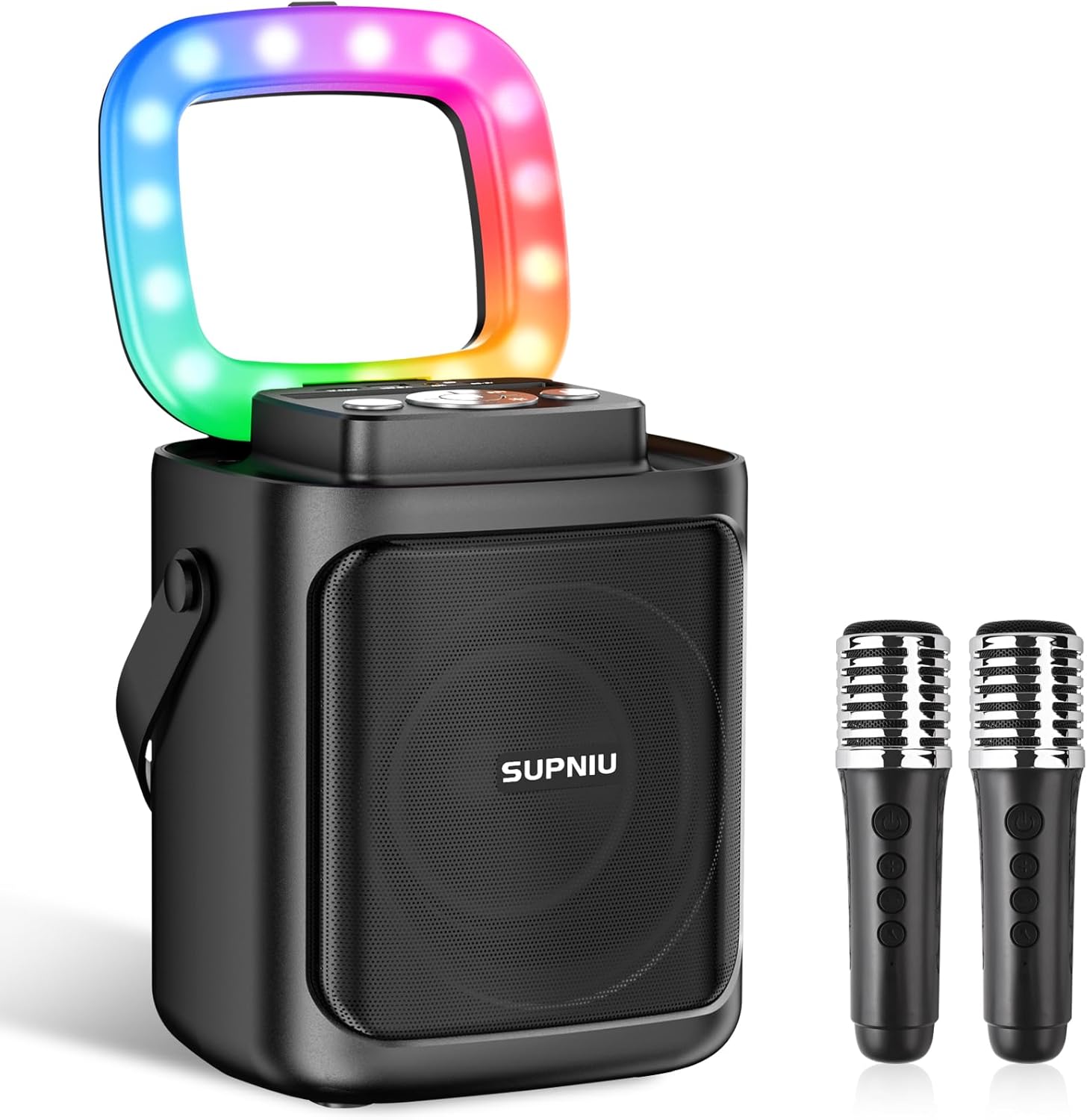
Image: All components included in the SUPNIU S50 Karaoke Machine package.
- 1 x SUPNIU S50 Bluetooth Party Speaker
- 2 عدد میکروفون بی سیم
- کابل 1 عدد AUX
- 1 عدد کابل USB Type-C
- 1 x دفترچه راهنمای کاربر
ویژگی های محصول
Clear & Powerful Sound
Equipped with a 4" Full-Range Driver and Bass Reflex Tube, the S50 delivers crisp, three-dimensional, and balanced sound. Advanced noise reduction technology ensures a clear audio output for an enhanced singing experience.

تصویر: داخلی view highlighting the 4-inch full-range driver for superior sound.
Portable & Lightweight Design
Small in size but powerful in volume, the S50 is highly portable. Its built-in battery provides 6-24 hours of playtime on a full charge, making it perfect for various indoor and outdoor events.

Image: The SUPNIU S50 being carried, emphasizing its portable design and long battery life.
اتصال همه کاره
Equipped with Bluetooth 5.0 for stable wireless streaming up to 49.2 feet (10m without obstacles). It also supports TF card, USB, and AUX audio input, ensuring compatibility with mobile phones, iPads, tablets, and PCs.

Image: Connectivity options including Bluetooth, TF card, USB, and AUX input.
میکروفون دوگانه بی سیم
Comes with two high-quality wireless microphones that deliver clear, high-definition sound, allowing for free movement and enhanced performance without cable constraints.

Image: The two wireless microphones, emphasizing their anti-whistle and noise reduction capabilities.
چراغ های رنگارنگ دیسکو
Dazzling LED lights create a fun and romantic karaoke and party atmosphere. The colorful adjustable LED lighting patterns sync with the music, providing a captivating stagاثر

Image: The karaoke machine displaying its colorful LED light patterns.
جفت شدن استریو بی سیم واقعی (TWS)
Pair two S50 units together for expanded sound and a true stereo experience, enhancing music, movie, or game audio.

Image: Two S50 units demonstrating TWS pairing for enhanced stereo sound.
راهنمای راه اندازی
1. شارژ کردن دستگاه
Before first use, fully charge the karaoke machine using the provided USB Type-C cable. Connect the cable to the "CHARGE Port" on the speaker and a compatible USB power adapter (not included). The LED indicator will show charging status.
2. روشن/خاموش کردن
را فشار داده و نگه دارید کلید برق button on the speaker's control panel to turn the device on or off.
۳. جفت شدن میکروفون
The wireless microphones are typically pre-paired with the speaker. If they do not connect automatically:
- مطمئن شوید که اسپیکر روشن است.
- Turn on each microphone by pressing its power button.
- The microphones should automatically connect to the speaker. If not, try restarting both the speaker and microphones.
4. اتصال بلوتوث
- Turn on the SUPNIU S50 speaker. It will automatically enter Bluetooth pairing mode.
- On your device (smartphone, tablet, PC), enable Bluetooth and search for "SUPNIU S50" in the list of available devices.
- Select "SUPNIU S50" to connect. A confirmation sound will indicate successful pairing.
5. Other Audio Inputs (TF Card, USB, AUX)
- کارت TF/USB: Insert a TF card or USB drive with MP3 audio files into the respective "TF Card" or "USB Port" slot. The speaker will automatically switch to the corresponding mode and begin playback.
- ورودی AUX: Connect an external audio device (e.g., MP3 player, laptop) to the "AUX Port" using the provided AUX cable. The speaker will switch to AUX mode.

Image: Control panel layout for easy setup and operation.
دستورالعمل های عملیاتی
کنترل های بلندگو
- سوئیچ قدرت: برای روشن/خاموش کردن فشار دهید و نگه دارید.
- دکمه حالت: برای تغییر حالت بین بلوتوث، کارت حافظه TF، USB و AUX، فشار کوتاهی وارد کنید.
- دکمه پخش/مکث: برای پخش یا توقف موسیقی، کوتاه را فشار دهید.
- دکمههای آهنگ قبلی/بعدی: Short press to skip to the previous or next track. Long press to adjust speaker volume.
- دکمه حالت LED: Short press to cycle through different LED light patterns.
- TWS Series Connection Button: Used for True Wireless Stereo pairing (see TWS Pairing section).
- "M" (Microphone Preferential) Button: Prioritizes microphone sound over background music.
کنترل های میکروفون
- سوئیچ قدرت: برای روشن/خاموش کردن میکروفون فشار دهید و نگه دارید.
- صدای میکروفون +/-: Adjusts the microphone's volume level.
- کنترل اکو/ریورب: Some models may have a button to adjust echo or reverb effects.

Image: Wireless microphone controls.
جفت شدن TWS (استریو بی سیم واقعی)
To achieve true stereo sound with two SUPNIU S50 speakers:
- مطمئن شوید که هر دو بلندگوی S50 روشن هستند و به هیچ دستگاه بلوتوثی متصل نیستند.
- On one speaker (this will be the primary), short press the دکمه TWS. It will search for another S50 speaker.
- The two speakers will automatically pair with each other. A confirmation sound will indicate successful TWS connection.
- Once TWS is established, connect your device via Bluetooth to the primary speaker. Audio will now play through both speakers in stereo.
تعمیر و نگهداری
- تمیز کردن: Use a soft, dry cloth to clean the speaker and microphones. Do not use abrasive cleaners, alcohol, or solvents.
- ذخیره سازی: دستگاه را در جای خشک و خنک و دور از نور مستقیم خورشید و دمای شدید نگهداری کنید.
- مراقبت از باتری: برای افزایش عمر باتری، از خالی شدن کامل باتری به طور مکرر خودداری کنید. دستگاه را به طور منظم شارژ کنید، حتی اگر برای مدت طولانی از آن استفاده نمیکنید.
- قرار گرفتن در معرض آب: این دستگاه ضد آب نیست. از قرار دادن آن در معرض آب یا رطوبت زیاد خودداری کنید.
عیب یابی
| مشکل | علت احتمالی | راه حل |
|---|---|---|
| برق قطع است/دستگاه روشن نمیشود. | باتری ضعیف؛ دکمه پاور به درستی فشار داده نشده است. | دستگاه را به طور کامل شارژ کنید. دکمه پاور را برای چند ثانیه فشار داده و نگه دارید. |
| صدایی از بلندگو نمیاد. | صدا خیلی کم است؛ حالت نادرست انتخاب شده است؛ دستگاه متصل نیست. | Increase speaker volume. Ensure correct input mode (Bluetooth, AUX, TF, USB). Reconnect Bluetooth or check cable connections. |
| Microphones not working/No sound from mics. | Microphones off; Low mic battery; Mic volume too low; Mic not paired. | Turn on microphones. Replace mic batteries (if applicable) or charge. Increase microphone volume. Re-pair microphones with the speaker. |
| Microphone feedback/echo. | Microphone too close to speaker; Microphone volume too high; Room acoustics. | Move microphones further away from the speaker. Reduce microphone volume. Try adjusting the "M" (Microphone Preferential) button. |
| مشکلات جفت شدن بلوتوث. | بلندگو در حالت جفتسازی نیست؛ بلوتوث دستگاه خاموش است؛ تداخل وجود دارد. | Ensure speaker is in Bluetooth mode. Turn Bluetooth off and on again on your device. Move closer to the speaker and away from other wireless devices. |
| جفتسازی TWS ناموفق بود. | Speakers already connected to other devices; Incorrect TWS pairing steps. | Disconnect both speakers from any other Bluetooth devices. Follow TWS pairing instructions carefully. |
مشخصات
| ویژگی | جزئیات |
|---|---|
| شماره مدل | S50 |
| نام تجاری | SUPNIU |
| وات خروجیtage | 30 وات |
| ابعاد محصول | 7.2 x 5.9 x 8.3 اینچ |
| وزن مورد | 3.45 پوند |
| منبع تغذیه | Battery Powered/DC |
| ظرفیت باتری | 4000mAh (Speaker), 2 AAA batteries (Microphones - included) |
| فناوری اتصال | Bluetooth 5.0, TF, USB, AUX |
| مواد | اکریلونیتریل بوتادین استایرن (ABS) |
| رنگ | Black-MU |
| دستگاه های سازگار | پخش کننده DVD، لپ تاپ، پخش کننده MP3، گوشی هوشمند، تبلت، تلویزیون |
| کشور مبدا | چین |
گارانتی و پشتیبانی
For warranty information and technical support, please refer to the user manual included in your product package or contact SUPNIU customer service directly. Contact details are typically provided on the product packaging or the manufacturer's official webسایت
لطفاً رسید خرید خود را برای هرگونه ادعای گارانتی نگه دارید.