
مقدمه
Thank you for choosing the Casio MWA-300H Series watch. This manual provides essential information regarding the setup, operation, and maintenance of your new timepiece. Please read this manual carefully to ensure proper use and to fully understand the features of your watch.
The Casio MWA-300H is an analog watch featuring a chronograph, 100-meter water resistance, and luminous hands for enhanced readability. It is designed for versatile wear, suitable for both daily use and recreational water activities.
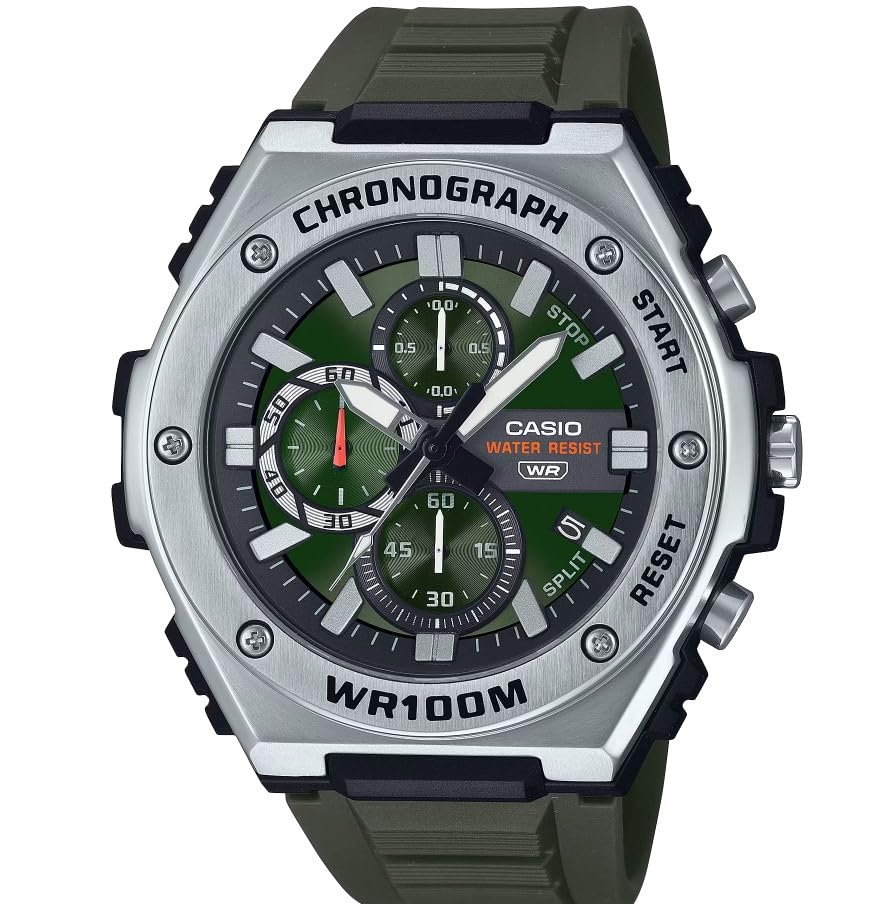
تصویر: جلو view of the Casio MWA-300H Series watch, highlighting its green dial, chronograph sub-dials, and black resin band.
Setup: Initial Settings
تنظیم زمان
- Pull the crown out to the second click (time setting position). The second hand will stop.
- Rotate the crown to set the hour and minute hands. Ensure the AM/PM setting is correct if your watch has a 24-hour indicator or date changes at midnight.
- دسته کوک را به حالت عادی برگردانید. عقربه ثانیهشمار دوباره حرکت خواهد کرد.
تنظیم تاریخ
- تاج را تا اولین کلیک (موقعیت تنظیم تاریخ) بیرون بکشید.
- برای تنظیم تاریخ، دسته کوک را بچرخانید. از تنظیم تاریخ بین ساعت ۹ شب تا ۱ بامداد خودداری کنید، زیرا این کار ممکن است در مکانیسم تغییر خودکار تاریخ اختلال ایجاد کند.
- تاج را به حالت عادی برگردانید.
اطلاعات باتری
Your Casio MWA-300H watch is powered by 1 LR44 battery, which is included. The battery life is approximately 3 years. When the battery runs low, the watch may exhibit irregular movement or stop. It is recommended to have the battery replaced by a qualified watch technician to maintain water resistance.
Operating: Watch Functions
استفاده از کرنوگراف (زمانسنج)
The chronograph function allows for precise timing of events. Your watch features a 1/10-second stopwatch that captures elapsed, split, and 1st/2nd place times across three dedicated sub-dials.
- Starting the Stopwatch: Press button A (typically the upper right button) to start the stopwatch.
- Stopping the Stopwatch: Press button A again to stop the stopwatch.
- Resetting the Stopwatch: After stopping, press button B (typically the lower right button) to reset the stopwatch hands to zero.
- اندازه گیری زمان تقسیم: While the stopwatch is running, press button B to measure split times. The stopwatch hands will momentarily stop to indicate the split time, then resume timing. Press button B again to release the split time and display the current elapsed time.
Note: Refer to the specific button layout on your watch for exact button assignments.
مقاومت در برابر آب (100 متر)
Your Casio MWA-300H watch is water resistant up to 100 meters (330 feet). This rating means the watch is suitable for swimming, showering, and recreational water activities. It is not suitable for diving or snorkeling where significant water pressure changes occur.
- Do not operate the crown or buttons while the watch is wet or submerged.
- پس از قرار گرفتن در معرض آب شور، ساعت را با آب شیرین بشویید و خشک کنید.
عقربهها و نشانگرهای نورانی
The watch features luminous hands and markers that absorb light and glow in the dark, providing readability in low-light conditions. The intensity and duration of the glow depend on the amount and type of light exposure.
تعمیر و نگهداری
مراقبت عمومی
- ساعت را مرتباً با یک پارچه نرم و خشک پاک کنید تا گرد و غبار و رطوبت از بین برود.
- از قرار دادن ساعت در معرض دمای بسیار بالا، نور مستقیم خورشید برای مدت طولانی یا میدانهای مغناطیسی قوی خودداری کنید.
- Keep the watch away from solvents, detergents, perfumes, and cosmetics, as these can damage the resin materials.
تعویض باتری
When the battery needs replacement, it is highly recommended to take your watch to an authorized Casio service center or a reputable watch repair shop. This ensures that the watch is properly sealed and its water resistance is maintained after battery replacement.
Water Resistance Checks
To maintain the water resistance of your watch, it is advisable to have it inspected periodically (e.g., every 2-3 years) by an authorized service center, especially if it is frequently exposed to water.
عیب یابی
| مشکل | علت احتمالی | راه حل |
|---|---|---|
| Watch hands do not move or move irregularly. | باتری کم. | باتری را تعویض کنید. با یک تکنسین حرفهای ساعت مشورت کنید. |
| زمان نادرست است. | Time not set correctly; watch has stopped and restarted. | طبق دستورالعملهای «تنظیم زمان»، زمان را مجدداً تنظیم کنید. |
| تاریخ به جای نیمه شب، ظهر تغییر میکند. | تنظیم AM/PM نادرست است. | زمان را ۱۲ ساعت جلوتر ببرید. |
| عقربههای کرنوگراف به صفر بازنشانی نمیشوند. | Chronograph hands misalignment. | Consult the full Casio module manual for chronograph hand adjustment procedures, or contact customer support. |
| رطوبت داخل ساعت. | Crown or buttons operated underwater; seals compromised. | Immediately take the watch to an authorized service center for inspection and repair to prevent further damage. |
مشخصات
| نام مدل | MWA-300H |
| نوع نمایشگر | آنالوگ |
| نوع حرکت | کوارتز |
| عمق مقاومت در برابر آب | متر 100 (پا 330) |
| ویژگی های اضافی | Chronograph, Date Display, Luminous Hands |
| منبع تغذیه | Battery Powered (1 x LR44 included) |
| مواد مورد | رزین |
| مواد باند | رزین |
| مواد کریستالی | رزین |
| قطر کیس | 50.9 میلیمتر |
| ضخامت مورد | 14.3 میلیمتر |
| پهنای باند | 22 میلیمتر |
| نوع قلاب | سگک |
گارانتی و پشتیبانی
گارانتی محدود
Your Casio MWA-300H watch comes with a limited warranty. Please refer to the warranty card included with your purchase for specific terms, conditions, and duration of coverage. The warranty typically covers manufacturing defects under normal use.
پشتیبانی مشتری
For further assistance, technical support, or warranty claims, please contact Casio customer service. You can find contact information on the official Casio webدر سایت یا در مستندات ارائه شده همراه ساعت شما.
For more detailed information, including specific module operations or advanced settings, please visit the official Casio support website or refer to the full module manual for your watch.