
1. مقدمه
Thank you for choosing the Sifely Keyless Entry Keypad Smart Door Lock. This smart lock offers enhanced security and convenience for your home, office, or rental property. Please read this manual carefully before installation and operation to ensure proper use and optimal performance.
2. محصول تمام شدview
The Sifely Smart Door Lock provides multiple access methods and smart features for flexible control. It is designed for easy installation on various door types, including front, bedroom, office, and interior doors.
ویژگی های کلیدی:
- 5 راه برای باز کردن قفل: Access your door using a keypad code, the Sifely app, a traditional physical key, a key FOB, or the interior knob.
- برنامه همه کاره: Suitable for residential homes, rental properties, shared living spaces, and guest rooms.
- App Control & Access Records: Manage user codes, view unlock history, and share remote access (with optional gateway) directly from your smartphone.
- نصب آسان DIY: Designed for quick installation with minimal tools, fitting most standard US doors without requiring additional drilling or wiring.
- خانه هوشمند آماده: Compatible with Alexa or Google Assistant via an optional gateway for voice control.

Figure 2.1: Five convenient ways to access your Sifely Smart Lock.
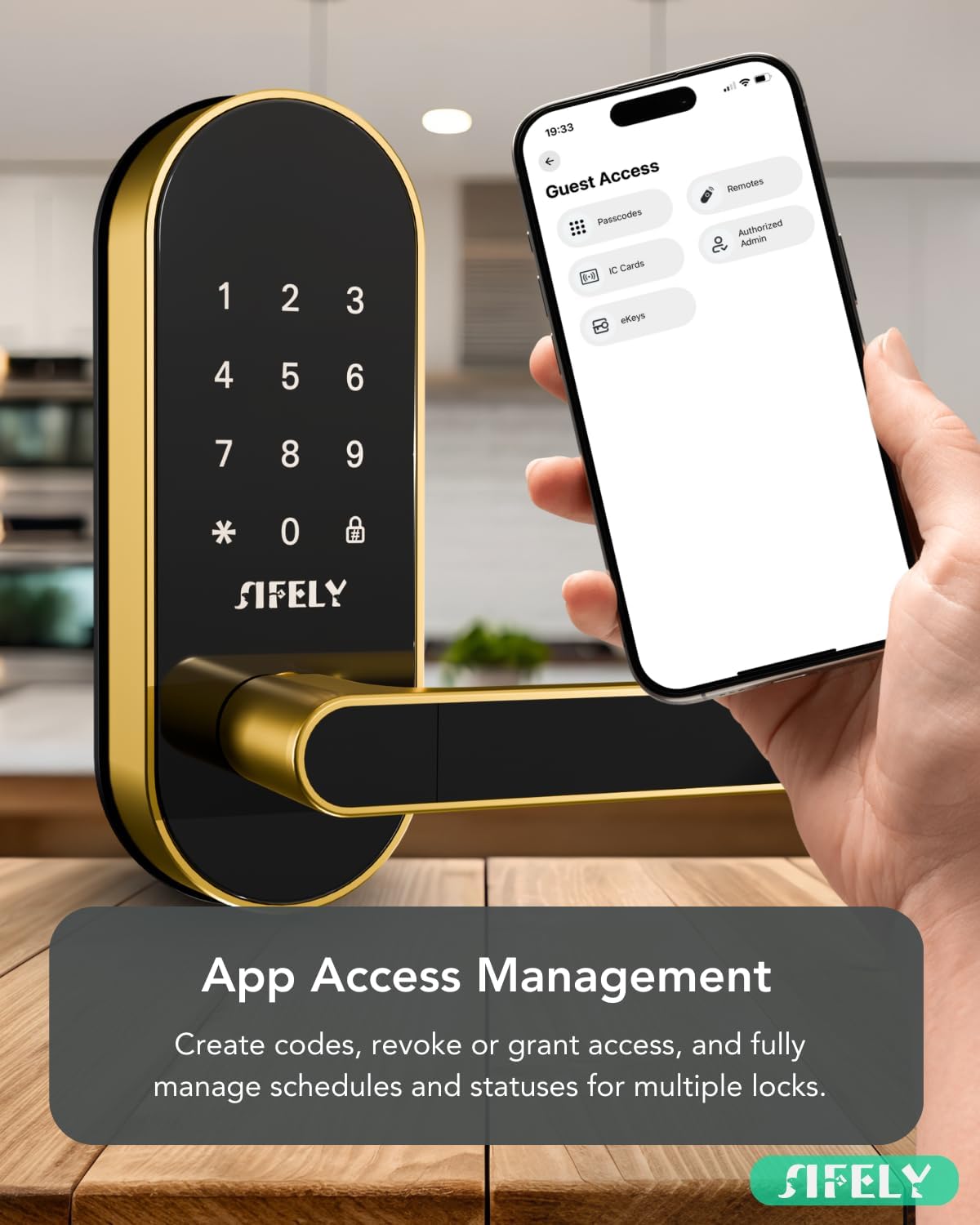
Figure 2.2: App Access Management interface for creating codes and managing access.
3. محتویات بسته
قبل از شروع نصب، لطفاً از وجود همه اجزا اطمینان حاصل کنید:
- صفحه نصب
- واشر لاستیکی
- صفحه صورت
- صفحه پشت
- مونتاژ پیچ و مهره
- ۲ کلید فیزیکی
- ۲ عدد جاکلیدی
4. مشخصات
| ویژگی | جزئیات |
|---|---|
| نام تجاری | Sifely |
| شماره مدل | Sifely St |
| رنگ | طلا |
| مواد | آلومینیوم ، روی |
| ابعاد مورد (L x W x H) | 3 x 1.22 x 7 اینچ |
| وزن مورد | 3.56 پوند |
| نوع قفل | Combination Lock, Keypad |
| ویژگی های خاص | Anti-Peeping Password, Auto-Lock, Fob Unlock |
| سازگاری ضخامت درب | 1 3/8" - 2 3/16" (35-55mm) |
| Bore Hole Backset | 2 3/8" or 2 3/4" (60mm or 70mm) |
| Bore Hole Diameter | 2 1/8" (54mm) |
| رتبه بندی IP | IP55 (مقاوم در برابر گرد و غبار و پاشش آب) |

Figure 4.1: Detailed specifications for door compatibility and dimensions.
۴. راهاندازی (نصب)
The Sifely Smart Door Lock is designed for easy DIY installation, typically requiring only a screwdriver. No additional drilling or wiring is needed for most standard US doors. Ensure your door meets the specifications listed in Section 4 before proceeding.
مراحل نصب:
- درب را آماده کنید: Ensure the door is properly prepped according to the dimensions provided in the specifications.
- Install the Bolt Assembly: Insert the bolt assembly into the door edge and secure it with screws.
- Install the Exterior Panel: Route the wire connector and spindle through the bolt assembly. Position the exterior panel on the door.
- صفحه نصب داخلی را نصب کنید: Secure the interior mounting plate to the exterior panel using the provided screws.
- Connect Wires and Install Interior Panel: Connect the wire harness from the exterior panel to the interior panel. Carefully tuck excess wire into the door cavity. Attach the interior panel, ensuring the spindle engages correctly.
- نصب باتری: Insert 4 AA batteries into the battery compartment of the interior panel.
- عملیات تست: Test the lock with a physical key and the interior knob to ensure smooth operation before closing the battery cover.
Video 5.1: Official Sifely Smart Lock Installation Guide. This video demonstrates the step-by-step process for installing the Sifely Smart Lock, including preparing the door, installing the bolt assembly, mounting the exterior and interior panels, connecting wires, and inserting batteries. It provides visual guidance for a smooth installation.
6. دستورالعمل های عملیاتی
باز کردن قفل در:
- صفحه کلید: Enter your programmed passcode followed by the '#' key. The lock will emit a voice confirmation.
- برنامه: Use the Sifely app on your smartphone to unlock the door via Bluetooth. For remote unlocking, an optional Sifely WiFi Gateway is required.
- کلید فیزیکی: Insert the provided physical key into the keyhole and turn to unlock.
- جا کلیدی: Present the key fob to the designated sensor area on the lock.
- دستگیره داخلی: Turn the interior knob to unlock from the inside.
قفل کردن در:
- قفل خودکار: The lock can be configured to automatically lock after a set period (e.g., 5 seconds) once closed.
- قفل دستی: Press and hold the '#' key on the keypad for 2 seconds to manually lock the door from the outside.
- برنامه: Use the Sifely app to lock the door via Bluetooth or remotely with the optional Sifely WiFi Gateway.
- دستگیره داخلی: Turn the interior knob to lock from the inside.
ویژگی های پیشرفته:
- رمز عبور ضد پیپ: Enter random digits before or after your actual passcode to prevent others from guessing your code. Example: XXX + Passcode + XXX.
- بازخورد صوتی: The lock provides audible feedback (e.g., "Unlocked!", "Locked!") to confirm actions.

Figure 6.1: Passcode protection using random numbers to enhance privacy.

Figure 6.2: Card access for convenient and versatile entry.

Figure 6.3: Auto-Lock feature ensures your door is always secured.

Figure 6.4: Voice feedback provides audible confirmation of lock status.
7. ویژگی های برنامه
The Sifely app provides comprehensive control and management capabilities for your smart lock.
Key App Functions:
- مدیریت کاربر: Create, modify, and delete passcodes, key fobs, and eKeys for various users (e.g., family, guests, Airbnb renters).
- گزارش های دسترسی: View a detailed history of all lock and unlock events, including the method used and the user.
- دسترسی موقت: Generate temporary or scheduled passcodes for guests or service providers.
- Remote Control (with Gateway): With the optional Sifely WiFi Gateway (sold separately), you can control your lock and view access logs from anywhere.
- Manager Portal: For property managers, a web portal offers advanced management features for multiple locks and properties.
- Auto-Booking Code: (Premium Feature) Automatically generate passcodes for vacation rental guests.

Figure 7.1: Secure, reliable, and versatile management through the Sifely app.

Figure 7.2: Secure access logs maintain a record of all entry events.
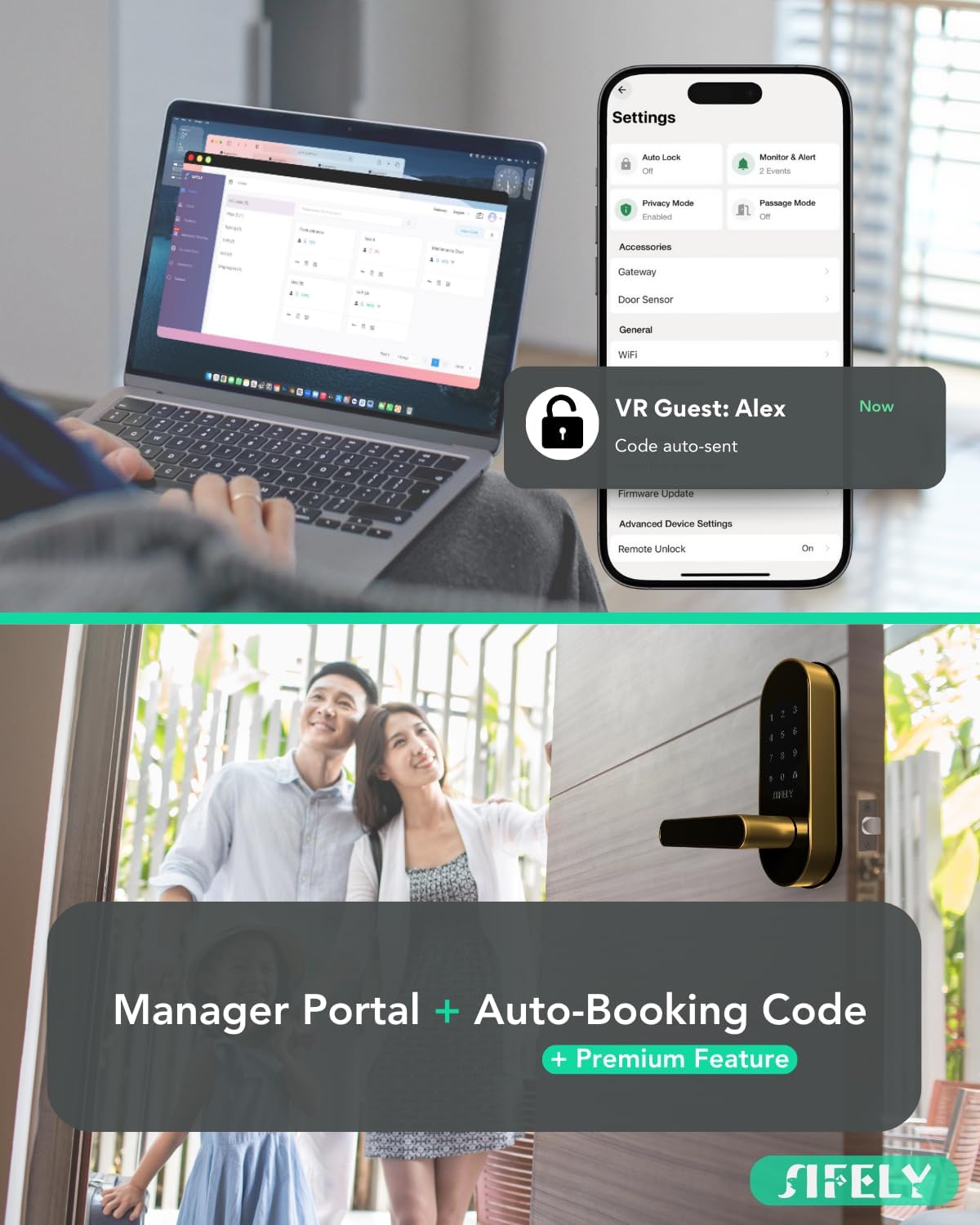
Figure 7.3: The Manager Portal and app provide comprehensive property management tools.

Figure 7.4: Voice control for hands-free convenience (requires optional gateway).

Figure 7.5: Easily manage family access with personalized passcodes.

Figure 7.6: Auto-Booking Code feature for seamless vacation rental management.
8. تعمیر و نگهداری
تعویض باتری:
The Sifely Smart Door Lock operates on 4 AA batteries, providing approximately 12 months of battery life under normal usage. The Sifely app will provide low battery alerts.
- When the battery is low, the lock will provide an audible warning.
- Replace all 4 AA batteries simultaneously with new, high-quality alkaline batteries.
- هنگام قرار دادن باتری ها از قطبیت صحیح اطمینان حاصل کنید.
پشتیبان گیری برق اضطراری:
In case of complete battery depletion, the lock features a Type-C USB port for emergency power. Connect a portable power bank to this port to temporarily power the lock and gain entry.

Figure 8.1: Type-C port for emergency power backup.

Figure 8.2: Battery alerts notify you when to change batteries.
تمیز کردن:
قسمت بیرونی قفل را با یک پارچه نرم و لطیف پاک کنید.amp پارچه. از پاککنندههای ساینده یا حلالهایی که میتوانند به روکش آسیب بزنند، خودداری کنید.
9 عیب یابی
If you encounter issues with your Sifely Smart Door Lock, please refer to the following common problems and solutions:
- قفل جواب نمیدهد: Check battery levels. If batteries are depleted, use the Type-C emergency power backup or the physical key.
- Keypad not working: Ensure the keypad is clean and dry. Re-enter the code carefully. If the issue persists, try replacing batteries.
- مشکلات اتصال برنامه: Ensure Bluetooth is enabled on your phone and you are within range of the lock. Restart the app or your phone. If using a gateway, ensure it is powered on and connected to your network.
- Lock mechanism jamming: Check for any obstructions in the door frame or bolt path. Ensure the lock is installed correctly and aligned with the strike plate.
- Incorrect mounting screws: Some users have reported short mounting screws. If you encounter this, contact Sifely support for longer screws or source appropriate replacements.
For more detailed troubleshooting or persistent issues, please contact Sifely customer support.
10. ضمانت و پشتیبانی
Sifely is committed to providing high-quality products and excellent customer service.
پشتیبانی مشتری:
Sifely offers comprehensive support to assist you with any questions or issues:
- USA Live Support: Access live support for immediate assistance.
- Full Installation & Tech Support: Expert guidance for installation and technical queries.
- پشتیبانی چند زبانه: Support available in English and Spanish.
Please refer to the Sifely website or your product packaging for specific warranty details and contact information.

Figure 10.1: Sifely customer support is available to assist you.