
SHARP KN-HW16H-B
SHARP Healsio Hot Cook KN-HW16H-B 1.6L Automatic Cooking Pot User Manual
Model: KN-HW16H-B
1. مقدمه
ممنون از خریدتونasing the SHARP Healsio Hot Cook KN-HW16H-B Automatic Cooking Pot. This appliance is designed to simplify your cooking process by offering automatic, waterless cooking and various convenient features. Please read this manual thoroughly before use to ensure safe and optimal operation.
For more information and recipes, please visit the official SHARP website or consult the recipe book included with your product.

Image: The SHARP Healsio Hot Cook KN-HW16H-B Automatic Cooking Pot, black color.
2. اقدامات احتیاطی ایمنی
هنگام استفاده از وسایل برقی، همیشه اقدامات احتیاطی اولیه ایمنی را رعایت کنید تا خطر آتشسوزی، برقگرفتگی و/یا آسیبدیدگی افراد کاهش یابد.
- دستگاه اصلی را در آب یا مایعات دیگر غوطه ور نکنید.
- مطمئن شوید که سیم برق به طور ایمن به پریز برق دارای اتصال زمین وصل شده است.
- دور از دسترس کودکان نگهداری شود.
- Do not operate if the appliance or power cord is damaged.
- همیشه وقتی از دستگاه استفاده نمی کنید و قبل از تمیز کردن، آن را از برق بکشید.
۳. اجزا و ابعاد محصول
Familiarize yourself with the parts of your Healsio Hot Cook.
- واحد اصلی
- گلدان داخلی
- درب
- Stirring Unit
- سیم برق

Image: The SHARP Healsio Hot Cook KN-HW16H-B with dimensions indicated. Height: 24.0cm, Width: 33.0cm, Depth: 28.2cm.
4. راه اندازی
- باز کردن بسته بندی: تمام مواد بستهبندی و لوازم جانبی را با دقت بردارید. در صورت نیاز، بستهبندی را برای حمل و نقلهای بعدی نگه دارید.
- تمیز کردن اولیه: Before first use, wash the inner pot, lid, and stirring unit with warm soapy water. Rinse thoroughly and dry. Wipe the exterior of the main unit with a damp پارچه
- قرار دادن: Place the appliance on a stable, flat, heat-resistant surface, away from direct sunlight and heat sources. Ensure adequate ventilation around the unit.
- اتصال برق: سیم برق را به دستگاه و سپس به پریز برق مناسب وصل کنید.
5. دستورالعمل های عملیاتی
5.1 Basic Automatic Cooking
The Healsio Hot Cook simplifies cooking by automatically adjusting heat and stirring. Simply add ingredients and seasonings, select a menu, and start cooking.
- Place ingredients and seasonings into the inner pot.
- درب را محکم ببندید.
- Select the desired cooking menu from the control panel.
- Press the Start button. The appliance will automatically cook the dish.

Image: The SHARP Healsio Hot Cook demonstrating automatic waterless cooking, with various dishes prepared.
5.2 Automatic Stirring Function
The built-in stirring unit ensures even cooking and prevents food from sticking. It stirs ingredients during heating, allowing flavors to penetrate thoroughly and resulting in a consistent, delicious finish.
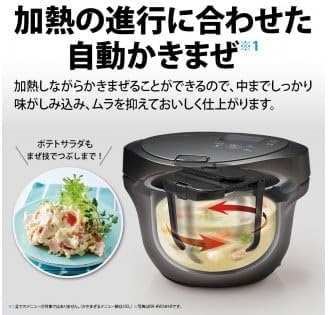
Image: Diagram showing the automatic stirring mechanism inside the SHARP Healsio Hot Cook, illustrating how it mixes ingredients.
5.3 Triple Sensor Technology
The appliance utilizes three sensors (temperature, steam, and load) to precisely monitor the cooking environment and the state of the ingredients. This allows for fine-tuned automatic heat adjustment, ensuring optimal cooking results.
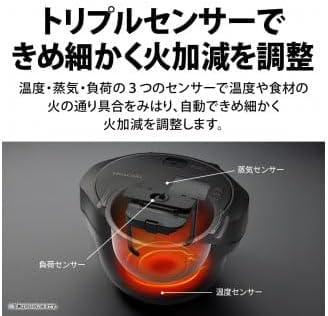
Image: Diagram illustrating the location of the three sensors (temperature, steam, and load) within the SHARP Healsio Hot Cook.
5.4 Reservation Cooking
The reservation cooking function allows you to set a delayed start time, so your meal is ready when you need it. This feature can be set for up to 15 hours, considering food hygiene.
- مواد لازم را آماده کنید و آنها را در قابلمه داخلی قرار دهید.
- Select a menu that supports reservation cooking.
- Set the desired finish time using the control panel.
- Press the Start button. The appliance will begin cooking at the appropriate time to finish at your set time.
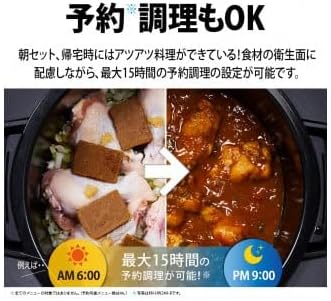
تصویر: مثالample of reservation cooking on the SHARP Healsio Hot Cook, showing ingredients placed in the pot at 6:00 AM for a meal ready by 9:00 PM.
6. نگهداری و تمیز کردن
تمیز کردن منظم، طول عمر و عملکرد بهداشتی دستگاه شما را تضمین میکند.
- قبل از تمیز کردن: همیشه قبل از تمیز کردن دستگاه را از برق بکشید و اجازه دهید کاملا خنک شود.
- Inner Pot and Stirring Unit: These parts are removable and can be washed with warm soapy water or placed in a dishwasher (refer to specific instructions for dishwasher compatibility).
- درب: The lid can be detached and washed with warm soapy water. Ensure all food residues are removed.
- نمای بیرونی واحد اصلی: قسمت بیرونی را با یک نرم پاک کنید، دamp پارچه. از پاککنندههای ساینده استفاده نکنید و دستگاه اصلی را در آب فرو نبرید.
- Easy-Clean Coat: The bottom heating plate of the main unit features an easy-clean coating, making it simple to wipe away spills and dirt with a damp پارچه

Image: A hand wiping the interior base of the SHARP Healsio Hot Cook, demonstrating the easy-clean coating.
7 عیب یابی
If you encounter issues with your Healsio Hot Cook, please refer to the following common problems and solutions:
| مشکل | علت احتمالی | راه حل |
|---|---|---|
| دستگاه روشن نمی شود. | سیم برق به درستی وصل نشده است. | Check if the power cord is securely plugged into both the appliance and the outlet. |
| غذا به طور یکنواخت پخته نمی شود. | Ingredients not properly distributed or stirring unit not installed correctly. | Ensure ingredients are spread evenly. Verify the stirring unit is correctly attached. |
| پیغام خطا نمایش داده شد | شرایط خطای خاص. | Refer to the detailed error code list in the full product manual or contact customer support. |
اگر پس از امتحان کردن این راهحلها مشکل همچنان ادامه داشت، لطفاً با پشتیبانی مشتری SHARP تماس بگیرید.
8. مشخصات
| نام تجاری | تیز |
| شماره مدل | KN-HW16H-B |
| ظرفیت | 1.6 لیتر |
| رنگ | مشکی |
| ابعاد محصول (D x W x H) | 30.5 × 33.4 × 39.5 سانتی متر |
| اجزای شامل | سیم برق |
| نوع محصول | دستگاه پخت و پز |
9. گارانتی و پشتیبانی
This product comes with a manufacturer's warranty. Please refer to the warranty card included with your purchase for details on coverage and duration. For technical support, service, or inquiries, please contact SHARP customer service through their official webسایت یا اطلاعات تماس ارائه شده در مستندات محصول شما.
SHARP Official Webسایت: https://jp.sharp/hotcook/
Ask a question about this manual
Ask about setup, troubleshooting, compatibility, parts, safety, or missing instructions. Manuals+ will review the question and use this page’s manual context to help answer it.