
مقدمه
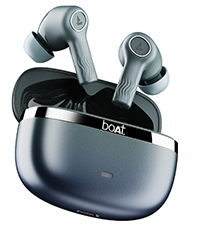
Welcome to the user manual for your boAt Nirvana Ion ANC Pro True Wireless Stereo (TWS) Earbuds. These earbuds are designed to provide a high-quality audio experience with advanced features such as Hi-Res Audio with LDAC, Active Noise Cancellation, and extended battery life. Please read this manual carefully to ensure proper use and optimal performance of your device.

Image: boAt Nirvana Ion ANC Pro TWS Earbuds and charging case.
آنچه در جعبه است
- 1 عدد ایرباد TWS
- 1 عدد کیف شارژ
- 1 عدد کارت گارانتی
- 1 x دفترچه راهنمای کاربر
- ۱ عدد کابل شارژ (نوع C)
راه اندازی
۱. شارژ اولیه
قبل از اولین استفاده، ایربادها و محفظه شارژ را کاملاً شارژ کنید. کابل شارژ Type-C ارائه شده را به پورت شارژ روی محفظه و منبع تغذیه وصل کنید. چراغ نشانگر روی محفظه، وضعیت شارژ را نشان میدهد.
۲. جفت شدن با دستگاه شما
- درب محفظه شارژ را باز کنید. ایربادها به طور خودکار وارد حالت جفت شدن میشوند.
- در تلفن هوشمند یا سایر دستگاههای دارای بلوتوث، به تنظیمات بلوتوث بروید.
- جستجو برای "Nirvana Ion ANC Pro" in the list of available devices.
- آن را برای اتصال انتخاب کنید. پس از اتصال، یک پیام صوتی خواهید شنید.
The earbuds support Bluetooth v5.3 for stable and efficient wireless connectivity.
3. boAt Hearables App Installation
Enhance your experience by installing the boAt Hearables App. This app allows for customization of EQ settings, firmware updates, and other advanced controls.
Scan this QR code to download the boAt Hearables App. Alternatively, visit l.ead.me/bdAX6k.

Image: boAt Hearables App interface for sound customization and ANC control.
دستورالعمل های عملیاتی
1. Controls را لمس کنید
The earbuds feature intuitive touch controls for various functions. Specific gestures may vary; refer to the app for customization options.
- پخش/مکث: یک ضربه روی هر یک از هدفون ها.
- آهنگ بعدی: روی ایرباد سمت راست دو بار ضربه بزنید.
- آهنگ قبلی: روی ایرباد سمت چپ دو بار ضربه بزنید.
- پاسخ/پایان تماس: یک ضربه روی هر یک از هدفون ها.
- رد تماس: روی هر یک از ایربادها فشار طولانی مدت دهید.
- دستیار صوتی را فعال کنید: سه بار روی هر یک از ایربادها ضربه بزنید.
- تغییر حالتهای ANC: Long press on either earbud (customizable via app).
۲. حالتهای حذف نویز فعال (ANC)
The Nirvana Ion ANC Pro offers up to 32dB Active Noise Cancellation to reduce ambient noise. You can switch between different modes:
- حالت ANC: نویز خارجی را برای یک تجربه شنیداری فراگیر کاهش میدهد.
- حالت شفافیت: Allows you to hear your surroundings while listening to audio, enhancing situational awareness.
- حالت عادی: پخش صدای استاندارد بدون حذف نویز یا شفافیت.

Image: Demonstrating 32dB Active Noise Cancellation.
3. Dual EQ Modes with Crystal Bionic Sound
Experience high-fidelity audio with 10mm drivers and choose between two distinct sound profiles:
- Crystal Bionic Sound: Powered by HiFi, this mode delivers enhanced clarity and detail.
- صدای مخصوص بوآت: Provides a balanced and dynamic audio experience, characteristic of boAt products.

Image: Visual representation of Dual EQ Modes.
4. BEAST™ Mode (Low Latency for Gaming)
Activate BEAST™ Mode for an ultra-low latency experience, ideal for gaming. This mode reduces audio delay to approximately 60ms, ensuring synchronized sound with on-screen action.

Image: BEAST™ Mode for low latency gaming.
۶. اتصال چند نقطهای
Connect your earbuds to two devices simultaneously and seamlessly switch between them. For example, you can listen to music on your laptop and instantly answer a call on your phone without re-pairing.

Image: Multipoint Connectivity feature.
6. Crystal Clear Calling with ENx™ Technology
The earbuds are equipped with 4 microphones and ENx™ Technology to ensure your voice is transmitted clearly during calls, even in noisy environments.

Image: Crystal Clear Calling with ENx™ Technology.
۷. شارژ و عمر باتری
The earbuds offer an impressive total playback time of up to 120 hours with the charging case. The ASAP™ Charge feature provides 4 hours of playback from just 10 minutes of charging.

Image: 120 Hours Playback and ASAP™ Charge.
تعمیر و نگهداری
- تمیز کردن: برای تمیز کردن ایربادها و محفظه شارژ از یک پارچه نرم و خشک استفاده کنید. از مواد شیمیایی قوی یا مواد ساینده استفاده نکنید.
- ذخیره سازی: هدفون ها را در صورت عدم استفاده در جعبه شارژ نگه دارید تا از آنها محافظت کنید و شارژ نگه دارید.
- مقاومت در برابر آب: The earbuds are not water resistant. Avoid exposure to water, sweat, or moisture.
- پورت شارژ: پورت شارژ Type-C را از گرد و غبار و آلودگی دور نگه دارید.
عیب یابی
| مشکل | راه حل |
|---|---|
| هدفونهای هدفون جفت نمیشوند | مطمئن شوید که هدفونها شارژ دارند. بلوتوث دستگاه خود را خاموش و روشن کنید. هدفونها را دوباره در جعبه قرار دهید، ببندید و سپس دوباره باز کنید تا دوباره وارد حالت جفتسازی شوید. |
| فقط یک هدفون کار می کند | Place both earbuds back in the case, close the lid, then open again. Check battery levels for both earbuds. Try resetting the earbuds (refer to app or support for specific reset instructions). |
| صدای کم یا کیفیت پایین صدا | Adjust volume on your device and through touch controls. Ensure earbuds are clean and properly seated in your ears. Check EQ settings in the boAt Hearables App. |
| مشکلات شارژ | Ensure the charging cable is securely connected. Try a different charging cable or power adapter. Clean the charging port on the case. |
| ANC مؤثر نیست | Ensure earbuds are properly sealed in your ear canal. Switch between ANC modes using touch controls or the app. |
مشخصات
| ویژگی | جزئیات |
|---|---|
| نام مدل | Nirvana Ion ANC Pro |
| نام تجاری | قایق |
| قرار دادن گوش | در گوش |
| نسخه بلوتوث | 5.3 |
| محدوده بلوتوث | 15 متر |
| کنترل نویز | حذف نویز فعال (تا 32 دسیبل) |
| اندازه درایور صوتی | 10 میلی متر |
| کدک صوتی | LDAC (Hi-Res Audio) |
| عمر باتری (کل) | تا 120 ساعت |
| شارژ سریع | ASAP™ Charge (10 mins = 4 Hrs playback) |
| روش کنترل | لمسی، کنترل صوتی |
| میکروفون ها | 4 (with ENx™ Technology) |
| سطح مقاومت در برابر آب | مقاوم در برابر آب نیست |
| دستگاه های سازگار | گوشیهای هوشمند، تبلتها، لپتاپها، کامپیوترهای رومیزی |
| وزن | 45 Grams (approx.) |
گارانتی و پشتیبانی
Your boAt Nirvana Ion ANC Pro TWS Earbuds come with a 1 سال گارانتی از تاریخ خرید
For product-related queries, technical support, or warranty claims, please contact boAt customer support:
- تماس با پشتیبانی: +91 (022) 69181920
- ایمیل: info@imaginemarketingindia.com
- سازنده: شرکت بازاریابی ایمجین
- آدرس سازنده: Unit no. 204 & 205, 2nd floor, D-wing & E-wing, Corporate Avenue, Andheri Ghatkopar Link Road, Mumbai, Maharashtra-400093, India.
لطفا رسید خرید خود را برای اعتبارسنجی گارانتی نگه دارید.