
1. مقدمه
Thank you for choosing the MOUNTUP Dual Monitor Arm MU8012-W-07. This instruction manual provides essential information for the safe and correct installation, operation, and maintenance of your new monitor arm. Please read this manual thoroughly before installation and keep it for future reference.
اقدامات احتیاطی ایمنی
- قبل از مونتاژ، مطمئن شوید که همه قطعات موجود و بدون آسیب هستند. در صورت مفقود شدن یا معیوب بودن هر قطعه، از آن استفاده نکنید.
- Verify that your desk surface is strong enough to support the combined weight of the monitor arm and your monitors.
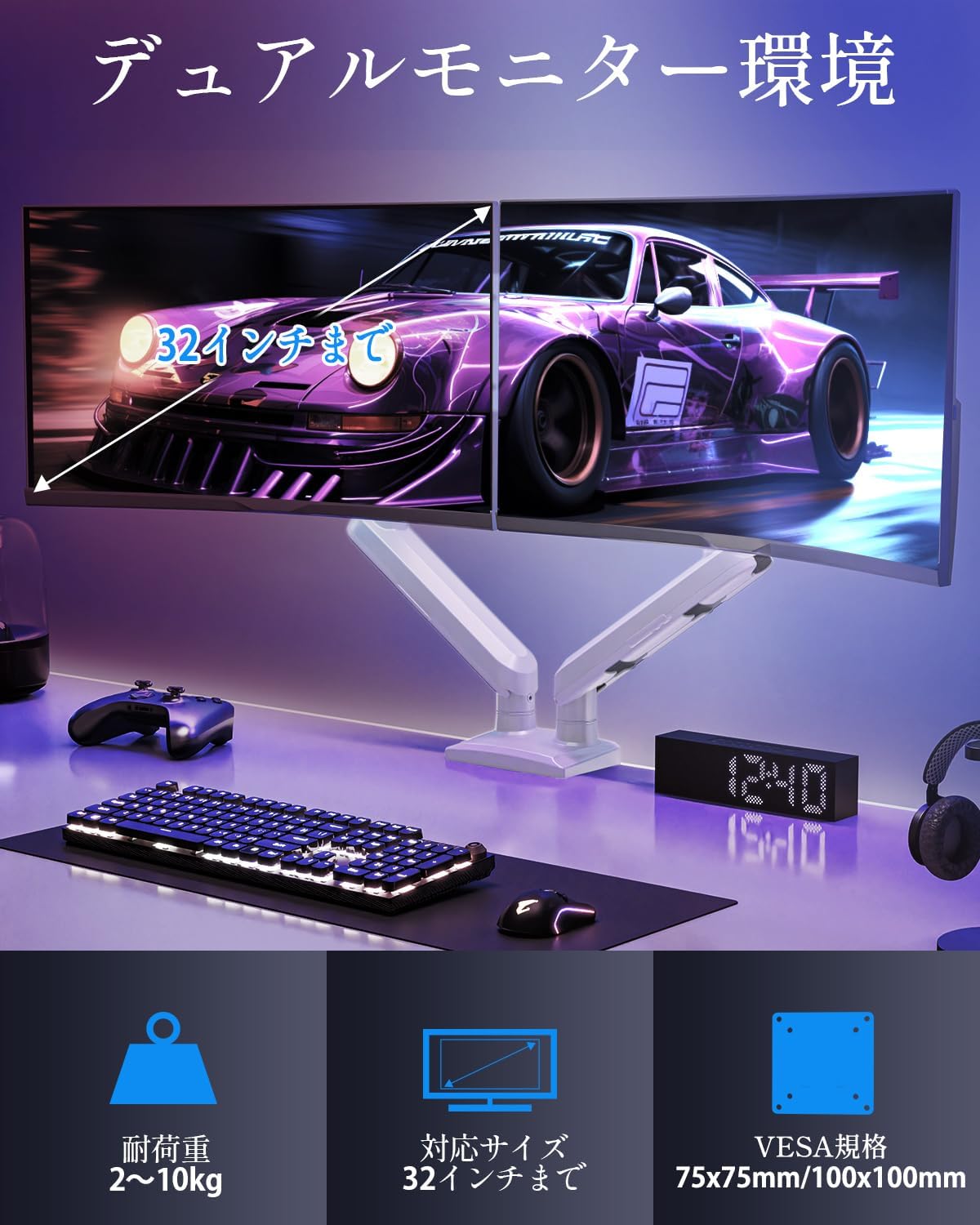
- Do not exceed the maximum weight capacity of 10kg (22 lbs) per arm.
- Always follow the installation steps carefully. Improper installation may result in product damage or personal injury.
- Keep children away from the product during assembly. Small parts may be a choking hazard.
2. محتویات بسته
لطفاً بررسی کنید که تمام اجزای زیر در بسته شما موجود باشد:
- Monitor Arm Assembly (x1)
- صفحه VESA (x2)
- میز کلamp پایه (x1)
- Grommet Base (x1)
- Mounting Hardware Kit (screws, washers, spacers)
- آچار شش گوش (سایزهای مختلف)
- راهنمای دستورالعمل (x1)
3. مشخصات
| ویژگی | مشخصات |
|---|---|
| مدل | MU8012-W-07 |
| مواد | فولاد آلیاژی |
| رنگ | سفید |
| سازگاری با اندازه صفحه نمایش | ۵.۴ تا ۷.۲ اینچ |
| Weight Capacity (per arm) | ۰ تا ۱۸۰ کیلوگرم (۰ تا ۳۹۶ پوند) |
| سازگاری با VESA | 75x75mm، 100x100mm |
| گزینه های نصب | Clamp، گرومت |
| محدوده شیب | +85 درجه تا -45 درجه |
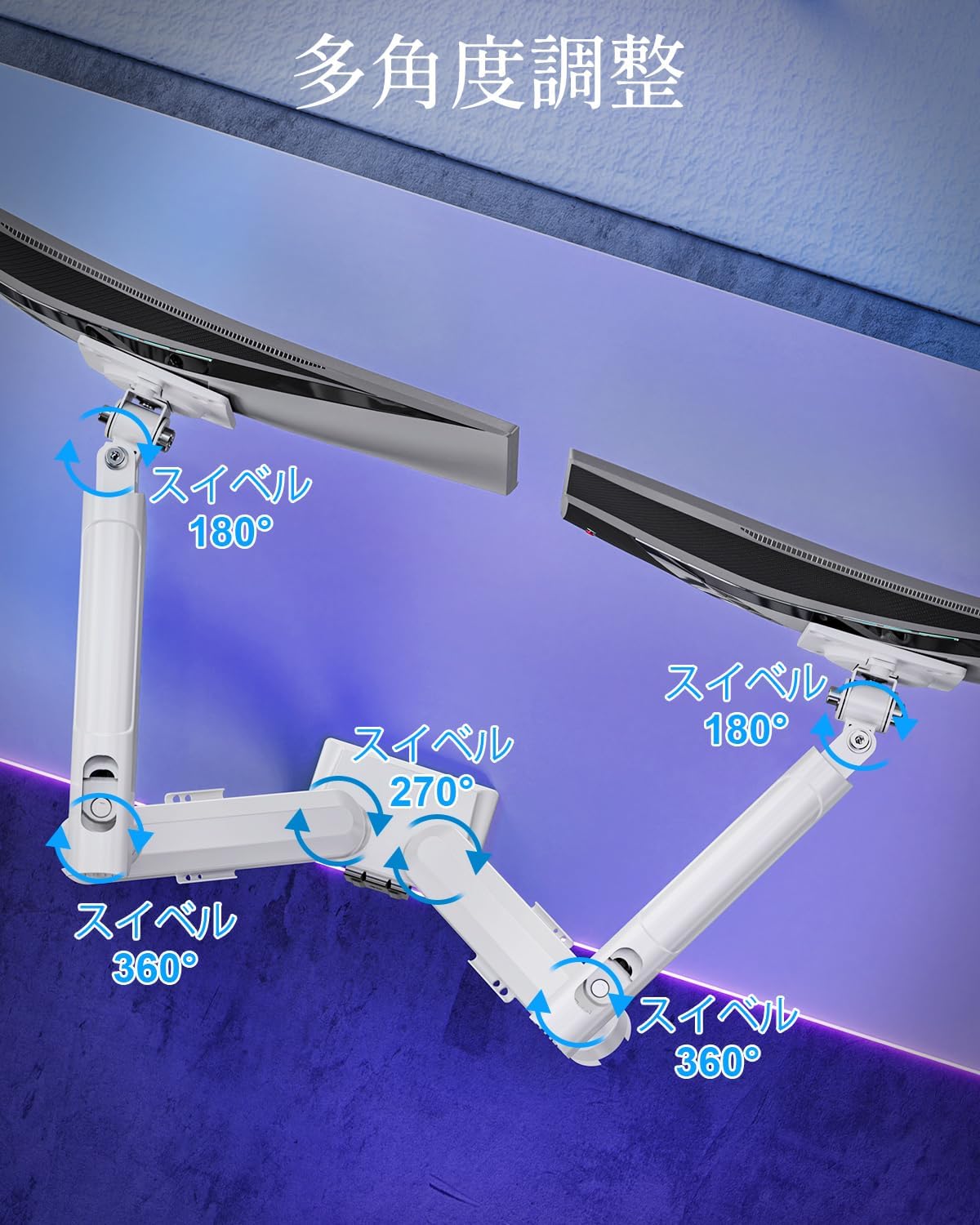
| محدوده چرخان | 180° (monitor plate), 270° (middle joint), 360° (base) |
| Rotation (Pivot) | 360 درجه |
| حداکثر تنظیم ارتفاع | 44 سانتی متر (17.3 اینچ) |
| حداکثر کشش بازو | 50 سانتی متر (19.7 اینچ) |
| وزن محصول | 3.1 کیلوگرم (6.8 پوند) |

4. راه اندازی و نصب
مرحله 1: روش نصب خود را انتخاب کنید
The MOUNTUP Dual Monitor Arm supports two installation methods: Clamp Mount and Grommet Mount. Choose the method that best suits your desk.

Clamp نصب و راه اندازی کوه
- cl را وصل کنیدamp پایه به قطب اصلی بازوی مانیتور.
- cl را قرار دهیدamp onto the edge of your desk. Ensure the desk thickness is between 10-70mm (0.4-2.7 inches).
- cl را سفت کنیدamp screw until the arm is securely fastened to the desk. Ensure it is stable and does not wobble.

نصب پایه گرومت
- If your desk has a grommet hole, ensure its diameter is between 10-60mm (0.4-2.4 inches) and the desk thickness is between 10-70mm (0.4-2.7 inches).
- Attach the grommet base to the main pole.
- Insert the grommet bolt through the desk hole and secure it from underneath with the provided plate and nut.
- Tighten the nut until the arm is firmly attached to the desk.
مرحله 2: صفحات VESA را به مانیتورها وصل کنید
- Carefully lay your monitor face down on a soft, clean surface.
- صفحه VESA را با سوراخهای نصب در پشت مانیتور خود تراز کنید.
- Use the appropriate screws (M4 or M5) and washers from the hardware kit to secure the VESA plate to the monitor. Do not overtighten.
Step 3: Mount Monitors to Arms
- Slide the monitor (with the attached VESA plate) onto the VESA head of the monitor arm.
- Ensure the monitor clicks into place or is securely fastened by the quick-release mechanism.
- Repeat for the second monitor.

مرحله 4: مدیریت کابل
Route your monitor cables through the integrated cable management clips on the underside of the arms. This helps maintain a tidy workspace.

۴. عملیات و تنظیمات
The MOUNTUP Dual Monitor Arm offers flexible adjustments to optimize your viewتجربه کردن

Adjusting Arm Tension (Gas Spring)
The gas spring mechanism allows for smooth height adjustments. If your monitor sags or is difficult to move, you may need to adjust the tension.

- To increase tension (if monitor sags): Use the provided hex wrench to turn the adjustment screw clockwise.
- To decrease tension (if arm is too stiff): Turn the adjustment screw counter-clockwise.
- Always adjust tension with the arm held horizontally. Test the movement after each small adjustment until the monitor holds its position freely.
تنظیمات مانیتور
- تنظیم ارتفاع: Gently push or pull the monitor up or down to your desired height. The gas spring will assist in holding the position. Max height is 44cm (17.3 inches).
- تنظیم شیب: Tilt the monitor screen up to +85° or down to -45° to reduce glare and optimize viewing angles. Loosen the tilt bolt, adjust, then re-tighten.
- تنظیم چرخش: The arm allows for 180° swivel at the monitor plate, 270° at the middle joint, and 360° at the base, providing wide range of motion.
- چرخش (محوری): Rotate your monitor 360° to switch between landscape and portrait orientations.

6. تعمیر و نگهداری
- تمیز کردن: Wipe the monitor arm with a soft, damp پارچه. از پاککنندههای ساینده یا حلالهایی که میتوانند به روکش آسیب بزنند، خودداری کنید.
- بررسی های دوره ای: به صورت دورهای تمام پیچها و اتصالات را بررسی کنید تا مطمئن شوید که محکم و ایمن هستند. در صورت لزوم، دوباره آنها را محکم کنید.
- Gas Spring Longevity: The high-quality gas spring is tested for over 20,000 cycles. Proper tension adjustment will help maintain its performance over time.

7 عیب یابی
- Monitor Sags or Won't Stay Up: The gas spring tension is too low. Refer to the "Adjusting Arm Tension" section and turn the adjustment screw clockwise to increase tension.
- Arm is Too Stiff or Difficult to Move: The gas spring tension is too high. Refer to the "Adjusting Arm Tension" section and turn the adjustment screw counter-clockwise to decrease tension.
- لرزش مانیتور: Ensure all mounting screws (VESA plate to monitor, arm to desk) are securely tightened. Check that the desk clamp or grommet mount is firm.
- Monitor Tilt Angle Won't Hold: The tilt bolt may be loose. Tighten the tilt bolt on the VESA head.
8. گارانتی و پشتیبانی
MOUNTUP provides a ضمانت کیفیت 2 ساله from the date of purchase for this product. This warranty covers manufacturing defects and issues arising from normal use.
If you encounter any problems with your MOUNTUP Dual Monitor Arm, or if you have questions regarding installation or operation, please contact our customer support. You can typically find seller contact information through your purchase history on the platform where you bought the product (e.g., Amazon order details).
Please have your model number (MU8012-W-07) and purchase date ready when contacting support to ensure a swift resolution.