
1. محصول تمام شدview
The Riokko YM119 OBD2 Scanner is a diagnostic tool designed for car owners to easily read and clear engine fault codes. It provides real-time data, freeze frame information, and supports various diagnostic functions for OBDII/EOBD compliant vehicles manufactured since 1996. Its intuitive interface and compact design make it suitable for both professional technicians and home users.

Figure 1.1: Riokko YM119 OBD2 Scanner. This image shows the main diagnostic tool with its color screen, control buttons, and the attached OBDII connector cable.
۴. راهاندازی و استفاده اولیه
2.1 محتویات بسته
- Riokko YM119 OBD2 Scanner Unit
- راهنمای کاربر (این سند)
۳.۱ اتصال اسکنر
- Locate the vehicle's Data Link Connector (DLC). This is typically located under the dashboard on the driver's side.
- Ensure the vehicle's ignition is turned ON (engine can be off or running, depending on the test).
- Plug the OBDII connector of the YM119 scanner firmly into the vehicle's DLC. The scanner will power on automatically.
2.3 انتخاب زبان
The YM119 supports 13 national languages. To change the language:
- From the main menu, navigate to "Setting" using the arrow keys.
- را فشار دهید OK button to enter the Setting menu.
- گزینه «زبان» را انتخاب کنید و زبان مورد نظر خود را از لیست انتخاب کنید.
- را فشار دهید OK برای تایید انتخاب شما
۲. کار با اسکنر
3.1 دکمه های ناوبری
- خروج: Returns to the previous screen or main menu.
- فلشهای بالا/پایین: در میان گزینه های منو حرکت کنید.
- فلشهای چپ/راست: Navigate through data screens or adjust settings.
- خوب: انتخاب را تأیید میکند یا وارد یک زیرمنو میشود.
- خفاش: Initiates the battery voltagتست e

Figure 3.1: Main Menu and Professional Functions. This image illustrates the scanner's main menu interface and highlights its key diagnostic capabilities such as Engine Fault Diagnostics, Quick Clear Fault Code, Real-time Data Stream, and Battery Life Test.
3.2 عملکردهای تشخیصی
From the main menu, select "Diagnosis" to access the primary diagnostic functions.

Figure 3.2: OBD II Diagnostic Test Items. This image shows the comprehensive list of diagnostic tests available on the scanner, from reading and erasing codes to advanced sensor and component tests.
3.2.1 خواندن کدها
This function retrieves Diagnostic Trouble Codes (DTCs) from the vehicle's computer. These codes indicate specific issues detected by the vehicle's onboard diagnostic system.
- Select "Read Codes" from the Diagnosis menu.
- The scanner will display any stored, pending, or permanent DTCs.
- استفاده کنید بالا/پایین arrows to scroll through the codes.
- For detailed information on a specific code, use the "DTC Lib" function or refer to a reliable automotive repair database.
3.2.2 پاک کردن کدها
This function erases DTCs from the vehicle's computer and turns off the Malfunction Indicator Lamp (MIL), also known as the Check Engine Light. Note: Clearing codes does not fix the underlying problem. The MIL will illuminate again if the fault persists.

Figure 3.3: Check and Turn Off Engine Light. This image demonstrates the scanner's ability to diagnose and clear engine fault codes, effectively turning off the Check Engine Light on the vehicle's dashboard.
- Select "Erase Codes" from the Diagnosis menu.
- هنگامی که از شما خواسته شد، اقدام را تأیید کنید.
- The MIL should turn off.
3.2.3 Real-time Data (Live Data Stream)
View real-time sensor data from the vehicle's engine control unit (ECU). This data can be displayed in text or graphical format, allowing for dynamic monitoring of vehicle performance.
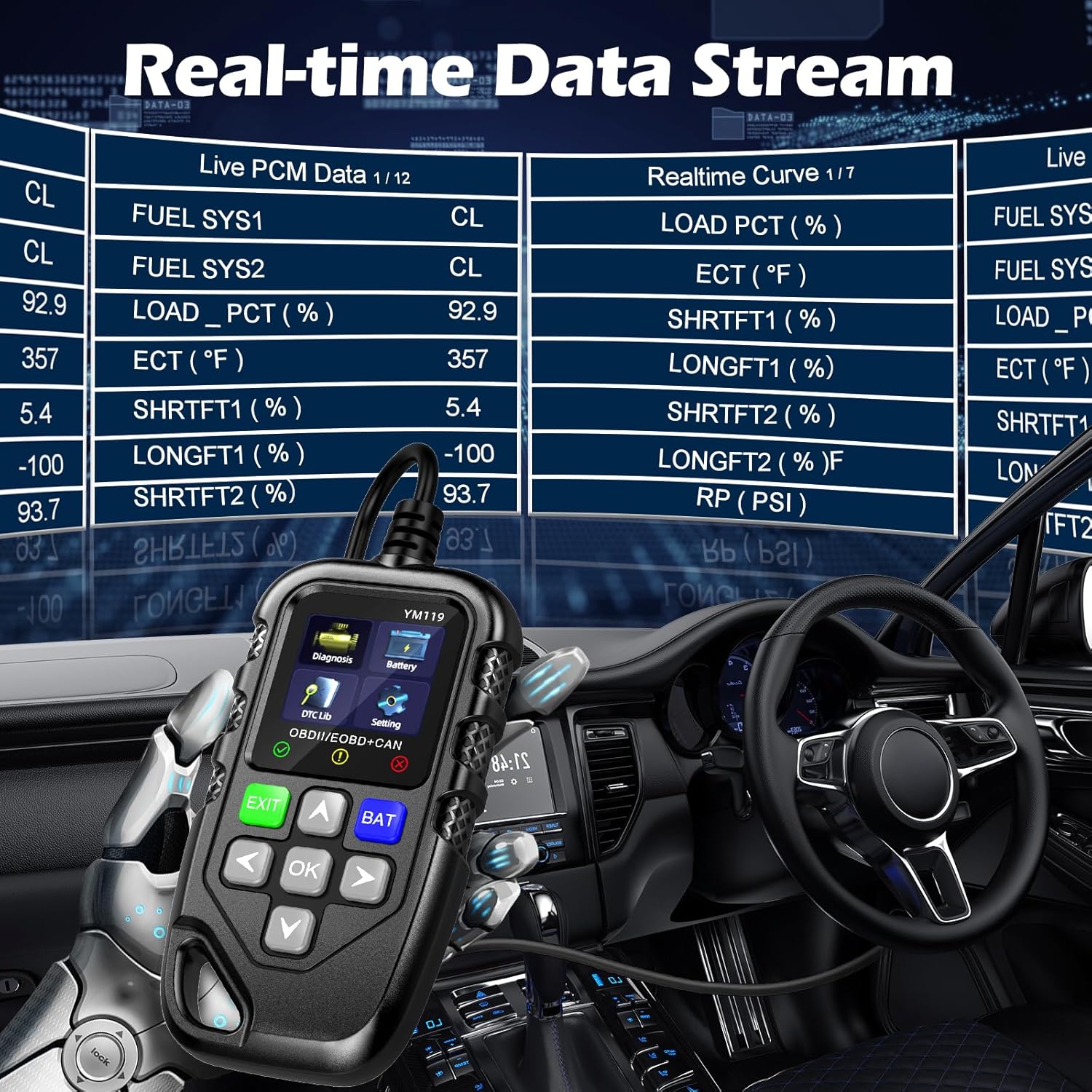
Figure 3.4: Real-time Data Stream. This image shows the scanner's capability to display live engine data, including various sensor readings and their corresponding real-time curves, aiding in dynamic vehicle diagnostics.
- Select "Live Data" or "Realtime Curve" from the Diagnosis menu.
- استفاده کنید بالا/پایین arrows to scroll through different data parameters.
- استفاده کنید چپ/راست arrows to switch between text and graph views (if available for the parameter).
۳.۴ فریز کردن دادههای فریم
When an emission-related fault occurs, the vehicle's computer records a snapshot of operating conditions at the time of the fault. This "freeze frame" data helps in diagnosing intermittent problems.
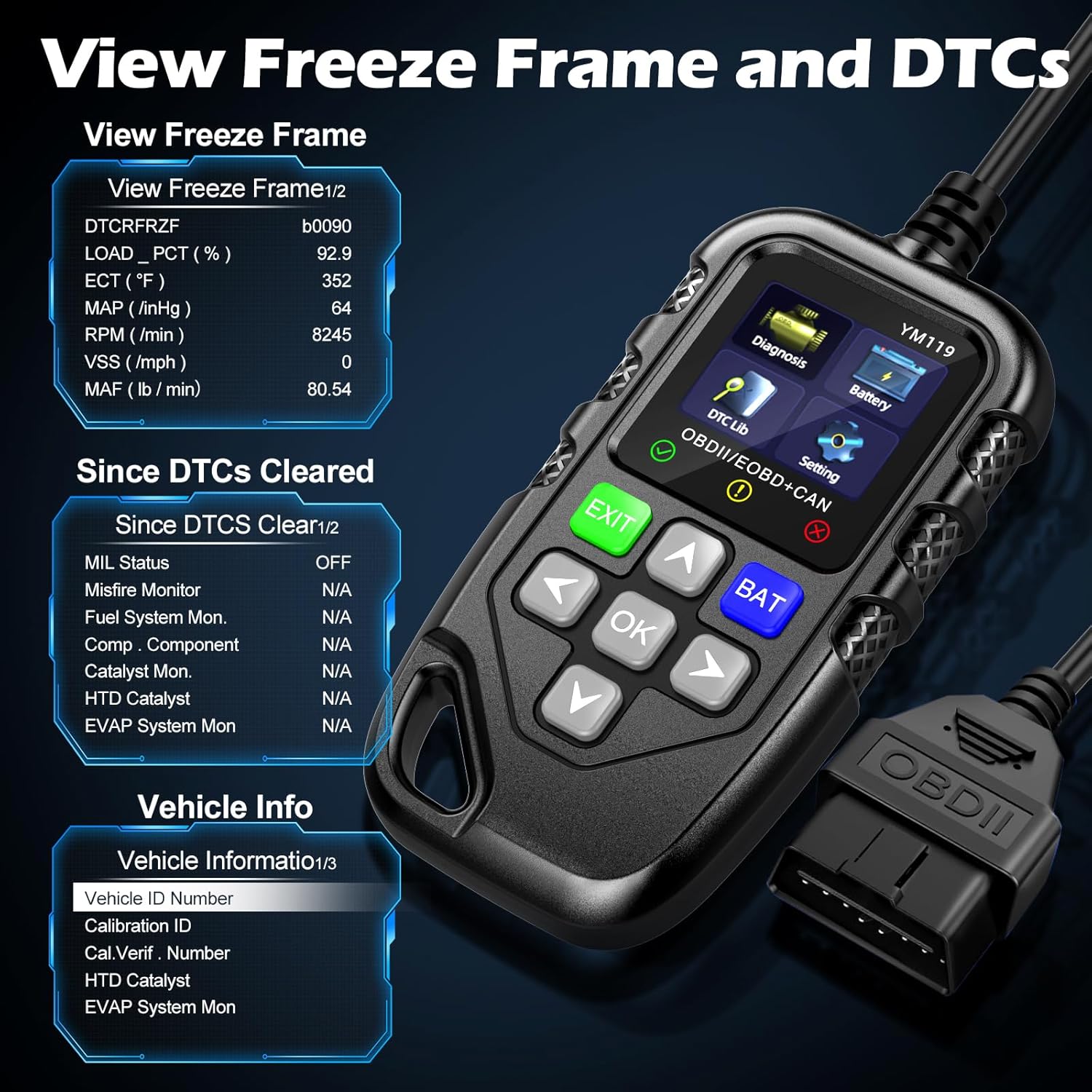
شکل 3.5: View Freeze Frame and DTCs. This image displays the scanner's ability to capture and show freeze frame data, which provides a snapshot of engine conditions at the moment a fault code was set, aiding in diagnosis.
- انتخاب کنید"View Freeze Frame" from the Diagnosis menu.
- Review the recorded parameters.
3.2.5 DTC Query (DTC Lib)
The built-in DTC Library allows you to look up definitions for generic (P0, P2, P34, B0, C0, U0) and manufacturer-specific (P1, P30-P33, B1, C1, U1) codes.
- From the main menu, select "DTC Lib".
- کد DTC را با استفاده از کلیدهای جهت نما وارد کنید و OK دکمه
- اسکنر تعریف کد را نمایش میدهد.
3.2.6 آمادگی I / M
This function checks the readiness of the emission-related monitoring systems on the vehicle. It's useful for determining if the vehicle is ready for an emissions test.
- Select "I/M Readiness" from the Diagnosis menu.
- The scanner will display the status of various monitors (e.g., Misfire Monitor, Fuel System Monitor). "OK" indicates the monitor has completed its test, "INC" indicates incomplete, and "N/A" indicates not applicable.
3.2.7 باتری جلدtage تست
The YM119 can perform a basic battery voltage test to assess the vehicle's battery health.

Figure 3.6: Estimate Battery Life Test. This image shows the scanner's dedicated function for monitoring and assessing the vehicle's battery voltage and overall health.
- From the main menu, select "Battery" or press the خفاش دکمه
- اسکنر میزان باتری فعلی را نمایش میدهدtage.
3.2.8 اطلاعات خودرو
This function retrieves the Vehicle Identification Number (VIN), Calibration ID (CALID), and Calibration Verification Number (CVN) of the vehicle.
- Select "Vehicle Info" from the Diagnosis menu.
- اسکنر اطلاعات موجود در مورد وسیله نقلیه را نمایش میدهد.
4. تعمیر و نگهداری
4.1 تمیز کردن دستگاه
To maintain the scanner's performance and appearance:
- دستگاه را با نرم ، d پاک کنیدamp پارچه
- از پاک کننده ها یا حلال های ساینده استفاده نکنید.
- Ensure the device is dry before storage.
4.2 ذخیره سازی
Store the scanner in a clean, dry environment away from extreme temperatures and direct sunlight. Keep the OBDII connector free from dust and debris.
5 عیب یابی
| مشکل | علت احتمالی | راه حل |
|---|---|---|
| اسکنر روشن نمیشود. |
|
|
| پیام «خطای لینک» یا «خطای ارتباط». |
|
|
| Engine light reappears after clearing codes. | Underlying fault has not been repaired. | Clearing codes only turns off the light; it does not fix the problem. Diagnose and repair the underlying issue before clearing codes again. |
| Inaccurate or missing data readings. |
|
|
6. مشخصات
| ویژگی | جزئیات |
|---|---|
| شماره مدل | AE0004L (YM119) |
| نام تجاری | Riokko |
| اندازه صفحه نمایش | 2.8 اینچ |
| پروتکل های پشتیبانی شده | Nine standard OBDII/EOBD protocols |
| زبان های پشتیبانی شده | 13 زبان ملی |
| وزن مورد | 7.8 اونس (تقریباً 221 گرم) |
| ابعاد بسته بندی | ۱۸.۵ در ۶.۸۱ در ۱.۱۸ اینچ (تقریباً ۴۷ در ۱۷.۳ در ۳ سانتیمتر) |
| اولین تاریخ در دسترس | 16 اکتبر 2024 |
7. گارانتی و پشتیبانی
7.1 اطلاعات گارانتی
The Riokko YM119 OBD2 Scanner comes with a 3 سال گارانتی از تاریخ خرید این ضمانت نقص در مواد و طرز کار در استفاده معمولی را پوشش می دهد.
7.2 سیاست بازگشت
A سیاست بازگشت کالا بدون هیچ سوالی، ۳۰ روز is offered for your purchase. Please refer to your retailer's specific return instructions.
7.3 پشتیبانی مشتری
For technical assistance, warranty claims, or any other inquiries, please contact Riokko customer service. خدمات مشتری 24/7 برای کمک به شما در دسترس است.
Please visit the official Riokko webبرای جدیدترین اطلاعات تماس، به سایت مراجعه کنید یا به بستهبندی محصول خود مراجعه کنید.