
گووی H6069B
دفترچه راهنمای چراغهای پنلی کوچک Govee
مدل: H6069B
1. محصول تمام شدview
The Govee Mini Panel Lights are smart RGBIC wall lights designed to enhance your home decor with dynamic and customizable lighting. Featuring RGBIC technology, these panels offer vibrant, multi-color effects and can be arranged in various patterns to suit your aesthetic preferences. They are compatible with Matter, Alexa, and Google Assistant for convenient voice control and offer extensive customization through the Govee Home App.

Image: Govee Mini Panel Lights showing product packaging, individual panels, and the Govee Home App interface.
Video: Official Govee overview of the RGBIC Mini Panel Lights, showcasing various lighting effects and features.
۲. چه چیزهایی در جعبه است؟
Your Govee Mini Panel Lights package includes the following components:
- Light Panel x 20
- Connecting Piece x 20
- جعبه کنترل x 1
- آداپتور x 1
- Spirit Level x 1
- راهنمای شروع سریع x 1
- راهنمای کاربر x 1
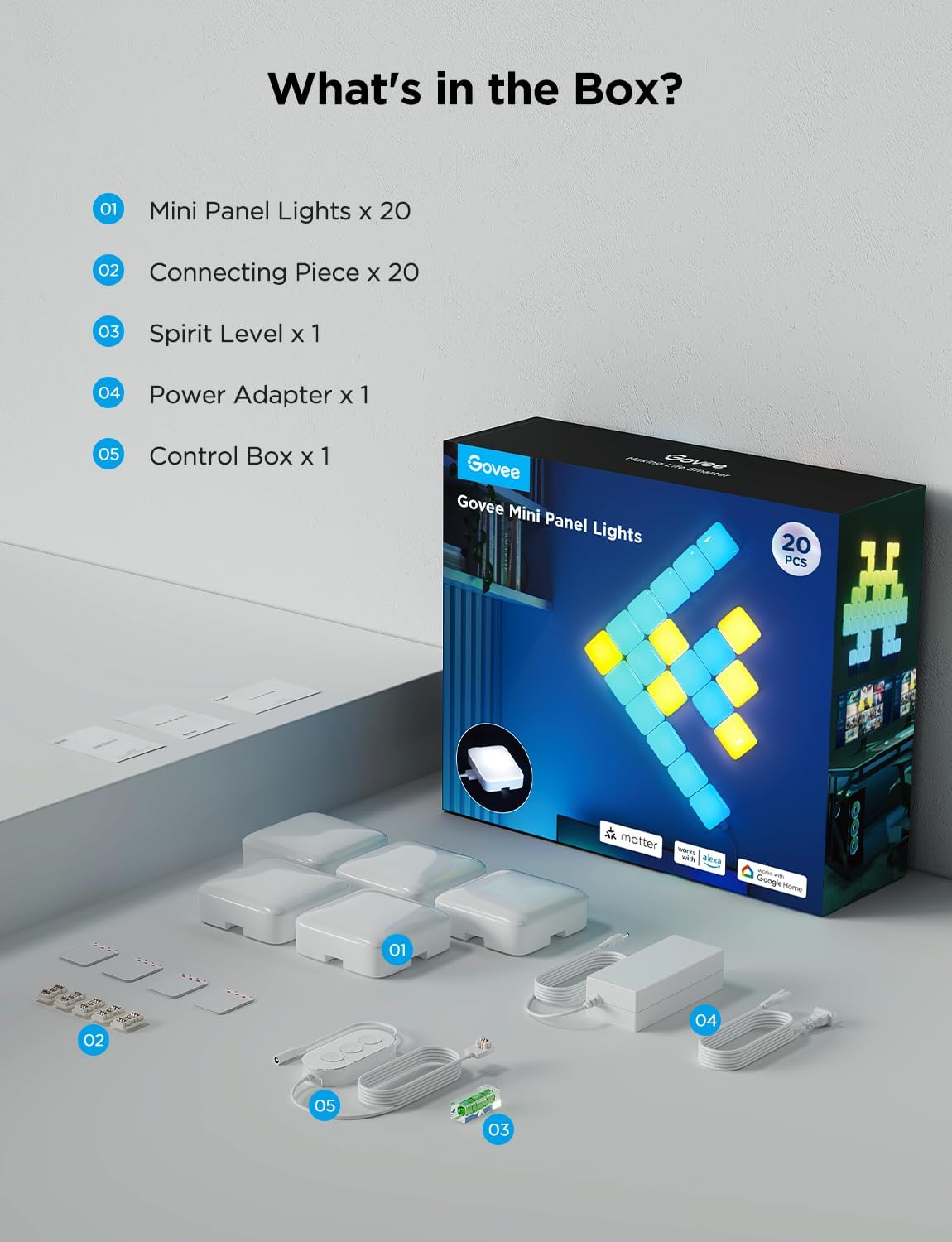
Image: All components included in the Govee Mini Panel Lights package laid out.
3. راه اندازی و نصب
Follow these steps to set up and install your Govee Mini Panel Lights:
- Connect the Panels: Press one end of a connecting piece into a port on a light panel. Then, press another light panel into the other end of the connecting piece. Ensure a secure connection.
- اتصال برق: Press the power supply terminal into a panel light.
- طرح خود را برنامه ریزی کنید: Before mounting, arrange your desired pattern on a flat surface (like a desk or the floor) and power them on to check the lighting effects.
- نصب: Remove the protective layer from the adhesive on the back of each panel. Press each panel firmly onto the wall for 5 seconds before releasing. Use the included spirit level to ensure your design is straight.
- کالیبراسیون: After installation, open the Govee Home App and follow the in-app instructions to complete calibration. Note: Re-calibration is required every time the spliced shape or the location of the panel lights is changed.

Image: Step-by-step visual guide for connecting and installing the Govee Mini Panel Lights.
Video: Detailed instructions on how to install the Govee Mini Panel Lights, including connecting panels and mounting.
۴. دستورالعملهای عملیاتی و ویژگیها
The Govee Mini Panel Lights offer a variety of operating modes and features to customize your lighting experience:
- RGBIC Technology: Each panel features a curved PC transparent lampshade, providing a dynamic three-dimensional style. The RGBIC technology allows for multiple colors to be displayed on a single panel simultaneously, creating vibrant and flowing light effects.
- Intelligent Graphics Recognition: The built-in MCU chip enables intelligent recognition of your panel design via the Govee Home App, simplifying the setup and customization process.
- Unlimited DIY Modeling: The four sides of each panel can be freely spliced using the push-type interface, offering immense flexibility for creating unique and personalized light patterns. A single adapter can connect up to 70 light panels, allowing for extensive pixel art effects.
- کنترل صدا: Compatible with Matter, Google Assistant, and Amazon Alexa, you can easily adjust the lighting mood with simple voice commands.
- Scene Modes & Music Sync: Explore over 50 pre-set scene lighting effects or synchronize your lights with music for a dynamic audio-visual experience. These features make the panels suitable for various scenarios, including bedrooms, living rooms, children's rooms, and gaming setups.

Image: The Govee Home App's shape recognition feature, allowing users to map their custom panel designs.

Image: Govee Mini Panel Lights demonstrating voice control compatibility with Matter, Google Home, and Alexa.
5. تعمیر و نگهداری
To ensure the longevity and optimal performance of your Govee Mini Panel Lights, follow these simple maintenance guidelines:
- تمیز کردن: Gently wipe the surface of the light panels with a soft, dry cloth. Avoid using abrasive cleaners, solvents, or harsh chemicals, as these can damage the finish and electronic components.
- رسیدگی: When adjusting or reconfiguring your panels, handle them carefully to prevent damage to the connecting pieces or the panels themselves. Refer to the removal instructions in the Setup section if you need to detach panels.
- ذخیره سازی: If storing the lights for an extended period, disconnect them from power and store them in a cool, dry place away from direct sunlight and extreme temperatures.
6 عیب یابی
If you encounter any issues with your Govee Mini Panel Lights, please refer to the following common troubleshooting tips:
- روشن نشدن چراغ ها:
- Ensure the power adapter is securely connected to the control box and plugged into a working power outlet.
- Verify that the control box is properly connected to a light panel.
- Check if the panels are correctly connected to each other using the connecting pieces.
- مشکلات اتصال برنامه:
- اطمینان حاصل کنید که بلوتوث و وای فای در گوشی هوشمند شما فعال است.
- Ensure your phone is within range of the lights.
- Restart the Govee Home App.
- Unplug the power adapter from the lights for 10 seconds, then plug it back in to reset the control box.
- Incorrect Light Patterns/Colors:
- Perform a re-calibration through the Govee Home App, especially if you have changed the panel layout.
- مطمئن شوید که برنامه شما به آخرین نسخه بهروزرسانی شده است.
- Panels Detaching from Wall:
- Ensure the wall surface is clean, dry, and smooth before applying the adhesive.
- Apply firm pressure for the recommended 5 seconds when mounting each panel.
- Avoid mounting on textured or uneven surfaces.
For more detailed troubleshooting or persistent issues, please consult the full User Manual (PDF) available online or contact Govee customer support.
7. مشخصات
| صفت | جزئیات |
|---|---|
| نام تجاری | گووی |
| شماره مدل | H6069B |
| رنگ | White (RGBIC lighting) |
| مواد | پلاستیک |
| ابعاد محصول | 3.14"L x 3.14"W x 1"H (per panel) |
| وزن مورد | 4.86 pounds (total for 20 Pcs) |
| منبع تغذیه | AC/DC |
| جلدtage | 36 ولت |
| واتtage | 72 وات |
| روش کنترل | App, Voice (Matter, Google Assistant, Amazon Alexa) |
| پروتکل اتصال | بلوتوث، ماتر، وایفای |
| تعداد منابع نور | 20 (for 20 Pcs variant) |
| نوع نصب | نصب چسباندن |
| استفاده در فضای باز/داخلی | سرپوشیده |
8. گارانتی و پشتیبانی
For detailed warranty information, please refer to the official User Manual (PDF) provided with your product or visit the Govee official website. Govee offers customer support for any product-related inquiries, technical assistance, or warranty claims.
راهنمای کاربر (PDF): از اینجا دانلود کنید
برای پشتیبانی بیشتر، به سایت مراجعه کنید فروشگاه Govee در آمازون.
Ask a question about this manual
Ask about setup, troubleshooting, compatibility, parts, safety, or missing instructions. Manuals+ will review the question and use this page’s manual context to help answer it.