
1. مقدمه
This manual provides detailed instructions for the EKSA E5000 BT Wireless Gaming Headset. It covers setup, operation, maintenance, and troubleshooting to ensure optimal performance and user experience. Please read this manual thoroughly before using the headset.

Image 1.1: The EKSA E5000 BT Wireless Gaming Headset, showcasing its design and included USB dongle.
2. محتویات بسته
بررسی کنید که همه اقلام در بسته شما موجود باشد:
- EKSA E5000 BT Wireless Gaming Headset
- میکروفون حذف نویز قابل جدا شدن
- 2.4GHz USB-A Wireless Transmitter
- USB-C to USB-A Adapter (integrated with 2.4GHz transmitter)
- کابل صوتی 3.5 میلی متری
- کابل شارژ USB (نوع C)
- راهنمای کاربر
- Carrying Pouch (if included with your specific model variant)
3. محصول تمام شدview و کنترل ها
با اجزا و کنترلهای هدست آشنا شوید.
تصویر 3.1: تمام شدview of headset controls including volume wheel, microphone mute, power/light switch, Type-C interface, and microphone interface.
- چرخ حجم: سطح خروجی صدا را تنظیم میکند.
- دکمه بیصدا کردن میکروفون: Toggles microphone on/off.
- Power/Light Switching Button: Powers the headset on/off, controls RGB lighting modes, and manages play/pause functions in Bluetooth mode.
- رابط نوع C: Used for charging and 2.4GHz wireless connection (when the transmitter is plugged in).
- رابط میکروفون: پورت اتصال میکروفون جداشدنی.
4. Setup and Connection Modes
The EKSA E5000 BT headset supports three connection modes: 2.4GHz Wireless, Bluetooth 5.3, and 3.5mm Wired.

Image 4.1: Visual representation of the three available connection modes and their compatible devices.
۲. اتصال بیسیم ۲.۴ گیگاهرتز
This mode provides a low-latency, lossless wireless connection for PC, PS5, PS4, Mac, and Nintendo Switch (docked mode).
- Plug the 2.4GHz USB-A wireless transmitter into an available USB port on your device (PC, PS5, PS4, Mac, Switch dock).
- If your device only has a USB-C port, use the integrated USB-C adapter on the transmitter.
- با فشار دادن و نگه داشتن دکمه پاور تا زمانی که چراغ نشانگر روشن شود، هدست را روشن کنید.
- The headset will automatically pair with the transmitter. The indicator light will turn solid blue when connected.
- مطمئن شوید که هدست به عنوان خروجی صدا و دستگاه ورودی در تنظیمات سیستم شما انتخاب شده است.
Note: The wireless transmitter chip is located inside the Type-C port of the dongle. The dongle must be plugged into a USB or Type-C port for the 2.4GHz connection to function.
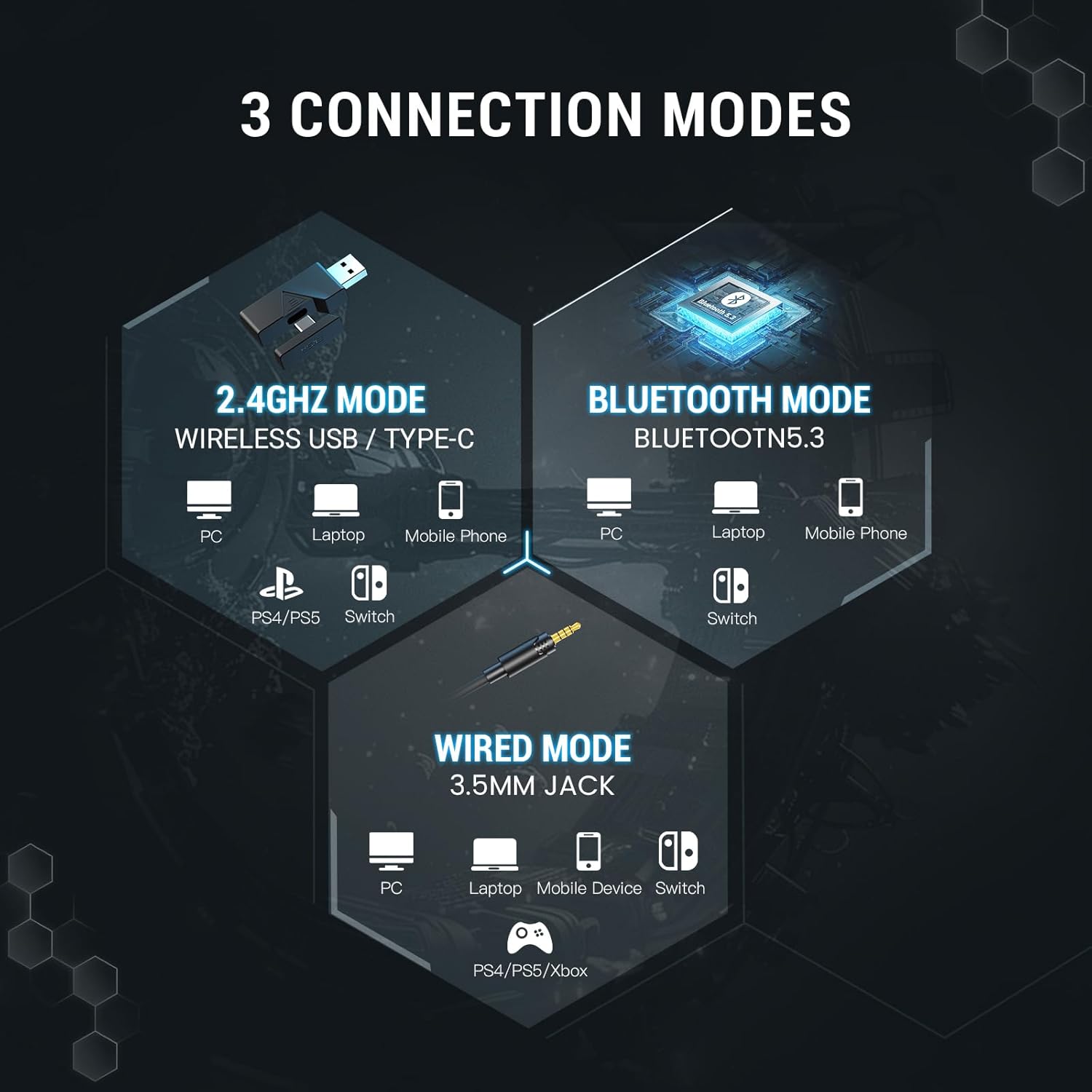
Image 4.2: The 2.4GHz wireless transmitter and its connection to the headset, highlighting stable, ultra-low latency technology.
۳. اتصال بلوتوث ۵.۰
Connect wirelessly to Bluetooth-enabled devices such as PCs, laptops, mobile phones, and Nintendo Switch (undocked).
- روشن کردن هدست.
- Press and hold the Power/Light Switching button for approximately 5 seconds until the indicator light flashes blue and red, indicating pairing mode.
- On your device, go to Bluetooth settings and search for "EKSA E5000 BT".
- Select the headset to pair. The indicator light will turn solid blue upon successful connection.
۳.۳ اتصال سیمی ۳.۵ میلیمتری
Use the 3.5mm audio cable for universal compatibility with devices like PC, laptops, mobile devices, Nintendo Switch, PS4, PS5, and Xbox Series X/S.
- یک سر کابل صدای ۳.۵ میلیمتری را به جک ۳.۵ میلیمتری هدست وصل کنید.
- سر دیگر را به پورت صدای ۳.۵ میلیمتری دستگاه خود وصل کنید.
- The headset will operate in passive wired mode. Power is not required for basic audio.
Note: The Xbox Series consoles only support 3.5mm wired connections for this headset. RGB lighting will not function in wired mode.

Image 4.3: Detailed compatibility matrix showing headphone, microphone, and mute function support for various devices across Bluetooth, USB Dongle Wireless, Type-C Dongle Wireless, and 3.5mm Audio Wired connections.
5. Audio Features and Software
5.1. 7.1 صدای فراگیر
The EKSA E5000 BT headset features 7.1 Surround Sound for an immersive audio experience, particularly beneficial for gaming. This feature is enabled through the EKSA SoundBase software.

Image 5.1: Visual representation of 7.1 Surround Sound technology enhancing the gaming experience.
- دانلود درایور: To utilize 7.1 surround sound, download the EKSA 7.1 driver from the official EKSA webسایت
- سازگاری: The EKSA 7.1 surround sound driver is compatible only with Windows 10/11 operating systems.
- فعال سازی: After installing the driver and ensuring the 2.4GHz transmitter is connected, select the 7.1 surround sound mode within the software.

Image 5.2: The EKSA SoundBase Software interface, offering sound customization options including 7.1 Surround Sound, Stereo Sound, and Mic ENC.
5.2. 50mm Neodymium Drivers
The headset is equipped with powerful 50mm neodymium magnet drivers that deliver clear audio, enhancing the perception of in-game sounds like footsteps and positional audio.

تصویر ۳.۱: جزئیات view of the 50mm magnetic neodymium driver, illustrating its role in delivering high-resolution audio and powerful low-frequency sound.
5.3. Dual Chamber Design
An innovative dual-chamber design processes low and high-frequency sounds separately. This optimization ensures enhanced bass effects and clear highs, contributing to a richer and more detailed sound experience.

Image 5.4: Cross-section diagram of the dual chamber drivers, showing separate chambers for high, mid, and bass frequencies to reduce distortion and enhance clarity.
5.4. Ultra-Low Latency
The headset features ultra-low latency (less than 30ms) in 2.4GHz wireless mode, ensuring precise synchronization between audio and visual cues for competitive gaming.
6. Detachable Noise-Canceling Microphone
The headset includes a high-performance detachable microphone with noise-canceling capabilities.
- لغو شدن سر و صدا: Effectively filters out background noise, ensuring clear voice communication during gaming or calls.
- انعطاف پذیری: The microphone can be easily attached or removed as needed for convenience and storage.
- استفاده: Insert the microphone into the dedicated microphone interface on the headset. Use the microphone mute button on the headset to toggle its active state.

Image 6.1: Illustration of the detachable noise-cancelling microphone, demonstrating its ability to suppress environmental sounds for clear voice pickup.
۶. راحتی و ویژگیهای طراحی
The EKSA E5000 BT headset is designed for extended comfort during long gaming sessions.
- طراحی ارگونومیک: Features soft ear pads and an adjustable headband.
- Glasses-Friendly: Specially designed ear pads reduce pressure for users wearing glasses.
- هدبند قابل تنظیم: Easily adjust the headband height for a personalized fit.

Image 7.1: Features contributing to headset comfort, including adjustable height, memory foam earcups, 45-degree rotation, and a glasses-friendly design.
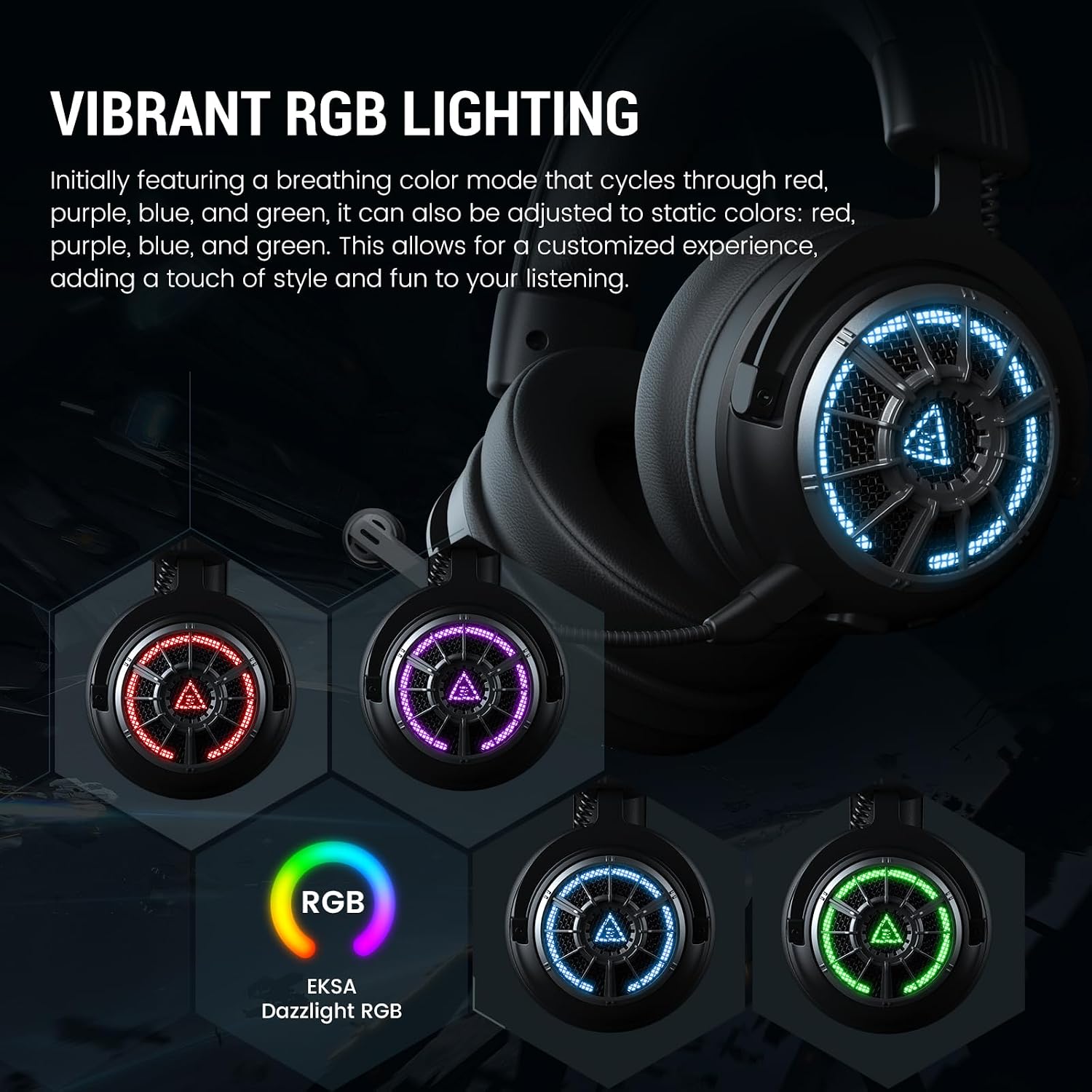
۵.۴ نورپردازی RGB
The headset features vibrant RGB lighting on the earcups.
- حالت ها: Initially features a breathing color mode that cycles through red, purple, blue, and green.
- سفارشی سازی: Can be adjusted to static colors (red, purple, blue, green) via the Power/Light Switching button.
- توجه: RGB lighting is not active in 3.5mm wired mode.

Image 7.2: The EKSA E5000 BT headset displaying its vibrant RGB lighting in different colors.
8. دستورالعمل های عملیاتی
8.1. روشن/خاموش
- روشن کردن: Press and hold the Power/Light Switching button for 3 seconds.
- خاموش: Press and hold the Power/Light Switching button for 3 seconds.
8.2. کنترل صدا
- را بچرخانید حجم چرخ up to increase volume.
- را بچرخانید حجم چرخ down to decrease volume.
8.3. میکروفون را قطع کنید
- را فشار دهید دکمه بی صدا میکروفون once to mute the microphone. The indicator light on the microphone will turn red.
- Press the button again to unmute. The indicator light will turn off.
8.4. RGB Light Switching
- را کوتاه فشار دهید Power/Light Switching Button to cycle through RGB lighting modes (breathing, static colors, off).
8.5. باتری و شارژ
The headset has a built-in rechargeable battery.
- زمان شارژ: تقریبا 2.5 ساعت برای شارژ کامل.
- عمر باتری: Up to 100 hours (Bluetooth, lights off) / 45 hours (Bluetooth, lights on); 80 hours (2.4GHz, lights off) / 25 hours (2.4GHz, lights on).
- شارژ کردن: Connect the USB charging cable to the headset's Type-C port and a power source (e.g., computer USB port, USB wall adapter). The indicator light will show charging status.
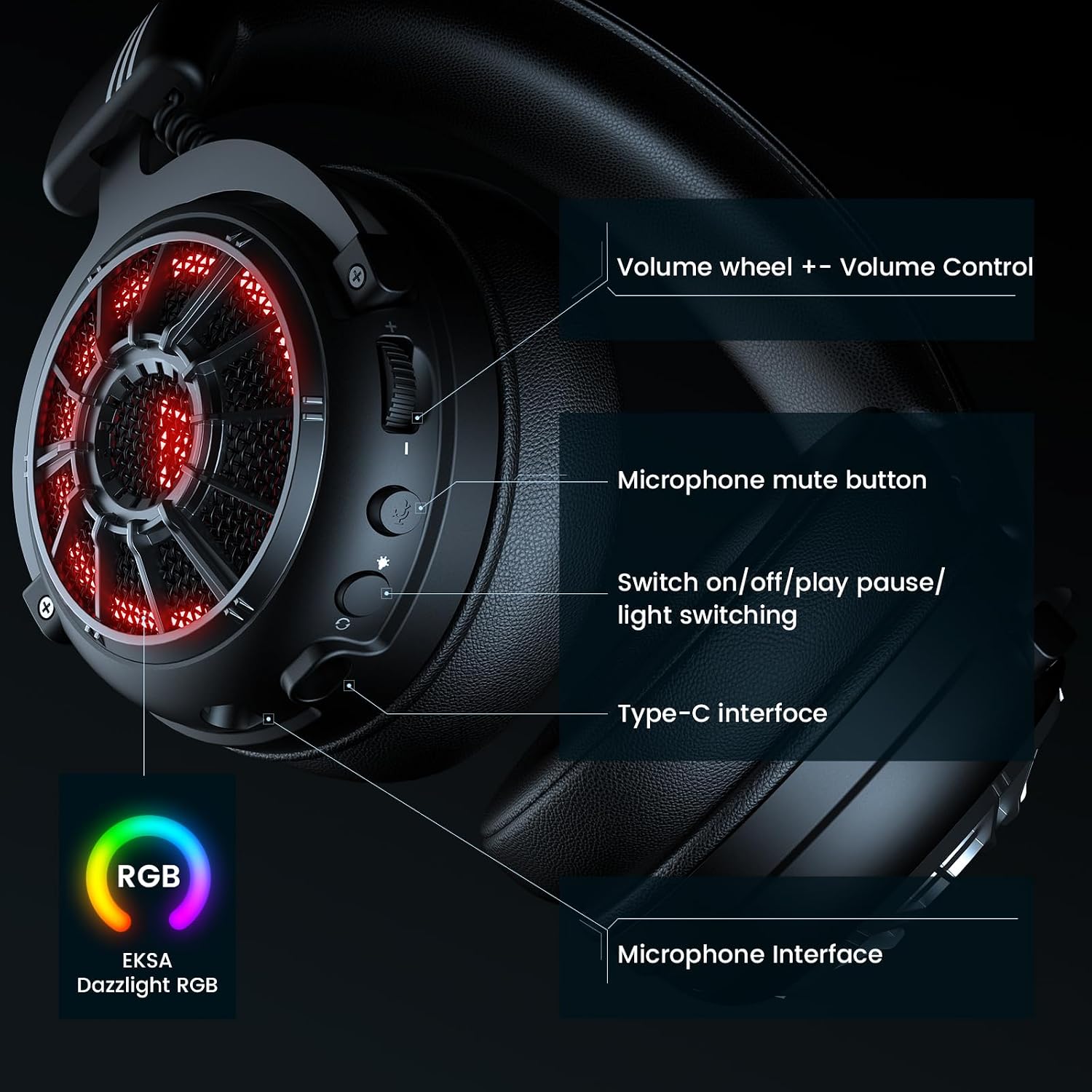
Image 8.1: Battery life specifications for 2.4GHz wireless and Bluetooth modes, with and without RGB lighting, and charging time.
9. تعمیر و نگهداری
نگهداری صحیح، طول عمر و عملکرد هدست شما را تضمین میکند.
- تمیز کردن: Use a soft, dry cloth to clean the headset. Avoid harsh chemicals or abrasive materials.
- ذخیره سازی: Store the headset in a cool, dry place, away from direct sunlight and extreme temperatures. Use the provided carrying pouch for protection during travel or storage.
- مراقبت از کابل: Avoid sharply bending or twisting cables to prevent damage.
- مقاومت در برابر آب: این هدست ضد آب نیست. از تماس با مایعات خودداری کنید.
10 عیب یابی
اگر با هدست خود با مشکل مواجه شدید، به راهحلهای رایج زیر مراجعه کنید.
| مشکل | علت احتمالی | راه حل |
|---|---|---|
| صدایی از هدست نمیاد |
|
|
| میکروفون کار نمی کند |
|
|
| 2.4GHz wireless connection unstable/not connecting |
|
|
| مشکلات جفت شدن بلوتوث |
|
|
| 7.1 Surround Sound not working |
|
|
For further assistance, please visit the official EKSA support webسایت
11. مشخصات
| ویژگی | جزئیات |
|---|---|
| نام مدل | E5000 BT |
| فناوری اتصال | بیسیم ۲.۴ گیگاهرتز، بلوتوث ۵.۲، جک ۳.۵ میلیمتری سیمی |
| نوع درایور صوتی | درایور پویا |
| اندازه درایور | 50 میلی متر نئودیمیم |
| محدوده فرکانس | ۲۰ هرتز - ۲۰۰۰۰ هرتز |
| میکروفون | قابل جدا شدن، دارای قابلیت حذف نویز |
| ویژگی های خاص | 7.1 Surround Sound (PC only), Dual Chamber Design, Ultra-Low Latency, RGB Lighting, Adjustable Headband, Memory Foam Earcups |
| Battery Life (Lights Off) | Bluetooth: 100 hours, 2.4GHz: 80 hours |
| عمر باتری (چراغها روشن) | Bluetooth: 45 hours, 2.4GHz: 25 hours |
| زمان شارژ | 2.5 ساعت |
| دستگاه های سازگار | PC, PS5, PS4, Mac, Switch, Laptops, Desktops, Gaming Consoles, Tablets, Telephones, Smartphones |
| وزن | 2.12 پوند |
| رنگ | X-Black Wireless |
12. گارانتی و پشتیبانی
EKSA products are designed for reliability and performance. For information regarding warranty coverage, technical support, or to register your product, please visit the official EKSA webسایت