
مقدمه
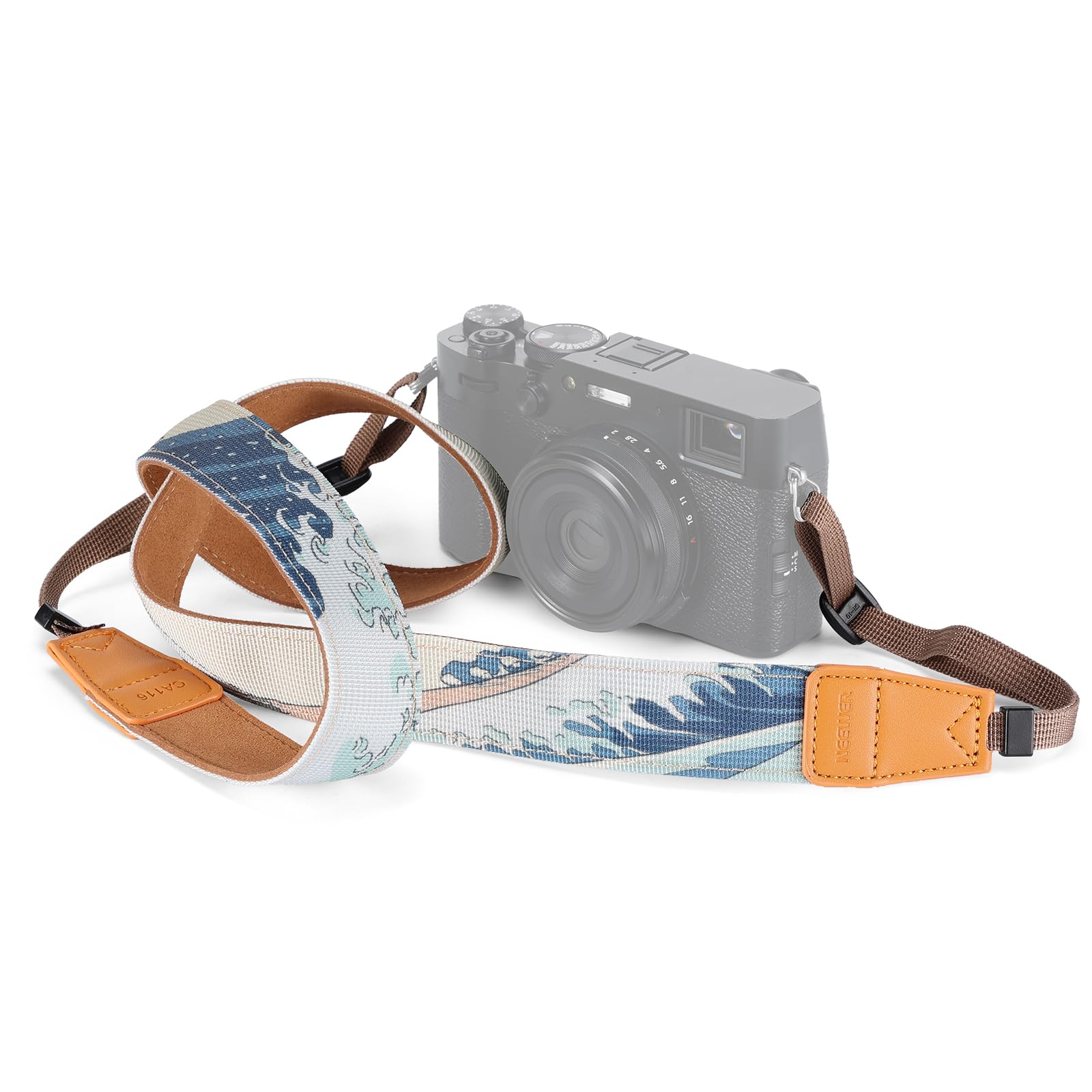
This manual provides essential information for the proper use and care of your NEEWER CA116 Camera Neck Strap. Designed for comfort and security, this adjustable strap features a durable woven fabric and a distinctive Japanese art pattern, suitable for various DSLR and mirrorless cameras.
ویژگی های محصول
- طراحی راحت: The broad strap ensures comfort during extended photography sessions, reducing neck and shoulder strain.
- سازگاری جهانی: Compatible with a wide range of DSLR and mirrorless cameras, including Fujifilm X100V/VI and Nikon Zf/Zfc, using handy fasteners for a secure fit.
- ساخت و ساز بادوام: Made from sturdy woven fabric to withstand daily use and provide long-lasting reliability.
- طول قابل تنظیم: Easily customize the strap length (up to 57 inches / 146 cm) to suit your preference and ensure optimal camera positioning.
- زیباییشناسی منحصر به فرد: Adorned with the iconic "The Great Wave off Kanagawa" art by Hokusai, adding a touch of elegance to your camera gear.
آنچه در جعبه است
- 1 x NEEWER CA116 Camera Shoulder Strap
راه اندازی و نصب
Follow these steps to securely attach the camera neck strap to your camera.
- Locate the strap lugs or attachment points on your camera body. These are typically small metal loops on either side of the camera.
- Thread the thin end of the strap through one of the camera's strap lugs.
- Pass the thin strap end through the plastic buckle on the main strap, then loop it back through the buckle to secure it. Ensure the strap is threaded correctly to prevent slippage. Repeat for the other side of the camera.
- Pull firmly on both ends of the strap to ensure it is securely fastened and cannot easily detach from the camera.


Video Guide: Strap Attachment and Usage
Video: This official NEEWER video demonstrates the unboxing, attachment process, and various ways to wear the camera neck strap for optimal comfort and security.
دستورالعمل های عملیاتی
The NEEWER CA116 strap offers versatile carrying options:
- بند گردن: Wear the strap around your neck for hands-free carrying and quick access to your camera. Adjust the length so the camera rests comfortably at your chest or waist level.
- بند شانه: Drape the strap over one shoulder, allowing the camera to hang at your side. This method provides easy access and can be comfortable for lighter cameras.
- مچ بند: For added security when actively shooting, you can wrap the strap around your wrist. This prevents accidental drops while maintaining flexibility.

تنظیم طول بند
To adjust the strap length, manipulate the plastic buckles located on the thin ends of the strap. Slide the buckles to shorten or lengthen the strap until it reaches your desired fit. Ensure both sides are adjusted evenly for balanced weight distribution.

تعمیر و نگهداری
To ensure the longevity and appearance of your NEEWER CA116 Camera Neck Strap:
- تمیز کردن: Wipe the strap with a damp cloth and mild soap if it becomes dirty. Avoid harsh chemicals or abrasive cleaners.
- خشک کردن: Allow the strap to air dry completely before reattaching it to your camera or storing it. Do not use direct heat.
- ذخیره سازی: در صورت عدم استفاده، بند را در جای خشک و خنک و دور از نور مستقیم خورشید نگهداری کنید.
- بازرسی: Periodically inspect the strap, especially the attachment points and buckles, for any signs of wear, fraying, or damage. Replace the strap if any significant damage is observed to prevent accidental drops of your camera.
عیب یابی
| موضوع | علت احتمالی | راه حل |
|---|---|---|
| Strap feels uncomfortable or digs into neck/shoulder. | Incorrect length adjustment. | Adjust the strap length to ensure the camera rests at a comfortable height and the strap distributes weight evenly. |
| Strap feels loose or insecure. | Improper attachment to camera lugs or buckles not fully tightened. | Re-thread the strap through the camera lugs and buckles, ensuring they are securely fastened and tightened. Refer to the 'Setup and Installation' section. |
| Strap shows signs of wear or fraying. | Normal wear and tear or exposure to harsh conditions. | Discontinue use if significant damage is present. Consider replacing the strap to prevent camera damage. |
مشخصات
| ویژگی | جزئیات |
|---|---|
| نوع مورد | بند شانهای دوربین |
| مدل | CA116 |
| ویژگی های اصلی | Japanese Art Pattern (The Great Wave off Kanagawa) |
| مواد اصلی | پارچه بافته شده |
| سازگاری | DSLR/Mirrorless Cameras (e.g., Fujifilm X100V/VI, Nikon Zf/Zfc) |
| برنامه | عکاسی/فیلم برداری |
| ابعاد | 57 inches / 146 cm (Length) |
| وزن | 1.4 اونس / 39 گرم |
| رنگ | آبی |
| نوع بست | قلاب |
| UPC | 191073104297 |
| شماره قطعه سازنده | 10104774 |

گارانتی و پشتیبانی
This NEEWER product is covered by a 1 سال گارانتی سازنده from the date of purchase. For warranty claims, technical support, or further inquiries, please contact NEEWER customer service or visit the official NEEWER webسایت
You can find more information and products from NEEWER by visiting their official store: فروشگاه NEEWER در آمازون.