
1. مقدمه
Thank you for choosing the Coleshome 71-Inch Computer Desk. This manual provides detailed instructions for assembly, operation, and maintenance to ensure you get the most out of your new desk. Designed for versatility and durability, this desk is an ideal solution for home offices, study areas, gaming setups, and creative workspaces.
2. ویژگی های کلیدی
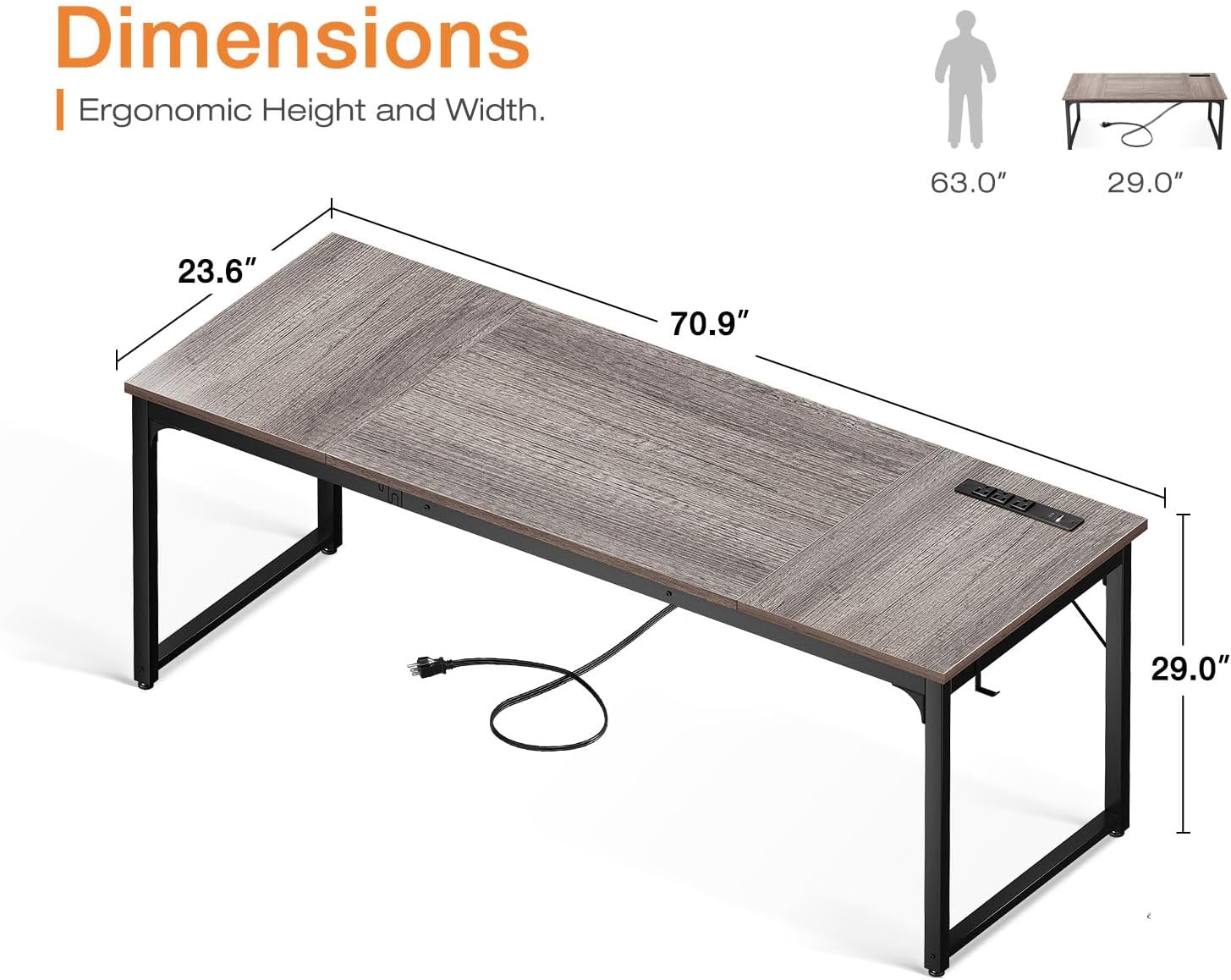
- Large Desk Panel: Measuring 70.9"(L) x 23.6"(W) x 29.0"(H), the spacious desktop accommodates multiple monitors, printers, and other essentials, providing ample room for various activities.
- پریزهای برق و پورتهای شارژ یکپارچه: Equipped with 3 standard AC power outlets, 1 USB charging port, and 1 Type-C port, allowing convenient charging for smartphones, gaming gear, and other electronic devices directly from your desk.
- ساخت و ساز محکم: Features thick metal frames made of heavy-duty, powder-coated steel for enhanced stability and safety. A triangular support structure under the panel ensures long-term durability.
- Versatile Side Hook: Includes a convenient side hook for hanging headphones, bags, or other accessories, keeping your workspace tidy.
- پد قابل تنظیم پا: Equipped with adjustable foot pads to ensure stability on uneven floors and protect your flooring from scratches.
3. محتویات بسته
Please verify that all components are present before beginning assembly. All necessary tools are included in the package.
- پنلهای رومیزی (۲ بخش)
- پایههای فلزی/اجزای قاب
- Integrated Power Strip with USB and Type-C ports
- Side Hook
- پدهای قابل تنظیم پا
- سختافزار مونتاژ (پیچ، مهره، آچار آلن)
- راهنمای دستورالعمل
4. راه اندازی و مونتاژ
The Coleshome 71-Inch Computer Desk is designed for quick and easy assembly, typically completed within 30 minutes. Follow these general steps:
- باز کردن قطعات: تمام قطعات را با دقت از بستهبندی خارج کرده و آنها را روی یک سطح تمیز و نرم قرار دهید تا از خراشیدگی جلوگیری شود.
- مونتاژ قاب: Attach the metal leg frames to the main support beams using the provided hardware. Ensure all connections are secure but do not fully tighten screws until the desk is fully assembled.
- پنلهای رومیزی را وصل کنید: Place the desktop panels onto the assembled frame. Align the pre-drilled holes with the frame and secure them with the appropriate screws. The desktop may consist of two sections that join together.
- نصب نوار برق: The integrated power strip can be installed on either the left or right side of the desk, depending on your preference. Secure it into the designated slot on the desktop.
- Attach Side Hook: Install the side hook to the desired location on the desk frame.
- تنظیم پدهای پا: Once the desk is upright, adjust the foot pads at the bottom of each leg to level the desk and prevent wobbling.
- سفت شدن نهایی: Double-check all screws and connections, then fully tighten them to ensure maximum stability.


5. دستورالعمل های عملیاتی
Using your Coleshome Computer Desk is straightforward:
- پریزهای برق: Plug the desk's main power cord into a wall outlet. You can then use the 3 AC outlets on the integrated power strip for your computer, monitor, or other devices.
- شارژ از طریق USB و Type-C: Connect your compatible devices to the USB or Type-C ports for convenient charging. These ports are designed for electronic devices such as smartphones, tablets, and gaming accessories.
- سازمان فضای کاری: Utilize the large desktop surface to arrange your equipment and materials. The side hook can be used to keep headphones or bags off the floor and within easy reach.
6. تعمیر و نگهداری
برای حفظ ظاهر و طول عمر میز خود:
- تمیز کردن: رومیزی و قاب فلزی را با یک اسفنج نرم و لطیف پاک کنید.amp پارچه. از مواد شیمیایی قوی یا پاککنندههای ساینده که میتوانند به روکش آسیب بزنند، خودداری کنید.
- توزیع وزن: Distribute weight evenly across the desktop. Avoid placing excessively heavy items on one spot.
- بررسی اتصالات: به صورت دورهای تمام پیچها و مهرهها را بررسی کنید تا از سفت بودن آنها اطمینان حاصل شود. در صورت لزوم، برای حفظ پایداری، آنها را دوباره سفت کنید.
- Power Strip Care: Ensure the power strip is kept dry and free from dust. Do not overload the outlets.
7 عیب یابی
- میز متزلزل است:
- مطمئن شوید که تمام پیچهای مونتاژ کاملاً سفت شدهاند.
- Adjust the foot pads on each leg to compensate for uneven flooring.
- پریز برق/پورتهای USB کار نمیکنند:
- مطمئن شوید که سیم برق اصلی میز به طور ایمن به یک پریز برق دیواری سالم وصل شده است.
- Check if the power strip's circuit breaker (if present) has tripped. Reset if needed.
- Ensure devices are properly connected to the ports.
- قطعات گم شده یا آسیب دیده: If your desk arrives with damaged or missing parts, please refer to the Warranty & Support section for contact information.
8. مشخصات
| ویژگی | جزئیات |
|---|---|
| نام تجاری | باحال |
| مدل | B0DDPW6ZMD |
| ابعاد محصول (D x W x H) | 23.6 اینچ × 70.9 اینچ × 29 اینچ |
| رنگ | بلوط خاکستری |
| مواد | چوب (رویه)، فلز (قاب) |
| طراحی میز | Computer Desk, Writing Desk |
| ویژگی خاص | Built-In USB Outlet (3 AC, 1 USB, 1 Type-C) |
| مونتاژ مورد نیاز است | بله |
9. ضمانت و پشتیبانی
Coleshome offers up to a 1 سال گارانتی for your peace of mind. If your desk arrives damaged, has missing parts, or is scratched, please contact our professional customer support team. We are committed to helping you solve any problems within 24 hours and offer fast refunds or replacements for any quality issues.
For support, please visit the official Coleshome store or contact customer service through your purchase platform.