
مقدمه
This manual provides detailed instructions for the safe and effective use of your CINCOM Handheld Controller, model CM-030A. Please read this manual thoroughly before operating the device and retain it for future reference.
محصول تمام شده استview
The CINCOM Handheld Controller CM-030A is designed to provide intuitive control over your compatible CINCOM massager. It features clearly labeled buttons for power, intensity, mode, and heat functions.

تصویر 1: CINCOM Handheld Controller CM-030A with its control buttons and connection port. The image highlights the Power, Intensity, Mode, and Heat buttons, along with their respective functions and levels.
Controller Buttons and Functions:
- دکمه پاور (⏻): Turns the device ON or OFF.
- Intensity Control Button (⚠): Adjusts massage intensity. Features 3 intensity levels (Min, Mid, Max).
- دکمه حالت (M): Selects massage mode. Offers 3 modes (Sequence, Circulation, Whole).
- دکمه گرم کردن (♨): Activates or adjusts heat function. Provides 2 heat levels (Min, Max).
مشخصات
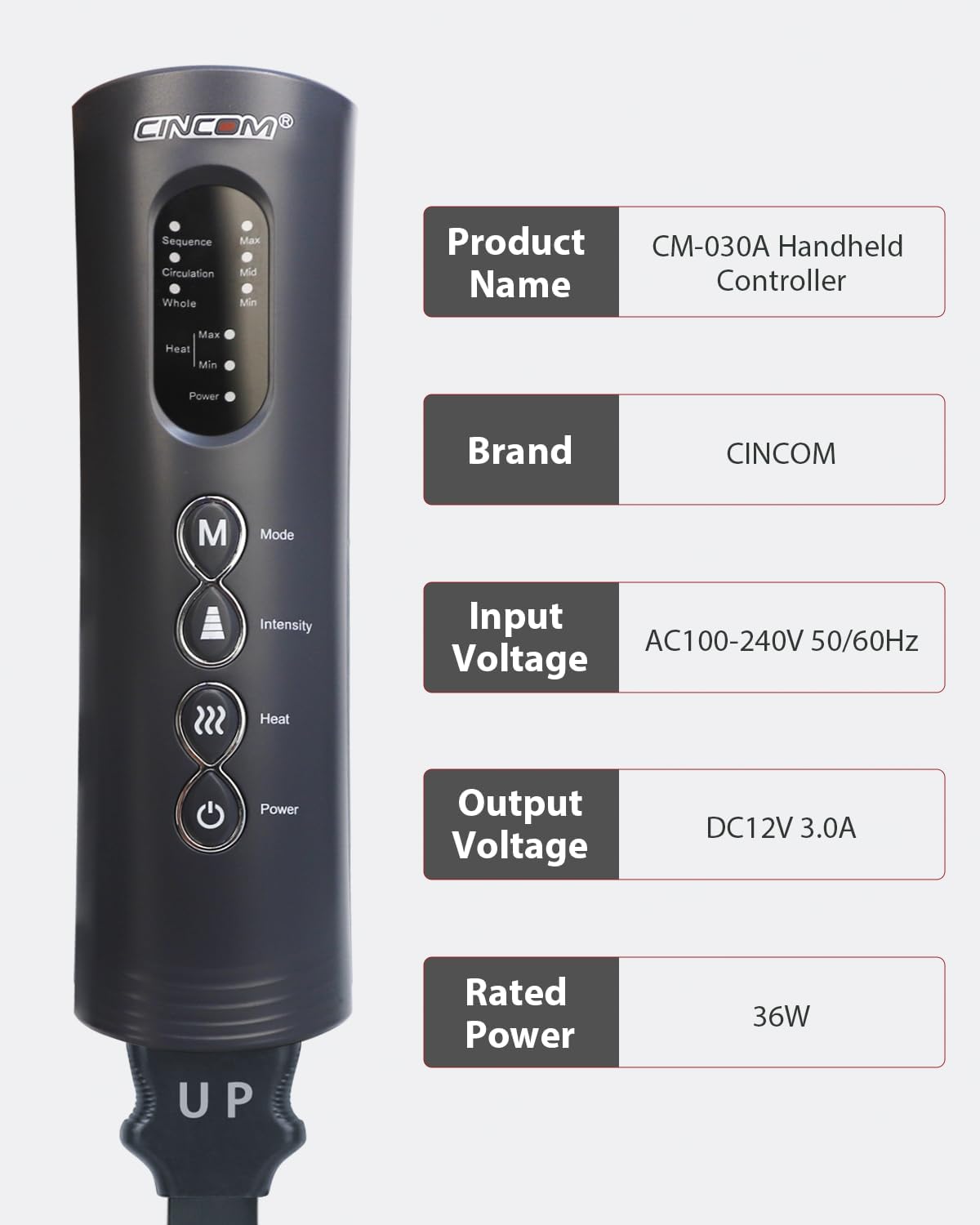
تصویر 2: Technical specifications for the CINCOM Handheld Controller CM-030A, including power requirements.
| مشخصات | جزئیات |
|---|---|
| نام محصول | CM-030A Handheld Controller |
| نام تجاری | CINCOM |
| حجم ورودیtage | AC100-240V 50 / 60Hz |
| خروجی جلدtage | DC12V 3.0A |
| قدرت امتیازی | 36 وات |
| ابعاد محصول | 1.97 x 2.1 x 6.92 اینچ |
| وزن مورد | 4.5 پوند |
| دستگاه های سازگار | Massager (specifically CM-030A series) |
دستورالعمل های راه اندازی
- باز کردن بسته: کنترلر را با دقت از بستهبندی آن خارج کنید.
- Connect to Massager: Locate the connection port on your CINCOM massager (e.g., leg massager) and the corresponding cable from the handheld controller. Ensure the "UP" indicator on the controller's cable aligns with the massager's port for correct insertion. Push firmly until securely connected.
- اتصال برق: Plug the power adapter into the controller's power input port, then plug the adapter into a standard AC100-240V 50/60Hz electrical outlet.
- بررسی اولیه: Once connected, the power indicator light on the controller should illuminate, indicating it is ready for use.

تصویر 3: Example of the CINCOM Handheld Controller in use with a leg massager, demonstrating a typical setup.
دستورالعمل های عملیاتی
- روشن/خاموش برق: را فشار دهید ⏻ دکمه پاور to turn the massager ON. The power indicator light will turn green. Press again to turn OFF.
- تنظیم شدت: را فشار دهید ⚠ Intensity Control Button to cycle through the 3 intensity levels: Minimum (Min), Medium (Mid), and Maximum (Max). The corresponding indicator light will illuminate.
- انتخاب حالت: را فشار دهید دکمه حالت M to switch between the 3 available massage modes: Sequence, Circulation, and Whole. The active mode's indicator light will be lit.
- فعال کردن گرما: را فشار دهید ♨ دکمه گرما to activate the heat function. Press again to cycle between 2 heat levels: Minimum (Min) and Maximum (Max). Press a third time to turn the heat OFF.
- مدت زمان جلسه: The massager typically operates for a preset duration (e.g., 15-20 minutes) and will automatically shut off. You can restart it if desired.
نگهداری و مراقبت
- تمیز کردن: Disconnect the power before cleaning. Wipe the controller surface with a soft, slightly damp پارچه. از پاککنندههای ساینده استفاده نکنید و کنترلر را در آب فرو نبرید.
- ذخیره سازی: کنترلر را در جای خشک و خنک و دور از نور مستقیم خورشید و دمای شدید نگهداری کنید. از قرار دادن اشیاء سنگین روی کنترلر خودداری کنید.
- رسیدگی: Handle the controller with care. Avoid dropping it or subjecting it to strong impacts.
- مراقبت از کابل: Do not twist, bend excessively, or pull on the power cord or massager connection cable. Always grasp the plug when disconnecting.
عیب یابی
| مشکل | علت احتمالی | راه حل |
|---|---|---|
| کنترلر روشن نمی شود. | منبع تغذیه وجود ندارد؛ اتصال شل است. | Ensure the power adapter is securely plugged into both the controller and a working electrical outlet. Check if the outlet is functional. |
| Massager does not respond to controller. | Controller not properly connected to massager. | Verify that the controller's cable is firmly and correctly inserted into the massager's port. Ensure the "UP" indicator is aligned. |
| عملکرد گرمایشی کار نمیکند. | Heat not activated or set to minimum. | Press the Heat Button multiple times to cycle through heat levels (Min, Max) and ensure it is not turned off. Allow a few minutes for heat to become noticeable. |
| چراغ های نشانگر خاموش هستند. | Device is off or power issue. | Press the Power Button to turn on the device. Check power connections as described above. |
گارانتی و پشتیبانی
For warranty information or technical support, please refer to the documentation included with your original CINCOM massager or visit the official CINCOM website. You may also contact CINCOM customer service directly for assistance.
CINCOM Official Store: Visit the CINCOM Store on Amazon