
1. مقدمه
This manual provides detailed instructions for the installation, operation, and maintenance of your BOTSLAB G980H 4K Dual Dash Cam and G300H 2.5K Front Dash Cam. Please read this manual thoroughly before using the device to ensure proper functionality and safety. Keep this manual for future reference.
2. محتویات بسته
لطفاً بررسی کنید که تمام موارد ذکر شده در زیر در بسته شما موجود باشد:
- BOTSLAB G980H 4K Dual Dash Cam Unit
- BOTSLAB G300H 2.5K Front Dash Cam Unit
- Hardwire Kit (Included as per product specifications)
- کابل برق
- Rear Camera Cable (for G980H)
- براکت های نصب
- راهنمای کاربر (این سند)
3. محصول تمام شدview
The BOTSLAB G980H and G300H dash cams are designed to provide high-quality video recording for vehicle safety and security. The G980H offers true 4K resolution for the front camera and 1080P for the rear, while the G300H provides 2.5K front recording. Both models incorporate advanced features for an enhanced driving experience.
ویژگی های کلیدی:
- True 4K Front Recording (G980H): Utilizes a Sony IMX 415 sensor for superior clarity.
- 2.5K Front Recording (G300H): Provides enhanced clarity at 30 frames per second.
- سیستمهای پیشرفته کمک راننده (ADAS): Powered by a 1.5TOPS AI NPU chip, offering real-time alerts for pedestrian collisions, vehicle movement ahead, lane departure, and headway monitoring.
- GPS داخلی: Records journey details including speed and location, viewable on Google Maps via your phone.
- حالت پارکینگ 24/7: Provides theft and vandalism protection when the vehicle is off (requires dedicated hardwire kit, ASIN: B0D3QK86TQ).
- سنسور جی: قفل خودکار ویدیوهای footage during collisions or sudden movements to prevent overwriting.
- دید در شب: وضوح بیشتر در شرایط کم نور
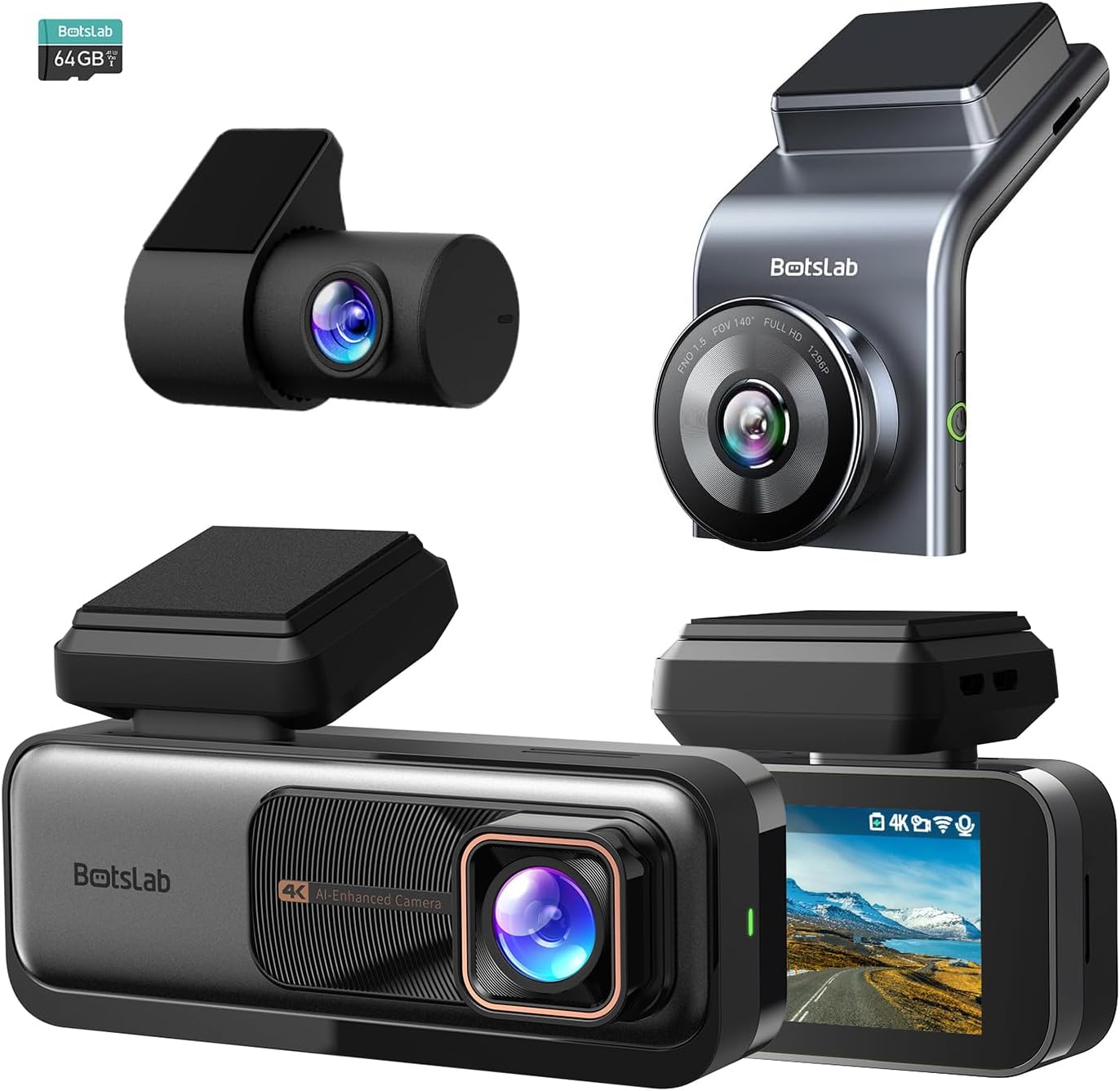
شکل 3.1: تمام شده استview of the BOTSLAB G980H and G300H dash cam units.

Figure 3.2: Illustration of the Sony IMX 415 sensor and the 6-layer lens with F1.5 aperture for enhanced clarity.
4. راه اندازی و نصب
Proper installation is crucial for optimal performance of your dash cam. Follow these steps carefully:
4.1 آماده شدن برای نصب
- انتخاب مکان: Select a spot on your windshield that does not obstruct your view, typically behind the rearview آینه
- شیشه جلو را تمیز کنید: Ensure the mounting area is clean and dry for secure adhesion.
- قرار دادن کارت SD: Insert a compatible microSD card (not included, unless specified) into the dash cam's card slot. Ensure the card is formatted before first use (refer to Section 6.1).
۴.۲ نصب دوربین داشبورد
- Attach the mounting bracket to the dash cam unit.
- Remove the protective film from the adhesive pad on the bracket.
- Firmly press the dash cam with the bracket onto the chosen windshield location for at least 30 seconds.
- For the G980H, install the rear camera on the rear windshield, ensuring a clear view.
4.3 اتصال برق
- کابل برق را به پورت ورودی برق دوربین داشبورد وصل کنید.
- Route the power cable along the edge of the windshield and dashboard to the vehicle's 12V power outlet (cigarette lighter socket) or fuse box.
- For 24/7 Parking Mode functionality, connect the included hardwire kit to your vehicle's fuse box according to the hardwire kit's specific instructions. This allows the dash cam to receive continuous power even when the vehicle is off.
- Connect the rear camera cable to the G980H main unit and route it to the rear camera.

Figure 4.1: Recommended installation position for a wide, unobstructed view (170 درجه).
5. دستورالعمل های عملیاتی
5.1 عملیات اساسی
- روشن/خاموش برق: The dash cam will automatically power on and begin recording when the vehicle's ignition is turned on. It will power off automatically when the ignition is turned off (unless hardwired for parking mode).
- ضبط: Loop recording is enabled by default. Older fileوقتی کارت حافظه پر شود، فایلهای s با فایلهای جدید جایگزین میشوند.
- ضبط اضطراری (سنسور G): In the event of a collision or sudden braking, the built-in G-Sensor will automatically detect the event and lock the current video segment, preventing it from being overwritten.
۴.۳ سیستمهای پیشرفته کمک راننده (ADAS)
The dash cam features an AI NPU chip that provides real-time ADAS alerts to enhance driving safety:
- هشدار برخورد با عابر پیاده: Alerts you to potential pedestrian collisions.
- Vehicle Movement Ahead: وقتی وسیله نقلیه جلویی شروع به حرکت میکند، به شما اطلاع میدهد.
- هشدار خروج از خط: Alerts you if you unintentionally drift out of your lane.
- Headway Monitoring: Helps maintain a safe distance from the vehicle ahead.
- Driver Fatigue Alerts: Provides alerts every 2 hours to remind you to take a break.

Figure 5.1: Visual representation of ADAS alerts and the AI NPU chip.

شکل 5.2: مثالample of a timely alert for front vehicle departure.

شکل 5.3: مثالample of pedestrian recognition with voice reminders.
5.3 Built-in GPS Functionality
The integrated GPS module records your driving data, including speed and location. This data can be viewed on Google Maps via a connected smartphone application, ensuring your travel data remains private and secure.

Figure 5.4: Visualization of GPS route recording and data display.
5.4 حالت پارکینگ
When connected with the dedicated hardwire kit (ASIN: B0D3QK86TQ), the dash cam can continue to monitor your vehicle even when it is turned off. This mode provides protection against theft and vandalism by recording events while parked.
5.5 Night Vision and Clarity
Both dash cam models are equipped with advanced sensors and optics (like the Sony IMX 415 in G980H) to ensure clear video capture even in low-light conditions or at night, without relying on streetlights.

شکل 5.5: مثالample of clear video capture in dark road conditions.

Figure 5.6: Comparison showing enhanced clarity with the G300H's 2.5K resolution.
6. تعمیر و نگهداری
6.1 مدیریت کارت SD
- قالب بندی: It is recommended to format the microSD card regularly (e.g., once a month) to prevent data corruption and ensure optimal recording performance. This can usually be done through the dash cam's settings menu.
- تعویض کارت: MicroSD cards have a limited lifespan. If you experience frequent recording errors or corrupted files, consider replacing the card.
6.2 تمیز کردن دستگاه
- Use a soft, dry cloth to clean the dash cam's lens and body.
- از پاککنندههای شیمیایی یا حلالها استفاده نکنید، زیرا ممکن است به دستگاه آسیب برسانند.
7 عیب یابی
اگر با دوربین داشبورد خود با مشکل مواجه شدید، به مشکلات و راهحلهای رایج زیر مراجعه کنید:
| مشکل | علت / راه حل احتمالی |
|---|---|
| دوربین داشبورد روشن نمیشود. |
|
| ضبط متوقف میشود یا fileاس ها فاسد شده اند |
|
| سیگنال GPS ضعیف است یا پیدا نمیشود. |
|
| ADAS alerts are not functioning. |
|
8. مشخصات
| ویژگی | توضیحات |
|---|---|
| نام مدل | G980H (Dual), G300H (Front) |
| نام تجاری | BOTSLAB |
| وضوح تصویربرداری | 4K (G980H Front), 1080P (G980H Rear), 2.5K (G300H Front) |
| ویژگی های خاص | Built-In GPS, ADAS, G-Sensor, 24/7 Parking Mode (with hardwire kit) |
| فناوری اتصال | USB, Wireless (Wi-Fi for app connectivity) |
| رنگ | مشکی |
| جهت گیری | Front and Inside (G980H), Front (G300H) |
| اجزای شامل | کیت Hardwire |
| سازنده | BOTSLAB |
9. گارانتی و پشتیبانی
For warranty information and technical support, please contact BOTSLAB customer service directly. Details can typically be found on the official BOTSLAB webسایت یا از طریق اطلاعات تماس ارائه شده همراه با مدارک خرید شما.